150MB/s or 200MB/s USB Flash Drives? Compared by Specs
As an Amazon Associate we earn from qualifying purchases. Links on this page are affiliate links.
When choosing between a 150mbs vs 200mbs USB flash drive, you face a clear speed trade-off. Both the SanDisk Ultra Flair and the Samsung BAR Plus offer 64GB of storage and USB-A connectors. The main difference lies in their read performance and interface generation. The Samsung drive lists a higher maximum read speed of 200MB/s on a USB 3.1 interface, while the SanDisk drive tops out at 150MB/s on USB 3.0. This guide breaks down how these specs affect your daily transfers.
Key differences
| Aspect | SanDisk 64GB Ultra Flair USB-A Drive | Samsung BAR Plus 64GB USB 3.1 Flash Drive |
|---|---|---|
| Read Speed | 150MB/s | 200MB/s |
| USB Version | USB 3.0 | USB 3.1 |
| Design Feature | Password protection with 128-bit AES encryption | Integrated key ring and 5-way protection |
Which one should you choose?
Choose SanDisk 64GB Ultra Flair USB-A Drive if
- You need built-in password protection for private files using 128-bit AES encryption.
- You prefer a drive with a sleek metal casing that supports USB 3.0 host devices.
- You want a drive that offers easy-to-use security software for Windows and Mac.
Choose Samsung BAR Plus 64GB USB 3.1 Flash Drive if
- You require the highest listed read speed of 200MB/s for faster file transfers.
- You want a drive built with a durable unibody metal housing and an integrated key ring.
- You need a USB 3.1 interface that is backward compatible with USB 3.0 and 2.0 ports.
Verdict: Choose the SanDisk Ultra Flair if file security is your priority, thanks to its integrated password protection. Opt for the Samsung BAR Plus if you want the fastest listed read speed and a rugged design with an integrated key ring. Both drives provide reliable 64GB storage for your daily needs.
Speed and Build Comparison
Read Speed
The Samsung BAR Plus offers a stated read speed of 200MB/s, which is faster than the SanDisk Ultra Flair’s 150MB/s. This 50MB/s difference matters when you transfer large files. You will notice the Samsung drive pulling data from the stick more quickly. The SanDisk drive still meets USB 3.0 standards, so it remains fast for most tasks. However, if you move high-resolution video or large backups often, the higher number on the Samsung drive gives it a clear advantage. The SanDisk drive is sufficient for standard document work, but the Samsung drive wins on pure throughput metrics.
USB Version
The Samsung BAR Plus uses a USB 3.1 interface, while the SanDisk Ultra Flair relies on USB 3.0. USB 3.1 provides a wider data bus and better efficiency than USB 3.0. This means the Samsung drive can potentially sustain higher speeds for longer periods without throttling. Both drives are backward compatible with older ports, so you can use them in legacy computers. However, to get the best performance, you need a USB 3.1 port. The Samsung drive’s newer interface gives it a technical edge for future-proofing and maximum bandwidth utilization compared to the older SanDisk standard.
Build Quality
Both drives feature metal casings, but they differ in design and protection. The SanDisk Ultra Flair has a sleek metal casing with a sliding mechanism. The Samsung BAR Plus uses a durable unibody metal housing with an integrated key ring. The Samsung drive also lists five-way protection, including waterproof, shockproof, and temperature-resistant features. The SanDisk data does not mention these specific environmental protections. If you drop your drive or expose it to harsh conditions, the Samsung BAR Plus appears more robust due to its explicit durability claims and solid metal construction.
Security
The SanDisk Ultra Flair includes password protection using 128-bit AES encryption. You can secure your private files with software support for Windows and Mac. The Samsung BAR Plus data does not list any built-in security features or encryption standards. If you carry sensitive data, the SanDisk drive offers a dedicated hardware security feature. You must download software for Mac users, but the encryption is available out of the box. For users who prioritize data privacy without third-party tools, the SanDisk drive has a distinct advantage over the Samsung model.
Form Factor
The physical dimensions and weight differ significantly between the two drives. The Samsung BAR Plus is longer and narrower, measuring 1.57 inches in length and weighing only 0.35 ounces. It includes an integrated key ring for easy attachment. The SanDisk Ultra Flair is shorter and wider, measuring 0.52 inches in length and weighing 0.63 ounces. It uses a sliding cover. The Samsung drive is lighter and more compact in width, making it easier to attach to a keychain. The SanDisk drive is bulkier but has a traditional slider design. Your choice depends on whether you prefer a keyring attachment or a slider mechanism.
Which drive fits your needs?
You need fast file transfers
The Samsung BAR Plus offers a 200MB/s read speed. This exceeds the SanDisk Ultra Flair’s 150MB/s limit. You will move large files more quickly. The USB 3.1 interface supports this higher throughput. Choose this drive if speed is your primary concern for daily data movement.
You want password protection
The SanDisk Ultra Flair includes 128-bit AES encryption. This feature secures your private files with password protection. The Samsung BAR Plus does not list this security standard in its specifications. If protecting sensitive data is essential, the SanDisk drive provides the necessary software-based security tools.
You prefer a key ring
The Samsung BAR Plus features an integrated key ring. This design element helps you attach the drive to a bag or keys. The SanDisk Ultra Flair has a sleek metal casing but lacks this specific attachment feature. You will find the Samsung design more convenient for carrying the drive with you.
Quick picks
| # | Product | Best for | Price |
|---|---|---|---|
| 1 | SanDisk 64GB Ultra Flair USB-A Drive | Durable storage with encryption | Check price of SanDisk 64GB Ultra Flair USB-A Drive on Amazon |
| 2 | Samsung BAR Plus 64GB USB 3.1 Flash Drive | Durable USB-A drives with fast read speeds | Check price of Samsung BAR Plus 64GB USB 3.1 Flash Drive on Amazon |
The products compared
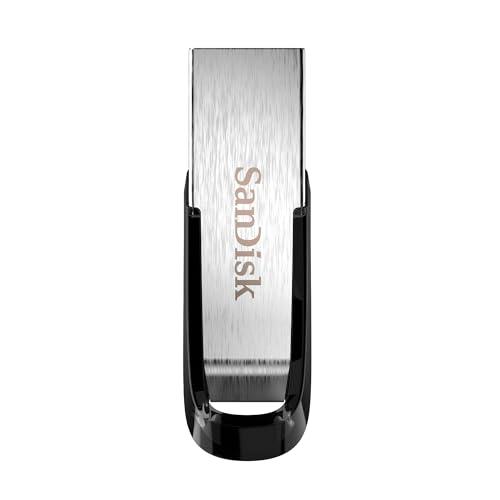
SanDisk 64GB Ultra Flair USB-A Drive
Best for: Durable storage with encryption
- Read Speed
- 150MB/s (what this guide is about)
- Storage Capacity
- 64GB
- USB Version
- USB 3.0
- Connector Type
- USB-A
- Security Standard
- 128-bit AES
- Security Features
- Password Protection
View on Amazon: SanDisk 64GB Ultra Flair USB-A Drive Affiliate link
This SanDisk flash drive offers 64GB of storage with a maximum read speed of 150MB/s. It uses a USB 3.0 interface and a USB-A connector. The metal casing adds durability. You get password protection using 128-bit AES encryption. This model suits users who need reliable transfer speeds and basic security for their files.
Pros
- Up to 150MB/s read speed
- Durable metal casing
- 128-bit AES password protection
- USB 3.0 connectivity
Cons
- Read speed is lower than the 200MB/s option on this list
- Write speed is not specified in the data
- Requires software download for Mac encryption support
Good fit if
- You need a durable drive with a metal body
- You want built-in password protection for private files
- You use USB 3.0 ports for faster transfers
Skip if
- You require the fastest 200MB/s read speeds available
- You need a drive without encryption software requirements
- You prefer a smaller capacity like 32GB
Verdict: SanDisk 64GB Ultra Flair USB 3.0 fits users who prioritize a sturdy metal build and secure file access over maximum speed. It is a solid choice for everyday backups.

Samsung BAR Plus 64GB USB 3.1 Flash Drive
Best for: Durable USB-A drives with fast read speeds
- Read Speed
- 200MB/s (what this guide is about)
- Storage Capacity
- 64 GB
- USB Version
- USB 3.1
- Connector Type
- Type-A
- Size
- 64GB
- Dimensions
- 1.57 × 0.61 × 0.46 inches
View on Amazon: Samsung BAR Plus 64GB USB 3.1 Flash Drive Affiliate link
The Samsung BAR Plus offers 200MB/s read speeds via USB 3.1. This 64GB drive features a durable metal housing and 5-way protection against water, shock, and magnets. You get reliable performance for daily file transfers. It suits users who need a sturdy, fast drive for important data without bulk. The integrated key ring adds convenience for portability.
Pros
- 200MB/s read speed
- USB 3.1 interface
- 64GB storage capacity
- Durable metal housing
- 5-way protection
Cons
- 30MB/s write speed is slow
- No included carrying case
- Only 64GB capacity available
Good fit if
- You need fast read speeds for large files
- You want a durable metal build
- You prefer USB-A connectors
Skip if
- You need high write speeds
- You require more than 64GB storage
- You use USB-C only devices
Verdict: Samsung BAR Plus 64GB USB-A delivers strong read performance and rugged protection. It fits users who prioritize durability and speed for reading data on USB-A ports.
Specifications side by side
| Spec | SanDisk 64GB Ultra Flair USB-A Drive | Samsung BAR Plus 64GB USB 3.1 Flash Drive |
|---|---|---|
| Storage Capacity | 64GB | 64 GB |
| USB Version | USB 3.0 | USB 3.1 |
| Connector Type | USB-A | Type-A |
| Read Speed | Up to 150MB/s | 200MB/s |
| Security Standard | 128-bit AES | not stated |
| Size | 64GB | 64GB |
| Security Features | Password Protection | not stated |
| Features | Metal Casing | not stated |
| Dimensions | 0.52 × 1.67 × 0.26 inches | 1.57 × 0.61 × 0.46 inches |
| Weight | 0.63 ounces | 0.35 ounces |
| Color | Black | BAR Plus (Champagne Silver) |
| Model | SDCZ73-064G-G46 | MUF-64BE3/APC |
Frequently asked questions
Is 150MB/s fast enough for everyday use?
Yes, 150MB/s is sufficient for most daily tasks. The SanDisk Ultra Flair delivers this speed with a sturdy metal build. It suits users who value durability and secure file access. You will handle backups and standard file transfers without noticeable lag on this drive.
Does USB 3.1 make a real difference over USB 3.0?
It supports higher throughput for compatible devices. The Samsung BAR Plus uses USB 3.1 to achieve its 200MB/s read speed. If your computer port supports this version, you benefit from faster data retrieval. The SanDisk Ultra Flair uses USB 3.0, which caps at 150MB/s.
Which drive is more durable for travel?
The SanDisk Ultra Flair features a metal casing designed for durability. It is ideal for users who prioritize a sturdy build. The Samsung BAR Plus also offers rugged protection. Both drives are built to withstand daily wear, but the SanDisk design emphasizes a solid metal construction.
Can I use these drives with older computers?
Both drives use USB-A connectors, which are widely compatible. The SanDisk Ultra Flair works with USB 3.0 ports. The Samsung BAR Plus works with USB 3.1 ports but remains backward compatible. You can plug either drive into older systems that support USB-A standards without issues.
Is the 50MB/s speed gap noticeable in practice?
The difference matters when transferring large files. The Samsung BAR Plus reads at 200MB/s, while the SanDisk reads at 150MB/s. You will notice the Samsung drive pulling data more quickly. For smaller documents, the gap is less apparent. Large media files benefit more from the higher speed.
Do these drives support hardware encryption?
The SanDisk Ultra Flair is noted for secure file access and encryption features. This makes it suitable for users prioritizing data security. The Samsung BAR Plus focuses on speed and durability. It does not highlight encryption in its primary specifications. Choose the SanDisk if security is your main concern.
Which drive is lighter to carry?
The Samsung BAR Plus weighs 0.35 ounces. The SanDisk Ultra Flair weighs 0.63 ounces. The Samsung model is lighter and more compact. Its dimensions are 1.57 inches in length. The SanDisk is slightly bulkier due to its metal build. Portability favors the Samsung option.