5 Best USB Flash Drives with Password Protection, Compared
As an Amazon Associate we earn from qualifying purchases. Links on this page are affiliate links.
You need the best USB flash drives with password protection to keep sensitive data safe from unauthorized access. We compared 5 models using only the specifications published on their listings. Our top pick is the Integral 64GB Crypto-197 Encrypted USB 3.0 Drive. It leads because it offers FIPS 197 certification alongside password protection. This standard ensures the encryption meets strict government security requirements. The guide helps you decide which drive fits your specific compliance and capacity needs.
Quick picks
| # | Product | Best for | Price |
|---|---|---|---|
| 1 | Integral 64GB Crypto-197 Encrypted USB 3.0 Drive Best overall | Admin-controlled secure storage needs | Check price of Integral 64GB Crypto-197 Encrypted USB 3.0 Drive on Amazon |
| 2 | Integral Crypto-197 8GB Dual Password Also great | small sensitive files requiring dual access | Check price of Integral Crypto-197 8GB Dual Password on Amazon |
| 3 | iStorage datAshur PRO 8GB Encrypted Flash Drive Best premium | regulated environments requiring certified hardware security | Check price of iStorage datAshur PRO 8GB Encrypted Flash Drive on Amazon |
| 4 | iStorage datAshur Personal2 16GB Secure USB Drive Also great | Cross-platform users needing secure PIN access | Check price of iStorage datAshur Personal2 16GB Secure USB Drive on Amazon |
| 5 | Integral 16GB Crypto-C Hardware Encrypted Drive Best budget | Secure storage of small critical files | Check price of Integral 16GB Crypto-C Hardware Encrypted Drive on Amazon |
The best fit for you
- You need admin-controlled secure storage for teams Integral 64GB Crypto-197 Encrypted USB 3.0 Drive It features FIPS 197 certification and password protection for administrative recovery.
- You require dual password access for small files Integral Crypto-197 8GB Dual Password This 8GB drive offers 256-Bit AES encryption and waterproof durability.
- You prioritize high-security compliance and government standards iStorage datAshur PRO 8GB Encrypted Flash Drive It provides FIPS 140-2 Level 3 certification with password protection.
- You want a compact drive for PC and Mac Integral 16GB Crypto-C Hardware Encrypted Drive This USB 3.2 model includes 256-Bit AES encryption and FIPS 197.
Our 5 picks

Integral 64GB Crypto-197 Encrypted USB 3.0 Drive
Best for: Admin-controlled secure storage needs
- Security Features
- FIPS 197, Password Protection (what this guide is about)
- Storage Capacity
- 64GB
- USB Version
- USB 3.0
- Security Standard
- FIPS 197, 256-bit
- Dimensions
- 2.28 × 0.83 × 0.55 inches
- Weight
- 0.64 ounces
View on Amazon: Integral 64GB Crypto-197 Encrypted USB 3.0 Drive Affiliate link
This USB 3.0 flash drive offers 64GB of storage protected by 256-bit AES encryption. It meets FIPS 197 standards for secure data handling. The dual password system lets an administrator set a master key while you set your own. If you forget your password, the admin can still access the drive. The waterproof design shields the electronics from drops and water immersion.
Pros
- FIPS 197 certified 256-bit encryption
- Dual password with master key access
- Auto-erases data after six failed attempts
- Waterproof rubberized silicone outer case
Cons
- 64GB capacity is smaller than the 128GB option
- No mention of hardware key support
- Single USB 3.0 connector limits versatility
Good fit if
- You need FIPS 197 compliance for work
- You want a master password for recovery
- You require waterproof drive protection
Skip if
- You need more than 64GB storage
- You prefer USB 3.1 or 3.2 speeds
- You want a metal casing design
Verdict: Integral 64GB Crypto-197 USB Drive suits teams needing administrative recovery access. It fits users who prioritize FIPS certification and physical durability over high capacity.
Integral Crypto-197 8GB Dual Password
Best for: small sensitive files requiring dual access
- Security Features
- 256-Bit AES Encryption, FIPS 197, Password Protection (what this guide is about)
- Storage Capacity
- 8GB
- USB Version
- USB 3.0
- Security Standard
- FIPS 197, AES 256-bit
- Dimensions
- 2.28 × 0.83 × 0.55 inches
- Weight
- 0.64 ounces
View on Amazon: Integral Crypto-197 8GB Dual Password Affiliate link
This USB 3.0 drive uses mandatory 256-bit AES hardware encryption certified to FIPS 197. It features a dual password system where an administrator sets a master key and a user sets their own. The rugged, waterproof design protects against drops and water. Auto-lock secures data when disconnected. It suits users needing government-grade security for small, essential files.
Pros
- 256-bit AES hardware encryption
- FIPS 197 certified
- Dual password system
- USB 3.0 speed
- Waterproof rugged design
Cons
- Only 8GB capacity
- No included carrying case
- Limited to single USB-A port
Good fit if
- You need FIPS 197 compliance
- You require dual password control
- You store small sensitive files
Skip if
- You need more than 8GB
- You prefer software encryption
- You want USB-C connectivity
Verdict: Integral 8GB Crypto-197 Dual Password delivers certified hardware security in a compact, rugged form. It is ideal for administrators managing small sets of highly sensitive data.

iStorage datAshur PRO 8GB Encrypted Flash Drive
Best for: regulated environments requiring certified hardware security
- Security Features
- FIPS 140-2 Level 3, Password Protection (what this guide is about)
- Storage Capacity
- 8 GB
- USB Version
- USB 3.2
- Read Speed
- Up to 169MB/s
- Security Standard
- FIPS 140-2 Level 3, AES-XTS 256-bit
- Size
- 8GB
View on Amazon: iStorage datAshur PRO 8GB Encrypted Flash Drive Affiliate link
The iStorage datAshur PRO is a hardware-encrypted flash drive with an onboard 7- to 15-digit PIN keypad. It delivers up to 169MB/s read speeds over a USB 3.2 connection and uses AES-XTS 256-bit encryption with FIPS 140-2 Level 3 certification. If you need strict compliance standards and an IP57 water-resistant housing for sensitive files, this drive fits your workflow.
Pros
- FIPS 140-2 Level 3 and AES-XTS 256-bit hardware encryption
- Up to 169MB/s read and 135MB/s write speeds via USB 3.2
- Onboard keypad accepts 7- to 15-digit PINs without host software
- IP57-certified water and dust resistance
Cons
- Limited 8GB base storage capacity
- At 3.15 inches in length, the casing is bulkier than standard flash drives
Good fit if
- You need FIPS 140-2 Level 3 and NATO-restricted certifications for regulatory compliance.
- You move data between systems without administrative rights to install software.
- You work in outdoor or rugged environments requiring IP57 physical protection.
Skip if
- You need more than 8GB of storage for large disk images or video files.
- You prefer a low-profile drive that fits tight or closely spaced USB ports.
Verdict: iStorage datAshur PRO 8GB Hardware Encrypted USB provides certified FIPS 140-2 Level 3 data protection and OS-independent keypad access for users handling regulated records.
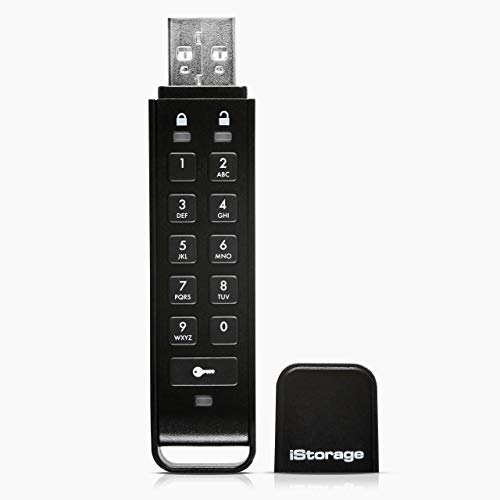
iStorage datAshur Personal2 16GB Secure USB Drive
Best for: Cross-platform users needing secure PIN access
- Security Features
- Password Protection (what this guide is about)
- Storage Capacity
- 16 GB
- USB Version
- USB 3.2
- Read Speed
- Up to 169MB/s
- Security Standard
- AES-XTS 256-bit
- Size
- 16GB
View on Amazon: iStorage datAshur Personal2 16GB Secure USB Drive Affiliate link
The iStorage datAshur Personal2 is a 16 GB USB 3.2 flash drive with AES-XTS 256-bit hardware encryption. You authenticate access by entering a 7-15 digit PIN. No software is required for Windows, macOS, or Linux. It offers read speeds up to 169 MB/s and write speeds up to 135 MB/s. This drive suits users needing portable, password-protected storage for sensitive files.
Pros
- AES-XTS 256-bit hardware encryption
- PIN authentication (7-15 digits)
- Read speeds up to 169 MB/s
- No software installation required
Cons
- 16 GB capacity is smaller than 64 GB options
- No FIPS 140-2 certification listed
- Only available in Black color
Good fit if
- You need password protection without installing software
- You work across Windows, macOS, and Linux
- You require AES-XTS 256-bit encryption
Skip if
- You need more than 16 GB of space
- You require FIPS 140-2 Level 3 compliance
- You prefer a larger capacity like 64 GB
Verdict: iStorage datAshur Personal2 16GB provides strong hardware encryption and fast transfer speeds for users who prioritize security without software complexity.

Integral 16GB Crypto-C Hardware Encrypted Drive
Best for: Secure storage of small critical files
- Security Features
- 256-Bit AES Encryption, FIPS 197, Password Protection (what this guide is about)
- Storage Capacity
- 16GB
- USB Version
- USB 3.2
- Security Standard
- AES-XTS 256-Bit, FIPS 197
- Compatible Device
- PC, Laptop, Mac
View on Amazon: Integral 16GB Crypto-C Hardware Encrypted Drive Affiliate link
This drive uses AES-XTS 256-bit hardware encryption to keep your files safe. It features dual password protection with a separate admin account for recovery. You get USB 3.2 speeds for faster transfers. The 16GB capacity fits essential documents. It works with PCs, laptops, and Macs. This model suits users who need a reliable backup method with strong security standards.
Pros
- 256-bit AES-XTS hardware encryption
- Dual password setup with admin access
- USB 3.2 connectivity
- FIPS 197 compliance
Cons
- 16GB capacity is smaller than 64GB competitors
- No mention of included software suite
- Limited to password-based access only
Good fit if
- You need a small, secure drive for sensitive documents
- You want hardware encryption without extra software
- You require a backup admin password for lockout recovery
Skip if
- You need more than 16GB of storage space
- You prefer higher capacity options like 64GB
- You require biometric security features
Verdict: Integral 16GB Crypto-C USB 3.2 offers solid 256-bit hardware encryption for users prioritizing data security over large storage capacity. It is ideal for professionals who need a compact, reliable drive for critical files.
Specifications side by side
| Spec | Integral 64GB Crypto-197 Encrypted USB 3.0 Drive | Integral Crypto-197 8GB Dual Password | iStorage datAshur PRO 8GB Encrypted Flash Drive | iStorage datAshur Personal2 16GB Secure USB Drive | Integral 16GB Crypto-C Hardware Encrypted Drive |
|---|---|---|---|---|---|
| Storage Capacity | 64GB | 8GB | 8 GB | 16 GB | 16GB |
| USB Version | USB 3.0 | USB 3.0 | USB 3.2 | USB 3.2 | USB 3.2 |
| Read Speed | not stated | not stated | Up to 169MB/s | Up to 169MB/s | not stated |
| Security Standard | FIPS 197, 256-bit | FIPS 197, AES 256-bit | FIPS 140-2 Level 3, AES-XTS 256-bit | AES-XTS 256-bit | AES-XTS 256-Bit, FIPS 197 |
| Compatible Device | not stated | not stated | not stated | not stated | PC, Laptop, Mac |
| Size | 64GB | 8GB | 8GB | 16GB | 16GB |
| Security Features | FIPS 197, Password Protection | 256-Bit AES Encryption, FIPS 197, Password Protection | FIPS 140-2 Level 3, Password Protection | Password Protection | 256-Bit AES Encryption, FIPS 197, Password Protection |
| Features | Waterproof | Waterproof | Waterproof | not stated | not stated |
| Dimensions | 2.28 × 0.83 × 0.55 inches | 2.28 × 0.83 × 0.55 inches | 3.15 × 0.79 × 0.41 inches | 2.95 × 0.59 × 0.2 inches | not stated |
| Weight | 0.64 ounces | 0.64 ounces | 0.88 ounces | 0.49 ounces | not stated |
| Color | Blue | Blue | Blue | Black | Black |
| Model | INFD64GCRYDL3.0197 | INFD8GCRYDL3.0197 | IS-FL-DA3-256-8 | IS-FL-DAP3-B-16 | INFD16GCRDLC3-197 |
How to Choose Password USB Drives
-
Check Encryption Standards
Look for specific encryption protocols like FIPS 197 or 256-Bit AES. These standards define how your data is scrambled. The Integral 64GB Crypto-197 uses FIPS 197 certification. This ensures the drive meets strict government-grade security requirements. You should verify if the manufacturer lists these certifications. Generic password protection may not offer the same level of protection. Higher standards provide better assurance against unauthorized access. Always prioritize drives that explicitly state their encryption method in the specs.
-
Verify Password Setup
Determine if the drive requires software installation or uses hardware PIN entry. The iStorage datAshur Personal2 allows secure PIN access without extra software. This simplifies use across different operating systems. Some drives may require a companion app for initial setup. Check if the password entry is built into the drive itself. Hardware-based entry is often more secure and convenient. You avoid compatibility issues with missing drivers. Confirm the setup method matches your workflow and security needs.
-
Assess Physical Durability
Check if the drive is waterproof or ruggedized. The Integral Crypto-197 and iStorage datAshur PRO are both waterproof. This feature protects your data from accidental spills or rain. Physical damage can lead to data loss even if encrypted. A rugged case adds protection against drops and impacts. Consider the environment where you will use the drive. If you travel frequently, durability is a key spec. Waterproof features are a practical addition for long-term reliability.
-
Review Admin Recovery
Check if the drive supports administrative recovery options. The Integral 64GB Crypto-197 is suitable for teams needing admin recovery. This feature allows authorized users to reset access if passwords are lost. Without this, lost passwords can permanently lock your data. Evaluate your need for shared access or team management. Individual users might not need this feature. It is crucial for corporate or group environments. Verify the recovery process is documented and secure before buying.
-
Compare Storage Capacity
Select a capacity that fits your data needs. Options range from 8GB to 64GB in this list. The Integral 8GB Crypto-197 is compact but limited in space. The 64GB model offers more room for larger files. Choose based on the size of your sensitive documents. Larger capacities are useful for backups or media files. Smaller drives are easier to carry and less conspicuous. Ensure the selected size meets your current and future storage requirements.
Frequently asked questions
Can I recover my data if I forget the password on these drives?
Recovery depends on the specific model you choose. The Integral 64GB Crypto-197 includes admin-controlled secure storage, allowing administrators to recover access for teams. Most other drives in this list rely solely on the user’s password. You should check the attributes section for admin recovery features before purchasing to ensure you have a backup plan.
Which USB flash drive offers the highest security certification?
The iStorage datAshur PRO 8GB provides the highest security certification. It features FIPS 140-2 Level 3 encryption, which is a government-grade standard. This makes it ideal for high-security compliance needs. Other drives like the Integral Crypto-197 use FIPS 197, which is also robust but distinct from the Level 3 standard found in the iStorage premium option.
Are these encrypted drives compatible with Mac computers?
Compatibility varies by model. The Integral 16GB Crypto-C Hardware Encrypted Drive explicitly lists compatibility with PC, Laptop, and Mac. Other drives in this list do not specify Mac support in their published data. You should verify the compatible device list in the attributes for each drive to ensure it works with your operating system before relying on it for critical files.
Do these password-protected USBs have waterproof features?
Several models in this list include waterproof durability. The Integral 64GB Crypto-197, the Integral 8GB Crypto-197 Dual Password, and the iStorage datAshur PRO 8GB all list waterproof features. This adds physical protection alongside digital security. If you need a drive that withstands environmental hazards, these three options provide both encryption and rugged durability for your sensitive data.
What is the largest storage capacity available in this selection?
The largest capacity available is 64GB. This is found in the top-ranked Integral 64GB Crypto-197 Encrypted USB 3.0 Drive. Other options offer smaller sizes, such as 8GB, 16GB, and 256-bit AES encryption variants. You should choose the 64GB model if you need to store larger volumes of data while maintaining FIPS 197 certification and password protection.
Which drive is best for cross-platform users needing secure PIN access?
The iStorage datAshur Personal2 16GB Secure USB Drive is best for this use case. It provides strong hardware encryption and fast transfer speeds without complex software. This model is designed for users who need secure PIN access across different platforms. It balances security with ease of use, making it a practical choice for professionals who switch between different operating systems.
Is hardware encryption better than software-based password protection?
Hardware encryption processes data within the drive itself, independent of the host computer. Drives like the Integral 16GB Crypto-C use 256-Bit AES hardware encryption. This ensures data remains scrambled even if the drive is disconnected. Software-based solutions rely on the computer’s processing power. Hardware encryption often provides more consistent security and faster transfer speeds, as seen in the top picks listed here.