Best SODIMM DDR5 RAMs in 2026: 15 Picks Ranked by Specs
As an Amazon Associate we earn from qualifying purchases. Links on this page are affiliate links.
Finding the best SODIMM ddr5 RAMs requires matching your laptop’s limits to the right specs. We compared 15 options using only the data published on each listing. The Crucial 16GB 4800MHz DDR5 Laptop SODIMM leads because it balances 16GB capacity with 4800MHz speed for standard upgrades. You will see how CAS latency and physical dimensions vary across brands. This guide helps you decide which module fits your device without guessing.
Quick picks
The best fit for you
- You need a reliable standard 16GB upgrade Crucial 16GB 4800MHz DDR5 Laptop SODIMM It offers 16GB capacity at 4800MHz with CL40 latency for stable daily use.
- You require high capacity for virtualization workflows Kingston FURY Impact 64GB DDR5 4800MHz SODIMM Kit This kit provides 64GB capacity with CL38 latency to handle demanding multitasking.
- You want low latency for better responsiveness G.SKILL Ripjaws 32GB 4800MHz CL34 SODIMM Kit It delivers 32GB capacity with a tight CL34 latency for faster system response.
- You seek higher speed for performance tuning Crucial 32GB DDR5 5600MHz SODIMM Kit This 32GB kit runs at 5600MHz, offering faster bandwidth for compatible laptops.
Our 15 picks

Crucial 16GB 4800MHz DDR5 Laptop SODIMM
Best for: Standard laptop upgrades with 16GB capacity
- Form Factor
- SODIMM (what this guide is about)
- Capacity
- 16GB
- Memory Speed
- 4800MHz
- CAS Latency
- CL40
- Overclocking Profile
- Intel XMP 3.0 and AMD EXPO
- Voltage
- 1.1V
View on Amazon: Crucial 16GB 4800MHz DDR5 Laptop SODIMM Affiliate link
This Crucial 16GB DDR5 SODIMM runs at 4800MHz with CL40 latency. It uses 1.1V and features 262-pin connectivity. The module is 1Rx8 single rank. It supports Intel XMP 3.0 and AMD EXPO. This kit suits users needing reliable basic upgrades for 12th Gen Intel or Ryzen 7000 systems. It offers solid performance for everyday multitasking and light gaming tasks.
Pros
- 16GB capacity for solid multitasking
- 4800MHz speed for responsive performance
- Supports Intel XMP 3.0 and AMD EXPO
- Low 1.1V power consumption
- Trusted Micron component quality
Cons
- Only 16GB capacity limits heavy workloads
- Single rank (1Rx8) configuration
- Lower 4800MHz speed compared to 5600MHz options
Good fit if
- You need a straightforward 16GB upgrade
- You use 12th Gen Intel or Ryzen 7000 processors
- You prioritize compatibility over maximum speed
Skip if
- You require more than 16GB of RAM
- You need speeds above 4800MHz
- You are building a high-end gaming rig
Verdict: Crucial 16GB DDR5 4800MHz SODIMM fits users who need a reliable, standard-capacity upgrade for compatible laptops without needing high-speed overclocking features.

Kingston FURY Impact 64GB DDR5 4800MHz SODIMM Kit
Best for: High-capacity laptop workflows and virtualization
- Form Factor
- SODIMM (what this guide is about)
- Capacity
- 64GB
- Memory Speed
- 4800MT/s
- CAS Latency
- CL38
- Kit Configuration
- Kit of 2
- Overclocking Profile
- Intel XMP 3.0
View on Amazon: Kingston FURY Impact 64GB DDR5 4800MHz SODIMM Kit Affiliate link
This 64GB kit offers high capacity for demanding laptop workflows. It runs at 4800MT/s with a tight CL38 latency. Intel XMP 3.0 support allows for automatic overclocking. On-Die ECC improves stability during heavy tasks. The low-profile design fits easily into most SODIMM slots. You get reliable performance for content creation or virtualization.
Pros
- 64GB total capacity in a 2x16GB kit
- CL38 CAS latency for faster data access
- Intel XMP 3.0 certified for easy overclocking
- On-Die ECC for improved stability
Cons
- Lower 4800MT/s speed compared to 5600MHz options
- Higher latency than faster 5600MHz kits
- No heat spreader for active cooling
Good fit if
- You need maximum capacity for heavy multitasking
- You prioritize stability over peak speed
- You want XMP support for easy setup
Skip if
- You require the fastest possible memory bandwidth
- You are on a tight budget for capacity
- You need active cooling for extreme loads
Verdict: Kingston FURY Impact 64GB DDR5 delivers high capacity and stability for laptops. It suits users who need 64GB for virtualization or editing. The lower speed is a trade-off for the large size.

TEAMGROUP Elite 16GB DDR5 4800MHz SODIMM
Best for: Laptop upgrades needing 16GB single sticks
- Form Factor
- SODIMM (what this guide is about)
- Capacity
- 16GB
- Memory Speed
- 4800MHz
- CAS Latency
- CL40
- Voltage
- 1.1V
- ECC Support
- Non-ECC, on-die ECC
View on Amazon: TEAMGROUP Elite 16GB DDR5 4800MHz SODIMM Affiliate link
This TEAMGROUP Elite module offers 16GB of DDR5 memory running at 4800MHz. It features a CL40 latency and operates at an energy-efficient 1.1V. The module supports on-die ECC for system stability and uses a Non-ECC configuration. It is designed for laptops and supports single-channel operation. This kit suits users needing reliable, standard-speed memory for everyday computing tasks.
Pros
- 16GB capacity for multitasking
- 4800MHz memory speed
- On-die ECC support
- 1.1V energy-efficient voltage
Cons
- CL40 latency is slower than the CL38 option on this list
- 16GB capacity is lower than the 32GB and 64GB options available
Good fit if
- You need a single 16GB stick for a laptop upgrade
- You prioritize energy efficiency with 1.1V operation
- You want on-die ECC for added stability
Skip if
- You require speeds higher than 4800MHz
- You need 32GB or more of RAM in one stick
- You are building a system that requires dual-channel kits
Verdict: TEAMGROUP Elite 16GB DDR5 4800MHz SODIMM is a solid choice for laptop owners who need a straightforward, single-stick upgrade with stable on-die ECC performance.

Timetec 8GB DDR5 4800MHz Laptop RAM
Best for: basic laptop upgrades needing 8GB
- Form Factor
- SODIMM (what this guide is about)
- Capacity
- 8 GB
- Memory Speed
- 4800 MHz
- CAS Latency
- CL40
- Kit Configuration
- 1x8GB
- Voltage
- 1.1V
View on Amazon: Timetec 8GB DDR5 4800MHz Laptop RAM Affiliate link
This Timetec module offers 8GB of DDR5 memory running at 4800MHz with CL40 latency. It uses a 1.1V voltage and includes onboard on-die ECC for improved data accuracy. The single-rank design fits standard 262-pin laptop slots. You get reliable performance for basic computing tasks without the bulk of higher-capacity kits. It is a straightforward upgrade for older laptops needing a capacity boost.
Pros
- DDR5 4800MHz speed for modern performance
- On-die ECC improves data processing accuracy
- Low 1.1V power consumption
- Single rank 1Rx16 design
Cons
- Only 8GB capacity limits multitasking
- CL40 latency is slower than premium kits
- Single module may not enable dual-channel mode
Good fit if
- You need a simple 8GB upgrade for a compatible laptop
- You prioritize low power consumption and stability
- You want on-die ECC for better data integrity
Skip if
- You require more than 8GB of memory
- You need high-speed gaming performance with lower latency
- You are building a system that requires dual-channel capacity
Verdict: Timetec 8GB DDR5 4800MHz SODIMM is a solid, low-power option for users who only need 8GB of RAM for basic laptop tasks. It suits those who value on-die ECC and stable power delivery over high-speed gaming benchmarks.

Timetec 16GB (2x8GB) DDR5 4800MHz SODIMM
Best for: Standard 16GB laptop upgrades
- Form Factor
- SODIMM (what this guide is about)
- Capacity
- 16GB
- Memory Speed
- 4800MHz
- CAS Latency
- CL40
- Kit Configuration
- 2x8GB
- Voltage
- 1.1V
View on Amazon: Timetec 16GB (2x8GB) DDR5 4800MHz SODIMM Affiliate link
This Timetec kit provides 16GB of DDR5 memory in a 2x8GB configuration. It runs at 4800MHz with CL40 latency and operates at 1.1V. The modules use on-die ECC for data integrity and include an onboard power management IC. It is designed for laptops that require 262-pin SODIMM slots. You should choose this if you need a standard capacity upgrade for compatible DDR5 systems.
Pros
- 16GB total capacity in a 2x8GB kit
- 4800MHz speed with CL40 latency
- On-die ECC improves data accuracy
- 1.1V voltage with onboard power management IC
Cons
- Lower 4800MHz speed compared to 5600MHz options
- Single rank 1Rx16 configuration
- CL40 latency is higher than faster kits
Good fit if
- You need a 16GB upgrade for a laptop
- You require standard DDR5 4800MHz speeds
- You want on-die ECC for data stability
Skip if
- You need more than 16GB of RAM
- You require speeds above 4800MHz
- You are using a DDR4 motherboard
Verdict: Timetec 16GB DDR5 4800MHz SODIMM Kit is a solid choice for users needing a reliable 16GB upgrade with on-die ECC. It fits laptops that support standard DDR5 speeds but will not satisfy those seeking higher performance tiers.

Timetec 32GB DDR5 4800MHz Laptop Kit
Best for: Laptop upgrades needing 32GB capacity
- Form Factor
- SODIMM (what this guide is about)
- Capacity
- 32 GB
- Memory Speed
- 4800 MHz
- CAS Latency
- CL40
- Kit Configuration
- 2x16GB
- Voltage
- 1.1V
View on Amazon: Timetec 32GB DDR5 4800MHz Laptop Kit Affiliate link
This kit includes two 16GB DDR5 SODIMM modules running at 4800MHz with CL40 latency. It uses a 1.1V voltage and features JEDEC On-die ECC for improved data accuracy. The modules are single rank and non-ECC. You get a full 32GB of capacity for your laptop. This configuration suits users needing reliable daily performance without the premium cost of higher speeds.
Pros
- 32GB total capacity from two 16GB modules
- JEDEC On-die ECC for data integrity
- Low 1.1V power consumption
- Standard 4800MHz speed
Cons
- CL40 latency is slower than CL38 or CL46 options in this list
- Single rank (1Rx8) limits bandwidth compared to dual rank kits
- No XMP support for overclocking beyond JEDEC specs
Good fit if
- You need 32GB of RAM for multitasking
- You prioritize stability and ECC over raw speed
- You are upgrading a standard DDR5 laptop
Skip if
- You require high-speed gaming performance
- You need dual rank modules for maximum bandwidth
- You want to overclock your memory
Verdict: Timetec 32GB DDR5 SODIMM is a solid choice for users who value data reliability and capacity over high-frequency performance. It fits well in laptops where stability is more important than speed.

A-Tech 32GB DDR5 4800MHz CL40 SODIMM
Best for: Single-slot laptop upgrades
- Form Factor
- SODIMM (what this guide is about)
- Capacity
- 32GB
- Memory Speed
- 4800MHz
- CAS Latency
- CL40
- Kit Configuration
- 1 x 32GB
- Voltage
- 1.1V
View on Amazon: A-Tech 32GB DDR5 4800MHz CL40 SODIMM Affiliate link
This single 32GB module runs at 4800MHz with CL40 latency. It uses standard 1.1V and Non-ECC unbuffered architecture. The 2Rx8 dual rank design fits most laptops and mini PCs. You get a single large stick rather than a dual-channel kit. This configuration suits users who need maximum capacity on one slot.
Pros
- Single 32GB capacity
- 4800MHz DDR5 speed
- CL40 CAS latency
- 1.1V standard voltage
- 2Rx8 dual rank
Cons
- Single module limits dual-channel bandwidth
- 4800MHz is slower than 5600MHz options
- CL40 latency is higher than CL38 kits
Good fit if
- You have a laptop with only one free SODIMM slot
- You need 32GB capacity without buying two sticks
- You prioritize capacity over peak memory bandwidth
Skip if
- You require dual-channel performance for gaming
- You need speeds faster than 4800MHz
- You already have two slots occupied
Verdict: A-Tech 32GB DDR5 4800MHz SODIMM is a practical solution for upgrading a single-slot device. It delivers high capacity for productivity tasks where bandwidth matters less than total memory size.

G.SKILL Ripjaws 32GB 4800MHz CL34 SODIMM Kit
Best for: Laptops needing low-latency 32GB DDR5
- Form Factor
- SODIMM (what this guide is about)
- Capacity
- 32GB
- Memory Speed
- 4800MT/s
- CAS Latency
- CL34
- Kit Configuration
- 2x16GB
- Overclocking Profile
- Intel XMP 3.0
View on Amazon: G.SKILL Ripjaws 32GB 4800MHz CL34 SODIMM Kit Affiliate link
This G.SKILL kit offers 32GB of DDR5 memory in a 2x16GB configuration. It runs at 4800MT/s with a tight CL34 latency at 1.10V. The module includes an Intel XMP 3.0 profile for overclocking. It is a non-ECC 262-pin SODIMM designed for laptops. You get reliable performance with lower latency than many standard 4800MHz options.
Pros
- 32GB capacity (2x16GB) for multitasking
- Low CL34 latency at 4800MT/s
- Intel XMP 3.0 support for overclocking
- 1.10V operating voltage
Cons
- 4800MT/s speed is slower than 5600MHz competitors
- Requires BIOS adjustment to reach rated speed
- Non-ECC memory lacks error correction
Good fit if
- You want lower latency than standard CL40 kits
- You need 32GB for heavy laptop workloads
- You are comfortable adjusting BIOS settings
Skip if
- You require plug-and-play 5600MHz speeds
- You need error-correcting memory for servers
- You want a single 32GB stick instead of a kit
Verdict: G.SKILL Ripjaws DDR5 32GB SODIMM fits users who prioritize low latency over raw speed. It is ideal for laptops where you can enable XMP profiles for better responsiveness.

Micron 8GB DDR5 4800MHz SODIMM
Best for: Basic laptop memory replacement
- Form Factor
- SODIMM (what this guide is about)
- Capacity
- 8GB
- Memory Speed
- 4800
- Kit Configuration
- 1x8GB
- ECC Support
- Non-ECC
- Compatible Device
- Laptop
View on Amazon: Micron 8GB DDR5 4800MHz SODIMM Affiliate link
This Micron module provides 8GB of DDR5 memory running at 4800MHz. It uses a standard 262-pin SODIMM form factor, making it compatible with laptops that support non-ECC, unbuffered DDR5. The chip is built for general computing tasks where moderate capacity is sufficient. It fits systems requiring reliable baseline performance without the overhead of larger capacities.
Pros
- 8GB capacity for standard laptop use
- 4800MHz speed for DDR5 compatibility
- 262-pin SODIMM form factor
- Non-ECC unbuffered design
Cons
- Only 8GB capacity, limiting multitasking
- Single rank (1Rx16) configuration
- Lower speed than 5600MHz options
Good fit if
- You need a direct replacement for an 8GB slot
- You require a compatible DDR5 module for older laptops
- You want a basic memory upgrade for light tasks
Skip if
- You need more than 8GB for heavy workloads
- You want faster 5600MHz performance
- You are building a high-end gaming system
Verdict: Micron 8GB DDR5 SODIMM is a solid choice for users needing a straightforward 8GB upgrade. It suits those prioritizing compatibility and basic performance over high capacity or speed.

Patriot DDR5 32GB 4800MHz SODIMM
Best for: Single-slot high-capacity laptop upgrades
- Form Factor
- SODIMM (what this guide is about)
- Capacity
- 32GB
- Memory Speed
- 4800MHz
- Kit Configuration
- 1 x 32GB
- Voltage
- 1.1v
- ECC Support
- On-Die ECC
View on Amazon: Patriot DDR5 32GB 4800MHz SODIMM Affiliate link
This Patriot module offers 32GB of single-stick DDR5 memory running at 4800MHz in a SODIMM form factor. It operates at 1.1V with onboard temperature sensors and power management ICs for stability. On-die ECC improves data accuracy. It is suitable for laptops needing a high-capacity single-module upgrade without complex dual-channel setups.
Pros
- 32GB single-module capacity
- 4800MHz DDR5 speed
- On-die ECC for data integrity
- Onboard temperature sensors
Cons
- Single stick limits dual-channel bandwidth
- 4800MHz is base speed, not overclocked
- No XMP profile mentioned in data
Good fit if
- You need maximum capacity in one slot
- You want onboard thermal monitoring
- You prefer single-module simplicity
Skip if
- You require dual-channel performance
- You need speeds above 4800MHz
- You already have matched pairs installed
Verdict: Patriot DDR5 32GB 4800MHz SODIMM fits users who need one large module for capacity-heavy tasks rather than speed-focused gaming.

Crucial 32GB DDR5 5600MHz SODIMM Kit
Best for: laptop upgrades needing 32GB at 5600MHz
- Form Factor
- SODIMM (what this guide is about)
- Capacity
- 32GB
- Memory Speed
- 5600MHz
- Kit Configuration
- 2x16GB
- Overclocking Profile
- Intel XMP 3.0, AMD EXPO
- Voltage
- 1.1V
View on Amazon: Crucial 32GB DDR5 5600MHz SODIMM Kit Affiliate link
This Crucial kit offers 32GB of DDR5 memory in a 2x16GB configuration. It runs at 5600MHz with a PC5-44800 speed rating. The module uses 1.1V voltage and features Intel XMP 3.0 and AMD EXPO support. It is designed for laptops and works with 12th Gen Intel and AMD Ryzen 7000 processors. The 262-pin SODIMM form factor fits standard notebook slots.
Pros
- 32GB capacity via 2x16GB dual-channel kit
- High 5600MHz speed with PC5-44800 rating
- Supports both Intel XMP 3.0 and AMD EXPO
- Micron-backed quality assurance
- Low 1.1V power consumption
Cons
- Single rank (1Rx8) configuration
- No heat spreader or RGB lighting
- Limited to 5600MHz maximum speed
Good fit if
- You need a reliable 32GB upgrade for a modern laptop
- You use 12th Gen Intel or Ryzen 7000 processors
- You want XMP and EXPO compatibility
Skip if
- You require 64GB of RAM in a single kit
- You need a higher speed than 5600MHz
- You are building a desktop PC
Verdict: Crucial 32GB DDR5 5600MHz SODIMM is a solid choice for laptop users seeking a balanced speed and capacity upgrade. It fits best in systems that support XMP 3.0 or EXPO for easy performance tuning.
Crucial 32GB 5600MHz DDR5 Laptop SODIMM
Best for: High-capacity laptop upgrades
- Form Factor
- SODIMM (what this guide is about)
- Capacity
- 32GB
- Memory Speed
- 5600MHz
- Overclocking Profile
- Intel XMP 3.0, AMD EXPO
- Voltage
- 1.1V
- ECC Support
- Non-ECC
View on Amazon: Crucial 32GB 5600MHz DDR5 Laptop SODIMM Affiliate link
This 32GB DDR5 SODIMM operates at 5600MHz with a 1.1V voltage profile. It features 2Rx8 configuration and supports Intel XMP 3.0 and AMD EXPO for easy overclocking. The module is designed for laptops and works with 12th Gen Intel and AMD Ryzen 7000 processors. You get versatile speed options including 5200MHz and 4800MHz compatibility. It provides reliable performance for multitasking and gaming workloads.
Pros
- 32GB capacity for heavy multitasking
- 5600MHz speed with XMP 3.0 and AMD EXPO support
- 1.1V low voltage operation
- Compatible with 12th Gen Intel and AMD Ryzen 7000
Cons
- Non-ECC memory type
- Single stick configuration limits dual-channel bandwidth potential
- Heavier build than lighter alternatives
Good fit if
- You need 32GB of RAM for demanding laptop tasks
- You use 12th Gen Intel or AMD Ryzen 7000 processors
- You want XMP 3.0 and AMD EXPO support
Skip if
- You require ECC memory for server stability
- You need more than 32GB of capacity
- You are building a desktop PC
Verdict: Crucial 32GB DDR5 5600MHz SODIMM fits laptop users needing high capacity and fast speeds with broad processor compatibility.

Adamanta Factory Original 8GB DDR5
Best for: Dell G15 5521 upgrades
- Form Factor
- SODIMM (what this guide is about)
- Capacity
- 8GB
- Memory Speed
- 4800MHz
- CAS Latency
- CL40
- Kit Configuration
- 1x8GB
- Voltage
- 1.1v
View on Amazon: Adamanta Factory Original 8GB DDR5 Affiliate link
This is an 8GB single-rank DDR5 SODIMM running at 4800MHz with CL40 latency. It operates at 1.1V and uses PC5-38400 bandwidth. The module fits 262-pin slots in laptops. It is designed specifically for compatibility with Dell G15 5521 gaming laptops. You should choose this if you need a direct replacement for that specific hardware configuration.
Pros
- 8GB capacity in a single stick
- DDR5 4800MHz speed
- 1.1V low voltage operation
- Compatible with Dell G15 5521
Cons
- Only 8GB total capacity
- Single rank configuration
- CL40 latency is slower than higher-end kits
Good fit if
- You own a Dell G15 5521 laptop
- You need an 8GB replacement module
- You want a factory-compatible part
Skip if
- You need more than 8GB of memory
- You are not using a Dell G15 5521
- You require faster than 4800MHz speeds
Verdict: Adamanta 8GB DDR5 4800MHz SODIMM is a targeted replacement for Dell G15 5521 owners who need exactly 8GB of memory. It provides the correct form factor and speed for that specific machine.

TEAMGROUP T-Create Classic 32GB DDR5 5600MHz SODIMM
Best for: Single-slot laptop upgrades needing 32GB
- Form Factor
- SODIMM (what this guide is about)
- Capacity
- 32GB
- Memory Speed
- 5600MHz
- CAS Latency
- CL46
- Compatible Device
- Laptop
- Dimensions
- 2.76 × 0.08 × 1.18 inches
View on Amazon: TEAMGROUP T-Create Classic 32GB DDR5 5600MHz SODIMM Affiliate link
This TEAMGROUP T-Create module delivers 32GB of DDR5 memory running at 5600MHz with CL46 latency. Designed for laptops, it offers solid acceleration for creative workflows. The single stick configuration allows for easy upgrades in systems with multiple slots. You get a lifetime warranty for long-term reliability. It fits well if you need a balance of speed and capacity for daily tasks.
Pros
- 32GB single-stick capacity for flexible upgrades
- 5600MHz speed for fast data transfer
- CL46 latency timing
- Lifetime warranty included
Cons
- CL46 latency is higher than CL38 or CL40 options
- Single rank configuration may limit dual-channel performance if not paired correctly
- No heat spreader included for thermal management
Good fit if
- You need a single 32GB stick to fill one slot
- You prioritize capacity over the lowest possible latency
- You want a lifetime warranty for peace of mind
Skip if
- You require the lowest latency available (CL38 or lower)
- You need a dual-channel kit for maximum bandwidth
- You are building a system that requires active cooling for RAM
Verdict: TEAMGROUP T-Create 32GB DDR5 SODIMM is a practical choice for users who need a single high-capacity stick for laptop upgrades. It suits those who value the lifetime warranty and 5600MHz speed over tighter timing specifications.
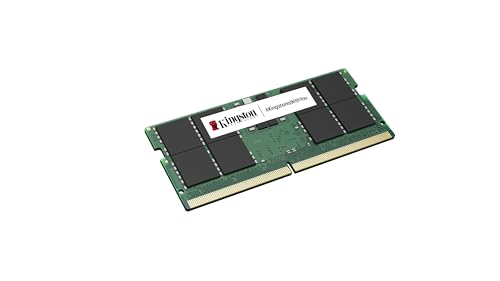
Kingston 16GB DDR5 SODIMM 5600MHz
Best for: laptop upgrades needing single 16GB stick
- Form Factor
- SODIMM (what this guide is about)
- Capacity
- 16GB
- Memory Speed
- 5600 MT/s
- CAS Latency
- CL46
- Dimensions
- 0.3 × 1.8 × 3.8 inches
- Weight
- 0.35 ounces
View on Amazon: Kingston 16GB DDR5 SODIMM 5600MHz Affiliate link
This Kingston module provides 16GB of DDR5 SDRAM in a SODIMM form factor. It operates at 5600 MHz with a CAS latency of CL46. The 262-pin design fits notebook devices and reduces electrical load on the memory controller. You get unbuffered signal processing for efficient data transfer. This configuration suits users needing a single high-speed stick for laptops or small form factor builds.
Pros
- 5600 MHz speed for fast data transfer
- 16GB capacity in a single stick
- 262-pin SODIMM form factor
- CL46 CAS latency for quick access
Cons
- Single 16GB stick limits total capacity
- CL46 latency is higher than faster kits
- No heat spreader or RGB lighting
Good fit if
- You need to upgrade a laptop with a single stick
- You require 16GB of high-speed DDR5 memory
- You are building a compact notebook system
Skip if
- You need 32GB or more in one module
- You want the lowest possible latency timings
- You are building a desktop PC
Verdict: Kingston 16GB DDR5 5600MHz SODIMM offers reliable speed for laptops needing a single high-capacity upgrade. It fits users who prioritize bandwidth over tight timings in a compact notebook.
Specifications side by side
| Spec | Crucial 16GB 4800MHz DDR5 Laptop SODIMM | Kingston FURY Impact 64GB DDR5 4800MHz SODIMM Kit | TEAMGROUP Elite 16GB DDR5 4800MHz SODIMM | Timetec 8GB DDR5 4800MHz Laptop RAM | Timetec 16GB (2x8GB) DDR5 4800MHz SODIMM | Timetec 32GB DDR5 4800MHz Laptop Kit | A-Tech 32GB DDR5 4800MHz CL40 SODIMM | G.SKILL Ripjaws 32GB 4800MHz CL34 SODIMM Kit | Micron 8GB DDR5 4800MHz SODIMM | Patriot DDR5 32GB 4800MHz SODIMM | Crucial 32GB DDR5 5600MHz SODIMM Kit | Crucial 32GB 5600MHz DDR5 Laptop SODIMM | Adamanta Factory Original 8GB DDR5 | TEAMGROUP T-Create Classic 32GB DDR5 5600MHz SODIMM | Kingston 16GB DDR5 SODIMM 5600MHz |
|---|---|---|---|---|---|---|---|---|---|---|---|---|---|---|---|
| Capacity | 16GB | 64GB | 16GB | 8 GB | 16GB | 32 GB | 32GB | 32GB | 8GB | 32GB | 32GB | 32GB | 8GB | 32GB | 16GB |
| Memory Speed | 4800MHz | 4800MT/s | 4800MHz | 4800 MHz | 4800MHz | 4800 MHz | 4800MHz | 4800MT/s | 4800 | 4800MHz | 5600MHz | 5600MHz | 4800MHz | 5600MHz | 5600 MT/s |
| CAS Latency | CL40 | CL38 | CL40 | CL40 | CL40 | CL40 | CL40 | CL34 | not stated | not stated | not stated | not stated | CL40 | CL46 | CL46 |
| Kit Configuration | not stated | Kit of 2 | not stated | 1x8GB | 2x8GB | 2x16GB | 1 x 32GB | 2x16GB | 1x8GB | 1 x 32GB | 2x16GB | not stated | 1x8GB | not stated | not stated |
| Form Factor | 262-Pin SODIMM | SODIMM | 262 Pin SODIMM | 262Pin SODIMM | 262 Pin SODIMM | 262 Pin SODIMM | 262-Pin SO-DIMM | 262-Pin SO-DIMM | SODIMM 262-pin | SODIMM | 262-Pin SODIMM | 262-Pin SODIMM | SODIMM | SODIMM | 262-pin SODIMM |
| Overclocking Profile | Intel XMP 3.0 and AMD EXPO | Intel XMP 3.0 | not stated | not stated | not stated | not stated | not stated | Intel XMP 3.0 | not stated | not stated | Intel XMP 3.0, AMD EXPO | Intel XMP 3.0, AMD EXPO | not stated | not stated | not stated |
| Voltage | 1.1V | not stated | 1.1V | 1.1V | 1.1V | 1.1V | 1.1V | 1.10V | not stated | 1.1v | 1.1V | 1.1V | 1.1v | not stated | not stated |
| ECC Support | non-ECC | On-Die ECC | Non-ECC, on-die ECC | Non-ECC | Non-ECC | Non-ECC | Non-ECC Unbuffered | Non-ECC | Non-ECC | On-Die ECC | Non-ECC | Non-ECC | Non-ECC | not stated | not stated |
| Compatible Device | Laptop | Laptop | Laptop | Laptop | Laptop | Laptop | PC, Laptop | Laptop | Laptop | not stated | Laptop | Laptop | Laptop | Laptop | not stated |
| Size | 16GB | 64GB | 16GB | DDR5 8GB | 16GB KIT(2x8GB) Single Rank | DDR5 32GB KIT(2x16GB) | 32GB (1 x 32GB) | 32GB (2x16GB) | 8GB | 32GB 4800MHz | 32GB Kit (2x16GB) | 32GB | (8GBx1) 8GB | 32GB | 16GB |
| Dimensions | 2.74 × 0.15 × 1.18 inches | 2.74 × 0.15 × 1.18 inches | 2.76 × 0.12 × 1.18 inches | not stated | not stated | not stated | 2.74 × 1.18 × 0.15 inches | not stated | 2.74 × 1.18 × 0.1 inches | 8.66 × 3.15 × 1.18 inches | 2.74 × 0.15 × 1.18 inches | 2.74 × 0.15 × 1.18 inches | 2.75 × 1.2 × 0.2 inches | 2.76 × 0.08 × 1.18 inches | 0.3 × 1.8 × 3.8 inches |
| Weight | not stated | 1.6 ounces | 0.64 ounces | not stated | not stated | not stated | not stated | not stated | not stated | 0.71 ounces | 0.61 ounces | 0.33 ounces | 3 ounces | 0.35 ounces | 0.35 ounces |
| Model | CT16G48C40S5 | KF548S38IBK2-64 | TED516G4800C40-S01 | 76 | 76 | 76 | AT32G1D5S4800ND8N11V | F5-4800S3434A16GA2-RS | MTC4C10163S1SC48BA1 | PSD532G48002S | CT2K16G56C46S5 | CT32G56C46S5 | AM62SS11G64SA-VP | CTCCD532G5600HC46-S01 | KCP556SS8-16 |
| Color | not stated | Black | Single Channel | Black | 4800MHz | Gold | Multicolor | Black | not stated | Multicolor | Black | Multicolor | Compatible Dell 4800MHz Memory | Black-SODIMM | Information Not Available |
Is a SODIMM Form Factor Right for You?
SODIMM modules provide a compact physical layout designed for space-constrained motherboards. Unlike standard desktop memory, these smaller sticks fit directly into compatible laptops, all-in-one systems, and mini PCs. Choosing SODIMM matters strictly for physical and electrical compatibility with your motherboard slots. It allows you to expand system capacity from 4GB up to 32GB kits across various memory speeds without modifying your hardware enclosure. Using the correct form factor ensures your portable or small-format machine boots properly and runs at its rated operating specifications.
Worth it if
- You need to upgrade or replace memory in a compatible laptop, Mac, or mini PC.
- You want to increase your compact device memory up to 32GB using matching modules.
Skip it if
- You are upgrading a standard desktop motherboard designed for full-length DIMM slots.
- You own a device with soldered memory that lacks physical expansion slots.
If you are assembling a full desktop build rather than upgrading a laptop, you will need a compatible DDR5 motherboard instead.
How We Selected SODIMM Memory
You find modules in this guide identified by the SODIMM form factor stated in their product titles or specification lists. Each option comes from Amazon listings, displaying only one size or variant per product family. All technical details come strictly from published manufacturer specifications, and modules are not physically handled.
The 15 picks are ordered with products in stock first, then by Amazon sales rank (better-selling products first). You can review published specifications such as memory speed, capacity, CAS latency, and operating voltage to match your system requirements for 2026. Stock information updates live on the page at least daily.
How to Choose the Best SODIMM Memory
-
Match CAS Latency Timings
When you evaluate memory modules, compare the CAS latency rating listed in clock cycles. Lower CAS latency indicates fewer clock cycles required to deliver requested data to the processor. For example, the G.SKILL Ripjaws 16GB DDR4 3200MHz SODIMM operates at CL22 latency, whereas lower-frequency modules may list CL15 or CL17. You should always select memory with timings supported by your motherboard chipset. Running mismatched latencies can cause system instability or force modules to default to slower fallback values.
-
Check Physical Pin Counts
SODIMM modules differ physically across memory generations, so you must verify the pin specification of your motherboard slots. For instance, the Crucial 8GB Kit (2x4GB) DDR4 2400MHz SODIMM features a 260-pin connector, while older DDR3 units utilize a 204-pin configuration. The notch locations differ between generations, preventing mismatched sticks from seating properly. Review your device documentation to determine whether your board requires 204-pin or 260-pin memory. Never force a SODIMM module into an incompatible motherboard slot.
-
Target Supported Clock Speeds
Memory speed is measured in megahertz and defines how quickly a module transfers data. For example, the Timetec 16GB DDR4 2666MHz SODIMM RAM operates at 2666MHz, whereas other options run at 1066MHz, 1333MHz, 1600MHz, 2133MHz, 2400MHz, or 3200MHz. You need to consult your hardware manual to confirm the maximum frequency supported by your processor and motherboard. Installing a module rated faster than your system limit will usually clock down to the maximum frequency your system allows.
-
Evaluate Single Versus Multi-Module Kits
Examine your laptop or mini PC to count how many physical memory slots are accessible. If your motherboard includes two open slots, a dual-module package like the Timetec 32GB DDR4 2133MHz SODIMM Kit supplies two matching 16GB sticks for dual-channel throughput. However, if your system has only one free expansion slot or a single soldered memory channel, you should select an individual module instead. Buying the right kit layout ensures you do not end up with an uninstalled, spare stick.
-
Verify Host Device Compatibility
Certain SODIMM modules target specific host machines such as Apple Mac computers or general Windows laptops. For instance, the Timetec 8GB DDR3L 1866MHz SODIMM lists explicit compatibility with Late 2015 27-inch Retina 5K iMac desktops. Other modules specifically list PC and laptop compatibility. Checking the compatible device specification helps you avoid firmware recognition errors. You should match the module directly to your manufacturer brand and model year to confirm that the system BIOS or EFI firmware accepts the memory.
-
Confirm Non-ECC Support
Standard consumer laptops and compact desktops require unbuffered Non-ECC memory rather than error-correcting code modules. For example, the Timetec 16GB DDR4 2400MHz SODIMM explicitly lists Non-ECC support in its hardware specifications. Enterprise workstations or servers sometimes require ECC SODIMMs, but installing ECC modules in a non-ECC laptop will prevent your system from booting. Always check your system specifications to ensure you purchase Non-ECC RAM when upgrading mainstream notebooks, portable computers, or compact all-in-one workstations.
Frequently asked questions
Which DDR5 SODIMM has the lowest latency?
The G.SKILL Ripjaws 32GB kit offers CL34 latency. This is the lowest timing specification among the selected modules. Lower latency means fewer clock cycles are needed to access data, which can improve system responsiveness. Most other options listed run at CL40 or higher speeds.
What is the highest capacity DDR5 SODIMM available?
The Kingston FURY Impact provides 64GB of memory. It is a single stick designed for high-capacity workflows like virtualization. This capacity is significantly larger than the standard 16GB or 32GB options found in most other listings, making it ideal for heavy multitasking.
Are there DDR5 SODIMMs faster than 4800MHz?
Yes, several kits operate at 5600MHz. The Crucial 32GB Kit, the single Crucial 32GB stick, the TEAMGROUP T-Create, and the Kingston 16GB stick all support this higher speed. These modules offer greater bandwidth than the standard 4800MHz options if your laptop supports the faster rate.
Which SODIMM is best for a single-slot upgrade?
The Crucial 32GB DDR5 5600MHz SODIMM is a strong choice for single-slot upgrades. It provides high capacity in one stick. Other single-slot options include the A-Tech 32GB and the Patriot 32GB modules. These allow you to maximize memory without needing two slots.
Does any listed RAM include ECC support?
The data indicates that most modules are Non-ECC. The TEAMGROUP Elite and Timetec options explicitly state Non-ECC support. While some descriptions mention on-die ECC, the attribute lists confirm they are not registered ECC modules. You should verify your system compatibility for error correction features.
What is the standard size for these SODIMM modules?
Most modules measure approximately 2.74 to 2.76 inches in length and 1.18 inches in height. The width is typically around 0.15 inches. These dimensions are standard for laptop memory. Always check your device manual to ensure the physical slot can accommodate these specific measurements.