Best Kingston DDR4 RAMS: 7 Models Compared
As an Amazon Associate we earn from qualifying purchases. Links on this page are affiliate links.
You need the best kingston ddr4 RAMs for your specific setup. Kingston offers a range of options, from server ECC kits and desktop modules to laptop SODIMMs and RGB-styled sticks. We compared 7 models based strictly on their published specifications. The top pick is the Kingston 64GB DDR4 ECC REG Server Kit because it supports error correction and high capacity. This guide helps you choose the right size and form factor for your device.
Quick picks
Our 7 picks
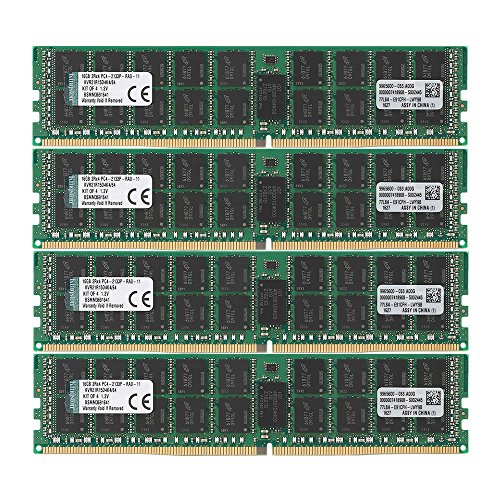
Kingston 64GB DDR4 ECC REG Server Kit
Best for: Server memory with ECC and high capacity
- Total Capacity
- 64GB
- Memory Speed
- 2133MHz
- CAS Latency
- CL15
- Module Configuration
- 4x16GB
- Form Factor
- DIMM
- ECC Support
- ECC Reg
View on Amazon: Kingston 64GB DDR4 ECC REG Server Kit Affiliate link
This Kingston kit delivers 64GB of DDR4 memory across four 16GB sticks. It runs at 2133MHz with CL15 latency. The modules are Registered DIMMs with ECC support, designed for server environments. This configuration provides high bandwidth and error correction for critical workloads. You should choose this kit if you need substantial capacity and stability for enterprise-grade hardware rather than standard desktop gaming.
Pros
- 64GB total capacity via four 16GB modules
- ECC support for data integrity
- Registered DIMM design for server stability
- 2133MHz speed with CL15 latency
Cons
- Lower 2133MHz speed compared to desktop kits
- Registered DIMMs are incompatible with standard desktop motherboards
- Single-rank configuration may limit peak bandwidth on some platforms
Good fit if
- You are building or upgrading a server system
- You require ECC memory for data reliability
- You need high capacity for virtualization tasks
Skip if
- You are installing RAM in a standard desktop PC
- You need high-speed gaming performance
- You require a single stick configuration
Verdict: Kingston 64GB DDR4 ECC Registered Server RAM is the correct choice for server builds requiring error correction and large capacity. It does not fit standard desktop users who need faster speeds and compatible non-registered modules.

Kingston 4GB DDR4-2666 Desktop RAM
Best for: Basic legacy desktop upgrades
- Total Capacity
- 4 GB
- Memory Speed
- 2666 MHz
- CAS Latency
- CL19
- Voltage
- 1.2 V
- Module Configuration
- 1x4GB
- Form Factor
- DIMM
View on Amazon: Kingston 4GB DDR4-2666 Desktop RAM Affiliate link
This Kingston module offers 4 GB of DDR4 memory running at 2666 MHz. It features CL19 latency and 1.2V voltage. The stick is a standard DIMM for desktop PCs. It is ideal for basic office tasks or upgrading older systems that require single-stick expansion. You get reliable performance for light computing needs without high-speed demands.
Pros
- 2666 MHz speed for standard desktop use
- Low 1.2V power consumption
- Compact 1-ounce weight
- CL19 latency timing
Cons
- Small 4 GB capacity limits multitasking
- Higher CL19 latency compared to faster kits
- Single stick only, not a matched pair
Good fit if
- You need a cheap upgrade for an old PC
- You only require 4 GB total system memory
- You are adding a second stick to an existing 4 GB module
Skip if
- You need more than 8 GB of RAM
- You want high-speed gaming performance
- You are building a modern multi-tasking workstation
Verdict: Kingston 4GB DDR4 2666MHz Desktop RAM fits users who just need a minimal, low-cost memory boost for legacy systems. It is not suitable for modern heavy workloads.

Kingston 16GB DDR4 2666MHz SODIMM
Best for: Laptop memory upgrades
- Total Capacity
- 16GB
- Memory Speed
- 2666MT/s
- Module Configuration
- 1x16GB
- Form Factor
- SODIMM
- Height
- 1.97 inches
- Compatible Device
- Laptop
View on Amazon: Kingston 16GB DDR4 2666MHz SODIMM Affiliate link
This Kingston module is a 16GB DDR4 SODIMM designed for laptops. It runs at 2666MHz with a 1.2V voltage and uses single-rank architecture. The black stick measures 3.15 inches long. It offers a lifetime warranty and rigorous testing. You should choose this if you need a reliable upgrade for compatible notebook systems that support this specific speed and form factor.
Pros
- 16GB capacity for single-slot upgrade
- 2666MHz speed for standard laptop performance
- 1.2V low voltage operation
- Lifetime warranty included
Cons
- Limited to 2666MHz speed
- Single stick only, not a dual-channel kit
- No RGB lighting or heat spreader
Good fit if
- You need a 16GB upgrade for a laptop
- Your system supports 2666MHz DDR4 SODIMMs
- You prefer a standard black module
Skip if
- You require speeds above 2666MHz
- You are building a desktop computer
- You need a dual-channel kit already assembled
Verdict: Kingston 16GB DDR4 2666MHz SODIMM fits laptop owners who need a straightforward, high-capacity single-stick upgrade. It provides reliable performance for users whose systems are optimized for this specific speed.

Kingston FURY Beast 16GB 3200MHz DDR4 RAM
Best for: Single-stick desktop upgrades with XMP support
- Total Capacity
- 16 GB
- Memory Speed
- 3200 MHz
- CAS Latency
- CL16
- Module Configuration
- 1 x 16 GB
- Height
- 1.34 inches
- Compatible Device
- Desktop
View on Amazon: Kingston FURY Beast 16GB 3200MHz DDR4 RAM Affiliate link
This Kingston FURY Beast module offers 16GB of DDR4 memory running at 3200MHz with CL16 latency. It features a low-profile black heat spreader and supports Intel XMP for easy overclocking. The stick is compatible with AMD Ryzen systems and runs at 2666MHz out of the box. It is a cost-efficient upgrade for desktop users who need reliable performance without RGB lighting.
Pros
- 16GB capacity for solid multitasking
- 3200MHz speed with CL16 latency
- Intel XMP ready for easy overclocking
- Low-profile design fits smaller cases
Cons
- Single stick configuration limits dual-channel bandwidth
- No RGB lighting for aesthetic builds
- Lower speed than the 3600MHz Beast RGB option
Good fit if
- You need a single 16GB stick for a desktop upgrade
- You prefer a low-profile, non-RGB design
- You want XMP support for easy performance tuning
Skip if
- You require RGB lighting for your build
- You need a faster 3600MHz speed option
- You are looking for a dual-channel kit
Verdict: Kingston FURY Beast 16GB 3200MHz DDR4 is a practical choice for users who prioritize capacity and XMP compatibility over aesthetics. It suits desktop builders who want a reliable, low-profile memory solution.

Kingston FURY Beast 8GB 2666MHz DDR4 RAM
Best for: Basic desktop upgrades and budget builds
- Total Capacity
- 8 GB
- Memory Speed
- 2666 MHz
- CAS Latency
- CL16
- Module Configuration
- 1 x 8 GB
- Height
- 0.28 inches
- Compatible Device
- Desktop
View on Amazon: Kingston FURY Beast 8GB 2666MHz DDR4 RAM Affiliate link
This single stick offers 8GB of DDR4 memory at 2666MHz with CL16 latency. It features a low-profile black heat spreader and supports Intel XMP for easy setup on compatible desktops. You get plug-and-play functionality that works with AMD Ryzen systems. It is a cost-efficient upgrade for basic desktop needs or as a starter module for building larger capacities later.
Pros
- 8GB capacity in a single module
- 2666MHz speed with CL16 latency
- Low-profile heat spreader design
- Intel XMP-ready for easy overclocking
- Compatible with AMD Ryzen platforms
Cons
- Lower 2666MHz speed compared to 3200MHz or 3600MHz options
- Only 8GB capacity, limiting multitasking
- Single module, not a matched kit
Good fit if
- You need a budget-friendly 8GB upgrade
- You are building a system with limited CPU cooler clearance
- You want a simple plug-and-play desktop memory stick
Skip if
- You require high-speed gaming performance above 3000MHz
- You need 16GB or more in a single stick
- You want RGB lighting effects
Verdict: Kingston FURY Beast 8GB 2666MHz is a practical entry-level module for users prioritizing cost and compatibility over raw speed. It fits desktops needing a modest capacity boost without complex setup.

Kingston Fury Impact 16GB DDR4-3200 SODIMM
Best for: Thin laptop memory upgrades
- Total Capacity
- 16 GB
- Memory Speed
- 3200 MHz
- CAS Latency
- CL20
- Module Configuration
- 2 x 8 GB
- Form Factor
- SODIMM
- Height
- 0.15 inches
View on Amazon: Kingston Fury Impact 16GB DDR4-3200 SODIMM Affiliate link
This Kingston Fury Impact kit provides 16GB of DDR4 SODIMM memory running at 3200MHz. It features a low-profile design measuring just 0.15 inches in height, making it suitable for thin laptops. The kit includes two 8GB sticks and supports Intel XMP profiles for automatic overclocking. It is also ready for AMD Ryzen systems, offering plug-and-play performance for portable computing needs.
Pros
- 3200MHz memory speed for enhanced performance
- Ultra-slim 0.15-inch height fits tight spaces
- Supports Intel XMP and AMD Ryzen
- Kit includes two 8GB modules
Cons
- Higher CL20 latency compared to desktop counterparts
- Only 16GB total capacity limits heavy multitasking
- No RGB lighting for aesthetic customization
Good fit if
- You need a low-profile upgrade for a thin laptop
- You want faster 3200MHz speeds over standard 2666MHz
- You are upgrading an AMD Ryzen mobile system
Skip if
- You require more than 16GB of total memory
- You are building a desktop computer instead of a laptop
- You prefer lower latency timings like CL16
Verdict: Kingston Fury Impact 16GB DDR4-3200 SODIMM is a practical upgrade for users needing compact, high-speed memory in portable devices. It suits those prioritizing fit and speed over capacity or aesthetic lighting.

Kingston FURY Beast RGB 8GB 3600MHz CL17 RAM
Best for: Single stick RGB upgrades at 3600MHz
- Total Capacity
- 8GB
- Memory Speed
- 3600MT/s
- CAS Latency
- CL17
- Height
- 1.62 inches
- Compatible Device
- PC
- Dimensions
- 5.25 × 0.28 × 1.62 inches
View on Amazon: Kingston FURY Beast RGB 8GB 3600MHz CL17 RAM Affiliate link
This Kingston FURY Beast module offers 8GB of DDR4 memory running at 3600MT/s with CL17 latency. It features low-profile RGB lighting and infrared sync technology for synchronized effects. The stick is Intel XMP certified and ready for AMD Ryzen systems. You get plug-and-play functionality at 2666MT/s out of the box. It is a solid choice for users seeking higher speed and aesthetic customization in a single stick format.
Pros
- 3600MT/s memory speed for enhanced performance
- Low-profile RGB lighting with infrared sync
- Intel XMP certified for easy overclocking
- Compatible with AMD Ryzen platforms
Cons
- Single 8GB stick rather than a dual-channel kit
- Slightly higher CL17 latency compared to CL16 alternatives
- No mention of software control for RGB patterns
Good fit if
- You want 3600MHz speed in a single stick
- You prefer RGB lighting with sync technology
- You are building or upgrading an AMD Ryzen PC
Skip if
- You need a matched dual-channel kit for stability
- You prefer lower CL16 latency for gaming
- You are looking for software-controlled RGB effects
Verdict: Kingston FURY Beast RGB 8GB 3600MHz delivers fast 3600MT/s speeds and stylish RGB lighting in a single stick. It fits users who want high-speed memory and visual flair without the complexity of a full kit.
Specifications side by side
| Spec | Kingston 64GB DDR4 ECC REG Server Kit | Kingston 4GB DDR4-2666 Desktop RAM | Kingston 16GB DDR4 2666MHz SODIMM | Kingston FURY Beast 16GB 3200MHz DDR4 RAM | Kingston FURY Beast 8GB 2666MHz DDR4 RAM | Kingston Fury Impact 16GB DDR4-3200 SODIMM | Kingston FURY Beast RGB 8GB 3600MHz CL17 RAM |
|---|---|---|---|---|---|---|---|
| Total Capacity | 64GB | 4 GB | 16GB | 16 GB | 8 GB | 16 GB | 8GB |
| Memory Speed | 2133MHz | 2666 MHz | 2666MT/s | 3200 MHz | 2666 MHz | 3200 MHz | 3600MT/s |
| CAS Latency | CL15 | CL19 | not stated | CL16 | CL16 | CL20 | CL17 |
| Voltage | not stated | 1.2 V | not stated | not stated | not stated | not stated | not stated |
| Module Configuration | 4x16GB | 1x4GB | 1x16GB | 1 x 16 GB | 1 x 8 GB | 2 x 8 GB | not stated |
| Form Factor | DIMM | DIMM | SODIMM | not stated | not stated | SODIMM | not stated |
| ECC Support | ECC Reg | Non-ECC | not stated | not stated | not stated | not stated | not stated |
| Height | not stated | 0.39 inches | 1.97 inches | 1.34 inches | 0.28 inches | 0.15 inches | 1.62 inches |
| Compatible Device | Server | not stated | Laptop | Desktop | Desktop | Laptop | PC |
| Size | 64GB | 4 Gb | 16GB | 16GB | 8GB | 16GB | 8GB |
| Dimensions | 13 × 4.5 × 0.1 inches | 1.97 × 6.3 × 0.39 inches | 3.15 × 1.18 × 1.97 inches | 5.25 × 0.28 × 1.34 inches | 5.25 × 1.34 × 0.28 inches | 2.74 × 1.18 × 0.15 inches | 5.25 × 0.28 × 1.62 inches |
| Weight | 0.35 ounces | 1 ounces | 0.35 ounces | 1.27 ounces | 1.27 ounces | 0.54 ounces | 1.37 ounces |
| Color | Multicolor | Multicolor | Black | Black | Black | Black | Black |
| Model | KVR21R15D4K4/64 | KCP426NS6/4 | KCP426SS8/16 | KF432C16BB/16 | KF426C16BB/8 | KF432S20IBK2/16 | KF436C17BB2A/8 |
Kingston DDR4 RAM Lineup Overview
Kingston separates its DDR4 options by target device and error correction needs. The 64GB ECC REG Server Kit suits data centers requiring reliability. For standard desktops, the FURY Beast 16GB 3200MHz offers XMP support for overclocking, while the 4GB Desktop RAM serves basic legacy upgrades. Laptop users can choose the 16GB SODIMM for high capacity or the slim Fury Impact 16GB for speed in thin chassis. Speed varies from 2133MHz to 3600MHz. Latency ranges from CL15 to CL19. Voltage remains standard at 1.2V for most desktop and mobile modules. Choose based on your form factor and performance requirements.
Where Kingston fits your needs
Kingston’s DDR4 range spans from 4GB to 64GB capacities. You can choose standard desktop modules, low-profile FURY Beast sticks, or compact SODIMMs for laptops. Options include high-speed 3600MHz RGB kits and reliable ECC server memory. However, the lineup has gaps. There are no dual-channel kits listed, only single sticks. You will not find 48GB configurations or non-ECC desktop options above 16GB capacity. Choose based on your specific device compatibility and whether you need error correction or visual lighting.
How to choose the right one
-
Check compatible device type
Match the RAM to your hardware. Server builds require ECC REG modules like the 64GB Kingston kit. Desktops use standard DIMMs, such as the FURY Beast 16GB. Laptops need SODIMM form factors, like the 16GB laptop upgrade. Using the wrong type prevents installation. Verify your motherboard or laptop manual for supported device types before purchasing to ensure physical and electrical compatibility.
-
Verify memory speed needs
Higher MHz does not always mean better performance. The 3600MHz Kingston FURY Beast offers speed for enthusiasts, while the 2666MHz Desktop RAM suits basic tasks. The 2133MHz Server Kit prioritizes stability over raw speed. Check your CPU and motherboard specifications to see which speeds are supported. Running RAM at unsupported speeds may cause instability or force the system to downclock to the lowest common denominator.
-
Assess ECC support requirements
Error Correction Code memory is critical for servers. The 64GB Kingston ECC REG kit corrects data errors automatically, ensuring reliability for data centers. Standard desktop and laptop users do not need ECC. The 4GB and 16GB desktop modules are Non-ECC. Adding ECC to a non-compatible system will prevent booting. Only select ECC options if your specific platform explicitly supports registered memory with error correction.
-
Consider CAS latency values
Latency affects response time. Lower numbers are generally faster. The 2133MHz Server Kit has a CL15 rating. The 3200MHz Desktop module uses CL16. The 3600MHz RGB stick is CL17. While higher speed often offsets higher latency, you should compare these values alongside MHz. A lower latency at a moderate speed can sometimes outperform a higher latency at a very high speed in specific applications.
-
Confirm voltage specifications
Voltage impacts power consumption and heat. Most modern DDR4 modules operate at 1.2V, including the 4GB Desktop RAM and the 16GB SODIMM. Ensure your system supports this standard voltage. Running RAM at incorrect voltages can damage components or cause instability. Check your motherboard manual for supported voltage ranges. Stick to the standard 1.2V unless your specific high-performance setup requires different electrical parameters for stability.
Frequently asked questions
Is the best Kingston DDR4 RAM ECC registered?
The top-rated model is a 64GB ECC Registered kit designed for servers. It operates at 2133MHz with CL15 latency. This configuration ensures error correction for critical data. Standard desktop users should avoid this type because it is incompatible with consumer motherboards. It is built specifically for enterprise environments requiring high reliability.
What is the fastest single-stick Kingston DDR4 option?
The Kingston FURY Beast RGB 8GB runs at 3600MHz. It features a CL17 timing and includes RGB lighting. This is the highest speed available in a single stick from this lineup. It suits users who want visual flair and quick data transfer rates without installing a full dual-channel kit.
Can I use Kingston DDR4 RAM in a laptop?
Yes, but you must choose the SODIMM form factor. The 16GB 2666MHz SODIMM and the 16GB DDR4-3200 Impact are both designed for portable devices. The Impact model offers higher speed at 3200MHz. Ensure your laptop supports the specific speed and voltage requirements listed for these modules before purchasing.
Does the budget Kingston DDR4 RAM support XMP?
The 4GB Desktop RAM does not mention XMP support in its specifications. It runs at a standard 2666MHz with CL19 latency. It is intended for basic legacy upgrades rather than performance tuning. For XMP compatibility, you should look at the FURY Beast series, which supports overclocking profiles for higher speeds.
What is the difference between the FURY Beast and Impact lines?
The FURY Beast line uses the standard DIMM form factor for desktops. It comes in 8GB and 16GB sizes with speeds up to 3600MHz. The Impact line uses the smaller SODIMM form factor for laptops. It offers 16GB capacity at 3200MHz. Choose based on your device type, not just the brand series.
Is the 64GB Kingston RAM suitable for gaming?
No, this module is an ECC Registered kit for servers. It runs at 2133MHz, which is slower than typical gaming RAM. It also requires a server motherboard that supports registered memory. Gamers should select non-ECC desktop modules like the FURY Beast series for better compatibility and higher clock speeds.
How much voltage do the Kingston DDR4 modules use?
Most listed Kingston DDR4 modules operate at 1.2V. This includes the 4GB Desktop RAM and the 16GB SODIMM. Standard DDR4 voltage helps improve power efficiency. Always verify your system supports 1.2V operation before installing these sticks to ensure stable performance and prevent potential compatibility issues with older hardware.