A-Tech vs Kingston: DDR4 RAMS Compared by Specs
As an Amazon Associate we earn from qualifying purchases. Links on this page are affiliate links.
When you compare a tech vs kingston ddr4 RAM, both kits offer 64GB of total capacity in four 16GB modules. They share a similar multicolor design and lifetime warranty coverage. The main difference lies in their intended use and electrical specifications. One is built for standard desktops with higher speeds, while the other targets servers with error correction and tighter latency. You need to check your motherboard compatibility carefully.
Key differences
| Aspect | A-Tech 64GB DDR4 2666MHz Non-ECC | Kingston 64GB DDR4 ECC REG Server Kit |
|---|---|---|
| Compatible Device | Desktop | Server |
| Memory Speed | 2666MHz | 2133MHz |
| CAS Latency | CL19 | CL15 |
| ECC Support | Non-ECC | ECC |
| Form Factor | UDIMM | Registered DIMM |
Which one should you choose?
Choose A-Tech 64GB DDR4 2666MHz Non-ECC if
- You need high-speed memory for a standard desktop computer.
- Your motherboard does not support registered or ECC memory.
- You prioritize higher clock speeds for general multitasking.
Choose Kingston 64GB DDR4 ECC REG Server Kit if
- You are building or upgrading a server system.
- You require ECC support for data integrity and error correction.
- You need a kit with lower CAS latency for stable server operations.
Verdict: The A-Tech kit is the right choice for desktop users who need higher speeds and standard UDIMM compatibility. The Kingston kit is strictly for server environments that require ECC and registered DIMMs. Do not mix these types as they are not interchangeable.
DDR4 RAM Specs Compared
compatible device
You need to match the RAM to your hardware. The A-Tech kit is explicitly listed as compatible with select DDR4 desktop computers. It uses standard UDIMM form factors designed for consumer PCs. The Kingston kit is labeled for server use. It features Registered DIMM technology, which is typical for enterprise environments. If you are building a standard desktop, the A-Tech option fits your motherboard slots. The Kingston module requires server-grade hardware and will not work in a typical home computer. Choose the A-Tech kit for your desktop build. The Kingston kit is reserved for specialized server racks.
memory speed
Speed affects how quickly data moves between the memory and the processor. The A-Tech kit runs at 2666 MHz. This is a higher frequency than the Kingston alternative. The Kingston kit operates at 2133 MHz. Higher numbers generally mean faster data transfer rates. For most desktop tasks, the 2666 MHz speed provides a performance edge. The Kingston speed is adequate for server workloads that prioritize stability over raw throughput. If you want faster loading times and better multitasking, the A-Tech speed is superior. The Kingston kit is slower in comparison.
ecc support
Error Correction Code (ECC) memory detects and fixes data corruption. The A-Tech kit is Non-ECC. It does not have error correction capabilities. This is standard for consumer desktops where occasional glitches are rare. The Kingston kit supports ECC. It also includes Registered DIMM features. This combination is vital for servers handling critical data. If you run a server, the Kingston ECC support prevents data loss. For a desktop, Non-ECC is sufficient and often more affordable. The Kingston kit offers robust error handling. The A-Tech kit lacks this protection.
cas latency
CAS Latency (CL) measures the delay before data is accessed. Lower numbers indicate faster response times. The Kingston kit has a CL15 rating. The A-Tech kit has a CL19 rating. The Kingston latency is four cycles lower. This means the Kingston modules can retrieve data slightly faster. However, the Kingston speed is also slower, which balances the equation. The A-Tech kit has higher latency but runs at a higher frequency. For strict latency metrics, the Kingston kit is better. The A-Tech kit trades lower latency for higher clock speeds.
form factor
The physical shape determines if the RAM fits your board. The A-Tech kit uses UDIMM, or Unbuffered DIMM. These are the standard sticks for most desktop motherboards. The Kingston kit uses Registered DIMM. These sticks have an extra buffer chip. They are physically similar but electrically different. You cannot mix UDIMM and Registered DIMM on the same motherboard. The A-Tech form factor is universal for desktops. The Kingston form factor is restricted to compatible server boards. Ensure your motherboard supports the specific type you choose.
Which DDR4 RAM Kit Fits Your Needs
Desktop users needing high capacity
Choose the A-Tech kit for desktop systems. It uses UDIMM modules compatible with consumer PCs. The 2666MHz speed offers faster data rates than the server option. You get 64GB total capacity in four 16GB sticks. This configuration supports heavy multitasking and boosts loading speeds for standard desktop workloads.
Server administrators requiring stability
Select the Kingston kit for server environments. It features ECC Registered DIMMs, which correct memory errors for reliability. The CL15 latency is tighter than the desktop alternative. Although the speed is 2133MHz, the registered nature ensures stable operation in enterprise hardware. It is built specifically for server compatibility and power efficiency.
Budget seekers wanting max RAM
The A-Tech option provides the largest capacity for general use. You receive four 16GB modules totaling 64GB. The 2666MHz frequency is higher than the server counterpart. It fits standard desktop motherboards without requiring specialized server hardware. This makes it a practical choice for users who need ample memory for creative or gaming tasks.
The products compared

A-Tech 64GB DDR4 2666MHz Non-ECC
Best for: Desktop users needing 64GB capacity
- Total Capacity
- 64GB
- Memory Speed
- 2666 MHz
- CAS Latency
- CL19
- Voltage
- 1.2V
- Module Configuration
- 4x16GB
- Form Factor
- UDIMM
View on Amazon: A-Tech 64GB DDR4 2666MHz Non-ECC Affiliate link
This A-Tech kit provides 64GB of DDR4 memory across four 16GB modules. It runs at 2666MHz with CL19 latency and uses standard 1.2V voltage. The modules are non-ECC unbuffered DIMMs designed for desktop computers. You get a lifetime warranty and support. This configuration suits users needing high capacity for multitasking or virtualization without requiring error-correction features.
Pros
- 64GB total capacity via four 16GB modules
- 2666MHz speed with PC4-2666V rating
- Standard 1.2V JEDEC DDR4 voltage
- Lifetime warranty included
Cons
- CL19 latency is slower than the CL15 option on this list
- Non-ECC memory lacks error correction
- No heat spreader listed in specifications
Good fit if
- You need 64GB of desktop memory
- You prioritize capacity over low latency
- You want a lifetime warranty
Skip if
- You require ECC registered memory
- You need CL15 or tighter latency
- You are building a server system
Verdict: A-Tech 64GB DDR4 2666MHz Desktop RAM fits users who need maximum capacity for heavy multitasking or virtualization workloads on a desktop. It is a practical choice for those who do not require ECC features.
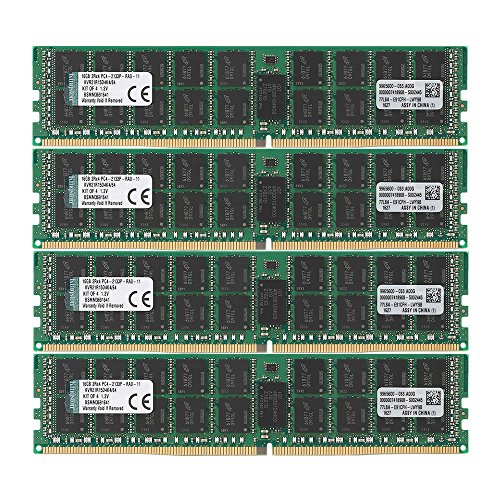
Kingston 64GB DDR4 ECC REG Server Kit
Best for: Server systems requiring ECC registered memory
- Total Capacity
- 64GB
- Memory Speed
- 2133MHz
- CAS Latency
- CL15
- Module Configuration
- 4x16GB
- Form Factor
- DIMM
- ECC Support
- ECC Reg
View on Amazon: Kingston 64GB DDR4 ECC REG Server Kit Affiliate link
This Kingston kit provides 64GB of DDR4 memory across four 16GB sticks. It runs at 2133MHz with a tight CL15 latency. The modules are ECC Registered DIMMs, meaning they include error correction and buffering for stability. You need a server motherboard that supports registered memory. This kit offers lower latency than standard desktop kits but requires compatible enterprise hardware.
Pros
- 64GB total capacity (4x16GB modules)
- 2133MHz speed with CL15 latency
- ECC Registered DIMM technology
- 240-pin form factor
Cons
- Registered DIMMs require server-grade motherboards
- 2133MHz speed is slower than modern DDR4 standards
- Not compatible with standard desktop PCs
Good fit if
- You are building or upgrading a server system
- You need ECC memory for data integrity
- You require 64GB of registered RAM
Skip if
- You are building a standard desktop computer
- Your motherboard does not support registered memory
- You need higher speeds than 2133MHz
Verdict: Kingston 64GB DDR4 ECC Registered Server RAM is a specialized kit for enterprise systems. It suits users who need error correction and stability in server environments, not desktop gamers.
Specifications side by side
| Spec | A-Tech 64GB DDR4 2666MHz Non-ECC | Kingston 64GB DDR4 ECC REG Server Kit |
|---|---|---|
| Total Capacity | 64GB | 64GB |
| Memory Speed | 2666 MHz | 2133MHz |
| CAS Latency | CL19 | CL15 |
| Voltage | 1.2V | not stated |
| Module Configuration | 4x16GB | 4x16GB |
| Form Factor | UDIMM | DIMM |
| ECC Support | Non-ECC | ECC Reg |
| Compatible Device | Desktop | Server |
| Size | 64GB Kit (4 x 16GB) | 64GB |
| Dimensions | 5.25 × 1.23 × 0.15 inches | 13 × 4.5 × 0.1 inches |
| Weight | not stated | 0.35 ounces |
| Color | Multicolor | Multicolor |
| Model | AT16G4D4D2666NA0N12V | KVR21R15D4K4/64 |
Frequently asked questions
Can I use the Kingston 64GB DDR4 ECC REG kit in my desktop PC?
No, that kit is designed for server systems. It uses registered ECC memory, which consumer desktop motherboards typically do not support. You need standard UDIMM modules for a desktop. The A-Tech kit is the correct choice for desktop compatibility. Using the wrong type may prevent your computer from booting.
What is the difference between Non-ECC and ECC memory?
ECC memory detects and corrects data errors on the fly, which is vital for server stability. Non-ECC memory does not have this error-checking feature. The A-Tech kit is Non-ECC, making it suitable for desktops. The Kingston kit includes ECC, targeting enterprise environments where data integrity is critical for long-term operations.
Which RAM kit has a faster memory speed?
The A-Tech kit runs at 2666MHz. The Kingston kit operates at 2133MHz. Higher MHz generally means faster data transfer rates. For desktop performance, the A-Tech speed is superior. The Kingston speed is standard for many server applications where stability matters more than raw speed.
Is the A-Tech 64GB kit suitable for virtualization workloads?
Yes, it is explicitly recommended for heavy multitasking and virtualization on desktops. It provides 64GB of capacity in four 16GB modules. This large capacity allows you to run multiple virtual machines simultaneously. The 2666MHz speed supports efficient data processing for these demanding tasks.
What form factor do these RAM kits use?
The A-Tech kit uses the UDIMM form factor. This is the standard for desktop computers. The Kingston kit is designed for server racks. Its physical dimensions and module type differ from standard desktop sticks. You must ensure your motherboard supports the specific form factor of the kit you choose.
Does the Kingston kit support error correction?
Yes, the Kingston kit includes ECC support. It is a Registered ECC kit. This feature helps maintain data accuracy in server environments. It is not intended for gaming or standard desktop use. If you need error correction for a server, this kit provides that specific hardware capability.