15 Best DDR4 RAMS for PC, Compared
As an Amazon Associate we earn from qualifying purchases. Links on this page are affiliate links.
Finding the best ddr4 RAMs for PC requires matching your board’s capabilities with verified module specs. We compared 15 kits based strictly on published listings. The G.SKILL Trident Z RGB 16GB DDR4 RAM Kit leads with CL16 latency at 3000MHz, offering reliable dual-channel performance for desktop builds. These picks reflect the data provided by manufacturers, ensuring you get accurate timing and speed information. This guide helps you decide which memory kit fits your specific capacity and clearance needs.
Quick picks
The best fit for you
- You need the best overall desktop RAM kit G.SKILL Trident Z RGB 16GB DDR4 RAM Kit This 16GB kit runs at 3000MHz with CL16 latency and 1.35V for balanced performance.
- You want the highest capacity per single slot Timetec 32GB DDR4 3200MHz UDIMM Memory It offers 32GB per stick at 3200MHz with CL22 latency for plug-and-play setup.
- You have tight CPU cooler clearance in your case Corsair Vengeance LPX 16GB DDR4 3000MHz This low-profile 16GB kit is only 34mm tall with CL15 timings at 3000MHz.
- You are upgrading a laptop or mini PC Timetec 16GB DDR4 2400MHz SODIMM This 16GB SODIMM runs at 2400MHz with CL17 latency at standard 1.2V.
Our 15 picks

G.SKILL Trident Z RGB 16GB DDR4 RAM Kit
Best for: desktop PC builds needing 16GB dual-channel memory
- Compatible Device
- Desktop, PC (what this guide is about)
- Total Capacity
- 16GB
- Memory Speed
- 3000MT/s
- CAS Latency
- CL16
- Voltage
- 1.35V
- Module Configuration
- 2x8GB
View on Amazon: G.SKILL Trident Z RGB 16GB DDR4 RAM Kit Affiliate link
This G.SKILL Trident Z RGB desktop memory kit provides 16GB of DDR4 memory across two 8GB 288-pin UDIMM modules. You get transfer speeds reaching up to 3000MT/s at 1.35V with CL16 latency when you apply its Intel XMP profile. It suits your standard desktop PC build if you want dual-channel memory paired with integrated multicolor lighting.
Pros
- Includes Intel XMP profile for 3000MT/s operation at 1.35V
- Dual-channel kit configuration with two matched 8GB modules
- CL16 latency with tested 16-18-18-38 timings
- Integrated multicolor heat spreader design
Cons
- Top speed of 3000MT/s is lower than 3200MT/s kits
- Module height of 1.7 inches can crowd low-profile CPU coolers
- Requires manual BIOS adjustments to achieve rated 3000MT/s speed
Good fit if
- You want a 16GB dual-channel setup using two 8GB modules.
- You have an Intel or AMD desktop motherboard that supports Intel XMP.
- You prefer multicolor RAM sticks with a 1.7-inch height profile.
Skip if
- You need 32GB or 64GB of memory for heavier multi-tasking workloads.
- You want higher stock bandwidth such as 3200MT/s.
- You require ECC memory support for specialized systems.
Verdict: G.SKILL Trident Z RGB 16GB 3000MT/s DDR4 fits PC builders wanting a balanced 16GB dual-channel kit with XMP profile support and multicolor lighting. It delivers verified CL16 timings at 1.35V on compatible desktop boards.

G.SKILL RipjawsV 8GB 2400MHz Red
Best for: basic desktop upgrades needing 8GB total
- Compatible Device
- Desktop, PC (what this guide is about)
- Total Capacity
- 8GB
- Memory Speed
- 2400MT/s
- CAS Latency
- CL15
- Voltage
- 1.20V
- Module Configuration
- 2x4GB
View on Amazon: G.SKILL RipjawsV 8GB 2400MHz Red Affiliate link
This G.SKILL RipjawsV kit provides 8GB of DDR4 desktop memory in a 2x4GB configuration. It runs at 2400MT/s with CL15 latency and 1.20V. The module includes Intel XMP support for easy overclocking. It fits standard U-DIMM slots for desktop PCs. You should choose this if you need a budget-friendly upgrade for basic computing tasks or older systems that do not require high bandwidth.
Pros
- 2400MT/s speed with CL15 latency
- Intel XMP profile included
- Low 1.20V operating voltage
- Standard 288-pin U-DIMM form factor
Cons
- 8GB capacity is lower than the 16GB kits on this list
- 2400MT/s speed is slower than the 3000-3200MT/s options
- Requires BIOS adjustments to reach maximum speed
Good fit if
- You are upgrading a desktop PC with 8GB of total RAM
- You need a budget memory kit for basic office work
- You want a low-voltage module for efficient power use
Skip if
- You require 16GB or more memory for gaming
- You need speeds above 2400MT/s for heavy multitasking
- You are building a high-performance workstation
Verdict: G.SKILL RipjawsV 8GB DDR4 2400MHz is a solid choice for users who only need 8GB of RAM for light desktop use. It offers reliable performance for everyday tasks but lacks the speed and capacity needed for modern gaming or intensive applications.

Timetec 32GB DDR4 3200MHz UDIMM Memory
Best for: plug-and-play desktop builds needing 32GB per slot
- Compatible Device
- Desktop, PC (what this guide is about)
- Total Capacity
- 32GB
- Memory Speed
- 3200MHz
- CAS Latency
- CL22
- Voltage
- 1.2V
- Module Configuration
- 1x32GB
View on Amazon: Timetec 32GB DDR4 3200MHz UDIMM Memory Affiliate link
This Timetec module gives you 32GB of DDR4 desktop memory on a single 288-pin stick. It runs at 3200MHz with CL22 latency at 1.2V without XMP overclocking. The stick can downclock to 2933MHz or 2666MHz when required by your system. It suits standard desktop PCs where you want high memory capacity in a single slot.
Pros
- 32GB capacity on a single 288-pin UDIMM module
- Runs at 3200MHz at 1.2V without requiring XMP
- Downclocks to 2933MHz or 2666MHz on supported systems
- Lifetime warranty with US-based technical support
Cons
- Higher CL22 CAS latency compared to CL15 and CL16 alternatives
- Single-module 1x32GB package does not provide dual-channel bandwidth on its own
- Not compatible with laptops, mini PCs, or all-in-one systems
Good fit if
- You need 32GB of memory in a single desktop slot.
- You want 3200MHz speed at standard 1.2V without adjusting BIOS profiles.
- You run a motherboard limited to 2933MHz or 2666MHz DDR4 speeds.
Skip if
- You want lower memory latency such as CL16.
- You are upgrading a laptop, mini PC, or all-in-one system.
- You want a multi-stick kit for immediate dual-channel operation.
Verdict: Timetec 32GB DDR4 3200MHz CL22 Desktop RAM is built for desktop PC builders who need maximum density per slot at standard 1.2V voltage without manual BIOS tuning. Its CL22 latency and single-stick setup favor plug-and-play capacity over aggressive memory timings.

Corsair Vengeance LPX 16GB DDR4 3000MHz
Best for: compact desktop builds needing low-profile clearance
- Compatible Device
- Desktop, PC (what this guide is about)
- Total Capacity
- 16GB
- Memory Speed
- 3000MHz
- CAS Latency
- CL15
- Voltage
- 1.35V
- Module Configuration
- 2x8GB
View on Amazon: Corsair Vengeance LPX 16GB DDR4 3000MHz Affiliate link
This Corsair Vengeance LPX kit gives you 16GB of desktop memory across two 8GB modules. It runs at 3000MHz with tight CL15 latency at 1.35V, supporting Intel XMP 2.0 for simple setup. Its 34mm module height fits tight spaces under large air coolers. This kit suits you if you need reliable low-profile memory for standard desktop tasks.
Pros
- Low 34mm module height for tight clearances
- Tight CL15 latency at 3000MHz
- Solid aluminum heatspreader for thermal dissipation
- Intel XMP 2.0 support for one-setting configuration
Cons
- 3000MHz clock speed trails 3200MHz alternatives
- 16GB capacity is lower than 32GB or 64GB options
Good fit if
- You build inside small-form-factor cases requiring 34mm clearance.
- You want lower latency with CL15 timings at 3000MHz.
- You need a dual-channel 16GB configuration for a desktop PC.
Skip if
- You want 3200MHz or higher memory clock speeds.
- You need 32GB or more RAM for heavier productivity tasks.
Verdict: Corsair Vengeance LPX 16GB 3000MHz CL15 DDR4 delivers low 34mm hardware clearance and tight CL15 timings for space-constrained desktop PC builds.

Corsair Vengeance LPX 16GB DDR4 3200MHz
Best for: compact PC builds needing low-profile clearance
- Compatible Device
- Desktop, PC (what this guide is about)
- Total Capacity
- 16GB
- Memory Speed
- 3200MHz
- CAS Latency
- CL16
- Voltage
- 1.35V
- Module Configuration
- 2x8GB
View on Amazon: Corsair Vengeance LPX 16GB DDR4 3200MHz Affiliate link
This Corsair Vengeance LPX kit gives you 16GB of DDR4 memory across two 8GB modules. It runs at 3200MHz with CL16 latency at 1.35V and supports Intel XMP 2.0. With a low-profile module height of 34mm, it fits under large CPU coolers and inside compact PC cases. It suits desktop builders who need dependable dual-channel memory.
Pros
- Low 34mm module height fits compact cases and tight CPU coolers
- Supports Intel XMP 2.0 for single-setting configuration
- Solid aluminum heatspreader provides thermal dissipation
- Backed by a limited lifetime warranty
Cons
- Total kit capacity is limited to 16GB rather than 32GB or 64GB
- Does not feature RGB lighting
Good fit if
- You build in a small-form-factor case with strict cooler clearance.
- You want a plug-and-play dual-channel 3200MHz kit with XMP 2.0 support.
Skip if
- You need 32GB or more system memory for your desktop workload.
- You want illuminated RGB memory modules inside your PC.
Verdict: Corsair Vengeance LPX 16GB 3200MHz DDR4 RAM delivers dependable dual-channel desktop speed in a low-profile 34mm form factor that clears tight CPU coolers.

G.SKILL Ripjaws V 16GB (2x8GB) 3200MHz DDR4 RAM
Best for: mainstream gaming desktops needing dual-channel 16GB
- Compatible Device
- Desktop, PC (what this guide is about)
- Total Capacity
- 16GB
- Memory Speed
- 3200MT/s
- CAS Latency
- CL16
- Voltage
- 1.35V
- Module Configuration
- 2x8GB
View on Amazon: G.SKILL Ripjaws V 16GB (2x8GB) 3200MHz DDR4 RAM Affiliate link
This G.SKILL Ripjaws V kit provides 16GB of desktop memory across two 8GB 288-pin UDIMM modules. You get a rated speed of 3200MT/s with CL16 latency at 1.35V when you enable its Intel XMP profile. It fits standard desktop systems needing reliable dual-channel bandwidth for gaming and daily tasks without extra bulk.
Pros
- Dual-channel 16GB capacity split across two 8GB modules
- Rated transfer speed of 3200MT/s with CL16 timing
- Built-in Intel XMP profile for BIOS configuration
- Standard 288-pin UDIMM form factor for desktop PCs
Cons
- Requires BIOS adjustments to run past default SPD speeds
- Non-ECC specification lacks hardware error correction
Good fit if
- You need a dual-channel 16GB configuration running at 3200MT/s.
- You use an Intel or AMD desktop motherboard that supports XMP.
- You want standard CL16 latency for everyday multitasking and gaming.
Skip if
- You need 32GB or more memory for heavy workloads.
- You require ECC memory for workstation error correction.
- You have a laptop system requiring SODIMM memory modules.
Verdict: G.SKILL Ripjaws V 16GB (2x8GB) 3200MHz DDR4 suits desktop builders who want a balanced dual-channel 16GB configuration with CL16 timings for gaming and mainstream productivity.

G.SKILL Ripjaws V 16GB DDR4 3200MHz UDIMM
Best for: Single-slot desktop DDR4 memory upgrades
- Compatible Device
- Desktop, PC (what this guide is about)
- Total Capacity
- 16GB
- Memory Speed
- 3200MT/s
- CAS Latency
- CL16
- Voltage
- 1.35V
- Module Configuration
- 1x16GB
View on Amazon: G.SKILL Ripjaws V 16GB DDR4 3200MHz UDIMM Affiliate link
This G.SKILL Ripjaws V memory module gives you 16GB of desktop DDR4 memory on a single stick. It operates at 3200MT/s with CL16-18-18-38 timings at 1.35V using Intel XMP. This setup suits you if your PC motherboard has only two slots and you want to leave one open for future expansion.
Pros
- Single 16GB module leaves open slots for future upgrades
- Reaches 3200MT/s with Intel XMP profile support
- CL16 latency for responsive memory timing
- Standard 288-pin U-DIMM form factor for desktop PCs
Cons
- Single-module configuration runs in single-channel mode alone
- Requires BIOS adjustment or XMP profile to reach rated 3200MT/s speed
- Non-ECC design lacks error-correcting memory support
Good fit if
- You want a single 16GB stick to keep an open slot on your desktop motherboard.
- You have an Intel or AMD desktop motherboard supporting 3200MT/s DDR4 memory.
Skip if
- You need a dual-channel kit out of the box with two matched modules.
- You require error-correcting ECC memory for workstation tasks.
Verdict: G.SKILL Ripjaws V 16GB 3200MT/s Single Module fits desktop builders who want 16GB of DDR4 memory while preserving motherboard DIMM slots for later expansion.

G.SKILL Ripjaws V 64GB DDR4 3200MHz RAM
Best for: four-slot desktop PCs needing 64GB capacity
- Compatible Device
- Desktop, PC (what this guide is about)
- Total Capacity
- 64GB
- Memory Speed
- 3200MT/s
- CAS Latency
- CL16
- Voltage
- 1.35V
- Module Configuration
- 4x16GB
View on Amazon: G.SKILL Ripjaws V 64GB DDR4 3200MHz RAM Affiliate link
This G.SKILL Ripjaws V kit provides 64GB of memory across four 16GB desktop modules. It runs at 3200MT/s with CL16 latency and requires 1.35V using Intel XMP settings. The 288-pin U-DIMM form factor fits desktop PCs with four open RAM slots. It suits you if you need a high-capacity memory setup for multitasking, production work, or memory-heavy applications.
Pros
- Total capacity of 64GB across four matched 16GB modules
- Rated for 3200MT/s speed with CL16-18-18-38 timings
- Supports Intel XMP overclock profiles for rated speeds
- Standard 288-pin U-DIMM layout for desktop PCs
Cons
- Occupies four motherboard slots in a 4x16GB configuration
- Requires BIOS or XMP adjustments to run at the full 3200MT/s speed
- Non-ECC design lacks error checking support
Good fit if
- You have a desktop motherboard with four available DDR4 slots.
- You need 64GB of total system memory for demanding desktop workloads.
- You can enable Intel XMP in your BIOS to hit 3200MT/s.
Skip if
- You only have two DDR4 DIMM slots on your motherboard.
- You need ECC memory for server hardware or error checking.
- You want plug-and-play 3200MT/s speeds without BIOS configuration.
Verdict: G.SKILL Ripjaws V 64GB DDR4-3200 Kit delivers large system capacity across four matched modules for desktop users running memory-intensive workloads. It fits PC builders with four open DIMM slots who intend to configure Intel XMP for 3200MT/s speeds.
G.SKILL Ripjaws V 16GB (2x8GB) DDR4 3200MHz
Best for: everyday desktop multitasking and gaming setups
- Compatible Device
- Desktop, PC (what this guide is about)
- Total Capacity
- 16GB
- Memory Speed
- 3200MT/s
- CAS Latency
- CL16
- Voltage
- 1.35V
- Module Configuration
- 2x8GB
View on Amazon: G.SKILL Ripjaws V 16GB (2x8GB) DDR4 3200MHz Affiliate link
This G.SKILL Ripjaws V kit provides 16GB of DDR4 memory across two 8GB modules. It operates at 3200MT/s with CL16 latency at 1.35V using an Intel XMP profile. You get a dual-channel 288-pin U-DIMM setup designed for desktop systems. It suits you if you need a standard 16GB memory configuration for daily desktop multitasking or gaming.
Pros
- 3200MT/s speed with CL16 latency
- Dual-channel 2x8GB module configuration
- Intel XMP profile support for overclocking
- Standard 288-pin U-DIMM desktop form factor
Cons
- Total capacity capped at 16GB rather than 32GB or 64GB
- Requires BIOS adjustments to run above default SPD speeds
- Non-ECC design excludes error-correcting workstation setups
Good fit if
- You want a 16GB dual-channel desktop memory kit running at 3200MT/s.
- You have an Intel or AMD desktop motherboard supporting XMP overclock profiles.
Skip if
- You need 32GB or more total RAM capacity for heavy workloads.
- You require ECC memory for error-correcting workstation hardware.
Verdict: G.SKILL Ripjaws V 16GB 3200MHz RAM delivers standard dual-channel 3200MT/s desktop performance for users seeking a balanced 16GB kit with CL16 latency.
G.SKILL Ripjaws V 16GB DDR4-3000 Kit
Best for: desktop PC builders wanting CL15 3000MHz memory
- Compatible Device
- Desktop, PC (what this guide is about)
- Total Capacity
- 16GB
- Memory Speed
- 3000MT/s
- CAS Latency
- CL15
- Voltage
- 1.35V
- Module Configuration
- 2x8GB
View on Amazon: G.SKILL Ripjaws V 16GB DDR4-3000 Kit Affiliate link
This G.SKILL Ripjaws V kit provides 16GB of DDR4 desktop memory divided into two 8GB modules. It runs at up to 3000MT/s with CL15-16-16-35 timings at 1.35V via Intel XMP. You receive tighter primary latency than standard CL16 modules, making this set a solid match for PC builders pairing dual-channel memory with compatible motherboards.
Pros
- Tight primary timings of CL15-16-16-35
- Dual-channel configuration using two 8GB modules
- Pre-configured Intel XMP overclock profile
- Standard 288-pin desktop UDIMM format
Cons
- Reaches 3000MT/s rather than higher 3200MT/s speeds
- Requires manual BIOS profile activation to exceed default SPD speed
- Non-ECC design lacks error checking support
Good fit if
- You want a dual-channel 16GB setup with CL15 latency.
- You use a desktop motherboard that supports Intel XMP memory profiles.
Skip if
- You require 3200MT/s or faster memory speeds for your system.
- You need a larger 32GB or 64GB capacity for heavy multitasking.
Verdict: G.SKILL Ripjaws V 16GB 3000MHz CL15 DDR4 RAM delivers responsive CL15 timings for desktop builders who want stable 3000MT/s performance across two matched modules.

G.SKILL Trident Z RGB 16GB DDR4-3200 RAM Kit
Best for: desktop gaming builds needing 16GB DDR4
- Compatible Device
- Desktop, PC (what this guide is about)
- Total Capacity
- 16GB
- Memory Speed
- 3200MT/s
- CAS Latency
- CL16
- Voltage
- 1.35V
- Module Configuration
- 2x8GB
View on Amazon: G.SKILL Trident Z RGB 16GB DDR4-3200 RAM Kit Affiliate link
This G.SKILL kit supplies 16GB of DDR4 memory across two 8GB modules. It is rated for 3200MT/s speeds at CL16 latency and 1.35V using an Intel XMP profile. The 288-pin U-DIMM modules measure 1.73 inches tall and include RGB lighting. You get standard desktop capacity tuned for gaming and daily tasks on systems that support memory overclocking.
Pros
- 3200MT/s speed rating with CL16 latency
- Dual-channel 16GB setup across two 8GB sticks
- Includes Intel XMP profile for overclocking setup
Cons
- 16GB total capacity is lower than 32GB or 64GB options on the list
- 1.73-inch module height requires clearance check under large coolers
- Non-ECC design lacks workstation memory error correction
Good fit if
- You need a 16GB dual-channel DDR4 memory kit for desktop gaming.
- You use a motherboard and processor that support 3200MT/s Intel XMP settings.
- You have at least 1.73 inches of clearance under your CPU cooler.
Skip if
- You need 32GB or 64GB of memory for memory-intensive productivity tasks.
- You require ECC memory for workstation error handling.
- You need SODIMM memory for a laptop build.
Verdict: G.SKILL Trident Z RGB 16GB DDR4-3200 Kit fits desktop builders who want 3200MT/s speeds and dual-channel memory for mid-tier gaming setups.

Timetec 16GB DDR4 2400MHz SODIMM
Best for: mini PC and laptop 2400MHz upgrades
- Compatible Device
- PC, Laptop (what this guide is about)
- Total Capacity
- 16GB
- Memory Speed
- 2400MHz
- CAS Latency
- CL17
- Voltage
- 1.2V
- Form Factor
- SODIMM
View on Amazon: Timetec 16GB DDR4 2400MHz SODIMM Affiliate link
This Timetec module gives you a single 16GB stick of DDR4 memory running at 2400MHz with CL17 timings and 1.2V standard voltage. Built in a 260-pin SODIMM form factor, it fits compatible laptops, mini PCs, and all-in-one systems rather than standard desktop slots. It works well if you need an unbuffered plug-and-play memory update for a compact PC.
Pros
- 260-pin SODIMM design fits laptops, mini PCs, and all-in-one systems
- Runs at 2400MHz on standard 1.2V operating voltage
- Backed by a limited lifetime warranty
- Plug-and-play installation requires no configuration
Cons
- Incompatible with standard desktop DIMM motherboard slots
- 2400MHz speed is slower than 3000MHz and 3200MHz alternatives
- Single-module configuration provides no dual-channel bandwidth out of the box
Good fit if
- You have a laptop, mini PC, or all-in-one system requiring 260-pin SODIMM memory.
- You need a single 16GB DDR4 module operating at 2400MHz and 1.2V.
Skip if
- You are upgrading a standard desktop computer with full-size DIMM slots.
- You want higher memory transfer rates such as 3000MHz or 3200MHz.
Verdict: Timetec 16GB DDR4 2400MHz SODIMM RAM is built specifically for users upgrading compact all-in-one rigs, mini PCs, or notebooks that require 260-pin 1.2V memory. It gives systems needing 2400MHz speeds a straightforward single-module 16GB capacity boost.

Corsair Vengeance LPX 16GB DDR4-3000 RAM
Best for: Small-form-factor builds needing low-profile memory
- Compatible Device
- Desktop, PC (what this guide is about)
- Total Capacity
- 16GB
- Memory Speed
- 3000MHz
- CAS Latency
- C16
- Voltage
- 1.35V
- Module Configuration
- 2x8GB
View on Amazon: Corsair Vengeance LPX 16GB DDR4-3000 RAM Affiliate link
This dual-channel desktop memory kit provides 16GB of total capacity across two 8GB modules. Operating at DDR4-3000 speeds with CL16 CAS latency at 1.35V, it supports Intel XMP 2.0 for single-step configuration. Its low-profile 34mm height fits compact cases with tight CPU cooler clearance, while the aluminum heatspreader manages thermal output during standard workloads.
Pros
- Low-profile 34mm module height fits tight CPU cooler setups
- Intel XMP 2.0 profile for one-step configuration
- Solid aluminum heatspreader for heat dissipation
- Limited lifetime warranty
Cons
- 3000MHz clock speed is lower than 3200MHz alternatives
- 16GB total capacity limits heavy multitasking headroom
Good fit if
- You need a low-profile 34mm kit to clear large CPU coolers or fit small-form-factor PC cases.
- You want a plug-and-play 16GB setup using standard Intel XMP 2.0 profiles.
Skip if
- You require 3200MHz or faster transfer speeds for memory-bound tasks.
- You need 32GB or more capacity for high-memory production workloads.
Verdict: Corsair Vengeance LPX 16GB DDR4-3000 Kit suits PC builders needing low-clearance dual-channel memory for compact systems or setups with bulky CPU heatsinks.

Timetec 32GB DDR4 2133MHz SODIMM Kit
Best for: mini PC and laptop 32GB upgrades
- Compatible Device
- PC, Laptop (what this guide is about)
- Total Capacity
- 32GB
- Memory Speed
- 2133MHz
- CAS Latency
- CL15
- Voltage
- 1.2V
- Module Configuration
- 2x16GB
View on Amazon: Timetec 32GB DDR4 2133MHz SODIMM Kit Affiliate link
This Timetec memory kit provides 32GB of DDR4 capacity across two 16GB SODIMM modules. It operates at 2133MHz with CL15 latency at standard 1.2V power. Designed specifically with a 260-pin form factor, it suits you if you need to upgrade compatible laptops, mini PCs, or all-in-one systems that require low-voltage SODIMM modules rather than full-size desktop DIMMs.
Pros
- 32GB total capacity across dual 16GB modules
- CL15 CAS latency at 2133MHz speed
- Standard 1.2V low-voltage operation
- Limited lifetime warranty coverage
Cons
- 260-pin SODIMM form factor does not fit standard desktop DIMM slots
- Lower 2133MHz clock speed compared to 3000MHz or 3200MHz DDR4 options
Good fit if
- You need a 32GB memory upgrade for a mini PC, laptop, or all-in-one system.
- You require 2133MHz DDR4 memory running at 1.2V.
- You want low-latency CL15 timing for 260-pin SODIMM slots.
Skip if
- You have a standard desktop motherboard with full-size 288-pin DIMM slots.
- You want higher transfer speeds such as 3000MHz or 3200MHz.
Verdict: Timetec 32GB DDR4 2133MHz SODIMM Kit provides dual-channel memory expansion for users upgrading compatible laptops, mini PCs, or all-in-one computers. It delivers CL15 latency at 1.2V for hardware requiring 260-pin SODIMM modules.
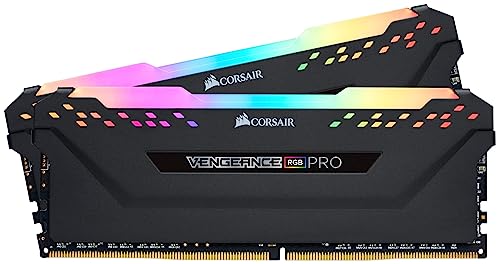
Corsair Vengeance RGB Pro 16GB 3200MHz DDR4
Best for: PC builds needing customizable RGB lighting
- Compatible Device
- Desktop, PC (what this guide is about)
- Total Capacity
- 16GB
- Memory Speed
- 3200MHz
- CAS Latency
- CL16
- Voltage
- 1.35V
- Module Configuration
- 2x8GB
View on Amazon: Corsair Vengeance RGB Pro 16GB 3200MHz DDR4 Affiliate link
This dual-channel desktop memory kit gives you 16GB of DDR4 memory across two 8GB sticks. It operates at 3200MHz with CL16 latency and 1.35 volts using Intel XMP 2.0. With ten individually addressable RGB LEDs per module and aluminum heat spreaders, it suits desktop builders who want customizable lighting alongside standard 3200MHz speeds.
Pros
- 3200MHz memory speed with CL16 latency
- Ten individually addressable RGB LEDs per module
- Aluminum heat spreader for thermal dissipation
- Intel XMP 2.0 support for overclocking configuration
Cons
- Module height of 2 inches requires more clearance than low-profile kits
- 16GB capacity is lower than 32GB and 64GB options on the list
Good fit if
- You want addressable RGB lighting synchronized through Corsair iCUE software.
- You need a standard 16GB 3200MHz dual-channel DDR4 configuration for your PC.
Skip if
- You require low-profile memory sticks to clear large CPU air coolers.
- You need 32GB or more system memory for heavier workloads.
Verdict: Corsair Vengeance RGB Pro 16GB DDR4 RAM delivers standard 3200MHz CL16 performance with per-module addressable lighting for desktop cases with ample cooler clearance.
Specifications side by side
| Spec | G.SKILL Trident Z RGB 16GB DDR4 RAM Kit | G.SKILL RipjawsV 8GB 2400MHz Red | Timetec 32GB DDR4 3200MHz UDIMM Memory | Corsair Vengeance LPX 16GB DDR4 3000MHz | Corsair Vengeance LPX 16GB DDR4 3200MHz | G.SKILL Ripjaws V 16GB (2x8GB) 3200MHz DDR4 RAM | G.SKILL Ripjaws V 16GB DDR4 3200MHz UDIMM | G.SKILL Ripjaws V 64GB DDR4 3200MHz RAM | G.SKILL Ripjaws V 16GB (2x8GB) DDR4 3200MHz | G.SKILL Ripjaws V 16GB DDR4-3000 Kit | G.SKILL Trident Z RGB 16GB DDR4-3200 RAM Kit | Timetec 16GB DDR4 2400MHz SODIMM | Corsair Vengeance LPX 16GB DDR4-3000 RAM | Timetec 32GB DDR4 2133MHz SODIMM Kit | Corsair Vengeance RGB Pro 16GB 3200MHz DDR4 |
|---|---|---|---|---|---|---|---|---|---|---|---|---|---|---|---|
| Total Capacity | 16GB | 8GB | 32GB | 16GB | 16GB | 16GB | 16GB | 64GB | 16GB | 16GB | 16GB | 16GB | 16GB | 32GB | 16GB |
| Memory Speed | 3000MT/s | 2400MT/s | 3200MHz | 3000MHz | 3200MHz | 3200MT/s | 3200MT/s | 3200MT/s | 3200MT/s | 3000MT/s | 3200MT/s | 2400MHz | 3000MHz | 2133MHz | 3200MHz |
| CAS Latency | CL16 | CL15 | CL22 | CL15 | CL16 | CL16 | CL16 | CL16 | CL16 | CL15 | CL16 | CL17 | C16 | CL15 | CL16 |
| Voltage | 1.35V | 1.20V | 1.2V | 1.35V | 1.35V | 1.35V | 1.35V | 1.35V | 1.35V | 1.35V | 1.35V | 1.2V | 1.35V | 1.2V | 1.35V |
| Module Configuration | 2x8GB | 2x4GB | 1x32GB | 2x8GB | 2x8GB | 2x8GB | 1x16GB | 4x16GB | 2x8GB | 2x8GB | 2x8GB | not stated | 2x8GB | 2x16GB | 2x8GB |
| Form Factor | U-DIMM | U-DIMM | UDIMM | not stated | not stated | U-DIMM | U-DIMM | U-DIMM | U-DIMM | U-DIMM | U-DIMM | SODIMM | Desktop | SODIMM | not stated |
| ECC Support | Non-ECC | Non-ECC | Non-ECC | not stated | not stated | Non-ECC | Non-ECC | Non-ECC | Non-ECC | Non-ECC | Non-ECC | Non-ECC | not stated | Non-ECC | not stated |
| Height | 1.7 inches | not stated | not stated | 34mm | 34mm | not stated | not stated | not stated | not stated | 0.5 inches | 1.73 inches | not stated | 34mm | 0.24 inches | 2 inches |
| Compatible Device | Desktop, PC | Desktop, PC | Desktop, PC | Desktop, PC | Desktop, PC | Desktop, PC | Desktop, PC | Desktop, PC | Desktop, PC | Desktop, PC | Desktop, PC | PC, Laptop | Desktop, PC | PC, Laptop | Desktop, PC |
| Size | 16GB | 8GB | 32GB | 16GB Kit (2x8GB) | 16GB Kit (2x8GB) | 16GB (2x8GB) | 16GB | 64GB | 16GB (2x8GB) | 16GB | 16GB (2x8GB) | 16GB Standard | 16GB Kit (2x8GB) | Dual Rank 32GB KIT(2x16GB) | 16GB (2x8GB) |
| Dimensions | 5.2 × 0.67 × 1.7 inches | 5.4 × 0.55 × 0.17 inches | not stated | 6.74 × 3.55 × 0.61 inches | 6.1 × 3.54 × 0.39 inches | 5.24 × 0.28 × 1.73 inches | 3.94 × 3.94 × 3.94 inches | 5.51 × 1.57 × 0.39 inches | 5.4 × 0.55 × 0.17 inches | 7.2 × 5.2 × 0.5 inches | 5.31 × 0.31 × 1.73 inches | not stated | 5.31 × 0.28 × 1.32 inches | 3.74 × 3.5 × 0.24 inches | 5.44 × 0.3 × 2 inches |
| Weight | 4.8 ounces | 4.6 ounces | not stated | 3.21 ounces | 3.21 ounces | 3.53 ounces | 2.4 ounces | 0.39 ounces | not stated | 3.17 ounces | 4.87 ounces | 0.32 ounces | 2.72 ounces | 1.12 ounces | 4.32 ounces |
| Color | Multicolor | Red | Black | Black | Black | Black | various | Black | Red | Black | Black | Gold | Black | Black | Black |
| Model | F4-3000C16D-16GTZR | F4-2400C15D-8GVR | not stated | CMK16GX4M2B3000C15 | CMK16GX4M2B3200C16 | FBA_4719692004970 | F4-3200C16S-16GVK | F4-3200C16Q-64GVK | F4-3200C16D-16GVRB | F4-3000C15D-16GVKB | 202715 | 76TT24NUS | CMK16GX4M2D3000C16 | 32GB Kit | CMW16GX4M2C3200C16 |
Before choosing your memory kit, verify chipset compatibility by comparing slot specs across the best DDR4 motherboards.
How to choose the right DDR4 RAM kit
-
Match the form factor first
Start by checking your motherboard slots. Standard desktop PCs use UDIMM modules, which are longer and taller. If you are building a compact mini PC or upgrading a laptop, you need SODIMM sticks instead. The Timetec 16GB DDR4 2400MHz SODIMM is designed specifically for these smaller 260-pin slots. Installing the wrong form factor will not fit your board. Verify your device type before purchasing any kit to ensure physical compatibility.
-
Check memory speed requirements
Memory speed determines how fast data moves between the RAM and CPU. Most modern desktop kits run at 3000MHz or 3200MHz. The G.SKILL Trident Z RGB 16GB DDR4 RAM Kit operates at 3000MHz, providing a solid baseline for general use. Older systems or budget builds might only support 2400MHz or 2133MHz. Always check your motherboard manual for the maximum supported speed. Buying faster RAM than your board supports will not increase performance.
-
Understand CAS latency values
CAS latency, or CL, measures the delay before the RAM responds to a command. Lower numbers mean faster response times. For example, the G.SKILL RipjawsV 8GB 2400MHz Red has a CL15 rating, which is quite tight for its speed. The Timetec 32GB DDR4 3200MHz UDIMM Memory uses CL22, which is higher but acceptable for capacity-focused builds. When comparing kits with similar speeds, choose the one with the lower CL number for better responsiveness in gaming and multitasking.
-
Consider total system capacity
Determine how much RAM your applications actually need. Basic tasks may only require 8GB, as seen in the G.SKILL RipjawsV 8GB kit. Most modern games and productivity tools benefit from 16GB. If you run heavy workloads like video editing or virtual machines, look for higher capacity options. The G.SKILL Ripjaws V 64GB DDR4 3200MHz RAM provides massive storage for four-slot boards. Ensure your motherboard has enough empty DIMM slots to reach your desired total capacity.
-
Verify voltage specifications
RAM voltage affects power consumption and heat output. Standard DDR4 operates at 1.2V, which is efficient and runs cool. The Timetec 32GB DDR4 3200MHz UDIMM Memory uses this standard 1.2V setting. However, many high-performance kits, like the Corsair Vengeance LPX 16GB DDR4 3000MHz, require 1.35V to maintain stable timings at higher speeds. Check your power supply and cooling setup. Higher voltage kits need proper airflow to prevent thermal throttling during sustained workloads.
-
Account for cooler clearance
Large CPU air coolers can block memory slots. If you have a bulky heatsink, you need low-profile RAM. The Corsair Vengeance LPX 16GB DDR4 3000MHz offers a slim 34mm height, clearing most coolers. The G.SKILL Trident Z RGB 16GB DDR4 RAM Kit is taller, measuring 1.7 inches in height. Measure the space above your CPU socket before buying. Choosing tall modules for a tight build will result in physical interference, preventing proper installation or requiring cooler removal.
Frequently asked questions
What is the best DDR4 RAM for a standard desktop PC?
The G.SKILL Trident Z RGB 16GB DDR4 RAM Kit is the top pick. It provides 16GB of dual-channel memory running at 3000MHz. The kit features CL16 latency and operates at 1.35V. It uses standard UDIMM form factor for desktop compatibility.
Which DDR4 RAM is best for compact builds with large CPU coolers?
The Corsair Vengeance LPX series is ideal for tight spaces. The 16GB 3000MHz and 3200MHz kits both have a low-profile height of 34mm. This clearance allows them to fit alongside bulky air coolers without interference. They maintain CL15 or CL16 timings.
How much RAM do I need for a basic desktop upgrade?
For light tasks, 8GB is sufficient. The G.SKILL RipjawsV 8GB 2400MHz kit offers a simple upgrade path. It runs at 2400MHz with CL15 latency. This size handles everyday computing but may struggle with modern gaming or heavy multitasking workloads.
What is the highest capacity DDR4 RAM kit available?
The G.SKILL Ripjaws V 64GB DDR4 3200MHz Kit holds the most memory. It consists of four 16GB modules for a total of 64GB. It runs at 3200MHz with CL16 latency. You need a motherboard with four open DIMM slots to use this kit.
Can I use DDR4 RAM in a laptop or mini PC?
Yes, if you choose the correct form factor. Laptops and mini PCs require SODIMM modules, not standard UDIMMs. The Timetec 16GB DDR4 2400MHz SODIMM and the 32GB 2133MHz SODIMM Kit are designed for these smaller devices. They operate at 1.2V.
Does DDR4 RAM come with customizable lighting?
Several kits include addressable RGB lighting for visual customization. The G.SKILL Trident Z RGB 16GB Kit features multicolor lighting. The Corsair Vengeance RGB Pro 16GB 3200MHz Kit also offers per-module addressable lighting. These kits maintain standard performance speeds alongside their aesthetic features.
What is the fastest DDR4 RAM speed on this list?
The fastest speed listed is 3200MHz. Multiple kits support this rate, including the Timetec 32GB UDIMM and the G.SKILL Ripjaws V 16GB kits. These modules typically run at CL16 latency and 1.35V. Faster speeds can improve data transfer rates in compatible systems.
Is ECC memory available in these DDR4 kits?
Most kits on this list are Non-ECC. The Timetec 32GB DDR4 3200MHz UDIMM is explicitly listed as Non-ECC. The Timetec SODIMM kits are also Non-ECC. ECC memory is typically reserved for servers and workstations, not standard gaming or home desktop PCs.