Best Kingston 64GB USB Flash Drives: 11 Spec-Based Picks
As an Amazon Associate we earn from qualifying purchases. Links on this page are affiliate links.
Selecting the right Kingston 64GB USB flash drive depends on your port types, physical durability needs, and transfer requirements. The Kingston DataTraveler Exodia 64GB Flash Drive leads the ranking because it pairs standard USB 3.2 Gen 1 connectivity with a protective cap and an integrated key ring loop for daily use.
This guide compares 11 products strictly through the specifications published on their listings. It helps you decide whether you need standard portable file storage, a dual USB-A and USB-C connector, or certified hardware encryption for sensitive data.
Quick picks
The best fit for you
- You need basic portable storage on a key ring Kingston DataTraveler Exodia 64GB Flash Drive This drive pairs USB 3.2 connectivity with an integrated loop and protective cap for secure keychain carrying.
- You want durable metal construction with fast transfer rates Kingston DataTraveler Kyson 64GB Metal USB Flash Drive Its capless metal housing provides physical durability alongside read speeds up to 200MB/s.
- You need direct plug-in storage for USB-C devices Kingston DataTraveler 70 64GB USB-C Flash Drive The native USB-C connector plugs directly into modern hardware without an adapter.
- You share files across both USB-A and USB-C hardware Kingston DataTraveler microDuo 3C 64GB Dual Drive Dual USB-A and USB-C connectors bridge legacy and modern ports with 200MB/s read speeds.
- You require platform-independent hardware encryption for sensitive data Kingston IronKey Keypad 200 64GB Encrypted USB An onboard physical keypad manages 256-bit XTS-AES hardware encryption independently of the connected operating system.
Our 11 picks

Kingston DataTraveler Exodia 64GB Flash Drive
Best for: Everyday portable file storage on key rings
- Size
- 64GB (what this guide is about)
- Storage Capacity
- 64GB
- USB Version
- USB 3.2 Gen 1
- Dimensions
- 2.65 × 0.83 × 0.4 inches
- Weight
- 0.39 ounces
View on Amazon: Kingston DataTraveler Exodia 64GB Flash Drive
The Kingston DataTraveler Exodia 64GB USB drive provides portable storage using the USB 3.2 Gen 1 standard. Measuring 2.65 inches long and weighing 0.39 ounces, it features a protective cap for the USB connector and an integrated loop for key rings. You get 64GB of space for documents, music, and video files. This drive suits everyday storage needs if you work with Windows 10, 8.1, or 8 systems.
Pros
- USB 3.2 Gen 1 interface for fast data access
- Lightweight build at 0.39 ounces
- Protective cap shields the USB plug
- Large integrated loop attaches to key rings
Cons
- Separate cap design can be misplaced
- Listed compatibility limited to Windows 10, 8.1, and 8
Good fit if
- You need a lightweight 64GB drive to carry on a key ring.
- You use computers running Windows 10, 8.1, or 8.
- You prefer a physical cap to protect the USB connector.
Skip if
- You prefer a capless or retractable drive design.
- You need stated compatibility with non-Windows operating systems.
Verdict: Kingston DataTraveler Exodia 64GB USB Drive delivers standard USB 3.2 Gen 1 connectivity with a built-in key ring loop and protective cap. It provides 64GB of compact, portable storage for Windows systems.

Kingston DataTraveler Kyson 64GB Metal USB Flash Drive
Best for: everyday portable storage with metal durability
- Size
- 64GB (what this guide is about)
- Storage Capacity
- 64GB
- USB Version
- USB 3.2
- Read Speed
- up to 200mb/s
- Features
- Metal Casing
- Length
- 1.57 inches
View on Amazon: Kingston DataTraveler Kyson 64GB Metal USB Flash Drive
The Kingston DataTraveler Kyson 64GB is a compact USB 3.2 flash drive featuring a capless metal casing and a functional loop. It delivers read speeds up to 200MB/s for moving your documents, music, and videos. With a length of 1.57 inches and width of 0.47 inches, it travels easily. This drive suits you if you prioritize physical casing durability alongside fast read performance.
Pros
- Read speeds reach up to 200MB/s
- Durable metal casing with capless design
- Integrated loop for keychain attachment
- Compact dimensions at 1.57 inches long by 0.47 inches wide
Cons
- Write speed is not listed in published specifications
- No hardware encryption features included
- Lacks a native USB Type-C interface
Good fit if
- You want a sturdy metal exterior without a removable cap to misplace.
- You prioritize read speeds up to 200MB/s for opening stored media.
- You prefer carrying your drive attached to a keyring or lanyard.
Skip if
- You need verified high-speed write specifications for large file saves.
- You require hardware encryption or keypad access control.
- You need direct connectivity to USB Type-C ports.
Verdict: Kingston DataTraveler Kyson 64GB Metal USB Drive delivers read speeds up to 200MB/s inside a sturdy, capless metal housing. It is a practical pick if you want compact daily storage without a plastic shell.

Kingston DataTraveler 70 64GB USB-C Flash Drive
Best for: everyday file storage on USB-C devices
- Size
- 64GB (what this guide is about)
- Storage Capacity
- 64GB
- USB Version
- USB 3.2 Gen 1
- Connector Type
- USB-C
View on Amazon: Kingston DataTraveler 70 64GB USB-C Flash Drive
The Kingston DataTraveler 70 gives you 64GB of portable storage with a native USB-C connector. It operates over the USB 3.2 Gen 1 interface, making it suitable for modern USB-C laptops, tablets, and phones. The drive comes in a black casing designed for simple portability. This unit suits you if you need a straightforward USB-C storage drive without adapters.
Pros
- Native USB-C connector for modern devices
- USB 3.2 Gen 1 interface
- Compact, portable black casing
Cons
- Lacks a standard USB-A connector
- No hardware encryption features listed
Good fit if
- You need direct connectivity to USB-C ports without using adapters.
- You want 64GB of portable USB 3.2 Gen 1 storage for everyday transfers.
Skip if
- You need a USB-A plug to connect to older computers.
- You require built-in hardware encryption or keypad security.
Verdict: Kingston DataTraveler 70 64GB USB-C Flash Drive delivers 64GB of USB 3.2 Gen 1 capacity tailored for USB-C devices. It provides a simple, direct plug-in solution for modern hardware.

Kingston DataTraveler Exodia 64GB 2-Pack
Best for: multi-drive file sorting and duplicate storage
- Size
- 64GB (what this guide is about)
- Storage Capacity
- 64GB
- USB Version
- USB 3.2 Gen 1
- Pack Quantity
- 2
- Compatible Device
- Desktop, Laptop
- Dimensions
- 3.06 × 0.9 × 0.47 inches
The Kingston DataTraveler Exodia 64GB 2-Pack gives you two separate 64GB USB 3.2 Gen 1 flash drives in one package. Each drive features a protective removable cap, a large integrated keyring loop, and a black and teal casing measuring 3.06 inches long. This setup suits you if you need to separate work files from personal media or want an extra backup drive ready to plug into standard USB ports.
Pros
- Includes two 64GB flash drives in one package
- USB 3.2 Gen 1 interface
- Large integrated loop attaches directly to keyrings
- Protective cap shields the USB plug
Cons
- Separate protective cap can be misplaced
- Body length of 3.06 inches is relatively long
Good fit if
- You need two identical 64GB drives for organizing separate files.
- You want a physical cap to cover the USB connector.
- You plan to clip your flash drives directly onto a key ring.
Skip if
- You prefer a retractable or capless casing design.
- You need an ultra-compact drive that sits nearly flush with your port.
Verdict: Kingston DataTraveler Exodia 64GB 2-Pack delivers two USB 3.2 Gen 1 drives equipped with protective caps and key loops. It is a practical option when you need split storage across multiple devices.

Kingston IronKey Vault Privacy 50 64GB Encrypted Drive
Best for: hardware-encrypted sensitive file storage
- Size
- 64GB (what this guide is about)
- Storage Capacity
- 64GB
- Security Standard
- FIPS 197, XTS-AES 256-bit
- Connector Type
- USB-A
- Security Features
- 256-Bit AES Encryption, FIPS 197
- Dimensions
- 3.06 × 0.9 × 0.47 inches
View on Amazon: Kingston IronKey Vault Privacy 50 64GB Encrypted Drive
This 64GB flash drive provides hardware-based security using FIPS 197 certified XTS-AES 256-bit encryption. It connects via a standard USB-A interface and includes digitally-signed firmware to guard against BadUSB attacks. You can set dual read-only modes to protect stored files from modification and configure passphrases instead of standard passwords. It suits you if you need TAA-compliant storage for sensitive documents on conventional USB-A computer ports.
Pros
- FIPS 197 certified XTS-AES 256-bit hardware encryption
- Dual read-only settings for write protection
- Digitally-signed firmware to block BadUSB attacks
- TAA compliant for enterprise and government procurement
Cons
- USB-A connector requires an adapter for USB-C only ports
- Larger casing at 3.06 inches long and 0.71 ounces
Good fit if
- You need hardware-level 256-bit encryption for sensitive files
- You require TAA compliance for organizational standards
- You want write-protection modes to prevent accidental data changes
Skip if
- You need native USB-C connectivity without using adapters
- You prefer an ultra-compact low-profile flash drive
Verdict: Kingston IronKey Vault Privacy 50 64GB Flash Drive delivers certified FIPS 197 hardware encryption and multi-password security in a standard USB-A form factor. It gives you enterprise-grade safeguards like write protection and BadUSB attack defense for critical data.
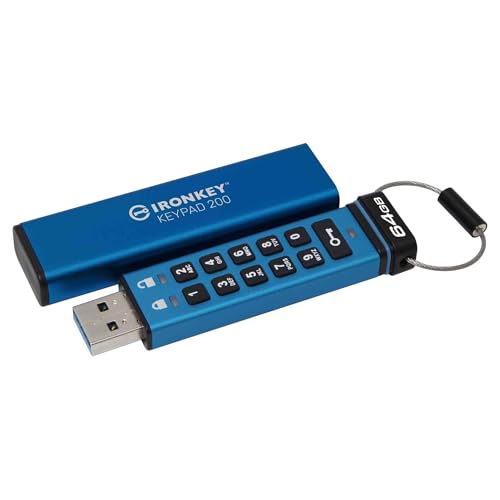
Kingston IronKey Keypad 200 64GB Encrypted USB
Best for: hardware-encrypted cross-platform data protection
- Size
- 64GB (what this guide is about)
- Storage Capacity
- 64GB
- Security Standard
- XTS-AES 256-bit, FIPS 140-3 Level 3
- Connector Type
- USB-A
- Security Features
- 256-Bit AES Encryption
- Dimensions
- 3.14 × 0.79 × 0.42 inches
View on Amazon: Kingston IronKey Keypad 200 64GB Encrypted USB
This 64GB flash drive provides hardware-based XTS-AES 256-bit encryption managed through a built-in alphanumeric keypad. Because authentication happens directly on the physical drive, it functions independently of your operating system across devices with standard USB-A ports. It also supports separate user and administrator PINs for controlled access. You get dedicated physical security controls for sensitive files without requiring extra software installation on your host system.
Pros
- XTS-AES 256-bit hardware encryption
- Built-in alphanumeric keypad for PIN entry
- OS and device independent operation
- Multi-PIN access for admin and user profiles
Cons
- Uses USB-A rather than native USB-C
- Larger 3.14-inch physical profile than standard flash drives
Good fit if
- You need hardware encryption unlocked via physical keypad without host software.
- You require multi-PIN access with both administrator and user permissions.
- You connect storage to multiple operating systems using USB-A ports.
Skip if
- You require native USB-C connectivity out of the box.
- You prefer an ultra-compact drive that sits flush with your port.
Verdict: Kingston IronKey Keypad 200 64GB Encrypted Drive delivers hardware-level XTS-AES 256-bit protection directly through an on-device keypad. It suits anyone needing platform-independent data security across USB-A hardware.

Kingston IronKey Locker+ 50 G2 64GB Flash Drive
Best for: FIPS 197 hardware-encrypted portable data storage
- Size
- 64GB (what this guide is about)
- Storage Capacity
- 64GB
- USB Version
- USB 3.2 Gen 1
- Read Speed
- Up to 145MB/s
- Security Standard
- FIPS 197, XTS-AES 256-bit
- Dimensions
- 2.38 × 0.73 × 0.1 inches
View on Amazon: Kingston IronKey Locker+ 50 G2 64GB Flash Drive
The Kingston IronKey Locker+ 50 G2 is a 64GB USB 3.2 Gen 1 flash drive designed for hardware-level data protection. It features FIPS 197 certified XTS-AES 256-bit encryption alongside multi-password support for Admin and User roles. With transfer rates reaching up to 145MB/s read and 115MB/s write, you get dependable throughput for confidential files. It suits you if you require strict password controls and certified data security for sensitive portable storage.
Pros
- FIPS 197 certified with XTS-AES 256-bit hardware encryption
- Multi-password option supporting Admin and User roles
- Read speeds up to 145MB/s and write speeds up to 115MB/s
- Supports both complex password and passphrase modes
Cons
- Write performance peaks at 115MB/s
- No physical alphanumeric keypad included
Good fit if
- You need FIPS 197 certified XTS-AES 256-bit hardware encryption.
- You require separate Admin and User password access modes.
- You want up to 145MB/s read and 115MB/s write transfer speeds.
Skip if
- You need write speeds faster than 115MB/s.
- You prefer hardware unlocking via an integrated keypad.
Verdict: Kingston IronKey Locker+ 50 G2 64GB Flash Drive delivers certified FIPS 197 security with XTS-AES 256-bit encryption and flexible multi-password options. It gives you dependable 145MB/s read performance in a dedicated hardware-encrypted format.

Kingston Exodia M 64GB Moving Cap Flash Drive
Best for: everyday keychain storage without loose caps
- Size
- 64GB (what this guide is about)
- Storage Capacity
- 64GB
- USB Version
- USB 3.2 Gen 1
- Dimensions
- 2.65 × 0.86 × 0.46 inches
- Weight
- 0.85 ounces
View on Amazon: Kingston Exodia M 64GB Moving Cap Flash Drive
The Kingston Exodia M provides 64GB of storage using a USB 3.2 Gen 1 interface. It measures 2.65 inches long and weighs 0.85 ounces. The drive features a moving cap design that slides to shield the connector when not in use, alongside an integrated key ring loop. If you need standard portable storage for daily file transfers without a detachable cap to lose, this drive fits your routine.
Pros
- USB 3.2 Gen 1 transfer interface
- Moving cap design protects the connector
- Integrated loop attaches directly to key rings
Cons
- No USB-C connector listed
- No hardware encryption features
Good fit if
- You want a moving cap design that cannot be lost.
- You need standard 64GB storage for general file transfers.
- You plan to carry your drive attached to a key ring.
Skip if
- You need hardware-based data encryption.
- You require a direct USB-C connection.
Verdict: Kingston Exodia M 64GB Moving Cap Flash Drive delivers 64GB of USB 3.2 Gen 1 storage with a sliding cap that shields the connector on keychains.

Kingston DataTraveler microDuo 3C 64GB Dual Drive
Best for: sharing files across USB-A and USB-C devices
- Size
- 64GB (what this guide is about)
- Storage Capacity
- 64GB
- USB Version
- USB 3.2 Gen 1
- Connector Type
- USB-C & USB-A
- Read Speed
- 200 MB/s
- Dimensions
- 1.18 × 0.65 × 0.33 inches
View on Amazon: Kingston DataTraveler microDuo 3C 64GB Dual Drive
The Kingston DataTraveler microDuo 3C is a compact 64GB flash drive featuring dual USB-C and USB-A connectors. It supports the USB 3.2 Gen 1 standard with read speeds reaching up to 200MB/s. Measuring 1.18 inches long and weighing 0.35 ounces, it bridges modern USB-C laptops or phones with standard Type-A ports. You get a portable dual-interface storage solution tailored for quick file transfers across different types of hardware.
Pros
- Dual USB Type-C and Type-A connectors
- Up to 200MB/s read transfer speed
- USB 3.2 Gen 1 interface
- Compact footprint at 1.18 inches long and 0.35 ounces
Cons
- Write speeds not specified in published data
- Hardware encryption features not included
Good fit if
- You switch files frequently between USB-A and USB-C devices.
- You want read speeds up to 200MB/s on a compact drive.
Skip if
- You require hardware encryption or password protection.
- You need confirmed high-speed write specifications.
Verdict: Kingston DataTraveler microDuo 3C 64GB Dual Drive provides dual USB-C and USB-A connectivity alongside 200MB/s read speeds in a tiny footprint. It serves as a practical bridge for moving data across both modern and legacy ports.

Kingston DataTraveler Micro 64GB Metal Flash Drive
Best for: compact low-profile laptop and media storage
- Size
- 64GB (what this guide is about)
- Storage Capacity
- 64GB
- USB Version
- USB 3.2 Gen 1
- Read Speed
- up to 200MB/s
- Pack Quantity
- 1
- Dimensions
- 0.98 × 0.48 × 0.18 inches
View on Amazon: Kingston DataTraveler Micro 64GB Metal Flash Drive
The Kingston DataTraveler Micro is an ultra-compact USB 3.2 Gen 1 flash drive built with a silver metal casing. It measures 0.98 inches long and 0.18 inches high, giving you 64GB of storage space. With read speeds reaching up to 200MB/s, you get fast access to files on standard ports. It suits you if you need a tiny, low-profile drive for everyday file storage.
Pros
- Read speeds reach up to 200MB/s
- Compact dimensions at 0.98 by 0.48 by 0.18 inches
- Silver metal casing design
Cons
- Write speed is not listed in the specifications
- Uses standard USB-A without USB-C connectivity
Good fit if
- You need an ultra-compact metal flash drive that stays out of the way.
- You want read transfer speeds up to 200MB/s over USB 3.2 Gen 1.
Skip if
- You require native USB-C compatibility for your devices.
- You need documented write speed specifications for continuous writing tasks.
Verdict: Kingston DataTraveler Micro 64GB Metal Flash Drive delivers up to 200MB/s read speeds inside a tiny 0.98-inch silver metal body. It provides a reliable low-profile storage option for USB 3.2 Gen 1 devices.

Kingston IronKey D500S 64GB Encrypted Drive
Best for: hardware-grade data encryption and physical tamper resistance
- Size
- 64GB (what this guide is about)
- Storage Capacity
- 64GB
- Security Standard
- FIPS 140-3 Level 3, XTS-AES 256-bit
- Security Features
- 256-Bit AES Encryption
- Dimensions
- 3.14 × 0.79 × 0.39 inches
- Weight
- 1.83 ounces
The Kingston IronKey D500S 64GB Encrypted Drive is a secure storage device built for sensitive data. You get hardware-based XTS-AES 256-bit encryption paired with a rugged zinc casing to deter physical tampering. It features dual hidden partitions, brute force protection, and a crypto-erase option for emergencies. If you handle classified or strictly regulated files on the go, this 64GB drive provides enterprise-level security specifications directly in your pocket.
Pros
- XTS-AES 256-bit hardware encryption
- Rugged zinc casing protects against physical penetration attacks
- Dual hidden partition option
- Integrated brute force and BadUSB attack protection
Cons
- FIPS 140-3 Level 3 status is listed as pending
- Weighs 1.83 ounces, heavier than standard plastic drives
- Longer 3.14-inch footprint takes up more physical space
Good fit if
- You need hardware-level XTS-AES 256-bit security for sensitive files.
- You want physical protection against penetration via a rugged zinc casing.
- You require dual hidden partitions or emergency crypto-erase capabilities.
Skip if
- You prefer an ultra-compact or lightweight plastic thumb drive.
- You require fully finalized rather than pending FIPS 140-3 certification.
Verdict: Kingston IronKey D500S 64GB Encrypted Drive delivers robust hardware encryption, zinc alloy physical defense, and advanced partition isolation for high-security offline storage.
Specifications side by side
| Spec | Kingston DataTraveler Exodia 64GB Flash Drive | Kingston DataTraveler Kyson 64GB Metal USB Flash Drive | Kingston DataTraveler 70 64GB USB-C Flash Drive | Kingston DataTraveler Exodia 64GB 2-Pack | Kingston IronKey Vault Privacy 50 64GB Encrypted Drive | Kingston IronKey Keypad 200 64GB Encrypted USB | Kingston IronKey Locker+ 50 G2 64GB Flash Drive | Kingston Exodia M 64GB Moving Cap Flash Drive | Kingston DataTraveler microDuo 3C 64GB Dual Drive | Kingston DataTraveler Micro 64GB Metal Flash Drive | Kingston IronKey D500S 64GB Encrypted Drive |
|---|---|---|---|---|---|---|---|---|---|---|---|
| Storage Capacity | 64GB | 64GB | 64GB | 64GB | 64GB | 64GB | 64GB | 64GB | 64GB | 64GB | 64GB |
| USB Version | USB 3.2 Gen 1 | USB 3.2 | USB 3.2 Gen 1 | USB 3.2 Gen 1 | not specified | not specified | USB 3.2 Gen 1 | USB 3.2 Gen 1 | USB 3.2 Gen 1 | USB 3.2 Gen 1 | not specified |
| Connector Type | not specified | not specified | USB-C | not specified | not specified | not specified | not specified | not specified | USB-C & USB-A | not specified | not specified |
| Read Speed | not specified | up to 200mb/s | not specified | not specified | not specified | not specified | Up to 145MB/s | not specified | 200 MB/s | up to 200MB/s | not specified |
| Security Standard | not specified | not specified | not specified | not specified | FIPS 197, XTS-AES 256-bit | XTS-AES 256-bit, FIPS 140-3 Level 3 | FIPS 197, XTS-AES 256-bit | not specified | not specified | not specified | FIPS 140-3 Level 3, XTS-AES 256-bit |
| Pack Quantity | not specified | not specified | not specified | 2 | not specified | not specified | not specified | not specified | not specified | 1 | not specified |
| Compatible Device | not specified | not specified | not specified | Desktop, Laptop | not specified | not specified | not specified | not specified | not specified | not specified | not specified |
| Size | 64GB | 64GB | 64GB | 64GB | 64GB | 64GB | 64GB | 64GB | 64GB | 64GB | 64GB |
| Security Features | not specified | not specified | not specified | not specified | 256-Bit AES Encryption, FIPS 197 | 256-Bit AES Encryption | FIPS 197 | not specified | not specified | not specified | 256-Bit AES Encryption |
| Features | not specified | Metal Casing | not specified | not specified | not specified | not specified | not specified | not specified | not specified | not specified | not specified |
| Dimensions | 2.65 × 0.83 × 0.4 inches | not specified | not specified | 3.06 × 0.9 × 0.47 inches | 3.06 × 0.9 × 0.47 inches | 3.14 × 0.79 × 0.42 inches | 2.38 × 0.73 × 0.1 inches | 2.65 × 0.86 × 0.46 inches | 1.18 × 0.65 × 0.33 inches | 0.98 × 0.48 × 0.18 inches | 3.14 × 0.79 × 0.39 inches |
| Weight | 0.39 ounces | not specified | not specified | 0.51 ounces | 0.71 ounces | 0.88 ounces | 0.81 ounces | 0.85 ounces | 0.35 ounces | not specified | 1.83 ounces |
| Length | not specified | 1.57 inches | not specified | not specified | not specified | not specified | not specified | not specified | not specified | not specified | not specified |
| Width | not specified | 0.47 inches | not specified | not specified | not specified | not specified | not specified | not specified | not specified | not specified | not specified |
| Color | Black | black | Black | black + Teal | Blue | blue | not specified | Black/Blue | Purple + Silver | Silver | black |
| Model | DTX/64GB | DTKN/64GBCR | DT70/64GBCR | DTX/64GB-2P | IKVP50/64GB | IKKP200/64GB | IKLP50G2/64GB | DTXM/64GB-2P | DTDUO3CG3/64GB | DTMC3G2/64GB | IKD500S/64GB |
How to Choose a Kingston 64GB Flash Drive
-
Match Your Device Port Type
Check whether your host hardware uses standard USB-A ports or modern USB-C ports before buying. Many modern laptops, tablets, and smartphones only accept USB-C plugs without bulky adapters. If you intend to connect your drive directly to USB-C devices, look specifically at the connector type on the specification sheet. The Kingston DataTraveler 70 provides a dedicated USB-C interface for seamless connection to modern ports. Verifying the port standard beforehand prevents compatibility problems across your everyday gear.
-
Consider Dual Connector Flexibility
If you regularly transfer files between legacy desktop computers and newer tablets, a single connector standard can limit your workflow. Look for drives engineered with dual interfaces to bridge both systems without extra dongles. The Kingston DataTraveler microDuo 3C features both USB-C and USB-A connectors in a single compact housing. This dual-ended configuration lets you plug directly into older USB-A workstations and modern USB-C notebooks. Review your equipment roster to determine if cross-generation port compatibility suits your daily sharing routine.
-
Evaluate Overall Physical Dimensions
Physical drive dimensions matter when you plan to leave storage plugged into laptops, media players, or vehicle ports. Standard drives can protrude several inches, creating snag hazards inside bags or tight console setups. For semi-permanent storage, check length specifications and look for ultra-compact profiles under one inch long. The Kingston DataTraveler Micro measures just 0.98 inches in length, sitting flush against ports to minimize accidental leverage damage. Measure surrounding port clearance on your host machine to confirm that wider drive shells will not block neighboring ports.
-
Select Connector Shielding Style
Consider how the drive protects its USB connector during transit. Separate caps provide complete dust defense, but you risk losing loose caps during travel. If you prefer attached components, look for sliding mechanisms that retract the connector into the body shell. The Kingston Exodia M features a moving cap design that slides back and forth without detaching from the housing. Choosing an integrated shielding mechanism ensures your connector stays shielded from pocket lint and impacts without requiring you to track a detachable plastic piece.
-
Verify Published Read Speeds
USB 3.2 Gen 1 drives do not all transfer data at identical rates. When you frequently open large media files, read performance determines how quickly files load onto your workstation. Check published sequential read ratings on spec sheets rather than assuming baseline USB 3.2 speeds. The Kingston IronKey Locker+ 50 G2 specifies read speeds up to 145MB/s, providing predictable throughput for file retrieval. If your workflow requires fast access to stored assets, confirm that the drive publishes an explicit read speed rating to avoid sluggish read operations during daily use.
-
Check Hardware Keypad Input
Operating system compatibility can complicate encrypted storage access if software drivers are required. When you move secure files across varied systems like Linux machines, embedded hardware, or locked-down corporate computers, software prompts may fail. Look for hardware-based authentication specs with an integrated keypad to enter PINs directly on the device. The Kingston IronKey Keypad 200 uses an onboard alphanumeric keypad for standalone authentication before insertion. Choosing on-device PIN entry ensures independent access across any operating system without installing administrative applications or dealing with software restrictions.
Frequently asked questions
Which Kingston 64GB flash drive has both USB-A and USB-C connectors?
The Kingston DataTraveler microDuo 3C features dual USB-A and USB-C connectors on a single drive. You can connect it directly to modern USB-C laptops or legacy USB-A ports without an external adapter. It delivers read speeds up to 200MB/s inside a compact 1.18-inch frame, which makes moving files across different device types fast and straightforward.
What read speeds can you expect from a Kingston 64GB USB drive?
Read speeds vary by model, reaching up to 200MB/s on high-speed units. The DataTraveler Kyson, DataTraveler Micro, and DataTraveler microDuo 3C all list read speeds up to 200MB/s using USB 3.2 Gen 1. The hardware-encrypted IronKey Locker+ 50 G2 provides rated read performance up to 145MB/s, while standard utility models like the Exodia focus on basic transfer speeds.
How does the IronKey Keypad 200 secure your data?
The Kingston IronKey Keypad 200 uses an onboard alphanumeric keypad to authenticate access before you plug it in. It provides hardware-level XTS-AES 256-bit encryption directly on the device. Because the authentication takes place on the physical keypad rather than through host software, you gain platform-independent security that works across any operating system equipped with a standard USB-A port.
Which Kingston 64GB drive is best for leaving plugged into a laptop?
The Kingston DataTraveler Micro is designed specifically for low-profile, semi-permanent storage. Measuring only 0.98 inches long and 0.18 inches thick, its ultra-compact metal body sits nearly flush against your device. You can leave it inserted in a laptop port or car media player without worrying about snagging it during transit, while still getting read speeds up to 200MB/s.
What is the difference between the DataTraveler Exodia and Exodia M?
The main difference is the cap mechanism that protects the USB connector. The standard DataTraveler Exodia features a traditional removable protective cap and an integrated key ring loop. In contrast, the Exodia M uses a sliding moving cap design that retracts without detaching. Both models offer 64GB of storage and connect via standard USB 3.2 Gen 1.
What hardware security features do Kingston IronKey drives offer?
Kingston IronKey drives provide dedicated hardware encryption rather than basic software-level locking. For example, the IronKey Vault Privacy 50 and Locker+ 50 G2 feature certified FIPS 197 XTS-AES 256-bit encryption with multi-password options. The Vault Privacy 50 adds BadUSB attack protection and write protection, while the IronKey D500S incorporates a rugged zinc alloy casing with partition isolation.
Which Kingston 64GB flash drive is native USB-C only?
The Kingston DataTraveler 70 is a dedicated USB-C flash drive designed without legacy USB-A plugs. It connects directly to modern laptops, tablets, and smartphones carrying USB-C ports. Utilizing the USB 3.2 Gen 1 standard, it provides 64GB of everyday portable storage in a lightweight, black housing without requiring any dongles or port converters.