Best Samsung ddr5 RAMs for Laptop in 2026: 15 Picks
As an Amazon Associate we earn from qualifying purchases. Links on this page are affiliate links.
Finding the best samsung ddr5 RAMs for laptop requires checking specific technical details. We compared 15 options based on the specifications published on the listings. The top pick is the Samsung 16GB DDR5 4800MHz SODIMM, which leads due to its reliable 16GB capacity and standard 4800MHz speed. This guide helps you decide which module fits your system's form factor and capacity needs.
Quick picks
The best fit for you
- You need the best overall standard laptop memory upgrade Samsung 16GB DDR5 4800MHz SODIMM It offers 16GB capacity at 4800MHz, providing reliable performance for standard tasks.
- You want the fastest speed for basic laptop memory upgrades Samsung 8GB DDR5 5600MHz SODIMM RAM This 8GB module runs at 5600MHz, delivering higher bandwidth than slower options.
- You need a single high-capacity upgrade for laptops with one slot Samsung 32GB DDR5 4800MHz SODIMM It provides 32GB in a single stick, ideal for systems with limited slots.
- You need a single high-capacity upgrade with faster speeds Samsung 32GB DDR5 5600MHz SODIMM This 32GB module runs at 5600MHz, offering high capacity and speed in one stick.
- You need the fastest speed for a single 16GB laptop upgrade Samsung 16GB DDR5 5600MHz SODIMM RAM It delivers 16GB at 5600MHz, ensuring modern performance standards in a single module.
Our 15 picks

Samsung 16GB DDR5 4800MHz SODIMM
Best for: Standard laptop memory upgrades
- Compatible Device
- Laptop (what this guide is about)
- Capacity
- 16GB
- Memory Speed
- 4800MHz
- CAS Latency
- CL40
- Kit Configuration
- 1x16GB
- Form Factor
- 262-Pin SO-DIMM
View on Amazon: Samsung 16GB DDR5 4800MHz SODIMM Affiliate link
This Samsung 16GB DDR5 module runs at 4800MHz with a CL40 latency. It uses a 1.1V voltage and features a 262-pin SODIMM form factor. The single-rank 1Rx8 design fits most laptops and mini PCs. You get reliable JEDEC standard performance for everyday computing tasks. It expands your system memory to reduce bottlenecks and improve workload capacity for general use.
Pros
- 16GB capacity for solid multitasking
- 4800MHz speed for smooth performance
- CL40 latency for responsive operation
- 1.1V low voltage for efficiency
- 262-pin SODIMM fits laptops
Cons
- 4800MHz is slower than the 5600MHz options on this list
- Single rank (1Rx8) limits bandwidth compared to dual rank kits
- Non-ECC memory lacks error correction
Good fit if
- You need a budget-friendly 16GB upgrade
- Your laptop supports DDR5 4800MHz
- You prioritize capacity over maximum speed
Skip if
- You require the fastest 5600MHz speeds available
- Your system needs dual-rank (2Rx8) memory
- You want ECC error correction for stability
Verdict: Samsung 16GB DDR5 4800MHz Laptop RAM is a solid choice for users who need reliable 16GB capacity at a lower speed tier. It suits students and office workers who do not require high-end gaming performance or dual-rank bandwidth.

Samsung 8GB DDR5 5600MHz SODIMM RAM
Best for: basic DDR5 laptop memory upgrades
- Compatible Device
- Laptop (what this guide is about)
- Capacity
- 8GB
- Memory Speed
- 5600MHz
- CAS Latency
- CL46
- Kit Configuration
- 1 Module
- Form Factor
- 262-Pin SODIMM
View on Amazon: Samsung 8GB DDR5 5600MHz SODIMM RAM Affiliate link
This Samsung memory module is a single 8GB DDR5 SODIMM designed for compatible notebook computers. Running at 5600MHz with a CL46 latency rating, it operates at the standard JEDEC DDR5 voltage of 1.1V. The 262-pin, single-rank 1Rx16 configuration suits you if you need to add memory to an open slot or replace an existing stick. It expands your available memory resources efficiently.
Pros
- High-speed 5600MHz DDR5 transfer rate
- JEDEC standard 1.1V low-voltage operation
- Standard 262-pin SODIMM form factor for laptops
Cons
- 8GB maximum capacity for the single module
- Non-ECC unbuffered design without hardware error correction
Good fit if
- You want to add 8GB of memory to an available DDR5 laptop slot.
- You have a notebook that supports 5600MHz SODIMM memory at 1.1V.
Skip if
- You need higher capacity per slot, such as 16GB or 32GB.
- You own an older notebook that requires DDR4 SODIMMs.
Verdict: Samsung 8GB DDR5 5600MHz SODIMM delivers standard 1.1V JEDEC performance in a compact 262-pin laptop format. It serves as a dependable replacement or single-slot upgrade for compatible systems.

Samsung 32GB DDR5 4800MHz SODIMM
Best for: Single-slot high-capacity laptop upgrades
- Compatible Device
- Laptop (what this guide is about)
- Capacity
- 32GB
- Memory Speed
- 4800MHz
- CAS Latency
- CL40
- Kit Configuration
- 1x32GB
- Form Factor
- 262-pin
View on Amazon: Samsung 32GB DDR5 4800MHz SODIMM Affiliate link
This Samsung module offers 32GB of DDR5 memory at 4800MHz. It uses a 2Rx8 dual rank configuration and operates at 1.1V. The CL40 latency is tighter than many 5600MHz competitors on this list. You get a single large stick rather than a kit. This setup maximizes capacity for laptops that support high-density modules.
Pros
- 32GB single-module capacity
- 4800MHz base speed
- CL40 CAS latency
- 2Rx8 dual rank design
- 1.1V standard voltage
Cons
- Slower 4800MHz speed compared to 5600MHz options
- Single stick limits dual-channel bandwidth potential
- Larger physical size may not fit all thin laptops
Good fit if
- You need maximum single-slot capacity
- You prioritize lower latency over higher speed
- You have a laptop with one open RAM slot
Skip if
- You require 5600MHz bandwidth
- You want to install two smaller sticks
- Your laptop only supports 8GB modules
Verdict: Samsung 32GB DDR5 4800MHz SODIMM provides high density with tight timing. It suits users who need a single large upgrade with better latency than faster, looser kits.

Samsung 32GB DDR5 5600MHz SODIMM
Best for: single-slot laptop upgrades needing 32GB
- Compatible Device
- Laptop (what this guide is about)
- Capacity
- 32GB
- Memory Speed
- 5600MHz
- CAS Latency
- CL46
- Kit Configuration
- 1x32GB
- Form Factor
- SODIMM 262 Pin
View on Amazon: Samsung 32GB DDR5 5600MHz SODIMM Affiliate link
This Samsung module offers 32GB of DDR5 memory running at 5600MHz. It uses a 2Rx8 dual rank configuration and operates at 1.1V. The 262-pin SODIMM form factor is designed for select laptops. You get increased workload capacity and reduced bottlenecks. This kit suits users who need maximum capacity in a single slot for portable computing tasks.
Pros
- 32GB single-module capacity
- 5600MHz DDR5 speed
- 2Rx8 dual rank architecture
- 1.1V low voltage operation
Cons
- Single module limits dual-channel bandwidth potential
- CL46 latency is higher than CL40 variants
- Limited to select laptop compatibility
Good fit if
- You need 32GB in a single slot
- You prioritize capacity over maximum speed
- You want a single high-capacity upgrade
Skip if
- You require dual-channel performance
- You need the lowest possible latency
- Your laptop only supports 16GB max
Verdict: Samsung 32GB DDR5 5600MHz SODIMM delivers high capacity for laptops with single memory slots. It fits users who need more RAM than 16GB allows without buying a kit.

Samsung 16GB DDR5 5600MHz SODIMM RAM
Best for: single-module 16GB DDR5 laptop upgrades
- Compatible Device
- Laptop (what this guide is about)
- Capacity
- 16GB
- Memory Speed
- 5600MHz
- CAS Latency
- CL46
- Kit Configuration
- Single 16 GB Module
- Form Factor
- 262-Pin SODIMM
View on Amazon: Samsung 16GB DDR5 5600MHz SODIMM RAM Affiliate link
This Samsung 16GB DDR5 memory module upgrades compatible laptops with 262-pin SODIMM slots. It operates at 5600MHz using standard 1.1V power and runs at CL46 latency with a 1Rx8 single-rank layout. You get unbuffered non-ECC memory designed to increase available system resources and prevent bottlenecks. It suits you if you need a high-speed single DDR5 stick to expand or replace existing notebook memory.
Pros
- 5600MHz memory speed
- Standard 1.1V operating voltage
- 1Rx8 single-rank design
- 16GB unbuffered SODIMM module
Cons
- CL46 CAS latency
- Single module instead of a multi-module kit
- Non-ECC memory without error correction
Good fit if
- You need a single 16GB DDR5 module running at 5600MHz.
- You have a laptop that supports 262-pin 1.1V SODIMM memory.
- You want a 1Rx8 single-rank memory module for your notebook.
Skip if
- You have a laptop that requires 260-pin DDR4 memory.
- You require error-correcting code (ECC) memory.
- You want a matched dual-module memory kit.
Verdict: Samsung 16GB DDR5 5600MHz SODIMM delivers standard 1.1V operation and 5600MHz transfer rates for compatible DDR5 laptops. It provides a straightforward 16GB single-rank upgrade to expand system memory capacity.

Samsung 16GB DDR5 5600MHz SODIMM
Best for: Basic laptop memory upgrades
- Compatible Device
- Laptop (what this guide is about)
- Capacity
- 16 GB
- Memory Speed
- 5600 MHz
- CAS Latency
- CL46
- Kit Configuration
- 1x16GB
- Form Factor
- 262-Pin SODIMM
View on Amazon: Samsung 16GB DDR5 5600MHz SODIMM Affiliate link
This Samsung module offers 16GB of DDR5 memory running at 5600MHz. It uses a 1Rx8 single-rank configuration with a 1.1V voltage rating. The SODIMM form factor fits most laptops and notebooks. You get PC5-44800 bandwidth and CL46 latency. This setup helps reduce system bottlenecks and expands available memory resources for your daily computing tasks.
Pros
- 5600MHz speed provides PC5-44800 bandwidth
- 16GB capacity expands system memory
- 1Rx8 single-rank design fits most laptops
- 1.1V standard voltage for efficiency
Cons
- CL46 latency is higher than CL40 options
- Single rank limits dual-channel pairing flexibility
- Non-ECC memory lacks error correction
Good fit if
- You need a single 16GB stick for basic upgrades
- You prioritize speed over tight latency
- You want a standard 1.1V laptop memory module
Skip if
- You require error-correcting ECC memory
- You need dual-rank 2Rx8 modules for specific stability
- You want the lowest possible CL40 latency
Verdict: Samsung 16GB DDR5 5600MHz SODIMM suits users who need a straightforward speed upgrade for their laptop without needing ECC or dual-rank configurations.

Samsung 32GB DDR5 5600MHz SODIMM Kit
Best for: Laptops needing 32GB dual-channel memory
- Compatible Device
- Laptop (what this guide is about)
- Capacity
- 32 GB
- Memory Speed
- 5600 MHz
- CAS Latency
- CL46
- Kit Configuration
- 2x16GB
- Form Factor
- 262-Pin SODIMM
View on Amazon: Samsung 32GB DDR5 5600MHz SODIMM Kit Affiliate link
This Samsung kit gives you 32GB of DDR5 memory in two 16GB modules. It runs at 5600MHz with a PC5-44800 speed rating. The modules use 1.1V and feature a single rank configuration. You get standard SODIMM form factors for laptops and notebooks. This setup helps reduce system bottlenecks and increases your workload capacity for demanding tasks.
Pros
- 32GB total capacity via two 16GB modules
- Fast 5600MHz DDR5 speed rating
- Standard 1.1V voltage for efficiency
- Single rank 1Rx8 configuration
Cons
- CL46 latency is slower than CL40 options
- Single rank limits some dual-rank performance benefits
- Requires two slots in your laptop
Good fit if
- You need maximum 32GB capacity for heavy multitasking
- Your laptop supports dual-channel DDR5 memory
- You want Samsung brand reliability for upgrades
Skip if
- Your laptop only has one free memory slot
- You require the lowest possible CL40 latency
- You only need 16GB of total system memory
Verdict: Samsung 32GB DDR5 5600MHz SODIMM Kit provides high capacity for users needing extensive multitasking power. It fits laptops with two open slots that benefit from fast DDR5 speeds.

Samsung 8GB DDR5 5600MHz SODIMM
Best for: single-module 8GB DDR5 laptop memory upgrades
- Compatible Device
- Laptop (what this guide is about)
- Capacity
- 8GB
- Memory Speed
- 5600MHz
- CAS Latency
- CL46
- Kit Configuration
- 1x8GB
- Form Factor
- 262-Pin SODIMM
View on Amazon: Samsung 8GB DDR5 5600MHz SODIMM Affiliate link
This is a single 8GB DDR5 SODIMM laptop memory module operating at 5600MHz. It features standard 1.1V operation, CL46 latency, a 262-pin connection, and a 1Rx16 single-rank configuration. You will find it suitable if you need a direct component replacement or want to add a second matching module to an existing laptop setup that supports DDR5 speeds up to PC5-44800.
Pros
- 5600MHz PC5-44800 operational speed
- Standard JEDEC 1.1V low-voltage operation
- Compact 262-pin DDR5 SODIMM form factor
- Single-rank 1Rx16 non-ECC unbuffered design
Cons
- Single module capacity limited to 8GB
- CL46 CAS latency specification
- Non-ECC design lacks error-correcting capability
Good fit if
- You need an 8GB DDR5 5600MHz SODIMM module for a compatible notebook or all-in-one system.
- You want standard JEDEC 1.1V unbuffered memory without needing voltage adjustments.
Skip if
- You need a kit with 16GB, 32GB, or higher memory capacity.
- You have an older laptop requiring 260-pin DDR4 memory modules.
Verdict: Samsung 8GB DDR5 5600MHz SODIMM delivers standard 5600MHz speed and 1.1V power efficiency in a compact single-rank laptop stick. It is a solid pick when you need an exact 8GB replacement or a matching secondary module.

Samsung 32GB DDR5 5600MHz SODIMM
Best for: Single-stick high-capacity upgrades
- Compatible Device
- Laptop (what this guide is about)
- Capacity
- 32GB
- Memory Speed
- 5600MHz
- CAS Latency
- CL46
- Kit Configuration
- 1x32GB
- Form Factor
- 262-Pin SODIMM
View on Amazon: Samsung 32GB DDR5 5600MHz SODIMM Affiliate link
This Samsung module offers 32GB of DDR5 memory running at 5600MHz. It uses a 2Rx8 dual-rank configuration with CL46 latency. The 1.1V voltage and SODIMM form factor make it suitable for laptops. You get a single large stick rather than a pair. This setup expands your system's resource capacity and reduces bottlenecks for demanding workloads.
Pros
- High 32GB single-module capacity
- Fast 5600MHz DDR5 speed
- Dual-rank 2Rx8 architecture
- Standard 1.1V low voltage
Cons
- Single module limits dual-channel symmetry
- Higher CL46 latency than some peers
- Requires motherboard support for 32GB sticks
Good fit if
- You need maximum single-stick capacity
- You want high-speed DDR5 performance
- You prefer fewer modules installed
Skip if
- You require matched dual-channel pairs
- You need lower latency timings
- Your laptop supports only 16GB max
Verdict: Samsung 32GB DDR5 5600MHz SODIMM is ideal for users who need a single high-capacity upgrade. It suits those prioritizing raw capacity over matched dual-channel symmetry.

Samsung 16GB DDR5 5600MHz SODIMM
Best for: Single-stick laptop memory upgrades
- Compatible Device
- Laptop (what this guide is about)
- Capacity
- 16GB
- Memory Speed
- 5600MHz
- CAS Latency
- CL46
- Kit Configuration
- 1x16GB
- Form Factor
- 262-Pin SODIMM
View on Amazon: Samsung 16GB DDR5 5600MHz SODIMM Affiliate link
This Samsung module offers 16GB of DDR5 memory running at 5600MHz. It uses a 1Rx8 single-rank configuration with a 1.1V voltage rating. The SODIMM form factor fits standard laptop slots. You get faster data transfer speeds compared to 4800MHz options. It helps reduce system bottlenecks for everyday computing tasks. This kit is ideal for users needing a reliable single-stick upgrade.
Pros
- 5600MHz speed for faster data transfer
- 16GB capacity in a single module
- 1.1V low voltage operation
- 1Rx8 single rank configuration
Cons
- CL46 latency is higher than some competitors
- Single rank may limit dual-channel performance gains
- Non-ECC unbuffered memory lacks error correction
Good fit if
- You need a single 16GB stick for a laptop upgrade
- You want DDR5 speeds faster than 4800MHz
- Your system supports 1.1V SODIMM modules
Skip if
- You require dual-channel 32GB from a single module
- You need error-correcting ECC memory
- You are building a desktop PC
Verdict: Samsung 16GB DDR5 5600MHz SODIMM provides a solid single-stick upgrade for laptops. It suits users who need more memory without buying a dual-channel kit. The 5600MHz speed ensures modern performance standards.

Samsung 8GB DDR5 4800MHz SODIMM
Best for: Basic laptop memory upgrades
- Compatible Device
- Laptop (what this guide is about)
- Capacity
- 8GB
- Memory Speed
- 4800MHz
- CAS Latency
- CL40
- Kit Configuration
- 1x8GB
- Form Factor
- 262-Pin SODIMM
View on Amazon: Samsung 8GB DDR5 4800MHz SODIMM Affiliate link
This Samsung module provides 8GB of DDR5 memory running at 4800MHz. It features a CL40 latency and operates at 1.1V. The 1Rx16 single-rank design fits standard laptop slots. It helps expand system resources for everyday tasks. You should choose this if you need basic upgrade capacity for compatible notebooks or all-in-one systems.
Pros
- DDR5 technology for modern performance standards
- 4800MHz speed with PC5-38400 rating
- Low 1.1V power consumption
- CL40 CAS latency
- 1Rx16 single rank configuration
Cons
- Lower 4800MHz speed compared to 5600MHz options
- Smaller 8GB capacity limits heavy multitasking
- Single module may not enable dual-channel performance
Good fit if
- You need a budget-friendly upgrade for basic laptop use
- Your device requires 8GB single-rank DDR5 modules
- You are replacing a failed or missing stick
Skip if
- You require high-speed 5600MHz memory for gaming
- You need 16GB or more capacity for professional work
- Your system requires dual-rank (2Rx8) memory for stability
Verdict: Samsung 8GB DDR5 4800MHz SODIMM suits users who need a reliable, low-cost memory expansion for basic computing tasks on compatible laptops.

Samsung 16GB DDR5 4800MHz SODIMM Kit
Best for: standard laptop memory upgrades
- Compatible Device
- Laptop (what this guide is about)
- Capacity
- 16GB
- Memory Speed
- 4800MHz
- CAS Latency
- CL40
- Kit Configuration
- 2x8GB
- Form Factor
- 262-Pin SODIMM
View on Amazon: Samsung 16GB DDR5 4800MHz SODIMM Kit Affiliate link
This Samsung kit gives you 16GB of DDR5 memory in two 8GB modules. It runs at 4800MHz with a CL40 latency. The single-rank 1Rx16 design uses 1.1V. It fits most DDR5 laptops and notebooks. You get reliable expansion for everyday tasks. The standard JEDEC voltage ensures compatibility. This is a solid upgrade for basic computing needs.
Pros
- 16GB total capacity across two 8GB modules
- DDR5 4800MHz speed for modern systems
- Low 1.1V power consumption
- CL40 latency for standard responsiveness
Cons
- 4800MHz speed is slower than the 5600MHz options on this list
- Single-rank 1Rx16 architecture may limit multitasking compared to dual-rank kits
- Lower capacity than the 32GB alternatives available
Good fit if
- You need a budget-friendly 16GB upgrade
- Your laptop supports DDR5 4800MHz SODIMMs
- You want a genuine Samsung memory kit
Skip if
- You require high-speed 5600MHz performance
- You need 32GB of RAM for heavy workloads
- Your system only supports DDR4 memory
Verdict: Samsung 16GB DDR5 4800MHz SODIMM Kit is a dependable choice for users who need standard capacity and speed. It suits those prioritizing brand reliability over peak performance metrics.
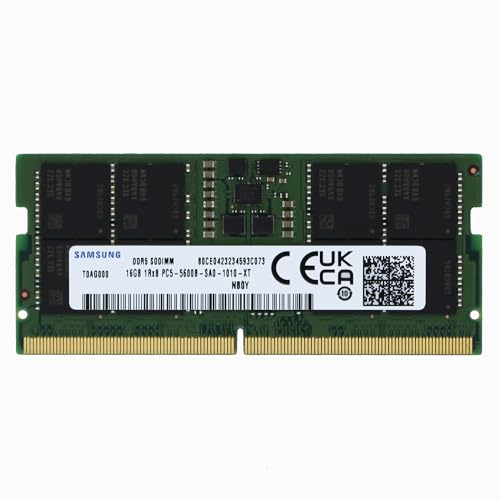
Samsung 16GB DDR5 5600MHz SODIMM
Best for: single-stick 16GB laptop upgrades
- Compatible Device
- Laptop (what this guide is about)
- Capacity
- 16GB
- Memory Speed
- 5600 MHz
- CAS Latency
- CL46
- Kit Configuration
- 1x16GB
- Form Factor
- 262-pin SODIMM
View on Amazon: Samsung 16GB DDR5 5600MHz SODIMM Affiliate link
This Samsung module offers 16GB of DDR5 memory running at 5600MHz with a PC5-44800 rating. It features a CL46 latency, 1Rx8 single rank configuration, and operates at 1.1V. The non-ECC unbuffered design makes it suitable for select laptops and notebooks. You get a 262-pin SODIMM form factor that expands system memory resources to reduce bottlenecks.
Pros
- DDR5 speed of 5600MHz for high bandwidth
- 16GB capacity in a single module
- 1Rx8 single rank configuration
- Standard 1.1V operating voltage
- Non-ECC unbuffered design for general use
Cons
- CL46 latency is higher than CL40 options on this list
- Single rank (1Rx8) may offer lower performance than dual rank modules
- Limited to 16GB capacity compared to 32GB alternatives
Good fit if
- You need a single 16GB stick for a laptop upgrade
- You want Samsung brand DDR5 memory at 5600MHz
- Your system supports non-ECC SODIMM modules
Skip if
- You require dual rank (2Rx8) memory for maximum performance
- You need a capacity larger than 16GB per stick
- You are looking for lower CL40 latency timings
Verdict: Samsung 16GB DDR5 5600MHz SODIMM fits users who need a reliable single-stick upgrade for compatible laptops without requiring the higher bandwidth of dual-rank or larger capacity modules.

Samsung 32GB (2x16GB) 5600MHz DDR5 SODIMM
Best for: non-ECC laptop memory upgrades
- Compatible Device
- Laptop (what this guide is about)
- Capacity
- 32GB
- Memory Speed
- 5600MHz
- CAS Latency
- CL46
- Kit Configuration
- 2x16GB
- Form Factor
- 262-Pin SODIMM
View on Amazon: Samsung 32GB (2x16GB) 5600MHz DDR5 SODIMM Affiliate link
This kit provides 32GB of memory using two 16GB DDR5 SODIMM modules. Operating at 5600MHz with CL46 CAS latency, each 262-pin non-ECC unbuffered stick adheres to the JEDEC 1.1V standard. The 1Rx8 single-rank configuration suits laptops, notebooks, and all-in-one systems that require DDR5 memory expansion. You gain high bandwidth across two slots without exceeding standard voltage limits.
Pros
- Total 32GB capacity across two 16GB modules
- 5600MHz clock speed rating (PC5-44800)
- Standard 1.1V operating voltage
- JEDEC standard 262-pin SODIMM form factor
Cons
- High CAS latency rated at CL46
- Single-rank (1Rx8) build
- Lacks ECC error correction support
Good fit if
- You need a 32GB DDR5 5600MHz dual-module kit for a compatible laptop.
- You require standard JEDEC 1.1V unbuffered non-ECC memory.
Skip if
- You need ECC memory support.
- You have an older laptop with DDR4 memory slots.
Verdict: Samsung 32GB (2x16GB) DDR5 5600MHz SODIMM Kit provides a standard 1.1V dual-channel upgrade for compatible laptops. It delivers PC5-44800 bandwidth with CL46 latency in a non-ECC format.

Samsung 16GB DDR5 4800MHz SODIMM
Best for: Standard laptop upgrades needing 16GB capacity
- Compatible Device
- Laptop (what this guide is about)
- Capacity
- 16GB
- Memory Speed
- 4800 MHz
- CAS Latency
- CL40
- Kit Configuration
- 1x16GB
- Form Factor
- 262-pin SODIMM
View on Amazon: Samsung 16GB DDR5 4800MHz SODIMM Affiliate link
This Samsung 16GB DDR5 SODIMM runs at 4800MHz with a PC5-38400 rating and CL40 latency. It uses 1.1V power and features a 1Rx8 single-rank configuration. The module is non-ECC and unbuffered, designed for select laptops and all-in-one computers. You get reliable expansion for everyday tasks without the overhead of error correction. It fits standard 262-pin slots.
Pros
- 16GB single-module capacity
- 4800MHz DDR5 speed
- 1Rx8 single rank design
- Non-ECC unbuffered configuration
Cons
- 4800MHz speed is slower than the 5600MHz options on this list
- Single rank (1Rx8) may offer less bandwidth than dual rank kits
- Non-ECC type lacks error correction for critical data integrity
Good fit if
- You need a 16GB upgrade for a compatible laptop
- You prefer single-rank modules for specific compatibility reasons
- You want a standard non-ECC module for general use
Skip if
- You require the faster 5600MHz DDR5 speed
- You need dual-rank (2Rx8) memory for higher bandwidth
- You are building a system that requires ECC memory
Verdict: Samsung 16GB DDR5 4800MHz SODIMM provides solid 16GB capacity for laptops that support 4800MHz speeds. It is a practical choice for users who do not need the extra bandwidth of 5600MHz modules or the error correction of ECC memory.
Specifications side by side
| Spec | Samsung 16GB DDR5 4800MHz SODIMM | Samsung 8GB DDR5 5600MHz SODIMM RAM | Samsung 32GB DDR5 4800MHz SODIMM | Samsung 32GB DDR5 5600MHz SODIMM | Samsung 16GB DDR5 5600MHz SODIMM RAM | Samsung 16GB DDR5 5600MHz SODIMM | Samsung 32GB DDR5 5600MHz SODIMM Kit | Samsung 8GB DDR5 5600MHz SODIMM | Samsung 32GB DDR5 5600MHz SODIMM | Samsung 16GB DDR5 5600MHz SODIMM | Samsung 8GB DDR5 4800MHz SODIMM | Samsung 16GB DDR5 4800MHz SODIMM Kit | Samsung 16GB DDR5 5600MHz SODIMM | Samsung 32GB (2x16GB) 5600MHz DDR5 SODIMM | Samsung 16GB DDR5 4800MHz SODIMM |
|---|---|---|---|---|---|---|---|---|---|---|---|---|---|---|---|
| Capacity | 16GB | 8GB | 32GB | 32GB | 16GB | 16 GB | 32 GB | 8GB | 32GB | 16GB | 8GB | 16GB | 16GB | 32GB | 16GB |
| Memory Speed | 4800MHz | 5600MHz | 4800MHz | 5600MHz | 5600MHz | 5600 MHz | 5600 MHz | 5600MHz | 5600MHz | 5600MHz | 4800MHz | 4800MHz | 5600 MHz | 5600MHz | 4800 MHz |
| CAS Latency | CL40 | CL46 | CL40 | CL46 | CL46 | CL46 | CL46 | CL46 | CL46 | CL46 | CL40 | CL40 | CL46 | CL46 | CL40 |
| Kit Configuration | 1x16GB | 1 Module | 1x32GB | 1x32GB | Single 16 GB Module | 1x16GB | 2x16GB | 1x8GB | 1x32GB | 1x16GB | 1x8GB | 2x8GB | 1x16GB | 2x16GB | 1x16GB |
| Form Factor | 262-Pin SO-DIMM | 262-Pin SODIMM | 262-pin | SODIMM 262 Pin | 262-Pin SODIMM | 262-Pin SODIMM | 262-Pin SODIMM | 262-Pin SODIMM | 262-Pin SODIMM | 262-Pin SODIMM | 262-Pin SODIMM | 262-Pin SODIMM | 262-pin SODIMM | 262-Pin SODIMM | 262-pin SODIMM |
| Voltage | 1.1V | 1.1V | 1.1V | 1.1V | 1.1V | 1.1 V | 1.1 V | 1.1V | 1.1V | 1.1V | 1.1V | 1.1V | 1.1V | 1.1V | 1.1V |
| ECC Support | Non-ECC | NON-ECC Unbuffered | Non-ECC | Non-ECC | NON-ECC Unbuffered | Non-ECC | Non-ECC | Non-ECC | Non-ECC | Non-ECC | Non-ECC | Non-ECC | Non-ECC | Non-ECC | Non-ECC |
| Compatible Device | Laptop | Laptop | Laptop | Laptop | Laptop | Laptop | Laptop | Laptop | Laptop | Laptop | Laptop | Laptop | Laptop | Laptop | Laptop |
| Size | 16GB | 8GB | 32GB | 32GB | 16GB | 16GB | 16GB | 1Rx8 | 8GB | 1Rx16 | 32GB | 2Rx8 | 16GB | 1Rx8 | 8GB | 1Rx16 | 8GB | 1Rx16 | not stated | not stated | not stated |
| Dimensions | 2.74 × 1.18 × 0.15 inches | 2.74 × 1.18 × 0.15 inches | 2.74 × 1.18 × 0.15 inches | 2.74 × 1.18 × 0.15 inches | 2.74 × 1.18 × 0.15 inches | 2.74 × 1.18 × 0.15 inches | 2.74 × 1.18 × 0.15 inches | 2.74 × 1.18 × 0.15 inches | 2.74 × 1.18 × 0.15 inches | 2.74 × 1.18 × 0.15 inches | 2.74 × 1.18 × 0.15 inches | 2.74 × 1.18 × 0.15 inches | not stated | not stated | not stated |
| Weight | not stated | not stated | not stated | not stated | not stated | 5 ounces | not stated | not stated | not stated | not stated | not stated | not stated | not stated | not stated | not stated |
| Color | Green | 1 Module | 1 Module | 1 Module | 1 Module | Multicolor | 2 Module Kit | 1 Module | 1 Module | 1 Module | 1 Module | 2 Module Kit | not stated | not stated | not stated |
| Model | M425R2GA3BB0-CQK | M425R1GB4BB0-CWM | M425R4GA3BB0-CQK | M425R4GA3BB0-CWM | M425R2GA3BB0-CWM | M425R2GA3PB0-CWM | not stated | not stated | not stated | not stated | not stated | not stated | not stated | not stated | not stated |
If you prefer buying a new system rather than upgrading modules, the best samsung gaming laptops list factory hardware specifications.
How to choose the right one
-
Match speed to needs
Samsung offers DDR5 modules in 4800MHz and 5600MHz variants. You should check your laptop’s maximum supported speed. If your system only handles 4800MHz, buying a 5600MHz stick like the Samsung 8GB DDR5 5600MHz SODIMM will not increase performance. It will simply run at the lower limit. Choose the 5600MHz option only if your hardware supports it. This ensures you get the best bandwidth available for your specific machine without paying for unused speed.
-
Select proper capacity
Capacity determines how many applications you can run simultaneously. Options range from 8GB to 32GB. The Samsung 8GB DDR5 4800MHz SODIMM suits basic tasks like web browsing and office work. If you multitask heavily or use demanding software, consider the Samsung 32GB DDR5 5600MHz SODIMM. This single module provides ample room for large datasets. Ensure you choose a size that fits your workflow requirements without exceeding what your laptop can address.
-
Check form factor
All listed Samsung DDR5 RAM is SODIMM. This is the standard form factor for laptops. You must not buy desktop DIMM sticks, as they will not fit. SODIMM modules are physically smaller and have fewer pins. Every product in this guide uses the 262-pin SODIMM design. Verify your laptop uses SODIMM slots before purchasing. This physical constraint is the most critical compatibility check to ensure the memory actually fits inside your device.
-
Review CAS latency
CAS Latency (CL) measures how quickly the RAM responds to commands. Lower numbers are generally faster. Some Samsung modules, like the 16GB DDR5 4800MHz SODIMM, list CL40. Others may have different timings. While speed (MHz) affects bandwidth, latency affects responsiveness. If you compare two similar speed options, check the CL value. A lower CL can provide slightly snappier performance in certain tasks. Always prioritize the lowest latency that matches your required speed.
-
Confirm ECC support
ECC (Error Correction Code) memory detects and fixes data errors. Most laptop users do not need ECC. The Samsung 16GB DDR5 4800MHz SODIMM is Non-ECC. This is the standard for consumer laptops. ECC modules are typically found in servers or workstations. Ensure your laptop supports Non-ECC RAM. Buying ECC memory for a standard laptop may cause boot failures or incompatibility. Stick to Non-ECC options unless your device manual explicitly requires error-correcting memory.
Frequently asked questions
Can I use Samsung DDR5 SODIMM in any laptop?
No, you must verify your laptop supports DDR5 SODIMM memory. The listed modules use the SODIMM form factor, which is specific to laptops. Desktops use larger DIMM sticks. You also need to check if your system supports DDR5, as older laptops may only handle DDR4. Using the wrong type will prevent the system from booting.
What is the difference between 4800MHz and 5600MHz RAM?
The difference lies in data transfer speed. 5600MHz offers higher bandwidth than 4800MHz, which can improve performance in demanding tasks. However, your laptop must support the higher speed to benefit. If your system only handles 4800MHz, a 5600MHz stick will run at the lower speed. Always check your laptop’s specifications for maximum supported RAM speed.
Do I need ECC memory for my laptop?
Most laptops do not require ECC memory. The Samsung DDR5 options listed are Non-ECC, which is standard for consumer laptops. ECC memory is typically used in servers or workstations for error correction. Unless your laptop specifically lists ECC support, you should choose Non-ECC modules. Using ECC in a non-ECC system will likely cause compatibility issues.
Can I mix different capacities like 8GB and 16GB?
It is better to match capacities for optimal performance. While some systems allow mixing sizes, it can disable dual-channel mode. This reduces bandwidth and may cause instability. The Samsung options include single sticks and kits. For the best results, buy two identical sticks or replace both modules with the same capacity and speed.
What does CAS Latency mean for laptop RAM?
CAS Latency (CL) measures the delay before data is accessed. Lower numbers mean faster response times. The Samsung 4800MHz modules listed have a CL40 rating. Some 5600MHz options may have different latency values. While speed is important, latency also affects performance. You should look for low latency paired with high speed for the best efficiency.
Is dual-rank or single-rank better for laptops?
The rank affects how memory chips are organized. Single-rank (1Rx8) modules use fewer chips per stick. Dual-rank (2Rx8) modules use more chips, potentially offering better bandwidth. The Samsung 32GB module is dual-rank, while others are single-rank. Your laptop’s motherboard determines compatibility. Most laptops handle both types, but you should check the manufacturer’s specifications for guidance.
How much RAM do I need for my laptop?
Capacity depends on your usage. 8GB is suitable for basic tasks like web browsing and office work. 16GB handles multitasking and moderate applications well. 32GB is ideal for heavy multitasking, video editing, or running virtual machines. Choose a capacity that meets your current needs and allows for future growth. More RAM prevents slowdowns when running multiple programs.