15 Best SODIMM DDR4 RAMS, Compared
As an Amazon Associate we earn from qualifying purchases. Links on this page are affiliate links.
Choosing the best SODIMM ddr4 RAMs requires matching your laptop's specific constraints to the correct specifications. We compared 15 kits strictly using the data published on each listing. The G.SKILL Ripjaws 16GB DDR4 3200MHz SODIMM Laptop RAM leads because it supports 3200MT/s speeds while maintaining a standard 1.20V power limit. This approach ensures you find memory that fits your hardware without needing manual BIOS adjustments. This guide helps you decide which kit offers the right balance of capacity, speed, and latency for your system.
Quick picks
The best fit for you
- You need fast dual-channel memory for laptops G.SKILL Ripjaws 16GB DDR4 3200MHz SODIMM Laptop RAM It offers 3200MHz speed and 16GB capacity in a dual-channel kit.
- You want a single stick for easy upgrades G.SKILL Ripjaws 8GB DDR4 2400MHz SODIMM This 8GB module runs at 2400MHz with tight CL16 latency.
- You need high capacity for older 2133MHz systems Timetec 32GB DDR4 2133MHz SODIMM Kit This kit provides 32GB capacity at the standard 2133MHz speed.
- You are upgrading a 2017 iMac desktop OWC 16GB DDR4 2400MHz SODIMM It delivers 16GB of 2400MHz SODIMM memory for iMac compatibility.
- You need a single 16GB stick for laptops Timetec 16GB DDR4 2400MHz SODIMM This single module provides 16GB capacity at standard 2400MHz speeds.
Our 15 picks

G.SKILL Ripjaws 16GB DDR4 3200MHz SODIMM Laptop RAM
Best for: laptops supporting 3200MT/s dual-channel DDR4 memory
- Form Factor
- SODIMM (what this guide is about)
- Total Capacity
- 16GB
- Memory Speed
- 3200MT/s
- CAS Latency
- CL22
- Voltage
- 1.20V
- Module Configuration
- 2x8GB
View on Amazon: G.SKILL Ripjaws 16GB DDR4 3200MHz SODIMM Laptop RAM Affiliate link
This memory kit provides 16GB of DDR4 memory across two 8GB 260-pin SODIMM modules designed for laptops. It operates at 3200MT/s at 1.20V with a CAS latency of CL22. If your notebook motherboard supports 3200MHz speeds and requires unbuffered non-ECC memory in a dual-channel setup, this pair fits your system directly.
Pros
- High 3200MT/s memory speed
- Dual-module 2x8GB layout enables dual-channel memory configurations
- Standard 1.20V operating voltage
Cons
- Rated at CL22 CAS latency
- Total 16GB capacity is lower than 32GB kits
- Non-ECC unbuffered design lacks error-correcting code support
Good fit if
- You need 16GB of dual-channel memory running at 3200MT/s.
- Your laptop uses standard 1.20V 260-pin DDR4 SODIMM slots.
Skip if
- You need a larger 32GB total memory capacity.
- You require lower CAS latency timings or ECC error correction.
Verdict: G.SKILL Ripjaws 16GB 3200MHz SODIMM RAM Kit suits laptop users seeking 3200MT/s dual-channel DDR4 memory without exceeding standard 1.20V power limits.

G.SKILL Ripjaws 8GB DDR4 2400MHz SODIMM
Best for: laptops needing low-latency 2400 MHz single-stick memory
- Form Factor
- SODIMM (what this guide is about)
- Total Capacity
- 8 GB
- Memory Speed
- 2400 MHz
- CAS Latency
- CL16
- Voltage
- 1.2 V
- Module Configuration
- 1 x 8 GB
View on Amazon: G.SKILL Ripjaws 8GB DDR4 2400MHz SODIMM Affiliate link
This G.SKILL Ripjaws module provides 8 GB of DDR4 memory for your laptop in a single stick. It operates at 2400 MHz with a CL16 CAS latency at standard 1.2 V. If your system accepts DDR4 SODIMM hardware and you want lower latency timing than typical CL17 or CL18 options at this speed, this stick fits your slot.
Pros
- CL16 CAS latency provides tighter timings than standard CL17 modules
- Standard 1.2 V operating voltage ensures broad DDR4 compatibility
- Single 8 GB stick design leaves open slots available for future upgrades
Cons
- Single-module configuration does not deliver multi-channel bandwidth on its own
- 2400 MHz operating speed is lower than 2666 MHz and 3000 MHz options
- Total kit capacity is limited to 8 GB
Good fit if
- You need an individual 8 GB DDR4 SODIMM stick to upgrade a single laptop slot.
- You want tighter CL16 latency on a 2400 MHz memory bus.
- Your portable system requires standard 1.2 V DDR4 memory modules.
Skip if
- You want a matched dual-channel pair out of the box.
- You need higher memory frequencies like 2666 MHz or 3200 MHz.
- You require 16 GB or more total system capacity from a single purchase.
Verdict: G.SKILL Ripjaws 8GB DDR4 2400MHz CL16 SODIMM is built for laptop users who require a single-stick 8 GB expansion with tighter CL16 timing at standard 1.2 V.
G.SKILL Ripjaws DDR4 SO-DIMM 16GB 2400MHz
Best for: Standard laptop upgrades needing stable 16GB
- Form Factor
- SODIMM (what this guide is about)
- Total Capacity
- 16 GB
- Memory Speed
- 2400 MT/s
- CAS Latency
- CL16
- Voltage
- 1.20 V
- Module Configuration
- 2 x 8 GB
View on Amazon: G.SKILL Ripjaws DDR4 SO-DIMM 16GB 2400MHz Affiliate link
This G.SKILL kit gives you 16GB of DDR4 memory in a 2x8GB configuration. It runs at 2400MHz with a CAS latency of CL16. The 1.20V rating helps manage power use in laptops. It is a non-ECC module designed for notebook computers. You get a matched pair for stable performance. This setup suits users who need reliable upgrades for standard laptop tasks.
Pros
- 16GB total capacity via two 8GB sticks
- 2400MHz speed for smooth multitasking
- CL16 latency for responsive performance
- 1.20V operation for efficiency
Cons
- 2400MHz speed is slower than 2666MHz or 3200MHz options
- No heat spreader for extra thermal management
- Non-ECC support limits use in specialized workstations
Good fit if
- You need a straightforward 16GB upgrade for your laptop
- You prioritize lower latency over higher clock speeds
- You want a matched kit for stability
Skip if
- You require ECC memory for data integrity
- You need speeds above 2400MHz for heavy workloads
- You are buying for a desktop computer
Verdict: G.SKILL Ripjaws 16GB DDR4 2400MHz SODIMM provides solid CL16 latency for laptops that do not need high-frequency speeds. It is a practical choice for standard notebook upgrades where stability matters most.

Crucial 8GB Kit (2x4GB) DDR4 2400MHz SODIMM
Best for: Laptops needing dual-channel 2400MHz memory upgrades
- Form Factor
- SODIMM (what this guide is about)
- Total Capacity
- 8 GB
- Memory Speed
- 2400 MHz
- CAS Latency
- CL17
- Voltage
- 1.2 V
- Module Configuration
- 2 x 4 GB
View on Amazon: Crucial 8GB Kit (2x4GB) DDR4 2400MHz SODIMM Affiliate link
This Crucial memory kit includes two 4GB DDR4 SODIMM modules, giving you an 8GB dual-channel setup. It runs at 2400MHz with CL17 latency at 1.2V across a standard 260-pin laptop interface. It suits you if you need to replace or balance memory in a laptop designed for baseline 2400MHz operation without overclocking.
Pros
- Dual-channel 8GB configuration split across two 4GB modules
- Standard 1.2V operating voltage
- 1Rx8 single-rank module architecture
- Standard 260-pin SODIMM form factor
Cons
- 8GB total capacity is lower than 16GB or 32GB alternatives
- 2400MHz transfer rate is slower than 2666MHz and 3200MHz DDR4 options
- Non-ECC support provides no error correction
Good fit if
- You need two matching 4GB modules for a dual-channel 8GB laptop setup.
- You have a laptop motherboard rated for 2400MHz DDR4 memory.
Skip if
- You require 16GB or higher total system memory for demanding tasks.
- You own a laptop capable of running faster 2666MHz or 3200MHz modules.
Verdict: Crucial 8GB 2400MHz DDR4 SODIMM Kit supplies a standard dual-channel 8GB memory configuration for laptops that run PC4-19200 speeds at 1.2V.

Corsair Vengeance 16GB DDR4 2666MHz CL18 SODIMM
Best for: Compatible Intel laptops needing auto-tuned 2666MHz memory
- Form Factor
- SODIMM (what this guide is about)
- Total Capacity
- 16GB
- Memory Speed
- 2666MHz
- CAS Latency
- CL18
- Voltage
- 1.2V
- Module Configuration
- 2x8GB
View on Amazon: Corsair Vengeance 16GB DDR4 2666MHz CL18 SODIMM Affiliate link
This dual-channel SODIMM kit gives you 16GB of DDR4 memory split across two 8GB modules. It operates at 2666MHz with 18-19-19-39 timings and 1.2V power consumption. It features automatic overclocking without requiring BIOS adjustments on compatible systems. This setup suits you if you need reliable dual-channel memory for a compatible 6th or 7th Gen Intel laptop.
Pros
- 2666MHz clock speed with 1.2V operating voltage
- Auto-overclocking support without manual BIOS configuration
- Dual-channel 16GB kit configuration using two 8GB sticks
- Limited lifetime warranty
Cons
- CL18 latency is higher than CL15, CL16, or CL17 alternatives
- 16GB total capacity limits systems requiring 32GB kits
Good fit if
- You have a 6th or 7th Generation Intel Core i5 or i7 notebook.
- You want automatic memory configuration without entering the BIOS.
Skip if
- You require tighter timings than CL18.
- You need 32GB or more memory capacity.
Verdict: Corsair Vengeance 16GB 2666MHz SODIMM RAM Kit delivers plug-and-play dual-channel DDR4 memory for owners of compatible Intel notebooks who want automated speed configuration at 1.2V.

OWC 16GB DDR4 2400MHz SODIMM
Best for: 2017 iMac memory upgrades
- Form Factor
- SODIMM (what this guide is about)
- Total Capacity
- 16GB
- Memory Speed
- 2400MHz
- Voltage
- 1.2 Volts
- Module Configuration
- 1 x 16GB
- ECC Support
- Non-ECC
View on Amazon: OWC 16GB DDR4 2400MHz SODIMM Affiliate link
This OWC kit provides 16GB of DDR4 memory running at 2400MHz in a SODIMM form factor. It operates at 1.2 volts and is non-ECC. The module is designed for specific 2017 iMac models and select PC laptops. You get a lifetime limited warranty with an advanced replacement program. It is a direct replacement for standard laptop memory upgrades where capacity and speed are the primary requirements.
Pros
- 16GB total capacity
- 2400MHz memory speed
- 1.2V operating voltage
- Lifetime limited warranty
- Advanced replacement program
Cons
- Limited to 2400MHz speed
- Only 16GB capacity
- Specific compatibility with 2017 iMacs
Good fit if
- You own a 2017 iMac needing an upgrade
- You require 16GB of SODIMM RAM
- You want a lifetime warranty
Skip if
- You need speeds above 2400MHz
- You require 32GB or more capacity
- You have a non-compatible device
Verdict: OWC 16GB DDR4 2400MHz SODIMM is a solid upgrade for 2017 iMacs or compatible laptops needing exactly 16GB. It offers reliable performance with strong warranty support.

Crucial 8GB DDR4 2400MHz SODIMM RAM
Best for: Single-slot everyday laptop memory upgrades
- Form Factor
- SODIMM (what this guide is about)
- Total Capacity
- 8GB
- Memory Speed
- 2400MT/s
- Module Configuration
- 1x8GB
- Dimensions
- 2.7 × 0.2 × 1.1 inches
- Weight
- 0.32 ounces
View on Amazon: Crucial 8GB DDR4 2400MHz SODIMM RAM Affiliate link
This Crucial module is a single 8GB DDR4 memory stick designed for laptops and compact systems. It runs at a clock speed of 2400MHz (PC4-19200) using a standard 260-pin SODIMM layout. You get a compact upgrade measuring 2.7 inches long and weighing 0.32 ounces. It suits you if you need a straightforward capacity boost for everyday computing.
Pros
- Standard 260-pin SODIMM form factor
- 2400MHz (PC4-19200) memory speed
- Compact dimensions of 2.7 inches by 1.1 inches
Cons
- 8GB capacity is lower than multi-module kits
- 2400MHz speed is slower than 2666MHz and 3200MHz options
Good fit if
- You need a single 8GB DDR4 stick to fill an open SODIMM slot.
- You have a system that supports standard 2400MHz memory speeds.
Skip if
- You require higher clock speeds such as 2666MHz or 3200MHz.
- You want a matched dual-channel kit with 16GB or more total capacity.
Verdict: Crucial 8GB DDR4 2400MHz SODIMM Memory delivers a single-module capacity upgrade for compatible notebook slots. It provides standard 2400MHz operation for systems that do not need high-density kits.

Timetec 16GB DDR4 2400MHz SODIMM
Best for: single-slot 16GB laptop memory upgrades
- Form Factor
- SODIMM (what this guide is about)
- Total Capacity
- 16GB
- Memory Speed
- 2400MHz
- CAS Latency
- CL17
- Voltage
- 1.2V
- ECC Support
- Non-ECC
View on Amazon: Timetec 16GB DDR4 2400MHz SODIMM Affiliate link
This Timetec memory module provides 16GB of DDR4 capacity on a single 260-pin SODIMM stick. It operates at 2400MHz with CL17 latency and requires 1.2V. Designed for compatible laptops, mini PCs, and all-in-one systems, it gives you an easy plug-and-play upgrade if your machine has an open SODIMM slot and supports 2400MHz Non-ECC unbuffered memory.
Pros
- 16GB capacity in a single module
- Operates at standard 1.2V low voltage
- CL17 latency at 2400MHz
- Backed by a limited lifetime warranty
Cons
- Single-stick setup does not provide dual-channel bandwidth on its own
- Rank specification and PCB color vary depending on production batch
Good fit if
- You want to add 16GB of memory while keeping an additional slot open.
- Your laptop or mini PC requires 2400MHz Non-ECC unbuffered SODIMM RAM.
Skip if
- You need a matched pair of modules for dual-channel operation.
- You require faster DDR4 speeds such as 2666MHz or 3200MHz.
- You are upgrading a standard desktop PC with full-size DIMM slots.
Verdict: Timetec 16GB DDR4 2400MHz SODIMM suits laptop and mini PC owners needing a single 16GB stick at standard 1.2V power. It is ideal if you want to keep a second memory slot free for later.

Timetec 32GB DDR4 2133MHz SODIMM Kit
Best for: 32GB upgrades on 2133MHz DDR4 systems
- Form Factor
- SODIMM (what this guide is about)
- Total Capacity
- 32GB
- Memory Speed
- 2133MHz
- CAS Latency
- CL15
- Voltage
- 1.2V
- Module Configuration
- 2x16GB
View on Amazon: Timetec 32GB DDR4 2133MHz SODIMM Kit Affiliate link
This memory kit provides 32GB of total capacity across two 16GB 260-pin DDR4 SODIMM modules. Running at 2133MHz with CL15 latency at 1.2V, it suits compatible laptops, notebooks, mini PCs, and all-in-one computers. You gain high memory density for multitasking systems that do not support higher data rates like 2400MHz or 2666MHz.
Pros
- Total 32GB capacity across two matching 16GB modules
- Tight CL15 CAS latency at 2133MHz
- Standard 1.2V operating voltage
- Limited lifetime warranty with US-based technical support
Cons
- 2133MHz speed is lower than 2400MHz, 2666MHz, and 3200MHz alternatives
- Module rank configuration and PCB color vary by production batch
- Non-ECC unbuffered design does not support error-correcting workloads
Good fit if
- You need 32GB of RAM in a dual-channel SODIMM configuration.
- You own a laptop or mini PC with memory speed capped at 2133MHz.
Skip if
- You own hardware capable of running 2400MHz, 2666MHz, or 3200MHz RAM.
- You need full-sized 288-pin DIMM modules for a standard desktop.
Verdict: Timetec 32GB DDR4 2133MHz SODIMM Kit delivers a high-capacity memory upgrade specifically suited for DDR4 laptops and compact systems limited to 2133MHz bus speeds.

Adamanta 32GB DDR4 2400MHz SODIMM
Best for: Laptops needing 32GB capacity
- Form Factor
- SODIMM (what this guide is about)
- Total Capacity
- 32GB
- Memory Speed
- 2400MHz
- CAS Latency
- CL17
- Voltage
- 1.2v
- Module Configuration
- 2x16GB
View on Amazon: Adamanta 32GB DDR4 2400MHz SODIMM Affiliate link
This kit gives you 32GB of DDR4 memory in a 2x16GB configuration. It runs at 2400MHz with CL17 latency on 1.2V. The modules are non-ECC and unbuffered SODIMMs for laptops. You get a limited lifetime warranty and free technical support. It fits systems needing high capacity at standard speeds.
Pros
- 32GB total capacity (2x16GB modules)
- 2400MHz speed with CL17 latency
- 1.2V operating voltage
- Limited lifetime warranty included
- Non-ECC unbuffered design
Cons
- 2400MHz speed is slower than 2666MHz or 3200MHz options
- CL17 latency is higher than faster kits
- Limited lifetime warranty excludes major OEM chips
Good fit if
- You need 32GB of RAM for heavy multitasking
- Your laptop supports 2400MHz DDR4 SODIMMs
- You want a limited lifetime warranty
Skip if
- You require speeds above 2400MHz
- You need ECC memory for workstations
- Your system only supports 16GB maximum
Verdict: Adamanta 32GB DDR4 SODIMM 2400MHz provides ample memory for laptops that need high capacity at standard speeds. It is a solid choice for users prioritizing storage over raw frequency.

Timetec 32GB DDR4 2400MHz SODIMM iMac Kit
Best for: 2017 iMac desktop memory upgrades
- Form Factor
- SODIMM (what this guide is about)
- Total Capacity
- 32GB
- Memory Speed
- 2400MHz
- CAS Latency
- CL17
- Voltage
- 1.2V
- Module Configuration
- 2x16GB
View on Amazon: Timetec 32GB DDR4 2400MHz SODIMM iMac Kit Affiliate link
This memory kit gives you 32GB of dual-rank memory across two 16GB 260-pin SODIMM modules. Operating at DDR4 2400MHz with CL17 timings at 1.2V, it delivers unbuffered, non-ECC performance. If you need to upgrade a compatible 2017 iMac system, this matched dual-channel configuration supplies double the capacity of baseline setups while matching factory memory frequency requirements.
Pros
- 32GB total capacity split into two 16GB modules
- Dual-rank 2Rx8 build with standard 1.2V power draw
- Lifetime warranty with US-based technical support
- JEDEC DDR4 2400MHz frequency with CL17 timing
Cons
- 2400MHz transfer rate is lower than 2666MHz or 3200MHz alternatives
- CL17 latency is slower than CL15 alternatives
- Non-ECC unbuffered design lacks error-correction capabilities
Good fit if
- You run a compatible 2017 iMac that utilizes 2400MHz SODIMM memory.
- You want 32GB of total RAM distributed across two dual-rank modules.
Skip if
- You need faster SODIMM speeds such as 2666MHz or 3200MHz.
- You need ECC memory support for specialized workstation hardware.
Verdict: Timetec 32GB DDR4 2400MHz SODIMM Kit provides a targeted 32GB capacity upgrade for owners of 2017 iMac desktop systems requiring 2400MHz specifications. It serves users seeking to boost available RAM headroom under default 1.2V operating parameters.

Timetec 16GB DDR4 2666MHz SODIMM RAM
Best for: single-slot laptop and mini PC upgrades
- Form Factor
- SODIMM (what this guide is about)
- Total Capacity
- 16GB
- Memory Speed
- 2666MHz
- CAS Latency
- CL19
- Voltage
- 1.2V
- Module Configuration
- 1x16GB
View on Amazon: Timetec 16GB DDR4 2666MHz SODIMM RAM Affiliate link
This Timetec module gives you 16GB of DDR4 memory running at 2666MHz. It uses a 260-pin SODIMM form factor operating at 1.2V with CL19 latency. It fits laptops, mini PCs, and all-in-one systems that accept unbuffered non-ECC SODIMM sticks. A single 16GB stick suits you if your system has one open slot or limited expandability.
Pros
- Single 16GB module leaves an extra slot available for future expansion
- Standard 1.2V operating voltage ensures broad DDR4 SODIMM compatibility
- Includes Timetec limited lifetime warranty with US-based support
Cons
- CL19 latency is higher than CL15 or CL16 alternatives
- Single module does not supply dual-channel performance by itself
- Rank configuration and PCB color vary between production batches
Good fit if
- You need a single 16GB module to upgrade a notebook, mini PC, or all-in-one system
- Your device requires 260-pin DDR4 memory operating at 2666MHz and 1.2V
Skip if
- You want a matched dual-module kit for immediate dual-channel operation
- Your system uses standard desktop DIMM slots rather than SODIMM slots
Verdict: Timetec 16GB DDR4 2666MHz SODIMM provides a single-stick 16GB upgrade for compatible laptops and mini PCs needing standard 1.2V operation. It fits systems with an open 260-pin slot running at 2666MHz CL19.

A-Tech 32GB (2x16GB) DDR4 2133MHz SODIMM Kit
Best for: laptops capped at 2133 MHz DDR4 speeds
- Form Factor
- SODIMM (what this guide is about)
- Total Capacity
- 32GB
- Memory Speed
- 2133 MHz
- CAS Latency
- CL15
- Voltage
- 1.2V
- Module Configuration
- 2x16GB
View on Amazon: A-Tech 32GB (2x16GB) DDR4 2133MHz SODIMM Kit Affiliate link
This 32GB kit includes two 16GB 260-pin DDR4 SODIMM modules running at 2133 MHz with CL15 latency. Built with dual-rank 2Rx8 non-ECC unbuffered memory, it operates at the standard JEDEC 1.2V level. It suits you if you need to expand memory capacity on an older DDR4 laptop or notebook that tops out at base 2133 MHz speeds.
Pros
- 32GB total capacity across two 16GB modules
- CL15 CAS latency
- Standard 1.2V JEDEC operating voltage
- Manufacturer lifetime warranty
Cons
- 2133 MHz frequency is slower than 2400MHz, 2666MHz, and 3200MHz alternatives
- Non-ECC unbuffered design lacks error-checking support
Good fit if
- You have a DDR4 laptop limited to 2133 MHz memory speeds.
- You need a 32GB dual-channel upgrade using two 16GB sticks.
- You want low CL15 latency at standard 1.2V operation.
Skip if
- You own a laptop that supports faster 2400MHz, 2666MHz, or 3200MHz RAM.
- You require error-correcting ECC memory for workstation hardware.
Verdict: A-Tech 32GB (2x16GB) DDR4 2133MHz SODIMM RAM Kit delivers dual-channel capacity and low CL15 latency for laptop users upgrading systems constrained to 2133 MHz DDR4 memory.
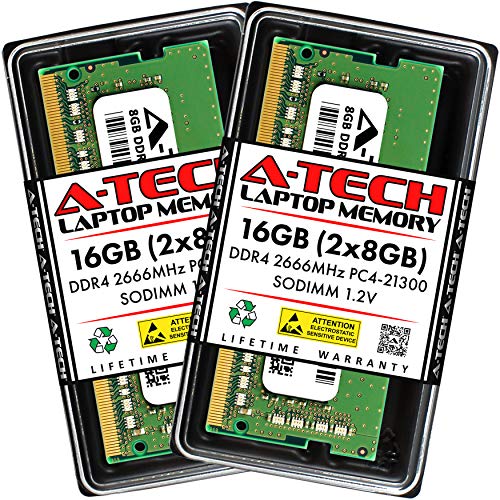
A-Tech 8GB DDR4 2666MHz SODIMM RAM
Best for: 2666MHz laptop and mini PC dual-channel upgrades
- Form Factor
- SODIMM (what this guide is about)
- Total Capacity
- 16GB
- Memory Speed
- 2666MHz
- CAS Latency
- CL19
- Voltage
- 1.2V
- Module Configuration
- 2x8GB
View on Amazon: A-Tech 8GB DDR4 2666MHz SODIMM RAM Affiliate link
This memory kit gives you 16GB of DDR4 memory across two 8GB SODIMM modules running at 2666MHz. It uses a standard 1.2V operating profile with a 260-pin laptop form factor. You can install it into compatible laptops, mini PCs, and all-in-one systems that require non-ECC unbuffered memory to expand capacity and improve multitasking responsiveness.
Pros
- Dual-channel 16GB capacity split across two 8GB modules
- Standard 1.2V operating voltage follows JEDEC DDR4 specifications
- Backed by a limited lifetime warranty
- Compatible with SODIMM-ready laptops, mini PCs, and all-in-one PCs
Cons
- Operates at 2666MHz rather than higher 3200MHz DDR4 speeds
- Non-ECC unbuffered design does not support error-correcting memory systems
Good fit if
- You need a 16GB dual-channel upgrade across two SODIMM slots.
- Your laptop or mini PC specifies 2666MHz DDR4 memory at 1.2V.
Skip if
- You own a system that supports faster 3200MHz DDR4 SODIMM speeds.
- Your system requires ECC memory or full-size desktop DIMM modules.
Verdict: A-Tech 16GB (2x8GB) DDR4 2666MHz SODIMM supplies dual-channel memory for notebook and mini PC owners needing a standard 1.2V laptop memory replacement. It suits hardware configurations matched specifically to 2666MHz non-ECC memory modules.
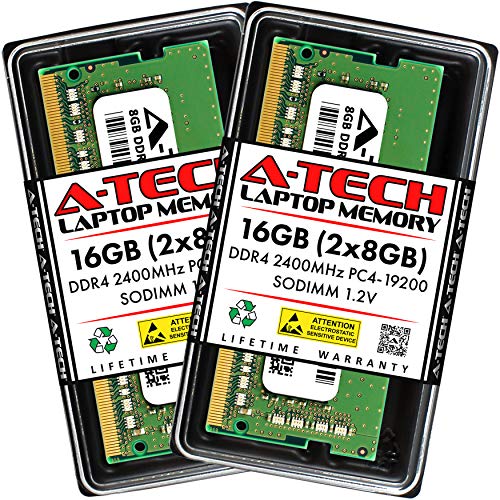
A-Tech 16GB (2x8GB) DDR4 2400MHz SODIMM
Best for: Laptops capped at 2400MHz DDR4 speeds
- Form Factor
- SODIMM (what this guide is about)
- Total Capacity
- 16GB
- Memory Speed
- 2400 MHz
- CAS Latency
- CL17
- Voltage
- 1.2V
- Module Configuration
- 2x8GB
View on Amazon: A-Tech 16GB (2x8GB) DDR4 2400MHz SODIMM Affiliate link
This memory kit gives you two 8GB DDR4 SODIMM modules running at 2400MHz with CL17 latency at standard 1.2 volts. It fits compatible laptops, mini PCs, and all-in-one systems with 260-pin slots. If you want a dual-channel 16GB upgrade for a system capped at 2400MHz bus speeds, this unbuffered non-ECC pair covers your setup.
Pros
- Dual-channel 16GB capacity split across two 8GB modules
- Standard JEDEC 1.2V operating voltage
- Limited lifetime warranty support
- 260-pin SODIMM form factor for laptops and mini PCs
Cons
- 2400MHz clock speed is lower than 2666MHz and 3200MHz alternatives
- CL17 CAS latency is higher than CL15 options at matching speeds
- Non-ECC unbuffered design does not support error-correcting workloads
Good fit if
- You have a laptop or mini PC motherboard rated for DDR4 2400MHz memory.
- You need a dual-channel 16GB setup across two open SODIMM slots.
- You want modules that run at standard JEDEC 1.2V without configuration.
Skip if
- You own a motherboard capable of utilizing 2666MHz or 3200MHz transfer rates.
- You need a single 16GB module to leave a slot open for later expansion.
Verdict: A-Tech 16GB (2x8GB) 2400MHz DDR4 SODIMM Kit gives laptop and mini PC owners a dual-channel memory upgrade matched to 2400MHz motherboards. It suits systems that require JEDEC standard 1.2V operation without manual BIOS adjustments.
Specifications side by side
| Spec | G.SKILL Ripjaws 16GB DDR4 3200MHz SODIMM Laptop RAM | G.SKILL Ripjaws 8GB DDR4 2400MHz SODIMM | G.SKILL Ripjaws DDR4 SO-DIMM 16GB 2400MHz | Crucial 8GB Kit (2x4GB) DDR4 2400MHz SODIMM | Corsair Vengeance 16GB DDR4 2666MHz CL18 SODIMM | OWC 16GB DDR4 2400MHz SODIMM | Crucial 8GB DDR4 2400MHz SODIMM RAM | Timetec 16GB DDR4 2400MHz SODIMM | Timetec 32GB DDR4 2133MHz SODIMM Kit | Adamanta 32GB DDR4 2400MHz SODIMM | Timetec 32GB DDR4 2400MHz SODIMM iMac Kit | Timetec 16GB DDR4 2666MHz SODIMM RAM | A-Tech 32GB (2x16GB) DDR4 2133MHz SODIMM Kit | A-Tech 8GB DDR4 2666MHz SODIMM RAM | A-Tech 16GB (2x8GB) DDR4 2400MHz SODIMM |
|---|---|---|---|---|---|---|---|---|---|---|---|---|---|---|---|
| Total Capacity | 16GB | 8 GB | 16 GB | 8 GB | 16GB | 16GB | 8GB | 16GB | 32GB | 32GB | 32GB | 16GB | 32GB | 16GB | 16GB |
| Memory Speed | 3200MT/s | 2400 MHz | 2400 MT/s | 2400 MHz | 2666MHz | 2400MHz | 2400MT/s | 2400MHz | 2133MHz | 2400MHz | 2400MHz | 2666MHz | 2133 MHz | 2666MHz | 2400 MHz |
| CAS Latency | CL22 | CL16 | CL16 | CL17 | CL18 | not stated | not stated | CL17 | CL15 | CL17 | CL17 | CL19 | CL15 | CL19 | CL17 |
| Voltage | 1.20V | 1.2 V | 1.20 V | 1.2 V | 1.2V | 1.2 Volts | not stated | 1.2V | 1.2V | 1.2v | 1.2V | 1.2V | 1.2V | 1.2V | 1.2V |
| Module Configuration | 2x8GB | 1 x 8 GB | 2 x 8 GB | 2 x 4 GB | 2x8GB | 1 x 16GB | 1x8GB | not stated | 2x16GB | 2x16GB | 2x16GB | 1x16GB | 2x16GB | 2x8GB | 2x8GB |
| Form Factor | SO-DIMM | SO-DIMM | SO-DIMM | SODIMM | SODIMM | SO-DIMM | SODIMM | SODIMM | SODIMM | SODIMM | SODIMM | SODIMM | SODIMM | SO-DIMM | SODIMM |
| ECC Support | Non-ECC | not stated | Non-ECC | Non-ECC | not stated | Non-ECC | not stated | Non-ECC | Non-ECC | Non-ECC | Non-ECC | Non-ECC | Non-ECC | Non-ECC | Non-ECC |
| Height | not stated | not stated | not stated | 1.1 inches | 1.19 inches | not stated | not stated | not stated | 0.24 inches | 1.13 inches | not stated | not stated | not stated | not stated | not stated |
| Compatible Device | Laptop | Laptop | Laptop | Laptop | not stated | Mac | not stated | PC, Laptop | PC, Laptop | Laptop | Mac | PC, Laptop | Laptop | PC, Laptop | Laptop |
| Size | 16GB | 8 GB (1 x 8 GB) | 16GB (8GBx2) | 8GB Kit (4GBx2) | (2 x 8GB) | 16GB | 8GB | 16GB Standard | Dual Rank 32GB KIT(2x16GB) | (2x16GB) 32GB | 32GB KIT(2x16GB) | 16GB | 32GB (2 x 16GB) | 8GB | 16GB Kit (2 x 8GB) |
| Dimensions | 1.1 × 9.7 × 6.5 inches | 3.94 × 1.97 × 0.79 inches | 3.94 × 1.97 × 0.79 inches | 2.7 × 0.2 × 1.1 inches | 2.66 × 0.16 × 1.19 inches | 7.09 × 4.92 × 0.39 inches | 2.7 × 0.2 × 1.1 inches | not stated | 3.74 × 3.5 × 0.24 inches | 2.63 × 0.13 × 1.13 inches | not stated | not stated | 2.74 × 1.18 × 0.15 inches | 2.74 × 1.18 × 0.15 inches | 2.74 × 1.18 × 0.15 inches |
| Weight | 1.76 ounces | 9.5 grams | 1.06 ounces | 0.32 ounces | 0.56 ounces | 0.81 ounces | 0.32 ounces | 0.32 ounces | 1.12 ounces | not stated | 0.64 ounces | not stated | not stated | 0.7 ounces | not stated |
| Color | black | 2400MHz | 2400MHz | Multicolor | DDR4 | 1 x 16GB | Multicolor | Gold | Black | 2400MHz | Black | Black | DDR4 2133 (PC4-17000) | not stated | Multicolor |
| Model | F4-3200C22D-16GRS | F4-2400C16S-8GRS | F4-2400C16D-16GRS | CT2K4G4SFS824A | CMSX16GX4M2A2666C18 | OWC2400DDR4S16G | CT8G4S24AM | 76TT24NUS | 32GB Kit | AM52SE22G64-RQ | 7 | 76HN26NUS1R | AT16G2D4S2133ND8N12V | AT8G2D4S2666NA0N12V | AT8G2D4S2400NA0N12V |
If you plan a desktop build instead of a laptop upgrade, compare specs across the best DDR4 motherboards.
How to Choose the Right SODIMM DDR4 RAM
-
Check supported memory speed
Your laptop’s motherboard dictates the maximum memory speed it can handle. If you install faster RAM, such as the G.SKILL Ripjaws 16GB DDR4 3200MHz kit, the system will likely downclock it to match your CPU’s limits. Conversely, slower modules like the Crucial 8GB DDR4 2400MHz stick will run at their rated speed on older systems. Always verify your laptop’s specifications to avoid paying for performance you cannot use. Matching the speed ensures you get the best value from your purchase without wasting potential bandwidth.
-
Match capacity to your needs
Capacity determines how many applications you can run simultaneously. The G.SKILL Ripjaws 16GB kit is ideal for users who multitask heavily or edit media. For those who only need to expand a single slot, the Timetec 16GB DDR4 2400MHz SODIMM offers a single-stick solution that leaves the other slot open for future upgrades. If you need maximum headroom, the Timetec 32GB DDR4 2400MHz iMac Kit provides substantial storage for demanding workloads. Choose the size that fits your current usage and future plans.
-
Verify compatible device type
Not all SODIMM modules work with every computer. Some kits, like the OWC 16GB DDR4 2400MHz SODIMM, are specifically targeted at 2017 iMacs or compatible laptops. Others, such as the Timetec 16GB DDR4 2666MHz SODIMM RAM, list compatibility with both PCs and laptops. Ensure the module is listed for your specific device type. Using incompatible hardware can prevent your system from booting or cause instability. Always check the compatible device field to confirm the RAM works with your specific machine model.
-
Consider CAS latency values
CAS latency, or CL, measures the delay between a command and the data’s availability. Lower numbers generally mean faster response times. The G.SKILL Ripjaws 8GB DDR4 2400MHz SODIMM features CL16 latency, which is tighter than the CL17 found in the Crucial 8GB Kit. The Timetec 32GB DDR4 2133MHz Kit offers CL15, which is quite low for its speed class. While speed matters, latency affects responsiveness. If your laptop supports it, choosing a module with a lower CL can improve system snappiness during heavy tasks.
-
Confirm voltage requirements
Standard DDR4 memory operates at 1.2V. Most modules in this guide, including the Corsair Vengeance 16GB DDR4 2666MHz CL18 SODIMM, adhere to this standard. Operating at standard voltage ensures compatibility with most laptops and prevents excessive heat generation. Avoid modules that require higher voltages unless your system explicitly supports them. Sticking to 1.2V modules like the Adamanta 32GB DDR4 2400MHz SODIMM guarantees safe operation across a wide range of devices. Always verify that the RAM voltage matches your laptop’s power delivery capabilities.
Frequently asked questions
Can I use DDR4 SODIMM RAM in a desktop computer?
No, you cannot use SODIMM modules in standard desktops. SODIMM stands for Small Outline Dual In-line Memory Module, which is designed specifically for laptops, mini PCs, and some all-in-one systems like the 2017 iMac. Desktop computers require larger DIMM sticks that are physically longer and have more pins. Using the wrong form factor will prevent the memory from fitting into the motherboard slots.
What is the difference between CL16 and CL22 latency?
CAS Latency (CL) measures the delay before the RAM responds to a command. A lower number means faster response times. For example, the G.SKILL Ripjaws 8GB 2400MHz kit uses CL16, which offers tighter timing than the 16GB 3200MHz kit’s CL22. While higher speeds often come with higher latency numbers, the actual performance impact varies by workload. Lower CL values generally improve responsiveness in specific tasks.
Is ECC memory necessary for my laptop upgrade?
Most consumer laptops do not require or support ECC (Error Correcting Code) memory. The kits listed here, such as the G.SKILL and Crucial options, are Non-ECC. ECC RAM is typically reserved for servers or workstations that need to detect and fix data corruption. For standard laptop use, Non-ECC SODIMM modules are the correct and compatible choice for your system.
Will a 3200MHz RAM kit work in a 2400MHz laptop?
Yes, but it will run at the lower speed. If you install the G.SKILL Ripjaws 16GB 3200MHz kit in a laptop that only supports 2400MHz, the system will downclock the memory to 2400MHz. This ensures compatibility, though you will not benefit from the higher 3200MHz speed rating. Always check your laptop’s maximum supported speed to get the best performance value.
How do I know if I need a single stick or a dual-channel kit?
It depends on your laptop’s available slots and your performance needs. A single stick, like the Crucial 8GB SODIMM, is ideal if you have only one free slot or plan to add more later. A dual-channel kit, such as the A-Tech 16GB (2x8GB) set, provides better bandwidth by using two modules simultaneously. Dual-channel is preferred for gaming and heavy multitasking on compatible systems.
What voltage do these SODIMM RAM kits operate at?
Most modern DDR4 SODIMM kits operate at a standard 1.2V. This includes the Timetec 16GB 2400MHz and the Corsair Vengeance 16GB 2666MHz kits. This lower voltage compared to older DDR3 standards helps reduce power consumption and heat generation. You do not need to manually adjust BIOS settings for voltage in most cases, as the modules follow JEDEC standard specifications for safe operation.