What Is Connector Type? A Guide for USB Flash Drives Buyers (2026)
As an Amazon Associate we earn from qualifying purchases. Links on this page are affiliate links.
Connector Type Explained For Buyers
The connector type is the physical interface that links your storage device to a host system. This spec defines the shape, pin configuration, and electrical standards of the plug. It determines whether a drive fits directly into a port or requires an adapter. Understanding this specification is essential for compatibility.
In the market for USB flash drives and memory cards, you will primarily encounter two connector types: USB-C and USB-A. These represent the two dominant physical standards in modern computing. Each serves a different purpose based on the device you are using.
USB-C is the newer standard. It features a small, oval-shaped connector that is reversible. You can insert it either way up, which eliminates frustration. This connector supports higher data transfer speeds and greater power delivery. It is standard on most recent laptops, tablets, and smartphones. If you buy a drive with a USB-C connector, it works seamlessly with newer hardware without needing extra cables.
USB-A is the traditional rectangular connector. It has been the industry standard for decades. Most desktop computers, older laptops, and many car stereos still rely on this port. The connector is not reversible, so you must align it correctly. While newer devices often include USB-C ports, USB-A remains ubiquitous in legacy equipment.
When shopping, check the product listing for the connector type explained in the specifications section. Listings usually label this clearly as USB-C or USB-A. Some drives include both connectors on a single unit for maximum versatility. This allows you to use the same drive on a new laptop and an older desktop.
Why does this matter to you? Mismatched connectors mean you cannot use the drive. You might buy a high-speed USB-C drive only to find your computer only has USB-A ports. In that case, you would need a separate adapter. Ensuring the connector type matches your available ports saves time and prevents compatibility issues. Always verify the physical interface before purchasing.
USB-C vs USB-A Connectors
USB-C
USB-C offers a reversible plug design and supports newer USB standards like USB 3.1. This connector is standard on modern smartphones, tablets, and laptops. It allows direct connection without adapters. Dual-drive models combine USB-C with USB-A for flexibility. The SanDisk 32GB Ultra Dual Drive uses this format. It connects to Android devices and older computers. This shape reduces wear from repeated plugging. You get faster data transfer potential with USB 3.1. The trade-off is that older devices may lack this port. You might need an adapter for legacy systems. Choose USB-C for future-proofing and ease of use. It is ideal for users with newer tech.
USB-A
USB-A is the traditional rectangular connector found on most computers and older devices. It is widely compatible but requires correct orientation when plugging in. This type supports speeds up to USB 3.0 or higher depending on the drive. The SanDisk 128GB Ultra USB-A Flash Drive uses this interface. It fits directly into standard desktop and laptop ports. You do not need adapters for most PCs. However, it lacks the reversible design of USB-C. It is not suitable for modern smartphones without an adapter. Choose USB-A if your workflow relies on older hardware. It is a reliable choice for standard file transfers. The trade-off is limited compatibility with new mobile devices.
Deciding If USB Type Matters
Who needs it
You need to check this spec if your devices have limited port options. Many modern laptops and smartphones only feature USB-C ports. If you buy a drive with only a USB-A connector, you must carry an adapter. This adds bulk and risk of loss. Users who travel often or switch between different computers will find dual-connector drives useful. They offer flexibility without extra hardware. If you frequently connect to older desktops or printers, the USB-A side is essential. For those who prioritize convenience and speed, matching the connector to your primary host system saves time. It ensures you can plug in immediately without searching for dongles. This spec directly impacts your daily workflow efficiency and device compatibility.
Who can skip it
You can ignore this detail if you have abundant port availability. If your workstation has multiple USB-A and USB-C inputs, the connector shape is less critical. You likely have adapters on hand anyway. In this case, focus on read and write speeds instead. The transfer rate determines how fast you move large files. Capacity is also more important for storing media libraries. If you use drives primarily for backups or archival, the physical plug type matters less than reliability and storage size. Prioritize specs that affect data integrity and volume. The connector is just a physical interface. As long as you have the right cable or adapter, the drive will function. Do not let this spec dictate your choice if other performance metrics are more relevant to your workflow.
USB Connector Glossary
USB Type-A
The classic rectangular connector found on most older computers and peripherals. It requires specific orientation for insertion and remains widely supported across legacy hardware.
USB Type-C
A smaller, oval-shaped connector that supports reversible insertion. It enables higher data speeds and power delivery, making it standard on modern devices.
Reversible Plug
A design feature allowing the connector to be inserted in either orientation. This eliminates the frustration of trying to flip the plug correctly.
Dual-Interface Drive
A storage device featuring two distinct connectors, typically USB-A and USB-C. This allows direct connection to both older and newer host systems without adapters.
Pin Configuration
The specific arrangement of electrical contacts within the connector. This determines compatibility and power transfer capabilities between the drive and the host port.
Host System
The primary device, such as a laptop or desktop, that reads data from the storage drive. The connector must match the host's available port type.
Electrical Standards
The technical specifications governing power and data transmission through the connector. These standards ensure safe and efficient communication between the drive and the computer.
Quick picks
| # | Product | Best for | Price |
|---|---|---|---|
| 1 | SanDisk 32GB Ultra Dual Drive USB-C | Android users needing USB-C and USB-A connectivity | Check price of SanDisk 32GB Ultra Dual Drive USB-C on Amazon |
| 2 | SanDisk 128GB Ultra USB-A Flash Drive | Standard USB-A port users | Check price of SanDisk 128GB Ultra USB-A Flash Drive on Amazon |
| 3 | Vansuny 128GB Dual USB-C Flash Drive | users needing dual USB-C and USB-A connectivity | Check price of Vansuny 128GB Dual USB-C Flash Drive on Amazon |
| 4 | SanDisk 64GB Ultra Flair USB-A Drive | Users with standard USB-A ports needing secure storage | Check price of SanDisk 64GB Ultra Flair USB-A Drive on Amazon |
| 5 | Sanfeya 32GB Dual USB-C and USB 3.0 Flash Drive | Android users needing basic USB-C storage | Check price of Sanfeya 32GB Dual USB-C and USB 3.0 Flash Drive on Amazon |
| 6 | SanDisk 32GB Dual Drive Go USB-C Flash Drive | Dual-device users needing basic USB-C and USB-A connectivity | Check price of SanDisk 32GB Dual Drive Go USB-C Flash Drive on Amazon |
Our 6 picks

SanDisk 32GB Ultra Dual Drive USB-C
Best for: Android users needing USB-C and USB-A connectivity
- Connector Type
- USB-C (what this guide is about)
- Storage Capacity
- 32GB
- USB Version
- USB 3.1
- Read Speed
- Up to 150MB/s
- Features
- OTG Dual Drive
- Dimensions
- 0.37 × 1.5 × 0.79 inches
View on Amazon: SanDisk 32GB Ultra Dual Drive USB-C Affiliate link
This SanDisk drive features a retractable USB-C and USB-A connector, making it a 2-in-1 solution for dual-port devices. It supports USB 3.1 speeds of up to 150MB/s for file transfers. The included Memory Zone app helps manage content on Android devices. Its compact size fits easily in your pocket. It suits users needing cross-device compatibility without carrying multiple drives.
Pros
- Retractable USB-C and USB-A connectors
- USB 3.1 support with 150MB/s read speed
- Includes SanDisk Memory Zone app for Android
- Compact 0.32 ounce weight
Cons
- 32GB capacity is smaller than 64GB and 128GB options
- Read speed of 150MB/s is slower than 400MB/s competitors
- App support is limited to Android devices
Good fit if
- You need a drive for both USB-C and USB-A ports
- You use Android smartphones with OTG support
- You prefer a retractable design for port protection
Skip if
- You require more than 32GB of storage
- You need faster read speeds than 150MB/s
- You use iOS devices without a compatible adapter
Verdict: SanDisk 32GB USB-C Dual Drive is a practical dual-connector option for Android users who need basic storage. It fits those who value portability over high capacity or maximum speed.

SanDisk 128GB Ultra USB-A Flash Drive
Best for: Standard USB-A port users
- Connector Type
- USB-A (what this guide is about)
- Storage Capacity
- 128GB
- USB Version
- USB 3.0
- Read Speed
- Up to 100MB/s
- Compatible Device
- PC, Laptop
- Dimensions
- 0.42 × 0.87 × 0.31 inches
View on Amazon: SanDisk 128GB Ultra USB-A Flash Drive Affiliate link
This SanDisk drive offers 128GB of storage with a standard USB-A connector. It supports USB 3.0, delivering read speeds up to 100MB/s. The compact red body measures 0.87 inches long. You get a one-year Rescue PRO Deluxe subscription for file recovery. It fits well if you need reliable capacity for everyday files on standard computers.
Pros
- 128GB storage capacity
- USB 3.0 support
- Up to 100MB/s read speed
- Includes Rescue PRO Deluxe software
Cons
- Only USB-A connector
- Read speed lower than USB-C competitors
- No included USB-C adapter
Good fit if
- You use computers with USB-A ports
- You need 128GB of storage
- You want included data recovery software
Skip if
- You need USB-C connectivity
- You require transfer speeds over 100MB/s
- You want a metal or premium build
Verdict: SanDisk 128GB USB-A Flash Drive is a solid choice for users with standard USB-A ports who need reliable 128GB storage and basic file recovery tools.

Vansuny 128GB Dual USB-C Flash Drive
Best for: users needing dual USB-C and USB-A connectivity
- Connector Type
- USB-C (what this guide is about)
- Storage Capacity
- 128GB
- USB Version
- USB 3.0
- Compatible Device
- PC, Android, Tablets
- Features
- OTG Dual Drive
- Dimensions
- 2.24 × 0.79 × 0.39 inches
View on Amazon: Vansuny 128GB Dual USB-C Flash Drive Affiliate link
This Vansuny drive offers 128GB of storage with dual USB-C and USB 3.0 connectors. It supports USB 3.0 speeds for faster transfers and includes OTG functionality for mobile devices. The drive uses the exFAT format, making it compatible with smartphones, tablets, and computers. It is a practical option for users needing to move files between different device types without adapters.
Pros
- 128GB storage capacity
- Dual USB-C and USB 3.0 connectors
- USB 3.0 speed support
- OTG function for mobile devices
- exFAT format for broad compatibility
Cons
- No read speed listed in specifications
- Limited to USB 3.0 standard
- Requires OTG support on mobile devices
Good fit if
- You need to transfer files between a USB-C phone and a USB-A computer
- You require 128GB of portable storage
- You want a drive that works with both Android and Windows systems
Skip if
- You need the highest possible transfer speeds
- Your mobile device does not support OTG
- You prefer a smaller capacity like 32GB or 64GB
Verdict: Vansuny 128GB USB-C Flash Drive is a solid choice for users who frequently switch between USB-C and USB-A ports. It provides ample storage and basic dual-connector convenience for everyday file management.
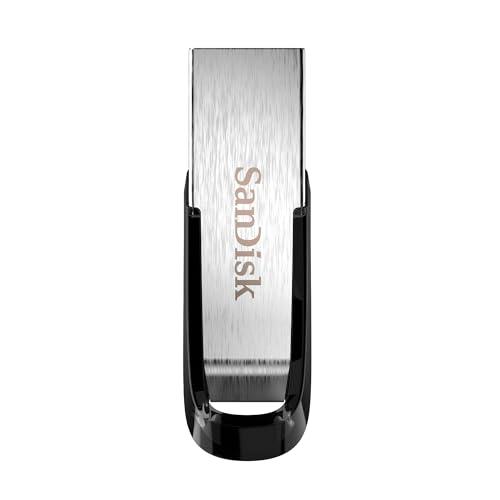
SanDisk 64GB Ultra Flair USB-A Drive
Best for: Users with standard USB-A ports needing secure storage
- Connector Type
- USB-A (what this guide is about)
- Storage Capacity
- 64GB
- USB Version
- USB 3.0
- Read Speed
- Up to 150MB/s
- Security Standard
- 128-bit AES
- Security Features
- Password Protection
View on Amazon: SanDisk 64GB Ultra Flair USB-A Drive Affiliate link
This SanDisk drive uses a USB-A connector, making it compatible with standard ports on most laptops and desktops. It offers 64GB of storage and read speeds up to 150MB/s. The metal casing provides durability. You get password protection with 128-bit AES encryption. This drive suits users who need reliable transfer speeds and secure storage for everyday files.
Pros
- USB-A connector for broad compatibility
- Read speeds up to 150MB/s
- Durable metal casing
- 128-bit AES password protection
Cons
- USB-A connector limits use with USB-C only ports
- 64GB capacity is smaller than 128GB options
- Requires software download for Mac encryption
Good fit if
- You need a drive for standard USB-A ports
- You want password protection for private files
- You prefer a durable metal build
Skip if
- Your device only has USB-C ports
- You need more than 64GB of storage
- You want built-in encryption without software
Verdict: SanDisk 64GB Ultra Flair USB-A is a solid choice for users with standard USB-A ports who value security and speed. It fits those needing reliable daily transfers.
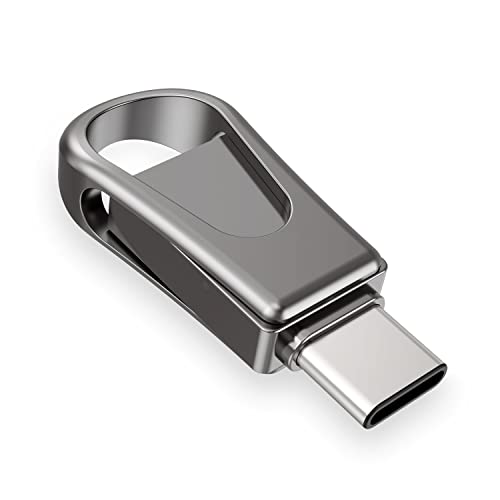
Sanfeya 32GB Dual USB-C and USB 3.0 Flash Drive
Best for: Android users needing basic USB-C storage
- Connector Type
- USB-C (what this guide is about)
- Storage Capacity
- 32GB
- USB Version
- USB 3.0
- Read Speed
- Up to 100MB/s
- Compatible Device
- PC, Laptop, Android, Tablets
- Features
- OTG Dual Drive
View on Amazon: Sanfeya 32GB Dual USB-C and USB 3.0 Flash Drive Affiliate link
This drive features a USB-C connector and USB 3.0 interface. It offers 32GB of storage with read speeds up to 100MB/s. The metal casing is splash-proof and shockproof. You can transfer files between Android devices and computers easily. It supports OTG for direct connection to smartphones and tablets.
Pros
- USB-C connector for direct device connection
- USB 3.0 interface with 100MB/s read speed
- Durable metal casing is splash-proof and shockproof
- Supports OTG for Android and PC use
Cons
- 32GB capacity is smaller than other options on this list
- Write speed is limited to 26MB/s
- No mention of included carrying case or keychain loop
Good fit if
- You need a USB-C drive for Android phones
- You want a durable metal build for travel
- You only need 32GB of portable storage
Skip if
- You require more than 32GB of space
- You need faster write speeds for large files
- You only have USB-A ports on your devices
Verdict: Sanfeya 32GB USB-C Flash Drive is a compact, durable option for users who primarily connect to USB-C Android devices and need basic file transfer speeds.

SanDisk 32GB Dual Drive Go USB-C Flash Drive
Best for: Dual-device users needing basic USB-C and USB-A connectivity
- Connector Type
- USB-C (what this guide is about)
- Storage Capacity
- 32GB
- USB Version
- USB 3.1 Gen 1
- Read Speed
- 150MB/s
- Features
- OTG Dual Drive
- Dimensions
- 5.94 × 4.09 × 0.39 inches
View on Amazon: SanDisk 32GB Dual Drive Go USB-C Flash Drive Affiliate link
This SanDisk drive features both USB Type-C and USB Type-A connectors, letting you move files between modern phones and older computers. It offers USB 3.1 Gen 1 speeds with read rates up to 150MB/s. The 32GB capacity is compact at 4.09 inches long. It suits users who need a simple, dual-port solution for basic storage needs on the go.
Pros
- Reversible USB Type-C connector for modern devices
- Includes traditional USB Type-A connector for desktops
- Read speeds up to 150MB/s
- Supports On-The-Go (OTG) for mobile backups
Cons
- 32GB capacity is smaller than many competitors
- Write speeds are lower than read speeds
- Requires specific app for automatic photo backups
Good fit if
- You need to transfer files between a USB-C phone and a USB-A PC
- You want a compact drive for basic daily backups
- You prefer a reversible connector for easier plugging
Skip if
- You require large storage for heavy media libraries
- You need the fastest possible transfer speeds for large files
- You only use modern USB-C computers and do not need a Type-A port
Verdict: SanDisk 32GB Dual Drive Go USB-C provides a reliable dual-connector solution for users who frequently switch between USB-C mobile devices and USB-A computers. It is a practical option for light storage tasks where capacity is not the primary concern.
Specifications side by side
| Spec | SanDisk 32GB Ultra Dual Drive USB-C | SanDisk 128GB Ultra USB-A Flash Drive | Vansuny 128GB Dual USB-C Flash Drive | SanDisk 64GB Ultra Flair USB-A Drive | Sanfeya 32GB Dual USB-C and USB 3.0 Flash Drive | SanDisk 32GB Dual Drive Go USB-C Flash Drive |
|---|---|---|---|---|---|---|
| Storage Capacity | 32GB | 128GB | 128GB | 64GB | 32GB | 32GB |
| USB Version | USB 3.1 | USB 3.0 | USB 3.0 | USB 3.0 | USB 3.0 | USB 3.1 Gen 1 |
| Connector Type | USB-C, traditional USB | USB-A | USB-A, USB-C | USB-A | USB-C | USB Type-C, USB Type-A |
| Read Speed | Up to 150MB/s | Up to 100MB/s | not stated | Up to 150MB/s | Up to 100MB/s | 150MB/s |
| Security Standard | not stated | not stated | not stated | 128-bit AES | not stated | not stated |
| Compatible Device | not stated | PC, Laptop | PC, Android, Tablets | not stated | PC, Laptop, Android, Tablets | not stated |
| Size | 32GB | 128GB | 128GB | 64GB | 32GB | 32GB |
| Security Features | not stated | not stated | not stated | Password Protection | not stated | not stated |
| Features | OTG Dual Drive | not stated | OTG Dual Drive | Metal Casing | OTG Dual Drive | OTG Dual Drive |
| Dimensions | 0.37 × 1.5 × 0.79 inches | 0.42 × 0.87 × 0.31 inches | 2.24 × 0.79 × 0.39 inches | 0.52 × 1.67 × 0.26 inches | 1.41 × 0.58 × 0.29 inches | 5.94 × 4.09 × 0.39 inches |
| Weight | 0.32 ounces | 0.48 ounces | 0.32 ounces | 0.63 ounces | not stated | not stated |
| Color | Black, Silver | Red | 1Pack | Black | Black | Black |
| Model | SDDDC2-032G-G46 | SDCZ48-128G-U46 | B07LGKTNJ2 | SDCZ73-064G-G46 | 763230616150 | SDDDC3-032G-G46 |
Frequently asked questions
Can I use a USB-C drive with an older computer?
You need an adapter or a dual-drive model. Standard USB-C plugs do not fit older USB-A ports. Models like the SanDisk 32GB Ultra Dual Drive include both connectors. This allows you to connect directly to modern devices and legacy computers without extra hardware.
What does USB 3.1 mean for my drive?
It indicates the data transfer standard the connector supports. The SanDisk 32GB Ultra Dual Drive uses USB 3.1. This version offers faster speeds than older USB 2.0 standards. It ensures efficient file movement between your device and the drive when the port supports it.
Is USB-C reversible like the old USB-A?
Yes, USB-C is designed for reversible insertion. You can plug it in either way up. This differs from USB-A, which has a specific orientation. The Vansuny 128GB Dual Drive uses USB-C for one side, making it easier to connect to phones and tablets without fumbling.
Do I need OTG support for my phone?
Your phone must support On-The-Go (OTG) to read external drives. Most modern Android devices have this feature. Drives like the Sanfeya 32GB Dual Drive list OTG compatibility. This lets you transfer files directly from the flash drive to your Android device without a computer.
Which connector is better for speed?
The connector type itself does not dictate speed; the USB version does. However, USB-C often pairs with newer, faster standards. The SanDisk 64GB Ultra Flair uses USB-A but achieves 150MB/s read speeds. Check the USB version, not just the shape, for performance expectations.
Can one drive work with both my laptop and phone?
You need a dual-connector model for this flexibility. These drives feature both USB-C and USB-A plugs. The SanDisk 32GB Dual Drive Go includes both types. This lets you plug it into your USB-C phone and your USB-A laptop using the same device.