Corsair vs Crucial: ddr5 RAMs Compared by Specs
As an Amazon Associate we earn from qualifying purchases. Links on this page are affiliate links.
When comparing corsair vs crucial ddr5 RAM, you are looking at two reliable desktop memory options that share the same CAS latency but differ significantly in speed and capacity. Both modules support Intel XMP 3.0 for easy overclocking. The main difference lies in their performance targets: one offers higher frequency and larger capacity options, while the other provides broader compatibility with AMD EXPO and lower voltage operation. You need to decide which balance of speed and versatility fits your specific motherboard and workload.
Key differences
| Aspect | Corsair Vengeance DDR5 32GB 5200MHz | Crucial 16GB DDR5 4800MHz Desktop RAM |
|---|---|---|
| Memory Speed | 5200MHz | 4800MHz |
| Capacity | 32GB (2x16GB) | 16GB |
| Voltage | 1.25V | 1.1V |
| Overclocking Profile | Intel XMP 3.0 | Intel XMP 3.0, AMD EXPO |
| ECC Support | not listed | Non-ECC |
Which one should you choose?
Choose Corsair Vengeance DDR5 32GB 5200MHz if
- You need more total memory capacity for heavy multitasking or content creation.
- You prioritize higher clock speeds for faster data processing on Intel platforms.
- You want to use Corsair iCUE software for detailed voltage and profile customization.
Choose Crucial 16GB DDR5 4800MHz Desktop RAM if
- You are using an AMD Ryzen 7000 Series processor and want EXPO support.
- You prefer lower voltage operation for potentially reduced power consumption.
- You need a smaller 16GB kit for basic system responsiveness upgrades.
Verdict: Choose the Corsair Vengeance if you require higher speeds and larger capacity for demanding Intel-based builds. Opt for the Crucial module if you are building with AMD hardware or need the flexibility of EXPO profiles alongside lower voltage operation.
Specs Compare Corsair Vs Crucial
memory speed
The Corsair Vengeance kit runs at 5200MHz, while the Crucial module operates at 4800MHz. Higher frequency generally allows data to move faster between the memory and the CPU. This difference of 400MHz can matter in bandwidth-heavy tasks like video rendering or large dataset processing. You get a clear speed advantage with the Corsair option if peak throughput is your priority. The Crucial stick is sufficient for standard gaming and office work, but it will not match the raw transfer rates of the faster Corsair module. For pure speed metrics, the higher number wins.
capacity
Capacity determines how many applications you can run simultaneously without slowing down. The Corsair Vengeance comes in a 32GB configuration, specifically two 16GB sticks. The Crucial unit listed here is a single 16GB stick. Having double the memory allows for heavier multitasking, such as streaming while gaming or running virtual machines. If you need more space for your operating system and background apps, the Corsair kit provides that headroom. The Crucial 16GB is a solid starting point for basic users, but it offers half the capacity of the Corsair option in this specific comparison.
voltage
Voltage affects power consumption and heat generation. The Crucial DDR5 module operates at 1.1V, which is the standard low voltage for modern DDR5 memory. The Corsair Vengeance kit lists 1.25V in its specifications. Lower voltage typically means slightly less power draw and potentially cooler running temperatures under load. While 1.25V is still very efficient compared to older DDR4 standards, the Crucial option is more energy-efficient on paper. This difference is minor for most desktop builds, but if you are building a compact system with limited airflow, the lower voltage of the Crucial stick is a practical benefit.
overclocking profile
Both modules support Intel XMP 3.0, allowing you to easily apply preset speeds via your motherboard BIOS. The Crucial memory also lists support for AMD EXPO, making it versatile for both Intel and AMD platforms. The Corsair kit highlights customization through the iCUE software, allowing you to save specific profiles for different tasks. This software integration offers a layer of management that the Crucial module does not explicitly mention. If you use an Intel system, both work well. If you plan to use AMD hardware, the Crucial option has broader native support for EXPO profiles out of the box.
cas latency
CAS Latency (CL) measures the delay before data is available after a command. Both the Corsair Vengeance and the Crucial module share a CL40 rating. This means the timing response for accessing data is identical for both sticks at their rated speeds. Since the latency number is the same, you cannot claim one is faster in terms of timing responsiveness based on this spec alone. This aspect results in a tie. You should look at the combination of speed and latency for total performance, but on latency alone, they are equal.
Which DDR5 RAM Kit Suits You
Users needing maximum capacity for heavy workloads
This Corsair kit offers 32GB of total memory, which is double the capacity of the Crucial 16GB module. If you run multiple applications simultaneously or handle large files, the extra 16GB provides more headroom. The 5200MHz speed also helps keep data flowing quickly to your CPU during intensive tasks.
Budget-conscious builders prioritizing lower power draw
The Crucial module runs at a lower voltage of 1.1V compared to the Corsair's 1.25V. This reduces power consumption and heat generation. It also supports AMD EXPO profiles in addition to Intel XMP 3.0, making it a versatile choice for both Intel and AMD desktop platforms without extra cost.
Gamers seeking higher frequency for better responsiveness
With a speed of 5200MHz, this Corsair RAM moves data faster than the Crucial 4800MHz option. This 400MHz difference can improve frame rates and reduce stuttering in fast-paced games. The onboard voltage regulation also allows for more stable performance when pushing your system to its limits.
The products compared
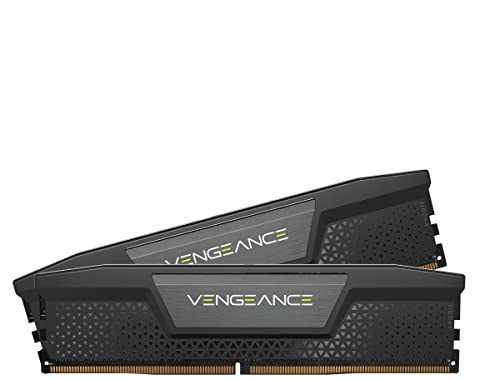
Corsair Vengeance DDR5 32GB 5200MHz
Best for: Desktops needing 32GB with voltage control
- Capacity
- 32GB
- Memory Speed
- 5200MHz
- CAS Latency
- CL40
- Kit Configuration
- 2x16GB
- Overclocking Profile
- Intel XMP 3.0
- Voltage
- 1.25V
View on Amazon: Corsair Vengeance DDR5 32GB 5200MHz Affiliate link
This Corsair Vengeance kit offers 32GB of DDR5 memory running at 5200MHz with CL40 latency. It uses a two-stick configuration for standard desktops. The module includes onboard voltage regulation for stable overclocking. You can manage settings via the iCUE software. This kit suits users who want reliable performance with customizable profiles for their high-end CPUs.
Pros
- 32GB capacity in a 2x16GB configuration
- 5200MHz speed with CL40 latency
- Onboard voltage regulation for stability
- Custom Intel XMP 3.0 profiles via iCUE
Cons
- CL40 latency is slower than higher-end DDR5 kits
- Requires iCUE software for full feature access
- Black color option only in this specific listing
Good fit if
- You need 32GB of RAM for multitasking
- You want stable overclocking with voltage control
- You prefer software-managed memory profiles
Skip if
- You need the fastest possible DDR5 speeds
- You prefer white memory modules
- You want plug-and-play without software
Verdict: Corsair Vengeance 32GB DDR5 5200MHz provides solid performance for desktops needing 32GB. It fits users who value voltage regulation and software control over raw speed.

Crucial 16GB DDR5 4800MHz Desktop RAM
Best for: Budget desktop upgrades and standard multitasking
- Capacity
- 16GB
- Memory Speed
- 4800MHz
- CAS Latency
- CL40
- Form Factor
- 288-pin UDIMM
- Overclocking Profile
- Intel XMP 3.0, AMD EXPO
- Voltage
- 1.1V
View on Amazon: Crucial 16GB DDR5 4800MHz Desktop RAM Affiliate link
This Crucial 16GB DDR5 module runs at 4800MHz with CL40 latency. It uses a standard 288-pin UDIMM form factor and operates at 1.1V. The kit supports Intel XMP 3.0 and AMD EXPO for easy overclocking. It is built with Micron quality components. This option suits users who need reliable, entry-level DDR5 performance for 12th Gen Intel or AMD Ryzen 7000 systems.
Pros
- 4800MHz memory speed for solid multitasking
- Supports Intel XMP 3.0 and AMD EXPO
- Standard 288-pin UDIMM form factor
- 1.1V operating voltage
Cons
- Lower 4800MHz speed compared to 6000MHz competitors
- Higher CL40 latency than CL30 options
- Only 16GB capacity in this specific kit
Good fit if
- You need a budget-friendly DDR5 upgrade
- You are building a system with 12th Gen Intel or Ryzen 7000
- You prioritize stability and compatibility over maximum speed
Skip if
- You require high-speed gaming performance above 5600MHz
- You need 32GB or more in a single stick
- You want tighter latency like CL30
Verdict: Crucial 16GB DDR5 4800MHz Desktop RAM offers dependable entry-level performance for standard desktop builds. It fits users who value proven Micron quality and broad processor compatibility over peak speed.
Specifications side by side
| Spec | Corsair Vengeance DDR5 32GB 5200MHz | Crucial 16GB DDR5 4800MHz Desktop RAM |
|---|---|---|
| Capacity | 32GB | 16GB |
| Memory Speed | 5200MHz | 4800MHz |
| CAS Latency | CL40 | CL40 |
| Kit Configuration | 2x16GB | not stated |
| Form Factor | not stated | 288-pin UDIMM |
| Overclocking Profile | Intel XMP 3.0 | Intel XMP 3.0, AMD EXPO |
| Voltage | 1.25V | 1.1V |
| ECC Support | not stated | Non-ECC |
| Compatible Device | Desktop, PC | Desktop |
| Size | 32GB (2x16GB) | 16GB |
| Dimensions | 5.3 × 1.4 × 0.3 inches | 5.25 × 0.16 × 1.23 inches |
| Weight | 1.31 ounces | not stated |
| Color | Black | Multicolor |
| Model | CMK32GX5M2B5200C40 | CT16G48C40U5 |
Frequently asked questions
Is Corsair Vengeance DDR5 compatible with Intel XMP?
Yes, the Corsair Vengeance kit supports Intel XMP profiles. This allows you to easily enable higher speeds and optimized timings through your motherboard’s BIOS. It simplifies the process of getting the most out of your memory without manual configuration.
Does the Crucial DDR5 kit support overclocking?
The Crucial 16GB DDR5 module is designed for standard desktop operation. It does not list an overclocking profile like Intel XMP in its specifications. You can rely on its stable 4800MHz speed for dependable performance in standard multitasking scenarios.
What is the physical size of the Corsair Vengeance RAM?
The Corsair Vengeance module measures 5.3 inches in length, 1.4 inches in width, and 0.3 inches in height. These dimensions ensure it fits standard desktop cases. The low profile design helps with compatibility with large CPU coolers.
How much memory does the top Corsair kit contain?
The top-ranked Corsair Vengeance kit contains 32GB of total memory. This is achieved through a dual-channel configuration of two 16GB sticks. This capacity is ideal for desktops requiring significant memory for heavy workloads or multitasking.
Is the Crucial RAM single or dual channel?
The Crucial product listed is a single 16GB module. It is a UDIMM form factor designed for desktop computers. To achieve dual-channel performance, you would need to purchase a second identical stick or a matched pair from the same product line.
What CAS latency do these DDR5 kits have?
Both the Corsair Vengeance and Crucial DDR5 kits feature a CAS latency of CL40. This timing value indicates the delay between the command to access data and the data itself. Both kits share this specification despite their differences in speed and capacity.
Can the Corsair Vengeance fit in small form factor PCs?
The Corsair Vengeance kit has a width of 1.4 inches and a height of 0.3 inches. These dimensions are typical for standard desktop memory modules. You should verify your case’s clearance for RAM height before installation, especially if using large air coolers.