Crucial 16GB Kit vs Crucial 16GB Single DDR4 3200 (2026): Key Differences
As an Amazon Associate we earn from qualifying purchases. Links on this page are affiliate links.
You are deciding between the Crucial 16GB kit vs 16gb single ddr4 3200 for your laptop. Both modules share the same 3200 MT/s speed, SODIMM form factor, and CL22 latency. They also target the same power savings and bandwidth gains. The main difference lies in capacity configuration. One product provides 16GB as a dual-rank single stick. The other offers 16GB as an 8GBx2 dual-rank kit. This changes how you install memory.
Key differences
| Aspect | Crucial 16GB DDR4 3200MHz SODIMM | Crucial 16GB DDR4 3200MHz SODIMM |
|---|---|---|
| Capacity Configuration | 8GBx2 Kit | 16GB Single Stick |
| Rank Type | Dual Rank (SR) | Dual Rank (DR) |
| Weight | 0.63 ounces | 0.39 ounces |
Which one should you choose?
Choose Crucial 16GB DDR4 3200MHz SODIMM if
- You have only one available SODIMM slot in your device.
- You need maximum capacity in a single module.
- You want a lighter single stick for portable builds.
Verdict: Choose the kit if your laptop supports two memory slots and you want to ensure dual-channel operation for better multitasking. Choose the single stick if your device has only one free slot or if you need a simple one-step upgrade. Both offer identical speeds and latency for their respective configurations.
Kit vs Single Module Specs
memory configuration
Product A is a 16GB kit composed of two 8GB sticks, identified by the CT2K8G4SFS832A model number. This dual-stick setup allows for dual-channel operation if your laptop has two available SODIMM slots. Product B is a single 16GB module, model CT16G4SFD832A. It uses a single stick design. You must check your device to see if it has enough slots for the kit or if a single high-capacity stick is required. The configuration choice depends entirely on your hardware limitations and slot availability.
rank structure
The data reveals a key internal difference. Product B is explicitly labeled as Dual Rank (DR) in its specifications. This means the memory chips are organized across two distinct planes on the module. Product A is listed as Single Rank (SR) in its features. Single rank modules have all chips on one plane. Dual rank can sometimes offer better performance in specific workloads due to parallel access capabilities, though both operate at the same 3200 MT/s speed. This structural difference may affect compatibility with older platforms.
form factor
Both products are SODIMM modules designed for laptops and small form factor PCs. They share identical physical dimensions: 2.74 inches in length, 1.18 inches in height, and 0.44 inches in width. Both use 260-pin connectors. This means they fit into the same standard slots. You do not need to worry about physical incompatibility regarding size or pin count. The choice between them will not be driven by space constraints within the device, as both occupy the same footprint.
cas latency
Both memory modules share the same CAS Latency of CL22. This timing value indicates the delay between the command to read data and the actual data being available. Since both Product A and Product B operate at CL22, there is no difference in this specific latency metric. You will experience the same response time for memory access commands on both options. This consistency ensures that neither module has a timing advantage over the other in terms of latency.
weight
Product A, the dual-stick kit, has a total weight of 0.63 ounces. This reflects the mass of two individual 8GB modules. Product B, the single 16GB stick, weighs 0.39 ounces. The single module is significantly lighter. While weight rarely impacts laptop performance, the lighter single stick might be slightly easier to handle during installation. However, for a laptop, this difference is negligible. The weight difference is purely a result of having two sticks versus one.
Choose based on your slot count
Users with two empty SODIMM slots
Product A is a kit of two 8GB sticks. This configuration enables dual-channel memory bandwidth, which improves performance in multitasking and gaming. You get the full 16GB capacity while maintaining the speed advantages of dual-channel operation on compatible laptops.
Users with only one SODIMM slot
Product B is a single 16GB module. It fits directly into a laptop with just one memory slot. You do not need to remove existing sticks or find matching pairs. This single stick provides the full capacity without requiring a second slot.
Users prioritizing lower weight
Product B weighs 0.39 ounces, which is lighter than the 0.63 ounces of Product A. If you are building a lightweight system or replacing a single stick, this lower weight is a practical benefit. Both share the same 3200 MT/s speed.
The products compared
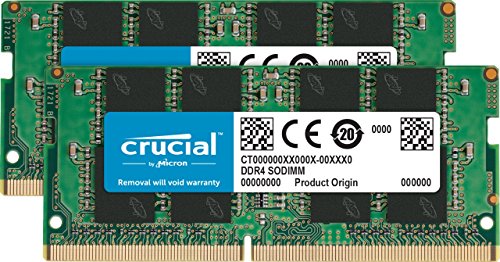
Crucial 16GB DDR4 3200MHz SODIMM
Best for: Laptop upgrades requiring dual-channel memory
- Total Capacity
- 16GB
- Memory Speed
- 3200 MT/S
- CAS Latency
- CL22
- Module Configuration
- 8GBx2
- Form Factor
- SODIMM
- ECC Support
- Unbuffered
View on Amazon: Crucial 16GB DDR4 3200MHz SODIMM Affiliate link
This Crucial 16GB kit includes two 8GB SODIMM modules running at 3200 MT/s with CL22 latency. It is designed for laptops and small form factor PCs. The dual-stick configuration increases bandwidth by up to 30% compared to single sticks. You get faster burst access speeds for improved sequential data throughput. It reduces power consumption by up to 40% to extend battery life on compatible devices.
Pros
- Dual 8GB modules for 16GB total capacity
- 3200 MT/s speed for high bandwidth
- Reduces power consumption by up to 40%
- Optimized for next-generation processors
Cons
- Requires two available SODIMM slots
- Higher latency than CL16 or CL18 options
- Limited to 260-pin SODIMM form factor
Good fit if
- You need to upgrade a laptop with two empty memory slots
- You want maximum bandwidth for multitasking
- You prioritize battery life efficiency
Skip if
- You only have one available SODIMM slot
- You need desktop DIMM modules
- You require lower latency for gaming
Verdict: Crucial 16GB DDR4 3200 SODIMM Kit fits users who need dual-channel performance in laptops. It delivers balanced speed and power efficiency for everyday computing tasks.
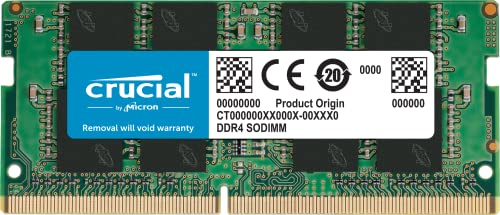
Crucial 16GB DDR4 3200MHz SODIMM
Best for: Upgrading laptops with one free memory slot
- Total Capacity
- 16GB
- Memory Speed
- 3200 MT/S
- CAS Latency
- CL22
- Module Configuration
- 1x16GB
- Form Factor
- SODIMM
- ECC Support
- Unbuffered
View on Amazon: Crucial 16GB DDR4 3200MHz SODIMM Affiliate link
This is a single 16GB DDR4 SODIMM module running at 3200 MT/s with CL22 latency. It features dual-rank architecture and weighs only 0.39 ounces. The design targets laptops and small form-factor PCs, offering up to 30% more bandwidth and reduced power consumption. You should choose this if you need to upgrade a single memory slot in a portable device rather than filling two slots for dual-channel performance.
Pros
- 3200 MT/s speed for improved sequential data throughput
- 16GB capacity in a single SODIMM stick
- Reduces power consumption by up to 40%
- Compact dimensions of 2.74 x 1.18 x 0.44 inches
Cons
- Single stick limits you to single-channel mode
- CL22 latency is standard for this speed tier
- Dual-rank configuration may not fit all ultra-thin laptops
Good fit if
- You are upgrading a laptop with only one available memory slot
- You need 16GB of total system memory
- You prioritize power efficiency and battery life
Skip if
- You want to enable dual-channel performance by using two sticks
- Your motherboard only supports single-rank modules
- You need a kit with matched timing profiles for two sticks
Verdict: Crucial 16GB Single DDR4 3200 SODIMM is a practical upgrade for laptops requiring a single large memory module. It fits users who need to maximize capacity in a device with limited expansion slots.
Specifications side by side
| Spec | Crucial 16GB DDR4 3200MHz SODIMM | Crucial 16GB DDR4 3200MHz SODIMM |
|---|---|---|
| Total Capacity | 16GB | 16GB |
| Memory Speed | 3200 MT/S | 3200 MT/S |
| CAS Latency | CL22 | CL22 |
| Module Configuration | 8GBx2 | 1x16GB |
| Form Factor | SODIMM | SODIMM |
| ECC Support | Unbuffered | Unbuffered |
| Height | 1.18 inches | 1.18 inches |
| Dimensions | 2.74 × 0.44 × 1.18 inches | 2.74 × 0.44 × 1.18 inches |
| Weight | 0.63 ounces | 0.39 ounces |
| Color | Multicolor | Multicolor |
| Model | CT2K8G4SFS832A | CT16G4SFD832A |
| Size | not stated | 16GB Dual Rank |
Frequently asked questions
Can I mix the 16GB single stick with existing memory?
You can mix modules, but performance may vary. The single 16GB stick uses dual-rank architecture, while the kit uses two 8GB sticks. Mixing different configurations can prevent dual-channel mode. For best stability, use identical modules. Check your laptop manual for supported memory combinations before installing mixed sizes.
Do both options support dual-channel mode?
Only the 16GB kit supports native dual-channel operation. It consists of two 8GB sticks that work together to double bandwidth. The single 16GB module runs in single-channel mode unless paired with an identical stick. Dual-channel improves multitasking speeds. Choose the kit if your laptop has two empty slots.
Which is better for gaming laptops?
The 16GB kit is better for gaming. It provides dual-channel memory bandwidth, which boosts frame rates and reduces stuttering. The single 16GB stick lacks this bandwidth advantage. Both run at 3200MHz with CL22 latency. Gamers should prioritize the kit to maximize system performance and responsiveness during intense sessions.
Is the single 16GB stick heavier than the kit?
No, the single 16GB stick is lighter. It weighs 0.39 ounces. The kit weighs 0.63 ounces because it includes two modules. Both share the same SODIMM dimensions of 2.74 by 1.18 inches. The weight difference is minimal. Consider total system weight only if carrying your laptop frequently.
What is the CAS latency for these modules?
Both the kit and the single stick have a CAS latency of CL22. This timing affects how quickly the memory responds to commands. Lower numbers mean faster response, but CL22 is standard for 3200MHz DDR4. Both options offer identical latency specs. You will not see performance differences in latency between the two choices.
Will the single 16GB fit in any laptop?
It fits any laptop with a standard SODIMM slot. The module measures 2.74 inches long and 1.18 inches high. It is designed for notebook computers. Verify your laptop supports 16GB single modules. Some older systems may only support 8GB max per slot. Check your manufacturer specifications before purchasing.