What Is Form Factor? A Guide for DDR4 RAMs Buyers (2026)
As an Amazon Associate we earn from qualifying purchases. Links on this page are affiliate links.
Form Factor Explained for DDR4
When you shop for memory, the first thing you must check is the physical shape. This physical shape is called the form factor. It determines whether the stick will fit into your specific computer. If you buy the wrong one, it simply will not install. You cannot force it. The two main types for DDR4 are UDIMM and SODIMM. Understanding the difference saves you from returning items.
UDIMM stands for Unbuffered Dual In-line Memory Module. These are the long sticks you see in most desktop computers. They are designed for standard desktop towers and some larger all-in-one PCs. The length is typically around 5.25 inches. You will find these in systems that have plenty of space on the motherboard. They offer standard performance for general computing and gaming. If you are building a new desktop PC, you likely need UDIMM. Check your motherboard specifications to confirm the slot type.
SODIMM stands for Small Outline Dual In-line Memory Module. These are much shorter. They are about 2.6 inches long. You will find these in laptops, mini-PCs, and some compact desktops. The smaller size allows manufacturers to keep portable devices thin and lightweight. If you have a laptop, you almost certainly need SODIMM. You cannot use a desktop stick in a laptop. The pins are also spaced differently. Trying to force a UDIMM into a SODIMM slot will damage the hardware.
Why does this matter to you? It matters because compatibility is not optional. Your computer has a specific slot size. You must match the RAM to that slot. Look at your current RAM or your motherboard manual. It will clearly state the form factor. Do not guess. The form factor explained here is the most basic hardware constraint. Get this right, and the rest of the upgrade process is easier. Get it wrong, and you have a useless purchase. Always verify the physical dimensions before you click buy.
Choosing Between UDIMM and SODIMM
UDIMM
UDIMM stands for Unbuffered DIMM. These sticks are designed for desktop computers. They are longer than laptop memory modules. The G.SKILL Ripjaws V is a common example. It measures 5.24 inches in length. This size fits standard desktop motherboards. You get more space for heat spreaders. Timetec offers a 32GB UDIMM option. It suits users who need high capacity. Desktops can handle the extra power draw. You do not need to worry about tight spaces. However, UDIMMs will not fit in laptops. Check your device type before buying. This form factor is standard for desktop PCs.
SODIMM
SODIMM stands for Small Outline DIMM. These are the standard for laptops and mini PCs. They are much shorter than desktop sticks. The Crucial 8GB Kit is a typical SODIMM. It is only 2.7 inches long. This compact size fits inside portable devices. A-Tech also provides 16GB SODIMM kits. G.SKILL offers 32GB SODIMM options too. These are ideal for upgrading older laptops. You save space inside the chassis. The trade-off is lower capacity per stick. You may need to fill all slots. SODIMMs run at standard voltages. They are essential for mobile computing. Always verify your laptop supports DDR4 SODIMM.
Is This Form Factor Right For You
Who needs it
You need to pay close attention to the form factor if you are building a desktop computer or upgrading a standard tower PC. The UDIMM specification is essential for these systems. These modules are longer and designed to fit the standard memory slots found on desktop motherboards. If your computer is a full-sized desktop, you must select UDIMM sticks. They provide the correct physical dimensions and electrical connections for your board. Using the wrong type will prevent the memory from fitting or working. Check your current system specifications or the motherboard manual to confirm you require UDIMM. This ensures compatibility and proper installation without forcing components into slots that are too small. Correct form factor selection is the first step in a successful upgrade.
Who can skip it
You can skip this specific detail if you are upgrading a laptop, tablet, or small form factor PC. These devices use SODIMM modules, which are significantly shorter than desktop RAM. The physical size difference is the primary concern here. If you buy UDIMM sticks for a laptop, they will not fit. Focus on finding SODIMM modules instead. Ensure the new memory matches the length and pin count required by your portable device. Prioritize checking your device manual for the correct SODIMM specifications. Getting the physical shape right is more important than other specs at this stage. Mismatched form factors are the most common cause of installation failures in portable computers. Always verify the module type before purchasing to avoid returns.
Key RAM Terms Explained
Memory Speed
This is the rate at which the RAM transfers data, measured in megatransfers per second. Higher numbers allow faster communication between your processor and memory modules.
Compatible Device
This refers to the specific computer or motherboard that can use the memory stick. You must verify this matches your hardware to ensure the RAM fits and works.
Form Factor
This describes the physical size and shape of the memory module. Common types include UDIMM for desktops and SODIMM for laptops, determining which slot it occupies.
Cas Latency
This number indicates the delay before the RAM responds to a command from the CPU. Lower latency values generally mean faster response times for data access.
Overclocking Profile
This is a preset configuration that allows the RAM to run faster than its base speed. It simplifies tuning by applying specific timings and frequencies automatically.
Ecc Support
Error Correction Code memory detects and fixes data corruption automatically. This feature is critical for servers and workstations where data integrity is more important than speed.
Voltage
This is the electrical power required to run the memory stick. DDR4 typically uses lower voltage than older standards, affecting power consumption and heat generation.
Usb Version
This specifies the generation of the Universal Serial Bus standard. It determines the maximum data transfer rate for connected storage devices like external memory cards.
Quick picks
| # | Product | Best for | Price |
|---|---|---|---|
| 1 | Crucial 8GB Kit (2x4GB) DDR4 2400MHz SODIMM | Basic laptop upgrades requiring 8GB capacity | Check price of Crucial 8GB Kit (2x4GB) DDR4 2400MHz SODIMM on Amazon |
| 2 | Timetec 32GB DDR4 3200MHz UDIMM Memory | Desktop single-stick upgrades | Check price of Timetec 32GB DDR4 3200MHz UDIMM Memory on Amazon |
| 3 | A-Tech 16GB (2x8GB) DDR4 2400MHz SODIMM | Laptop upgrades needing standard DDR4 capacity | Check price of A-Tech 16GB (2x8GB) DDR4 2400MHz SODIMM on Amazon |
| 4 | G.SKILL Ripjaws V 16GB (2x8GB) 3200MHz DDR4 RAM | Desktop PCs needing 16GB DDR4 | Check price of G.SKILL Ripjaws V 16GB (2x8GB) 3200MHz DDR4 RAM on Amazon |
| 5 | G.SKILL Ripjaws 32GB DDR4 2666MHz SODIMM | Laptops needing 32GB DDR4 capacity | Check price of G.SKILL Ripjaws 32GB DDR4 2666MHz SODIMM on Amazon |
Our 5 picks

Crucial 8GB Kit (2x4GB) DDR4 2400MHz SODIMM
Best for: Basic laptop upgrades requiring 8GB capacity
- Form Factor
- SODIMM (what this guide is about)
- Total Capacity
- 8 GB
- Memory Speed
- 2400 MHz
- CAS Latency
- CL17
- Voltage
- 1.2 V
- Module Configuration
- 2 x 4 GB
View on Amazon: Crucial 8GB Kit (2x4GB) DDR4 2400MHz SODIMM Affiliate link
This Crucial kit provides 8GB of DDR4 laptop memory in a 2x4GB configuration. It runs at 2400MHz with CL17 latency on 260-pin SODIMM modules. The 1.2V voltage supports standard laptop power requirements. You should choose this for basic computing tasks where capacity needs are modest. It ensures compatibility with 13th Gen processors and other supported devices through verified testing.
Pros
- 8GB capacity via 2x4GB dual-channel configuration
- 2400MHz speed for standard laptop performance
- 260-pin SODIMM form factor for laptops
- 1.2V operating voltage for efficiency
Cons
- 8GB total capacity is lower than 16GB or 32GB options
- 2400MHz speed is slower than 3200MHz variants
- Non-ECC memory lacks error correction
Good fit if
- You need a budget-friendly upgrade for an older laptop
- You require 8GB of RAM for light multitasking
- You want verified compatibility with 13th Gen systems
Skip if
- You need more than 8GB of total memory
- You require high-speed memory for heavy gaming
- You are building a desktop computer
Verdict: Crucial 8GB DDR4 2400MHz SODIMM suits users needing a reliable, low-capacity upgrade for standard laptops. It is ideal for basic office work or web browsing where 8GB is sufficient.

Timetec 32GB DDR4 3200MHz UDIMM Memory
Best for: Desktop single-stick upgrades
- Form Factor
- UDIMM (what this guide is about)
- Total Capacity
- 32GB
- Memory Speed
- 3200MHz
- CAS Latency
- CL22
- Voltage
- 1.2V
- Module Configuration
- 1x32GB
View on Amazon: Timetec 32GB DDR4 3200MHz UDIMM Memory Affiliate link
This Timetec kit offers 32GB of DDR4 memory in a single stick configuration. It runs at 3200MHz with CL22 latency and operates at 1.2V. The module is a 288-pin UDIMM designed for desktop PCs. It does not include an XMP profile for automatic overclocking. You can use it to upgrade desktop systems that support DDR4 UDIMM modules. It is not suitable for laptops or mini PCs.
Pros
- 32GB single-module capacity
- 3200MHz base speed
- CL22 latency timing
- 1.2V low voltage operation
Cons
- Non-XMP profile requires manual configuration
- Single stick limits dual-channel performance
- Incompatible with laptop or mini PC systems
Good fit if
- You need a single high-capacity stick for desktop upgrades
- You prefer manual memory timing control over XMP
- You want a standard UDIMM for desktop compatibility
Skip if
- You are buying for a laptop or mini PC
- You want automatic XMP overclocking support
- You need dual-channel performance from a single stick
Verdict: Timetec 32GB DDR4 UDIMM Non-XMP provides a high-capacity single-stick solution for desktops. It suits users who need manual timing control and do not require laptop compatibility.
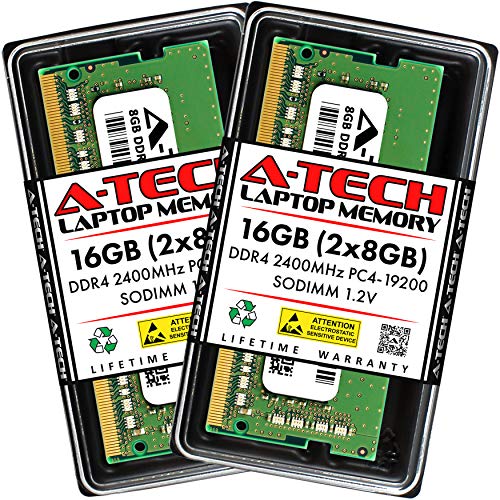
A-Tech 16GB (2x8GB) DDR4 2400MHz SODIMM
Best for: Laptop upgrades needing standard DDR4 capacity
- Form Factor
- SODIMM (what this guide is about)
- Total Capacity
- 16GB
- Memory Speed
- 2400 MHz
- CAS Latency
- CL17
- Voltage
- 1.2V
- Module Configuration
- 2x8GB
View on Amazon: A-Tech 16GB (2x8GB) DDR4 2400MHz SODIMM Affiliate link
This A-Tech kit provides 16GB of DDR4 memory in a 2x8GB configuration. It uses the standard 260-pin SODIMM form factor, making it suitable for laptops, notebooks, and mini PCs. The modules run at 2400MHz with CL17 latency and 1.2V voltage. It is non-ECC and unbuffered. You should choose this if you need a reliable, budget-friendly upgrade for older or entry-level portable systems that rely on DDR4 standards.
Pros
- Standard 260-pin SODIMM form factor for laptops and mini PCs
- 16GB total capacity provided as a 2x8GB dual-channel kit
- Low 1.2V operating voltage for efficient power usage
- Non-ECC unbuffered design compatible with standard consumer hardware
Cons
- 2400MHz speed is slower than modern DDR5 options
- CL17 latency is higher than high-performance DDR4 kits
- No XMP or EXPO profiles for automatic overclocking
Good fit if
- You are upgrading a laptop that requires DDR4 SODIMM modules
- You need a basic 16GB capacity for everyday multitasking
- You are building a budget mini PC or all-in-one system
Skip if
- You require DDR5 speed for high-end gaming or rendering
- You need ECC memory for professional workstation stability
- You want to overclock your system beyond JEDEC standards
Verdict: A-Tech 16GB DDR4 2400MHz SODIMM is a straightforward memory kit for users who need reliable, standard-speed DDR4 for laptops or mini PCs. It fits buyers who prioritize capacity and compatibility over high-frequency performance.

G.SKILL Ripjaws V 16GB (2x8GB) 3200MHz DDR4 RAM
Best for: Desktop PCs needing 16GB DDR4
- Form Factor
- UDIMM (what this guide is about)
- Total Capacity
- 16GB
- Memory Speed
- 3200MT/s
- CAS Latency
- CL16
- Voltage
- 1.35V
- Module Configuration
- 2x8GB
View on Amazon: G.SKILL Ripjaws V 16GB (2x8GB) 3200MHz DDR4 RAM Affiliate link
This G.SKILL RipjawsV kit provides 16GB of DDR4 memory in a 2x8GB configuration. It operates at 3200MT/s with CL16 latency at 1.35V. The 288-pin U-DIMM form factor is designed for desktop PCs. It includes an Intel XMP profile for overclocking. You get JEDEC default settings if overclocking is not enabled. This kit suits desktop builders needing reliable standard memory.
Pros
- 16GB capacity in a 2x8GB kit configuration
- 3200MT/s memory speed with CL16 latency
- Supports Intel XMP for easy overclocking
- Non-ECC 288-pin U-DIMM for desktops
Cons
- Only 16GB total capacity
- DDR4 technology is older than DDR5
- Requires BIOS adjustments for XMP speeds
Good fit if
- You are building a desktop PC
- You need a standard 16GB memory kit
- You want Intel XMP support
Skip if
- You require DDR5 memory
- You need more than 16GB capacity
- You are buying for a laptop
Verdict: G.SKILL RipjawsV 16GB DDR4 U-DIMM is a solid choice for desktop users who need a reliable 16GB kit with XMP support. It fits buyers who prioritize standard DDR4 performance over newer DDR5 speeds.

G.SKILL Ripjaws 32GB DDR4 2666MHz SODIMM
Best for: Laptops needing 32GB DDR4 capacity
- Form Factor
- SODIMM (what this guide is about)
- Total Capacity
- 32GB
- Memory Speed
- 2666MT/s
- CAS Latency
- CL19
- Voltage
- 1.20V
- Module Configuration
- 2x16GB
View on Amazon: G.SKILL Ripjaws 32GB DDR4 2666MHz SODIMM Affiliate link
This G.SKILL kit provides 32GB of DDR4 memory in a 2x16GB configuration. It runs at 2666MT/s with a CAS Latency of CL19. The 260-pin SO-DIMM form factor is designed for laptops and notebooks. It operates at 1.20V and uses Non-ECC technology. You should verify your system's compatibility before purchase. This kit suits users needing high capacity for mobile computing tasks.
Pros
- 32GB total capacity in a 2x16GB kit
- 2666MT/s memory speed
- 260-pin SO-DIMM form factor for laptops
- 1.20V operating voltage
Cons
- Lower 2666MT/s speed compared to modern 3200MT/s+ options
- Non-ECC memory lacks error correction
- CL19 latency is higher than faster kits
Good fit if
- You need 32GB of RAM for a laptop
- Your device requires 260-pin SO-DIMM modules
- You are upgrading an older DDR4 system
Skip if
- You require ECC memory for workstation stability
- Your laptop only supports DDR5 modules
- You need speeds above 2666MT/s for gaming
Verdict: G.SKILL 32GB DDR4 2666MT/s SO-DIMM offers substantial capacity for laptops that support DDR4. It is a solid upgrade for users prioritizing multitasking ability over maximum clock speed.
Specifications side by side
| Spec | Crucial 8GB Kit (2x4GB) DDR4 2400MHz SODIMM | Timetec 32GB DDR4 3200MHz UDIMM Memory | A-Tech 16GB (2x8GB) DDR4 2400MHz SODIMM | G.SKILL Ripjaws V 16GB (2x8GB) 3200MHz DDR4 RAM | G.SKILL Ripjaws 32GB DDR4 2666MHz SODIMM |
|---|---|---|---|---|---|
| Total Capacity | 8 GB | 32GB | 16GB | 16GB | 32GB |
| Memory Speed | 2400 MHz | 3200MHz | 2400 MHz | 3200MT/s | 2666MT/s |
| CAS Latency | CL17 | CL22 | CL17 | CL16 | CL19 |
| Voltage | 1.2 V | 1.2V | 1.2V | 1.35V | 1.20V |
| Module Configuration | 2 x 4 GB | 1x32GB | 2x8GB | 2x8GB | 2x16GB |
| Form Factor | SODIMM | UDIMM | SODIMM | U-DIMM | SO-DIMM |
| ECC Support | Non-ECC | Non-ECC | Non-ECC | Non-ECC | Non-ECC |
| Height | 1.1 inches | not stated | not stated | not stated | not stated |
| Compatible Device | Laptop | Desktop, PC | Laptop | Desktop, PC | Laptop |
| Size | 8GB Kit (4GBx2) | 32GB | 16GB Kit (2 x 8GB) | 16GB (2x8GB) | 32GB |
| Dimensions | 2.7 × 0.2 × 1.1 inches | not stated | 2.74 × 1.18 × 0.15 inches | 5.24 × 0.28 × 1.73 inches | 23.6 × 23.6 × 33.5 inches |
| Weight | 0.32 ounces | not stated | not stated | 3.53 ounces | not stated |
| Color | Multicolor | Black | Multicolor | Black | Black |
| Model | CT2K4G4SFS824A | not stated | AT8G2D4S2400NA0N12V | FBA_4719692004970 | F4-2666C19D-32GRS |
Frequently asked questions
Can I install SODIMM RAM in a desktop computer?
No. SODIMM modules are designed for laptops and mini PCs. Desktop motherboards require UDIMM sticks. The physical dimensions differ significantly. SODIMM modules are shorter and have fewer pins. You cannot force a SODIMM into a UDIMM slot. Always match the form factor to your device type.
What is the difference between UDIMM and SO-DIMM size?
UDIMM sticks are longer than SO-DIMM modules. A typical UDIMM measures around 5.24 inches in length. SODIMM modules are approximately 2.7 inches long. This size difference prevents installation in the wrong device. Desktop PCs use the longer UDIMM format. Laptops use the compact SODIMM format for space efficiency.
Does form factor affect memory speed?
No. The form factor only defines the physical shape and pin layout. It does not dictate performance speed. Both UDIMM and SODIMM modules come in various speeds. You can find 2400MHz or 3200MHz options in either form. Choose the speed that matches your system requirements, not the physical size.
Are SODIMM modules only for laptops?
Mostly yes. SODIMM is the standard for laptops and mini PCs. Some small form factor desktops also use them. However, standard desktop towers require UDIMM. Check your device specifications before buying. Using the wrong form factor will prevent the memory from fitting into the slot correctly.
Can I mix UDIMM and SODIMM in one system?
No. A single motherboard slot accepts only one form factor. You cannot mix UDIMM and SODIMM modules. They have different physical dimensions and pin counts. Each slot is designed for a specific stick type. Ensure all installed RAM sticks match the required form factor for your computer.
Is ECC support related to form factor?
No. ECC (Error Correcting Code) is a data integrity feature. It is independent of the physical form factor. You can find Non-ECC and ECC options in both UDIMM and SODIMM. The presence of ECC depends on the chip design, not the stick shape. Check your motherboard compatibility for ECC support separately.
What determines if RAM fits my laptop?
The SODIMM form factor determines fit for most laptops. You must verify the slot type and physical dimensions. SODIMM modules are shorter and narrower than desktop RAM. Check your laptop manual for supported memory types. Installing the wrong size will damage the slot or prevent booting.