Gigastone or A-Tech? DDR4 RAMs Compared in 2026
As an Amazon Associate we earn from qualifying purchases. Links on this page are affiliate links.
This gigastone vs a tech ddr4 RAM comparison highlights two distinct 16GB kits. Both offer 2x8GB modules with Non-ECC technology. The main difference lies in their intended use. The Gigastone kit targets desktops with higher speeds and RGB lighting. The A-Tech kit is designed for laptops and mini PCs, prioritizing standard voltage and compact form factors. You need to match the RAM to your specific device type and performance needs.
Key differences
| Aspect | Gigastone Game Turbo 16GB DDR4-3200 RGB RAM | A-Tech 16GB (2x8GB) DDR4 2400MHz SODIMM |
|---|---|---|
| Compatible Device | Desktop | Laptop, Mini PC, AIO |
| Form Factor | UDIMM (288-pin) | SO-DIMM (260-pin) |
| Memory Speed | 3200MHz | 2400MHz |
| Voltage | 1.35V | 1.2V |
| CAS Latency | CL16 | CL17 |
| Overclocking Profile | Intel XMP 2.0 | JEDEC Standard |
Which one should you choose?
Choose Gigastone Game Turbo 16GB DDR4-3200 RGB RAM if
- You are upgrading a desktop PC and need higher memory bandwidth.
- You want RGB lighting with eight individual LEDs on the modules.
- You plan to use Intel XMP 2.0 for overclocking profiles.
Choose A-Tech 16GB (2x8GB) DDR4 2400MHz SODIMM if
- You are upgrading a laptop, notebook, or mini PC.
- You require the standard 1.2V JEDEC specification for maximum compatibility.
- You need a compact SO-DIMM form factor that fits small chassis.
Verdict: Choose the Gigastone kit if you are building or upgrading a desktop system that benefits from higher speeds and XMP support. Select the A-Tech kit if you are working with a laptop or small form factor PC that requires SO-DIMM modules and standard voltage settings.
DDR4 Desktop vs Laptop Memory
Compatible Device
The Gigastone Game TURBO kit is explicitly designed for desktop PCs. Its specifications list compatibility with select gaming desktop systems. In contrast, the A-Tech module targets laptops, notebooks, mini PCs, and all-in-one computers. This distinction is critical because desktop and laptop motherboards use different physical slots. You cannot install the larger Gigastone UDIMM into a laptop slot, nor the smaller A-Tech SODIMM into a standard desktop slot. The form factor dictates your upgrade path. If you are building or upgrading a tower, you need the Gigastone. If you are enhancing a portable machine, the A-Tech is the correct choice.
Memory Speed
Speed determines how fast data moves between the memory and the processor. The Gigastone kit operates at 3200MHz, which is significantly faster than the A-Tech module. The A-Tech RAM runs at 2400MHz. This 800MHz difference impacts system responsiveness in data-heavy tasks. Higher speeds allow for quicker loading of applications and smoother multitasking in compatible systems. The Gigastone’s PC4-25600 rating confirms its higher throughput capability compared to the A-Tech’s PC4-19200 rating. For desktop performance, the higher frequency is generally preferred. The A-Tech speed is standard for many entry-level or older laptop configurations.
Form Factor
Physical dimensions and pin counts define compatibility with your hardware. The Gigastone uses a 288-pin UDIMM (Unbuffered DIMM) form factor. It measures 6.02 inches in length and 4.02 inches in width. The A-Tech kit uses a 260-pin SO-DIMM (Small Outline DIMM). It is much smaller, measuring 2.74 inches in length and 1.18 inches in width. The pin count difference prevents physical installation in the wrong device type. The UDIMM is built for the larger expansion slots found in desktop towers. The SO-DIMM is engineered for the compact slots inside laptops and small form-factor PCs. Size and pin count are non-negotiable for fit.
Overclocking Profile
Overclocking profiles allow memory to run faster than its base JEDEC standard speeds. The Gigastone kit supports Intel XMP 2.0 and AMD Ryzen profiles. This feature lets you enable higher speeds, like the advertised 3200MHz, through your motherboard’s BIOS. The A-Tech module operates at a standard 2400MHz without mention of XMP support. It relies on JEDEC standards for operation. If you want to manually tune your system for maximum performance, the Gigastone offers the necessary profile support. The A-Tech is designed for plug-and-play stability at its rated speed without user configuration. This makes the Gigastone more flexible for performance enthusiasts.
Voltage
Voltage affects power consumption and heat generation. The Gigastone kit runs at 1.35V. The A-Tech module operates at 1.2V. Lower voltage is generally more efficient and generates less heat. The 1.2V standard is common for modern DDR4 memory, especially in mobile devices where battery life and thermal management are priorities. The 1.35V on the Gigastone supports its higher speed and RGB lighting features. While the difference is small, the A-Tech is slightly more power-efficient. This lower voltage draw can contribute to longer battery life in laptops. For desktops, the higher voltage is acceptable given the available cooling.
CAS Latency
CAS Latency (CL) measures the delay between a command and the availability of data. Lower numbers indicate faster response times. The Gigastone kit has a CL of 16. The A-Tech module has a CL of 17. The Gigastone’s lower latency means it responds slightly quicker to processor requests. However, the Gigastone also runs at a higher speed, which further reduces the actual time delay in nanoseconds. The A-Tech’s higher latency aligns with its slower base speed. Both kits use Non-ECC memory, so error correction does not impact these latency numbers. The Gigastone offers a marginally tighter timing specification.
Choose your DDR4 kit based on your device
Desktop gamer needing high speed and RGB
The Gigastone kit runs at 3200MHz with CL16 latency, offering faster data transfer for gaming. It features RGB lighting with eight individual LEDs for visual customization. The 1.35V voltage and Intel XMP 2.0 support ensure compatibility with modern desktop motherboards for overclocked performance.
Laptop user needing standard upgrade
The A-Tech module uses SO-DIMM form factor, which is required for laptops and mini PCs. It operates at 2400MHz with 1.2V, matching standard JEDEC specifications for notebook compatibility. This kit provides 16GB of non-ECC memory to boost multitasking capabilities in portable systems.
Budget desktop builder seeking value
This desktop kit delivers 3200MHz speed and CL16 timing, which are standard for performance-oriented builds. The 2x8GB configuration fits dual-channel motherboards. The included XMP profile allows easy setup for higher speeds without manual configuration, making it a practical choice for desktop upgrades.
The products compared

Gigastone Game Turbo 16GB DDR4-3200 RGB RAM
Best for: Desktop gaming with RGB lighting needs
- Total Capacity
- 16GB
- Memory Speed
- 3200MHz
- CAS Latency
- CL16
- Voltage
- 1.35V
- Module Configuration
- 2x8GB
- Form Factor
- UDIMM
View on Amazon: Gigastone Game Turbo 16GB DDR4-3200 RGB RAM Affiliate link
This 16GB kit uses two 8GB UDIMM modules running at 3200MHz. It features a CAS Latency of CL16 and supports Intel XMP 2.0 for easy overclocking. The modules include RGB lighting with eight individual LEDs. It is designed for desktop PCs and operates at 1.35V. You get a non-ECC, unbuffered configuration suitable for standard gaming builds.
Pros
- DDR4 3200MHz speed with PC4-25600 rating
- Low CL16 latency for responsive performance
- Intel XMP 2.0 and AMD Ryzen support
- 8 individual RGB LEDs for lighting customization
Cons
- Non-ECC memory lacks error correction
- No mention of software control for RGB
- Standard voltage may limit extreme overclocking
Good fit if
- You need 3200MHz DDR4 for desktop gaming
- You want CL16 latency for better responsiveness
- You prefer RGB lighting with your build
Skip if
- You require ECC memory for stability
- You need DDR5 speeds for future proofing
- You want software control for RGB effects
Verdict: Gigastone Game TURBO 16GB DDR4 3200MHz fits gamers who want fast CL16 speeds and RGB lighting. It is a solid choice for desktops needing XMP 2.0 support.
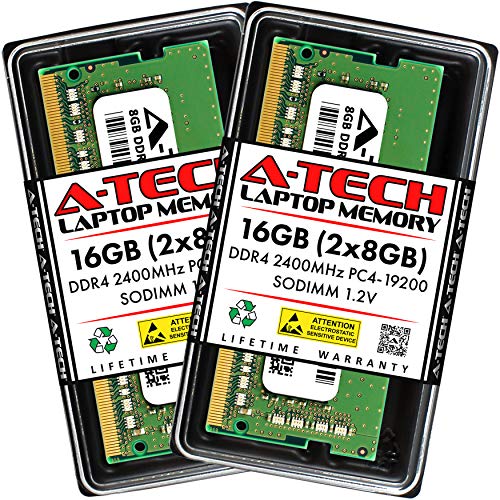
A-Tech 16GB (2x8GB) DDR4 2400MHz SODIMM
Best for: Standard laptop upgrades and office use
- Total Capacity
- 16GB
- Memory Speed
- 2400 MHz
- CAS Latency
- CL17
- Voltage
- 1.2V
- Module Configuration
- 2x8GB
- Form Factor
- SODIMM
View on Amazon: A-Tech 16GB (2x8GB) DDR4 2400MHz SODIMM Affiliate link
This A-Tech kit provides 16GB of DDR4 SODIMM memory for laptops and mini PCs. It runs at 2400 MHz with CL17 latency and 1.2V voltage. The non-ECC unbuffered design ensures compatibility with standard consumer systems. You get two 8GB modules for a dual-channel setup. It is a solid upgrade for everyday computing tasks where speed is not the highest priority.
Pros
- 16GB total capacity (2x8GB modules)
- DDR4 SODIMM form factor for laptops
- Standard 1.2V low voltage operation
- Non-ECC unbuffered configuration
- Limited Lifetime Warranty included
Cons
- 2400 MHz speed is slower than 3200 MHz kits
- No RGB lighting or aesthetic features
- Basic CL17 latency timing
Good fit if
- You need affordable RAM for a standard laptop
- You want a reliable 16GB upgrade for office work
- You prefer standard black modules without lights
Skip if
- You require high-speed 3200 MHz performance
- You want RGB lighting for your build
- You are building a desktop PC
Verdict: A-Tech 16GB DDR4 2400MHz Laptop RAM is a practical, budget-friendly choice for users who prioritize capacity and compatibility over high-speed performance.
Specifications side by side
| Spec | Gigastone Game Turbo 16GB DDR4-3200 RGB RAM | A-Tech 16GB (2x8GB) DDR4 2400MHz SODIMM |
|---|---|---|
| Total Capacity | 16GB | 16GB |
| Memory Speed | 3200MHz | 2400 MHz |
| CAS Latency | CL16 | CL17 |
| Voltage | 1.35V | 1.2V |
| Module Configuration | 2x8GB | 2x8GB |
| Form Factor | UDIMM | SODIMM |
| ECC Support | Non-ECC | Non-ECC |
| Height | 0.59 inches | not stated |
| Compatible Device | Desktop | Laptop |
| Overclocking Profile | Intel XMP | not stated |
| Dimensions | 6.02 × 4.02 × 0.59 inches | 2.74 × 1.18 × 0.15 inches |
| Weight | 2.08 ounces | not stated |
| Size | 2x8 GB | 16GB Kit (2 x 8GB) |
| Color | 3200 | Multicolor |
| Model | not stated | AT8G2D4S2400NA0N12V |
Frequently asked questions
Can I use the Gigastone DDR4 in my laptop?
No, you cannot. The Gigastone Game Turbo kit uses UDIMM form factor modules. These are designed specifically for desktop computers. Laptops require SODIMM modules, which are smaller and have a different pin layout. Using desktop RAM in a laptop will not work physically or electrically.
Does the A-Tech RAM support overclocking profiles?
The provided specifications do not list an overclocking profile for this module. It runs at a standard 2400MHz speed. The Gigastone kit, by contrast, explicitly supports Intel XMP 2.0. This allows desktop users to easily enable higher speeds like 3200MHz through their motherboard BIOS settings.
Is the A-Tech memory suitable for gaming?
It is not ideal for high-performance gaming. The A-Tech kit runs at 2400MHz with CL17 latency. The Gigastone kit offers 3200MHz speed and CL16 latency. Faster memory and lower latency generally provide better frame rates and smoother performance in modern games on desktop systems.
What is the voltage difference between these kits?
The Gigastone kit operates at 1.35V. The A-Tech specifications do not list a voltage value. Standard DDR4 typically runs at 1.2V, but XMP profiles often require higher voltages like 1.35V. You should check your specific A-Tech product manual for its voltage requirements.
Do I need ECC for these RAM kits?
No, you do not need ECC for these kits. Both the Gigastone and A-Tech modules are Non-ECC. Error Correction Code memory is primarily used in servers and workstations for data integrity. Standard desktop and laptop users do not require ECC for typical tasks or gaming.
How much space does the Gigastone RAM take up?
The Gigastone modules measure 6.02 inches in length and 0.59 inches in height. They are standard UDIMM sticks. This size is designed to fit into desktop motherboard slots. The A-Tech SODIMM is much smaller, measuring 2.74 inches in length, to fit in laptops.