Kingston vs Samsung ddr5 RAMs: Which Brand Fits You?
As an Amazon Associate we earn from qualifying purchases. Links on this page are affiliate links.
When you compare kingston vs samsung ddr5 RAM, you see two distinct approaches to desktop memory. Both modules are designed for desktop use and feature black casings. The Samsung unit is a single 16GB stick running at 4800MHz. The Kingston kit offers 32GB total capacity across two sticks, with a faster 5200MT/s speed. You need to decide if you prioritize raw capacity and speed or a simpler single-stick configuration.
Key differences
| Aspect | Samsung 16GB DDR5 4800MHz UDIMM | Kingston Fury Beast 32GB 5200MT/s DDR5 RAM |
|---|---|---|
| Capacity | 16GB | 32GB (2x16GB) |
| Memory Speed | 4800MHz | 5200MT/s |
| CAS Latency | not listed | CL40 |
| Overclocking Profile | not listed | Intel XMP 3.0 |
| ECC Support | Non-ECC | not listed |
Which one should you choose?
Choose Samsung 16GB DDR5 4800MHz UDIMM if
- You need a single 16GB module for a basic desktop upgrade.
- You want a standard UDIMM with Non-ECC support.
Choose Kingston Fury Beast 32GB 5200MT/s DDR5 RAM if
- You require 32GB of total memory for multitasking.
- You want faster 5200MT/s speeds with Intel XMP 3.0 profiles.
Verdict: Choose the Samsung module if you need a simple, single-stick 16GB upgrade. Pick the Kingston kit if you need higher capacity and faster speeds with easy overclocking profiles.
Kingston vs Samsung DDR5 Specs
Memory Speed
The Kingston FURY Beast operates at 5200MT/s, while the Samsung module runs at 4800MHz. Higher speeds generally allow data to transfer faster between your RAM and processor. This difference of 400MT/s may benefit tasks that rely heavily on memory bandwidth, such as large dataset processing or high-refresh-rate gaming. If your motherboard supports it, the Kingston kit provides a faster baseline performance. The Samsung stick is slightly slower but still meets standard DDR5 requirements for most desktop builds.
Total Capacity
You are comparing a single 16GB Samsung stick against a 32GB Kingston kit. The Kingston package includes two 16GB modules, giving you double the total memory of the single Samsung unit. More capacity allows you to run more applications simultaneously without slowing down your system. If you need 32GB for your workflow, the Kingston option delivers that in one purchase. The Samsung module would require buying two sticks to match that capacity, which may affect cost and slot availability.
CAS Latency
The Kingston kit lists a CAS Latency of CL40. The Samsung product data does not specify a latency value for its 4800MHz speed. Lower latency numbers typically mean the RAM responds faster to commands from the CPU. Since the Kingston speed is higher, a CL40 latency is reasonable for that frequency. Without the Samsung latency figure, you cannot directly compare responsiveness. However, the Kingston specification is clearly defined, allowing you to calculate performance metrics if needed.
Overclocking Profile
The Kingston FURY Beast supports Intel XMP 3.0. This profile allows you to easily overclock your RAM to its rated speed by enabling a setting in your BIOS. The Samsung module is listed as non-ECC and unbuffered but does not mention an XMP profile in its data. While standard DDR5 runs at its base speed, XMP support ensures the Kingston kit reaches its full 5200MT/s potential with minimal effort. If you plan to tweak settings, the Kingston profile is a clear advantage.
Form Factor
Both modules use the UDIMM form factor, which is standard for desktop computers. The Samsung stick is a single module, whereas the Kingston is a kit of two modules. Both fit into standard DIMM slots on desktop motherboards. The physical dimensions differ slightly, with the Kingston having a low-profile heat spreader. This design may help with airflow around the CPU cooler. Both are compatible with standard desktop cases and motherboards, making them equally easy to install in terms of slot type.
Which RAM Kit Fits Your Desktop Build
Users needing maximum capacity for heavy multitasking
The Kingston FURY Beast provides 32GB of total memory capacity. This kit includes two 16GB modules, giving you double the storage of the Samsung single stick. The higher 5200MT/s speed also supports faster data transfer. This combination is ideal for users running many applications simultaneously or handling large files in desktop environments.
Buyers seeking a single standard speed module
The Samsung module is a single 16GB UDIMM stick running at 4800MHz. It uses a standard non-ECC configuration suitable for typical desktop builds. If you only need one stick or prefer a lower speed profile, this single-module option offers a straightforward solution without the complexity of a dual-kit setup.
Enthusiasts wanting overclocking profiles and efficiency
The Kingston kit features Intel XMP 3.0 support for improved stability during overclocking. It also highlights increased efficiency and a low-profile heat spreader design. These features suggest better thermal management and performance tuning capabilities compared to the standard Samsung module, which lacks these specific enthusiast-focused specifications in its data.
The products compared

Samsung 16GB DDR5 4800MHz UDIMM
Best for: basic DDR5 desktop upgrades
- Capacity
- 16 GB
- Memory Speed
- 4800 MHz
- Kit Configuration
- 1x16GB
- Form Factor
- UDIMM
- ECC Support
- Non-ECC
- Compatible Device
- Desktop
View on Amazon: Samsung 16GB DDR5 4800MHz UDIMM Affiliate link
This Samsung module offers 16GB of DDR5 memory running at 4800MHz. It uses a standard UDIMM form factor and is non-ECC. The black stick measures 6 inches long and weighs just 0.6 ounces. It is designed for desktop computers. You will find this kit suitable for general computing tasks where moderate speed is sufficient. It fits systems that support DDR5 UDIMM slots.
Pros
- 16GB single-module capacity
- DDR5 speed of 4800MHz
- Standard UDIMM form factor
- Lightweight at 0.6 ounces
Cons
- Lower speed than 5200MT/s competitors
- Smaller 16GB capacity per stick
- Non-ECC configuration limits error correction
Good fit if
- You need a single 16GB stick for upgrades
- You prioritize standard UDIMM compatibility
- You build a budget-conscious desktop
Skip if
- You require high-speed 5200MT/s performance
- You need ECC memory for stability
- You want larger 32GB single modules
Verdict: Samsung 16GB DDR5-4800 Desktop RAM is a solid entry-level option for users who need basic DDR5 capacity without premium speeds. It fits buyers who value standard form factors over high-frequency performance.
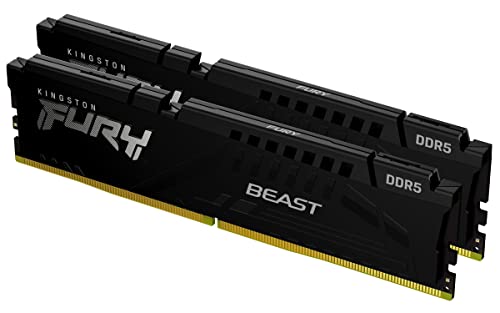
Kingston Fury Beast 32GB 5200MT/s DDR5 RAM
Best for: compact desktop builds needing 32GB
- Capacity
- 32GB
- Memory Speed
- 5200MT/s
- CAS Latency
- CL40
- Kit Configuration
- 2x16GB
- Overclocking Profile
- Intel XMP 3.0
- Compatible Device
- Desktop
View on Amazon: Kingston Fury Beast 32GB 5200MT/s DDR5 RAM Affiliate link
This Kingston kit offers 32GB of DDR5 memory running at 5200MT/s with a CAS latency of CL40. It uses a low-profile heat spreader and supports Intel XMP 3.0 for overclocking. The design is compact, measuring just 0.26 inches wide. You should choose this if you need reliable desktop performance with a slim profile that fits easily into most cases.
Pros
- 32GB capacity in a 2x16GB kit
- 5200MT/s memory speed
- Low-profile 0.26 inch width
- Intel XMP 3.0 support
Cons
- Higher CAS latency of CL40
- Non-ECC memory type
- No RGB lighting included
Good fit if
- You need a low-profile kit for tight cases
- You want 32GB of desktop memory
- You use Intel XMP for overclocking
Skip if
- You require ECC memory for servers
- You want RGB lighting effects
- You need higher speeds than 5200MT/s
Verdict: Kingston FURY Beast 32GB DDR5 fits users who prioritize compact size and standard desktop performance over ECC reliability or high-speed overclocking.
Specifications side by side
| Spec | Samsung 16GB DDR5 4800MHz UDIMM | Kingston Fury Beast 32GB 5200MT/s DDR5 RAM |
|---|---|---|
| Capacity | 16 GB | 32GB |
| Memory Speed | 4800 MHz | 5200MT/s |
| CAS Latency | not stated | CL40 |
| Kit Configuration | 1x16GB | 2x16GB |
| Form Factor | UDIMM | not stated |
| Overclocking Profile | not stated | Intel XMP 3.0 |
| ECC Support | Non-ECC | not stated |
| Compatible Device | Desktop | Desktop |
| Size | 16GB | 32GB |
| Dimensions | 0.1 × 6 × 1 inches | 5.25 × 0.26 × 1.37 inches |
| Weight | 0.6 ounces | 2.72 ounces |
| Color | Black | Black |
| Model | M323R2GA3BB0-CQK | KF552C40BBK2-32 |
Frequently asked questions
Does Samsung DDR5 RAM support error correction?
No, the Samsung 16GB DDR5 module does not support ECC. It is a Non-ECC stick designed for standard desktop use. This means it lacks the hardware ability to detect and fix data corruption on the fly. You should choose this only if your motherboard and workflow do not require error-correcting code memory for stability.
Is the Kingston FURY Beast compatible with Intel XMP?
Yes, the Kingston kit supports Intel XMP profiles. This allows you to easily enable the rated 5200MT/s speed in your BIOS without manual timing adjustments. It ensures the memory runs at its specified performance level out of the box. This feature simplifies setup for users who want reliable, high-speed performance without complex configuration.
Which RAM kit offers more total memory capacity?
The Kingston FURY Beast offers more capacity with 32GB total. It is configured as two 16GB modules, doubling the storage of the single 16GB Samsung stick. This extra space is beneficial for heavy multitasking or running memory-intensive applications. You get significantly more room for your data and programs with the Kingston option.
What form factor do these DDR5 sticks use?
Both modules use the UDIMM form factor, which stands for Unbuffered DIMM. This is the standard size for most desktop computers. It fits directly into the memory slots on your motherboard without requiring additional buffers. This makes both the Samsung and Kingston options compatible with standard desktop builds and upgrades.
Does the Samsung RAM support overclocking beyond its base speed?
The Samsung module is rated for 4800MHz and is positioned as a basic entry-level option. The product data does not list specific overclocking profiles or XMP support for this stick. It is designed for users who need standard capacity and reliable basic performance rather than high-frequency tuning or manual speed adjustments.
Are these RAM kits suitable for laptop upgrades?
No, both kits are designed for desktop computers. The Samsung stick is a UDIMM, and the Kingston kit is for desktop use. Laptops typically require SO-DIMM modules, which are smaller. You should not attempt to install these desktop-specific sticks into a laptop, as they will not fit the physical slots or connect correctly.