Lexar JumpDrive V10 16GB Flash vs Lexar JumpDrive D400 64GB Metal: Spec Comparison
As an Amazon Associate we earn from qualifying purchases. Links on this page are affiliate links.
This comparison looks at the lexar jumpdrive v10 16gb USB vs 64gb jumpdrive dual drive. Both drives let you move files between computers. They share similar weights and basic portability. The main difference is connectivity. The V10 uses a standard USB-A plug. The D400 offers both USB-C and USB-A ports. This makes the D400 better for modern devices. The V10 is a simpler, older style drive.
Key differences
| Aspect | Lexar JumpDrive V10 16GB Flash Drive | Lexar JumpDrive D400 64GB Metal Dual Drive |
|---|---|---|
| Storage Capacity | 16 GB | 64 GB |
| USB Version | not listed | USB 3.1 |
| Connector Type | USB Type-A | USB Type-C, USB Type-A |
| Read Speed | not listed | Up to 130MB/s |
| Material | Plastic | Metal |
| Security | not listed | Lexar DataShield |
Which one should you choose?
Choose Lexar JumpDrive V10 16GB Flash Drive if
- You need a small, lightweight drive for basic file transfers on older computers.
- You prefer a simple plug-and-play design without dual connectors.
- You only need 16GB of storage for small files.
Choose Lexar JumpDrive D400 64GB Metal Dual Drive if
- You connect to devices with USB-C ports, like newer phones or laptops.
- You want faster transfer speeds with USB 3.1 performance.
- You need more storage space for photos or videos.
Verdict: The Lexar JumpDrive D400 is the more versatile choice due to its dual connectors and higher capacity. It suits users with modern devices who need faster speeds. The V10 is a basic option for simple tasks on older systems.
Lexar V10 vs D400 Spec Showdown
storage capacity
You need to decide how much data you want to carry. The Lexar JumpDrive V10 offers 16 GB of storage space. This is enough for a modest collection of documents and a few photos. The Lexar JumpDrive D400 provides 64 GB. This is four times the capacity of the V10. You can store significantly more high-resolution photos, longer videos, or larger software files with the D400. If you frequently move large media files, the D400 gives you much more room to work without constantly managing space.
connectivity
The connection type changes how you use each drive. The V10 uses a standard USB-A plug. It connects directly to older laptops and desktop computers. You do not need adapters for these systems. The D400 features dual connectors with both USB Type-C and USB Type-A ports. This design lets you plug it into modern smartphones, tablets, and newer laptops that only have Type-C ports. It also works with traditional USB-A ports. The dual connector makes the D400 much more versatile across different device types.
usb version
Transfer speeds depend on the USB standard used. The D400 supports USB 3.1. This standard allows for faster data transfer rates compared to older versions. The V10 does not list its specific USB version in the provided specifications. Without that data, we cannot confirm its speed capabilities. However, the D400 explicitly states it delivers up to 130MB/s read speeds. This suggests the D400 will move files more quickly, especially if you are transferring large video files or many small documents. The V10 likely relies on older, slower USB 2.0 standards.
build quality
Physical construction affects durability and protection. The D400 features a stylish metal housing with a swivel design. This metal casing offers better protection for the internal components against drops and impacts. The swivel mechanism also covers the connector when not in use. The V10 includes a protective cap. This cap must be attached to prevent loss. The D400 integrated swivel design is generally more convenient and less prone to losing parts. The metal build also feels more premium and robust compared to the standard plastic construction typical of the V10.
device compatibility
You should check which devices you plan to use. The V10 is compatible with PC and Mac systems. It works well for traditional computer file transfers. The D400 is compatible with Android, PC, and Mac systems. The Android support is a key advantage. You can use the D400 to expand storage on your phone or tablet directly. The V10 cannot connect to Android devices without additional adapters. If you use a smartphone for work or media, the D400 offers direct connectivity that the V10 simply cannot provide.
Which Lexar JumpDrive Should You Buy?
Mac or Android users needing dual ports
You need a drive that works with modern devices. The D400 features both USB Type-C and Type-A connectors. This dual design lets you connect directly to newer laptops and Android phones without adapters. It also offers 64 GB of storage and reads data at up to 130 MB/s for faster transfers.
Users needing basic PC or Mac storage
You want a simple plug-and-play solution for older computers. The V10 uses a standard USB-A connector that fits most PCs and Macs. It includes a protective cap and an LED activity light to confirm your files are saving. The 16 GB capacity is sufficient for essential documents and small media files.
Buyers wanting metal build and security
You prefer durable hardware and data protection. The D400 has a stylish metal housing with a swivel design that protects the connectors. It also includes Lexar DataShield for advanced security. The five-year limited warranty provides long-term peace of mind. You get more storage space and higher speed performance in this package.
The products compared

Lexar JumpDrive V10 16GB Flash Drive
Best for: Basic file storage and transfer
- Storage Capacity
- 16 GB
- Size
- 16GB
- Dimensions
- 4 × 0.48 × 5.5 inches
- Weight
- 0.64 ounces
View on Amazon: Lexar JumpDrive V10 16GB Flash Drive Affiliate link
The Lexar JumpDrive V10 is a 16GB USB flash drive designed for basic file storage and transfer. It features a compact plastic body measuring 5.5 inches in length and includes a protective cap to shield the connector. An LED activity indicator lets you know when data is being written or read. This drive is compatible with both PC and Mac systems, making it a simple solution for everyday portable storage needs.
Pros
- 16 GB storage capacity for photos and documents
- LED activity indicator shows data transfer status
- Includes protective cap for connector safety
- Compatible with PC and Mac systems
Cons
- 16 GB capacity is limited compared to 64 GB options
- Plastic build is less durable than metal drives
- No USB Type-C interface available
Good fit if
- You need a low-cost drive for small files
- You want a simple plug-and-play USB drive
- You need a backup for documents and photos
Skip if
- You require large storage for video files
- You need a USB Type-C connection
- You want a metal build for durability
Verdict: Lexar JumpDrive V10 16GB USB Flash Drive is a basic storage option for users who only need to move small files between computers. It suits those who prioritize simplicity and low cost over high capacity or premium materials.
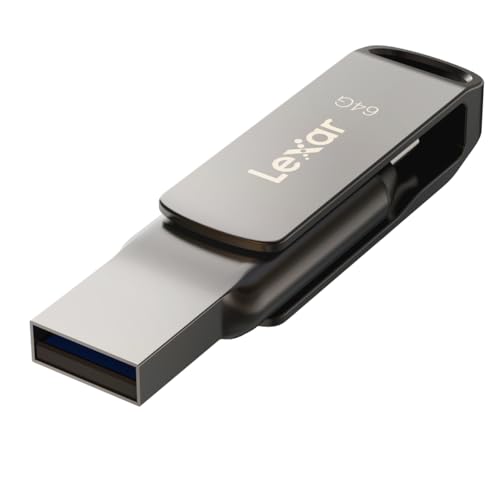
Lexar JumpDrive D400 64GB Metal Dual Drive
Best for: Cross-device backup with dual connectivity
- Storage Capacity
- 64GB
- USB Version
- USB 3.1
- Connector Type
- USB Type-C, USB Type-A
- Read Speed
- Up to 130MB/s
- Features
- OTG Dual Drive, Metal Casing
- Dimensions
- 5.45 × 4 × 0.4 inches
View on Amazon: Lexar JumpDrive D400 64GB Metal Dual Drive Affiliate link
This drive offers 64GB of storage with dual USB-C and USB-A connectors. It features a metal swivel design and supports USB 3.1 speeds up to 130MB/s. The included DataShield app provides security for Android, PC, and Mac users. It suits those needing cross-device compatibility and reliable backup capacity without relying on cloud services.
Pros
- Dual USB-C and USB-A connectors for versatile connectivity
- 64GB storage capacity for substantial file backup
- Metal housing with swivel design for physical protection
- Read speeds up to 130MB/s via USB 3.1
Cons
- Smaller 64GB capacity compared to other options in this comparison
- Heavier build at 0.63 ounces due to metal casing
- No mention of included physical security key or hardware encryption
Good fit if
- You need to transfer files between Android devices and computers
- You prefer a durable metal build over plastic drives
- You require both USB-C and USB-A ports on one drive
Skip if
- You need more than 64GB of local storage
- You require USB 3.2 or Thunderbolt speeds
- You want a lighter, more compact plastic drive
Verdict: Lexar JumpDrive D400 64GB Dual Drive fits users who need reliable cross-platform backup with a durable metal build. It is ideal for those prioritizing dual connectivity over higher capacity or faster transfer rates.
Specifications side by side
| Spec | Lexar JumpDrive V10 16GB Flash Drive | Lexar JumpDrive D400 64GB Metal Dual Drive |
|---|---|---|
| Storage Capacity | 16 GB | 64GB |
| USB Version | not stated | USB 3.1 |
| Connector Type | not stated | USB Type-C, USB Type-A |
| Read Speed | not stated | Up to 130MB/s |
| Size | 16GB | 64GB |
| Features | not stated | OTG Dual Drive, Metal Casing |
| Dimensions | 4 × 0.48 × 5.5 inches | 5.45 × 4 × 0.4 inches |
| Weight | 0.64 ounces | 0.63 ounces |
| Color | Purple,Teal | Titanium |
| Model | LJDV10-16GABNL | LJDD400064G-BNQNU |
Frequently asked questions
Does the Lexar JumpDrive D400 work with Android phones?
Yes, the D400 supports OTG dual drive functionality. This allows you to connect it directly to Android devices using its USB-C connector. You can transfer files between your phone and the drive without needing an extra adapter. This makes it convenient for backing up photos or documents on the go.
What is the transfer speed of the Lexar JumpDrive D400?
The Lexar JumpDrive D400 has a read speed of 130MB/s. This speed helps you retrieve files quickly from the drive. It uses USB 3.1 technology to ensure efficient data movement. This makes it suitable for handling larger files compared to standard USB 2.0 drives.
Is the Lexar JumpDrive V10 durable for daily use?
The V10 is a basic storage option designed for simplicity. It does not feature a metal casing like the D400. Its plastic construction is lightweight and compact. You should handle it with care to avoid damage. It is best suited for stationary storage or occasional file transfers between computers.
Can I use the Lexar JumpDrive D400 with a MacBook?
Yes, the D400 works with MacBooks. It includes a USB-C connector that fits directly into newer MacBook models. It also has a USB-A connector for older computers. This dual connectivity ensures compatibility across various devices without needing additional dongles or adapters for data access.
What colors are available for the Lexar JumpDrive V10?
The Lexar JumpDrive V10 is available in Purple and Teal. These color options allow you to identify the drive easily among other accessories. The specific model number is LJDV10-16GABNL. You can choose the color that best suits your personal preference or organizational system.
How heavy is the Lexar JumpDrive D400?
The Lexar JumpDrive D400 weighs 0.63 ounces. This light weight makes it easy to carry in a pocket or bag. The metal casing adds a slight heft but remains portable. Its compact dimensions of 4 inches in width ensure it does not take up much space.
Does the Lexar JumpDrive V10 have a sliding cap?
The provided data does not specify the cap mechanism for the V10. It is described as a basic flash drive with a standard USB-A plug. You should check the product images for visual confirmation of its design. It focuses on simple file storage rather than advanced protective features.
Which drive has more storage capacity?
The Lexar JumpDrive D400 has significantly more storage. It offers 64GB of space, which is four times the capacity of the V10. The V10 provides only 16GB. If you need to store large video files or extensive document libraries, the D400 is the better choice.