Overclocking Profile Explained: What It Means for DDR5 RAMs
As an Amazon Associate we earn from qualifying purchases. Links on this page are affiliate links.
Overclocking Profile Explained for DDR5
An overclocking profile is a preset configuration stored in the memory module’s SPD. It allows your system to run at higher speeds than the standard JEDEC baseline. Without this profile, your RAM defaults to safe, slower settings to ensure stability across all motherboards. Enabling the profile applies the manufacturer’s tested timings and voltages automatically. This saves you from manual tuning in the BIOS.
Intel XMP is the standard for platforms using Intel processors. It stands for Extreme Memory Profile. When you see this label, your motherboard reads the data and adjusts the memory controller to match the specified frequency and latency. AMD EXPO serves the same function for Ryzen systems. It optimizes the Infinity Fabric clock and memory timings for AMD chipsets. Both profiles aim to deliver peak performance with minimal user intervention.
These profiles are labeled clearly on product listings. Look for terms like XMP 3.0 or EXPO in the specifications. The listing will show the target speed, such as 6000 MHz, along with CAS latency numbers. You must also check the required voltage. DDR5 typically runs at 1.1 volts by default, but overclocked profiles may require 1.35 volts or higher. Ensure your motherboard supports the specific profile version.
Why does this matter to you? Higher speeds reduce data transfer latency. This improves performance in gaming, video editing, and large file transfers. However, not all motherboards support every speed. You must verify compatibility before buying. Using the wrong profile can cause boot failures or system instability. Always read the motherboard’s QVL list to confirm support. Understanding overclocking profile explained helps you choose the right kit for your hardware. It ensures you get the speed you paid for without complex manual configuration.
Intel XMP vs AMD EXPO
Intel XMP
Intel Extreme Memory Profile is a preset configuration stored in the memory module’s SPD. It allows your system to run at higher speeds than the standard JEDEC baseline. Without this profile, your RAM defaults to safe, slower settings to ensure stability across all motherboards. Enabling XMP in your BIOS applies specific voltage, timing, and frequency settings optimized for Intel platforms. This profile is essential for unlocking the full performance potential of DDR5 kits designed for Intel processors. For example, the Kingston Fury Beast 32GB 5200MT/s uses Intel XMP to deliver stable performance for Intel-based builds. It is ideal for users prioritizing case compatibility and straightforward setup over aesthetic lighting or ultra-low latency. If you are building with an Intel CPU, this profile ensures your memory runs at its advertised speed without manual tweaking.
AMD EXPO
AMD Extended Profiles for Overclocking is a preset configuration similar to XMP but optimized for AMD Ryzen platforms. It allows your system to run at higher speeds than the standard JEDEC baseline. Without this profile, your RAM defaults to safe, slower settings to ensure stability across all motherboards. Enabling EXPO in your BIOS applies specific voltage, timing, and frequency settings optimized for AMD processors. This profile is essential for unlocking the full performance potential of DDR5 kits designed for AMD systems. For example, the G.SKILL Trident Z5 Neo 64GB DDR5-6000 CL30 is a high-capacity memory kit optimized for AMD systems. It fits users who need 64GB of fast, low-latency RAM with simple EXPO setup. If you are building with an AMD CPU, this profile ensures your memory runs at its advertised speed without manual tweaking.
Who Needs Overclocking Profiles
Who needs it
You need these profiles if you plan to push your DDR5 memory beyond its standard baseline speeds. Intel XMP and AMD EXPO allow your system to run at higher frequencies and tighter timings than the safe JEDEC defaults. This matters for users who demand maximum performance from their hardware. If you are building a gaming PC or a workstation for heavy data processing, every bit of speed helps. These profiles ensure your RAM works in harmony with your CPU and motherboard. Without them, your system falls back to slower, stable settings. This limits your potential performance. Enabling the profile is simple, but it unlocks the full capability of your modules. You should choose kits with verified profiles if you want reliability at higher speeds. This ensures stability while you gain the performance benefits. It is essential for enthusiasts who want to squeeze every drop of power from their build without manual tweaking.
Who can skip it
You can ignore these profiles if you prioritize stability over raw speed. Standard JEDEC settings are designed for broad compatibility and long-term reliability. If you use your computer for office work, web browsing, or media consumption, the performance difference is negligible. Your daily tasks do not require high memory bandwidth. In these cases, focusing on capacity and latency might be more beneficial than chasing higher frequencies. You also should skip complex overclocking if you are not comfortable with BIOS adjustments. Manual tuning can lead to instability if done incorrectly. Relying on the default safe settings ensures your system boots correctly every time. This is ideal for users who want a set-it-and-forget-it experience. You save time and avoid potential troubleshooting. For general use, the standard speeds are more than sufficient. Prioritize ease of use and compatibility instead of performance gains that you will not notice in everyday scenarios.
DDR5 Overclocking Terms
SPD
Serial Presence Detect is a chip on the module storing factory settings. It tells your motherboard the safe baseline speed and timings to use during boot.
JEDEC
The standard body setting the baseline speed for stability. All DDR5 RAM runs at JEDEC specs first. Profiles override this for higher performance.
XMP
Intel Extreme Memory Profile. An Intel-specific preset that unlocks higher speeds. Enable it in BIOS to run your RAM faster than the default settings.
EXPO
AMD Extended Profiles for Overclocking. An AMD-specific preset for higher speeds. It works similarly to XMP but is optimized for AMD platform stability.
CAS Latency
The delay before data is accessed. Lower numbers mean faster response. It is a key timing spec in overclocking profiles alongside speed.
Voltage
The power required to run the RAM. Higher speeds need more voltage. Profiles specify the exact voltage needed for stable overclocking.
ECC
Error Correction Code. It fixes data errors automatically. Most gaming RAM lacks ECC. Server modules include it for critical data integrity.
Form Factor
The physical size of the module. DIMM fits desktops. SO-DIMM fits laptops. Ensure the profile supports your specific physical hardware type.
Quick picks
| # | Product | Best for | Price |
|---|---|---|---|
| 1 | Kingston Fury Beast 32GB 5200MT/s DDR5 RAM | Intel desktops with limited case height | Check price of Kingston Fury Beast 32GB 5200MT/s DDR5 RAM on Amazon |
| 2 | G.SKILL Trident Z5 Neo 64GB DDR5-6000 CL30 | AMD desktops needing 64GB capacity | Check price of G.SKILL Trident Z5 Neo 64GB DDR5-6000 CL30 on Amazon |
| 3 | TEAMGROUP T-Force Delta RGB 32GB 6000MHz DDR5 RAM | Dual-platform builders needing stable 6000MHz performance | Check price of TEAMGROUP T-Force Delta RGB 32GB 6000MHz DDR5 RAM on Amazon |
| 4 | Corsair Vengeance DDR5 32GB 5200MHz | Intel desktops needing stable 32GB DDR5 | Check price of Corsair Vengeance DDR5 32GB 5200MHz on Amazon |
| 5 | G.SKILL Trident Z5 RGB 32GB 6000MHz RAM | Dual-platform DDR5 overclocking | Check price of G.SKILL Trident Z5 RGB 32GB 6000MHz RAM on Amazon |
| 6 | G.SKILL Trident Z5 RGB 32GB 6000MHz RAM | Dual-platform DDR5 gaming builds | Check price of G.SKILL Trident Z5 RGB 32GB 6000MHz RAM on Amazon |
Our 6 picks
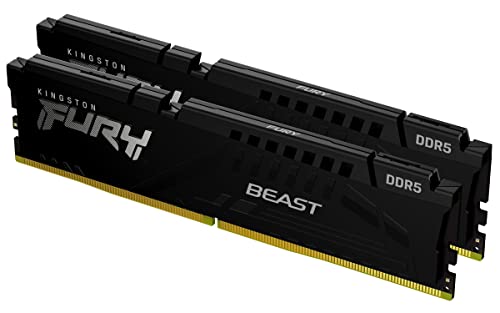
Kingston Fury Beast 32GB 5200MT/s DDR5 RAM
Best for: Intel desktops with limited case height
- Overclocking Profile
- Intel XMP (what this guide is about)
- Capacity
- 32GB
- Memory Speed
- 5200MT/s
- CAS Latency
- CL40
- Kit Configuration
- 2x16GB
- Compatible Device
- Desktop
View on Amazon: Kingston Fury Beast 32GB 5200MT/s DDR5 RAM Affiliate link
This Kingston FURY Beast kit offers 32GB of DDR5 memory running at 5200MT/s with Intel XMP 3.0 support. It features a low-profile heat spreader for compatibility with smaller cases. The CL40 latency is standard for this speed tier. It suits desktop users who need reliable overclocking profiles without bulky cooling solutions.
Pros
- Intel XMP 3.0 support for easy overclocking
- Low-profile heat spreader design
- 5200MT/s memory speed
- 32GB total capacity in a 2x16GB kit
Cons
- CL40 CAS latency is higher than faster DDR5 kits
- No RGB lighting features listed in specifications
- Limited to Intel XMP 3.0 profile only
Good fit if
- You use an Intel platform requiring XMP 3.0
- You have a compact case with low clearance
- You want stable overclocking without complex tuning
Skip if
- You need AMD EXPO compatibility
- You prefer lower latency like CL30 or CL32
- You want RGB lighting customization
Verdict: Kingston FURY Beast 32GB DDR5 5200MT/s provides solid performance for Intel-based builds. It is ideal for users prioritizing case compatibility and straightforward XMP 3.0 setup over aesthetic lighting or ultra-low latency.

G.SKILL Trident Z5 Neo 64GB DDR5-6000 CL30
Best for: AMD desktops needing 64GB capacity
- Overclocking Profile
- AMD EXPO (what this guide is about)
- Capacity
- 64GB
- Memory Speed
- 6000MT/s
- CAS Latency
- CL30-40-40-96
- Kit Configuration
- 2x32GB
- Form Factor
- 288-pin U-DIMM
View on Amazon: G.SKILL Trident Z5 Neo 64GB DDR5-6000 CL30 Affiliate link
This G.SKILL kit delivers 64GB of DDR5 memory running at 6000MT/s with a tight CL30 latency. It uses the AMD EXPO profile for easy setup on compatible platforms. The 1.40V voltage supports stable performance for demanding desktop workloads. You get a high-capacity dual-channel set designed for modern AMD systems. This configuration suits users who need substantial memory bandwidth without complex tuning.
Pros
- 64GB total capacity in a 2x32GB configuration
- 6000MT/s speed with CL30-40-40-96 timings
- Includes AMD EXPO overclocking profile
- Non-ECC U-DIMM form factor
- 1.40V operating voltage
Cons
- Only supports AMD EXPO, not Intel XMP
- Limited to AMD X670, B650, and similar platforms
- No RGB lighting or heat spreader color options listed
Good fit if
- You build on an AMD desktop platform
- You need 64GB of system memory
- You want low latency with EXPO support
Skip if
- You use an Intel motherboard
- You require RGB lighting customization
- You need Intel XMP 3.0 profiles
Verdict: G.SKILL Trident Z5 Neo 64GB DDR5 is a high-capacity memory kit optimized for AMD systems. It fits users who need 64GB of fast, low-latency RAM with simple EXPO setup.

TEAMGROUP T-Force Delta RGB 32GB 6000MHz DDR5 RAM
Best for: Dual-platform builders needing stable 6000MHz performance
- Overclocking Profile
- Intel XMP, AMD EXPO (what this guide is about)
- Capacity
- 32GB
- Memory Speed
- 6000MHz
- CAS Latency
- CL38
- Kit Configuration
- 2x16GB
- ECC Support
- On-die ECC
View on Amazon: TEAMGROUP T-Force Delta RGB 32GB 6000MHz DDR5 RAM Affiliate link
This 32GB DDR5 kit runs at 6000MHz with CL38 latency. It supports both Intel XMP 3.0 and AMD EXPO for easy overclocking on compatible motherboards. The white heatsink includes RGB lighting and a strengthened PMIC cooling design. On-die ECC helps maintain system stability. It is a solid option for builders who need broad platform compatibility and reliable performance.
Pros
- Supports Intel XMP 3.0 and AMD EXPO profiles
- 6000MHz speed with CL38 CAS latency
- Includes on-die ECC for stability
- Strengthened PMIC cooling design
Cons
- Higher CL38 latency than some 6000MHz competitors
- No mention of dedicated app control for RGB
- Limited to desktop use only
Good fit if
- You want one kit for both Intel and AMD platforms
- You prefer white aesthetics for your build
- You value on-die ECC for stability
Skip if
- You need lower latency than CL38
- You are building a mini-ITX case with strict height limits
- You require specific software control for lighting effects
Verdict: TEAMGROUP T-Force Delta RGB DDR5 32GB offers broad compatibility with dual-profile support, making it ideal for users switching between Intel and AMD systems who prioritize stability over ultra-low latency.
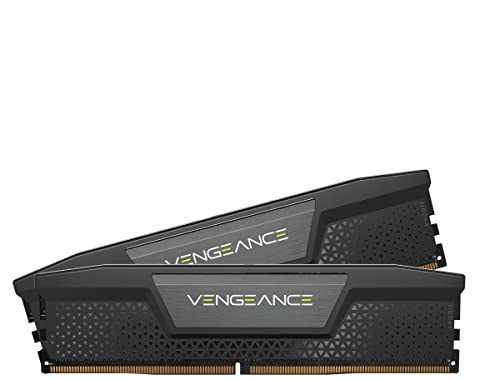
Corsair Vengeance DDR5 32GB 5200MHz
Best for: Intel desktops needing stable 32GB DDR5
- Overclocking Profile
- Intel XMP (what this guide is about)
- Capacity
- 32GB
- Memory Speed
- 5200MHz
- CAS Latency
- CL40
- Kit Configuration
- 2x16GB
- Voltage
- 1.25V
View on Amazon: Corsair Vengeance DDR5 32GB 5200MHz Affiliate link
This Corsair Vengeance kit provides 32GB of DDR5 memory running at 5200MT/s with CL40 latency. It supports Intel XMP profiles for straightforward overclocking. The design includes onboard voltage regulation to help stabilize higher frequencies. You get real-time monitoring and custom profile saving through the iCUE software. It is a practical choice for desktop PCs needing reliable, entry-level DDR5 speeds.
Pros
- 32GB capacity (2x16GB) for multitasking
- Intel XMP support for easy overclocking
- Onboard voltage regulation for stability
- Custom XMP profiles via iCUE software
Cons
- 5200MT/s speed is lower than competitors
- Intel XMP only, no AMD EXPO support
- CL40 latency is higher than faster kits
Good fit if
- You use an Intel-based desktop system
- You want stable voltage regulation
- You need 32GB of RAM
Skip if
- You use an AMD Ryzen system
- You need speeds above 5200MT/s
- You want RGB lighting effects
Verdict: Corsair Vengeance DDR5 32GB 5200MHz offers stable performance for Intel users who prioritize voltage regulation over raw speed. It fits those building a reliable desktop without needing AMD compatibility.

G.SKILL Trident Z5 RGB 32GB 6000MHz RAM
Best for: Dual-platform DDR5 overclocking
- Overclocking Profile
- Intel XMP, AMD EXPO (what this guide is about)
- Capacity
- 32GB
- Memory Speed
- Up to 6000MT/s
- CAS Latency
- CL36
- Kit Configuration
- 2x16GB
- Form Factor
- 288-pin U-DIMM
View on Amazon: G.SKILL Trident Z5 RGB 32GB 6000MHz RAM Affiliate link
This G.SKILL kit offers 32GB of DDR5 memory running at 6000MT/s with CL36 latency. It supports both Intel XMP 3.0 and AMD EXPO profiles for easy overclocking on compatible motherboards. The matte black design fits most builds. You get dual 16GB sticks for desktop PCs. This option suits users who want broad platform compatibility without choosing between Intel or AMD specific profiles.
Pros
- Supports Intel XMP 3.0 and AMD EXPO
- Runs at 6000MT/s speed
- Low CL36 latency
- Matte black aesthetic
Cons
- Requires motherboard and CPU support for XMP or EXPO
- Non-ECC memory type
- Higher voltage at 1.35V
Good fit if
- You need a single kit for Intel or AMD systems
- You want 6000MT/s speed with tight timings
- You prefer a low-profile matte black design
Skip if
- You require ECC memory for workstation stability
- You need more than 32GB of total capacity
- Your motherboard does not support DDR5 overclocking profiles
Verdict: G.SKILL Trident Z5 RGB DDR5 32GB provides versatile overclocking support for both Intel and AMD platforms. It is a solid choice for gamers seeking balanced speed and latency in a dual-channel configuration.

G.SKILL Trident Z5 RGB 32GB 6000MHz RAM
Best for: Dual-platform DDR5 gaming builds
- Overclocking Profile
- Intel XMP, AMD EXPO (what this guide is about)
- Capacity
- 32GB
- Memory Speed
- 6000MT/s
- CAS Latency
- CL36
- Kit Configuration
- 2x16GB
- Form Factor
- 288-pin U-DIMM
View on Amazon: G.SKILL Trident Z5 RGB 32GB 6000MHz RAM Affiliate link
This G.SKILL kit delivers 32GB of DDR5 memory at 6000MT/s with CL36 latency. It supports both Intel XMP 3.0 and AMD EXPO profiles for easy overclocking. The silver heat spreader fits standard desktop builds. You get dual 16GB sticks for balanced performance. It requires BIOS adjustments to reach maximum speed. This kit suits users who want broad platform compatibility without vendor lock-in.
Pros
- Supports both Intel XMP 3.0 and AMD EXPO profiles
- High speed of 6000MT/s with CL36 latency
- 32GB capacity provided as a 2x16GB kit
- Non-ECC design for standard desktop gaming
Cons
- Requires manual BIOS or overclocking adjustments
- No mention of RGB lighting control software
- Voltage fixed at 1.35V
Good fit if
- You use an AMD motherboard and want EXPO support
- You need a single kit for both Intel and AMD systems
- You want high-speed DDR5 for gaming performance
Skip if
- You require plug-and-play stability without BIOS changes
- You need 64GB of total system memory
- You prefer a lower latency profile like CL30
Verdict: G.SKILL Trident Z5 RGB DDR5 32GB offers versatile compatibility for both Intel and AMD platforms. It is ideal for builders who want high-speed memory that works across different motherboard vendors.
Specifications side by side
| Spec | Kingston Fury Beast 32GB 5200MT/s DDR5 RAM | G.SKILL Trident Z5 Neo 64GB DDR5-6000 CL30 | TEAMGROUP T-Force Delta RGB 32GB 6000MHz DDR5 RAM | Corsair Vengeance DDR5 32GB 5200MHz | G.SKILL Trident Z5 RGB 32GB 6000MHz RAM | G.SKILL Trident Z5 RGB 32GB 6000MHz RAM |
|---|---|---|---|---|---|---|
| Capacity | 32GB | 64GB | 32GB | 32GB | 32GB | 32GB |
| Memory Speed | 5200MT/s | 6000MT/s | 6000MHz | 5200MHz | Up to 6000MT/s | 6000MT/s |
| CAS Latency | CL40 | CL30-40-40-96 | CL38 | CL40 | CL36 | CL36 |
| Kit Configuration | 2x16GB | 2x32GB | 2x16GB | 2x16GB | 2x16GB | 2x16GB |
| Form Factor | not stated | 288-pin U-DIMM | not stated | not stated | 288-pin U-DIMM | 288-pin U-DIMM |
| Overclocking Profile | Intel XMP 3.0 | AMD EXPO | Intel XMP 3.0 & AMD Expo | Intel XMP 3.0 | Intel XMP 3.0 & AMD EXPO | Intel XMP 3.0 & AMD EXPO |
| Voltage | not stated | 1.40V | not stated | 1.25V | 1.35V | 1.35V |
| ECC Support | not stated | Non-ECC | On-die ECC | not stated | Non-ECC | Non-ECC |
| Compatible Device | Desktop | Desktop, PC | Desktop | Desktop, PC | Desktop, PC | Desktop, PC |
| Size | 32GB | 64GB | 32GB(2x16GB) | 32GB (2x16GB) | 32GB (2x 16GB) | 32GB |
| Dimensions | 5.25 × 0.26 × 1.37 inches | 6.3 × 5.51 × 0.39 inches | 5.68 × 0.28 × 1.79 inches | 5.3 × 1.4 × 0.3 inches | 8 × 6 × 3 inches | 5.91 × 4.8 × 0.59 inches |
| Weight | 2.72 ounces | 6.35 ounces | 1.59 ounces | 1.31 ounces | 5.93 ounces | 3.17 ounces |
| Color | Black | Black | White | Black | Matte Black | Silver |
| Model | KF552C40BBK2-32 | F5-6000J3040G32GX2-TZ5N | FF4D532G6000HC38ADC01 | CMK32GX5M2B5200C40 | F5-6000J3636F16GA2-TZ5RK | F5-6000J3636F16GX2 |
Frequently asked questions
What is the difference between Intel XMP and AMD EXPO?
Intel XMP and AMD EXPO are both overclocking profiles that store preset configurations in the memory SPD. They allow systems to run faster than JEDEC baselines. The main difference is platform compatibility. XMP is designed for Intel motherboards, while EXPO targets AMD platforms. Some kits, like the TEAMGROUP T-Force Delta RGB, support both for dual-platform builders.
Do I need an overclocking profile for DDR5 RAM?
Yes, if you want speeds higher than the standard JEDEC baseline. Without a profile, RAM defaults to safe, slower settings. Profiles like XMP or EXPO enable higher frequencies and tighter timings. For example, the Kingston Fury Beast uses XMP 3.0 to achieve 5200MT/s. The G.SKILL Trident Z5 Neo uses EXPO for 6000MHz speeds on AMD systems.
Which RAM kits support both Intel XMP and AMD EXPO?
Several kits offer dual-profile support for flexibility. The TEAMGROUP T-Force Delta RGB 32GB supports both Intel XMP and AMD EXPO. The G.SKILL Trident Z5 RGB models also list both profiles in their attributes. This makes them ideal for users switching between Intel and AMD desktops. Other kits, like the Corsair Vengeance, are optimized for Intel XMP only.
What does CAS Latency tell you about RAM performance?
CAS Latency measures the delay before RAM starts delivering data. Lower numbers indicate faster response times. For instance, the G.SKILL Trident Z5 Neo has a CL30 latency, which is tighter than the Kingston Fury Beast’s CL40. The G.SKILL Trident Z5 RGB sits at CL36. These values matter for latency-sensitive tasks alongside memory speed.
Can I use AMD EXPO on an Intel motherboard?
Generally, no. AMD EXPO is optimized for AMD platforms. Intel motherboards typically use Intel XMP profiles. However, some kits include both profiles for versatility. The G.SKILL Trident Z5 RGB supports both, allowing use on either platform. If a kit only lists EXPO, like the Trident Z5 Neo, it is intended for AMD systems. Check the attributes for compatibility.
How does memory size affect overclocking stability?
Larger capacities can sometimes impact stability at high speeds. The G.SKILL Trident Z5 Neo offers 64GB capacity for high-demand tasks. It uses EXPO for stable operation. Smaller kits, like the 32GB Kingston Fury Beast, often achieve stable speeds with XMP more easily. The TEAMGROUP T-Force Delta RGB uses 32GB for broad compatibility. Higher capacities require careful voltage and timing management.
What voltage do these DDR5 kits operate at?
Voltage requirements vary by model and speed. The G.SKILL Trident Z5 RGB kits operate at 1.35V. Other kits may use different voltages to achieve their rated speeds. For example, the Kingston Fury Beast runs at 5200MT/s with XMP. The Corsair Vengeance also supports Intel XMP for stable voltage regulation. Always check the specific attributes for the required voltage for your target speed.