Patriot Memory Patriot Signature Line 16GB or Patriot Memory Patriot Viper Elite II? Which Patriot Memory Model to Buy
As an Amazon Associate we earn from qualifying purchases. Links on this page are affiliate links.
When you compare patriot memory patriot signature line 16gb vs patriot viper elite ii, you see two distinct approaches to desktop upgrades. Both kits are DDR4 memory modules designed for desktop computers and operate at standard voltages. The Patriot Signature Line offers a complete 16GB dual-channel kit with 2666MHz speed. In contrast, the Viper Elite II is a single 8GB stick running at 3200MHz. You need to decide if total capacity or higher frequency matters more for your specific build.
Key differences
| Aspect | Patriot Signature Line 16GB 2666MHz DDR4 RAM | Patriot Viper Elite II 8GB 3200MHz RAM |
|---|---|---|
| Capacity | 16GB (2x8GB) | 8GB (1x8GB) |
| Memory Speed | 2666MHz | 3200MHz |
| CAS Latency | 19-19-19-43 | CL18 (16-20-40) |
| Overclocking Profile | not listed | XMP 2.0 |
| Kit Configuration | Dual Channel Kit | Single Module |
Which one should you choose?
Choose Patriot Signature Line 16GB 2666MHz DDR4 RAM if
- You need 16GB of total RAM for multitasking or gaming.
- You want a pre-tested dual-channel kit that is ready to install.
- You prefer a standard 2666MHz speed with a lower CAS latency profile.
Choose Patriot Viper Elite II 8GB 3200MHz RAM if
- You prioritize higher memory speed at 3200MHz for specific performance gains.
- You are looking for XMP 2.0 support for easy overclocking.
- You need a single stick to fill one slot on your motherboard.
Verdict: The Patriot Signature Line is the better choice if you need double the capacity in a ready-to-use dual-channel configuration. The Viper Elite II suits users who want higher speeds and XMP support for a single stick upgrade. Your decision depends on whether you need more total memory or faster individual module performance.
Speed, Latency, and Capacity
Memory Speed
The Patriot Viper Elite II runs at 3200MHz, which is faster than the Patriot Signature Line’s 2666MHz speed. Higher frequency generally allows data to transfer more quickly between the memory and the CPU. This difference matters for gaming and heavy multitasking. You will notice the Viper Elite II handling data-intensive tasks with less delay. The Signature Line operates at a standard speed that works well for basic office work or media consumption. If you want the quickest possible response times, the higher clock speed of the Viper Elite II gives it a clear advantage.
Capacity
You get 16GB total with the Patriot Signature Line, split into two 8GB sticks. The Patriot Viper Elite II is listed here as an 8GB single module. More memory lets you run more applications at once without slowing down your system. The Signature Line provides double the storage capacity of this specific Viper Elite II configuration. If you plan to stream, edit video, or keep many browser tabs open, the extra 8GB in the Signature Line is useful. The Viper Elite II may require you to buy a second stick to match that capacity, which adds cost and complexity.
CAS Latency
The Patriot Viper Elite II features a CAS Latency of CL18. The Patriot Signature Line has timings of 19-19-19-43. Lower latency means the memory responds faster to commands from the processor. While the Viper Elite II has a lower number, it also runs at a higher speed. The actual performance difference depends on your specific CPU and motherboard. However, CL18 is a tighter timing than CL19. For users who prioritize responsive system behavior over raw bandwidth, the Viper Elite II offers slightly better latency characteristics in this comparison.
Overclocking Profile
The Patriot Viper Elite II supports XMP 2.0. This feature allows your motherboard to automatically overclock the RAM to its rated speed with one click in the BIOS. The Patriot Signature Line does not list XMP support in its published features. Without XMP, you might need to manually configure settings or run at JEDEC standard speeds. XMP ensures you get the full 3200MHz performance without complex tweaking. If you want a hassle-free upgrade that delivers its maximum advertised speed, the Viper Elite II is the better choice.
ECC Support
Both products are Non-ECC memory. Error Correcting Code is used in servers to fix data errors automatically. Desktop users rarely need this feature. Since both kits lack ECC, there is no difference in this category. You do not need to worry about data corruption from memory errors in typical desktop usage. This spec is neutral for your decision. Focus instead on speed and capacity, which are the factors that actually impact your daily computing experience on a standard desktop computer.
Which Patriot Memory Kit Fits You
Users needing 16GB standard capacity
The Signature Line provides a complete 16GB kit (2x8GB) at 2666MHz. You get a dual-channel configuration ready for desktop use. This option suits you if you need more total memory for multitasking, rather than higher speed on a single stick. It runs at 1.2V with standard timings.
Gamers seeking maximum single-stick speed
The Viper Elite II offers 3200MHz speed on an 8GB single module. This higher frequency benefits gaming and latency-sensitive tasks. It supports XMP 2.0 for easy overclocking. Choose this if your motherboard supports higher speeds and you prefer a single stick upgrade path or plan to add more later.
Budget-conscious desktop builders
The Signature Line includes two 8GB sticks for a full 16GB capacity. This dual-channel setup is often more cost-effective than buying two single sticks. You get reliable 2666MHz performance for general desktop work. It is a straightforward solution for users who prioritize capacity and standard speeds over high-frequency benchmarks.
The products compared
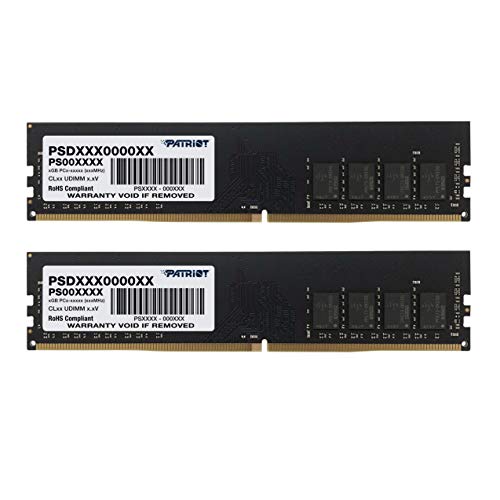
Patriot Signature Line 16GB 2666MHz DDR4 RAM
Best for: Everyday desktop computing and general upgrades
- Total Capacity
- 16GB
- Memory Speed
- 2666MHz
- CAS Latency
- 19
- Voltage
- 1.2V
- Module Configuration
- 2 x 8GB
- Form Factor
- UDIMM
View on Amazon: Patriot Signature Line 16GB 2666MHz DDR4 RAM Affiliate link
This Patriot Memory kit provides 16GB of DDR4 RAM in a 2x8GB configuration. It runs at 2666MHz with timings of 19-19-19-43 at 1.2V. The modules are non-ECC unbuffered UDIMMs in a black finish. You get a limited lifetime warranty on this tested hardware. It suits desktop users who need reliable capacity for everyday computing tasks without requiring high-speed overclocking.
Pros
- 16GB total capacity via 2x8GB modules
- Standard 2666MHz speed for compatibility
- Low 1.2V power consumption
- Limited lifetime warranty included
Cons
- 2666MHz speed is slower than 3200MHz options
- Basic heat spreader design offers minimal cooling
- Standard timings may limit high-performance gaming
Good fit if
- You need a budget-friendly 16GB upgrade
- You prioritize capacity over maximum speed
- You want a reliable daily driver kit
Skip if
- You require speeds above 3000MHz
- You are building a high-end gaming PC
- You need ECC memory for servers
Verdict: Patriot Signature Line 16GB DDR4 2666MHz is a sensible choice for users who need dependable capacity without paying for higher speeds. It fits well in standard desktop builds where 3200MHz is not a strict requirement.

Patriot Viper Elite II 8GB 3200MHz RAM
Best for: Single-stick desktop memory upgrades
- Total Capacity
- 8GB
- Memory Speed
- 3200MHz
- CAS Latency
- CL18
- Voltage
- 1.35V
- Module Configuration
- 1x8GB
- Form Factor
- UDIMM
View on Amazon: Patriot Viper Elite II 8GB 3200MHz RAM Affiliate link
This single 8GB DDR4 module runs at 3200MHz with CL18 latency. It features XMP 2.0 support for easy overclocking on Intel and AMD platforms. The compact design fits most desktop cases. You should buy this if you need a single stick to upgrade an existing system or build a low-cost PC. It offers reliable performance without bulk.
Pros
- 3200MHz memory speed for fast data transfer
- XMP 2.0 support for automatic overclocking
- Tested for compatibility with latest Intel and AMD platforms
- Compact single-module design
Cons
- Only 8GB capacity, which may limit multitasking
- Single stick configuration, not a dual-channel kit
- Higher latency (CL18) compared to faster kits
Good fit if
- You need to add a single memory stick to an existing PC
- You are building a budget desktop with limited slots
- You want easy XMP 2.0 setup without manual tweaking
Skip if
- You require 16GB or more for heavy multitasking
- You need dual-channel performance for gaming
- You prefer lower latency for maximum speed
Verdict: Patriot Viper Elite II 8GB 3200MHz DDR4 is a solid choice for single-stick upgrades or budget builds. It fits users who need simple, reliable expansion without the complexity of dual-channel kits.
Specifications side by side
| Spec | Patriot Signature Line 16GB 2666MHz DDR4 RAM | Patriot Viper Elite II 8GB 3200MHz RAM |
|---|---|---|
| Total Capacity | 16GB | 8GB |
| Memory Speed | 2666MHz | 3200MHz |
| CAS Latency | 19 | CL18 |
| Voltage | 1.2V | 1.35V |
| Module Configuration | 2 x 8GB | 1x8GB |
| Form Factor | UDIMM | UDIMM |
| ECC Support | Non-ECC | not stated |
| Height | 1.22 inches | 1.38 inches |
| Compatible Device | Desktop | Desktop |
| Overclocking Profile | not stated | Intel XMP |
| Dimensions | 5.24 × 0.11 × 1.22 inches | 5.24 × 0.2 × 1.38 inches |
| Weight | 1.55 ounces | 1.27 ounces |
| Size | 16GB 2666Mhz (2x8GB) | 8GB 3200MHz Single Module |
| Color | Multicolor | Multicoloured |
| Model | PSD416G2666K | PVE248G320C8 |
Frequently asked questions
Is the Patriot Signature Line 16GB better for multitasking?
Yes, if you need more total memory. This kit provides 16GB capacity in a 2x8GB configuration. That double the amount of the single 8GB stick in the Viper Elite II. More RAM helps when you run many applications at once. It is a sensible choice for users who prioritize capacity over speed.
Does the Viper Elite II support dual-channel mode?
No, this specific item is a single stick. The product data lists it as an 8GB single module. Dual-channel performance requires matching pairs of memory sticks. You would need to buy two of these to enable that mode. It is designed for simple, single-stick upgrades or budget builds.
Which Patriot RAM has lower latency?
The Viper Elite II features CL18 latency. The Signature Line data does not list a CAS latency value. Lower latency generally means faster response times for data access. If CL18 is your benchmark, the Viper Elite II is the faster option. The Signature Line focuses on standard 2666MHz operation.
Can I use the Viper Elite II in a laptop?
No, the data specifies it is for desktops. The compatible device field lists Desktop for this module. Laptop memory usually uses SO-DIMM form factors, which are smaller. This is a standard DIMM stick. It will not fit into most portable computers. You need desktop-specific RAM for your tower.
What is the physical size of the Signature Line stick?
It measures 5.24 inches in length and 1.22 inches in height. The width is 0.11 inches. These dimensions are standard for desktop DDR4 modules. The weight is 1.55 ounces. You should check your case clearance to ensure the cooler fits with this profile.
Is the Viper Elite II black or multicolored?
The color is listed as Multicoloured. The Signature Line is Black. This difference matters for build aesthetics. You can choose based on your case theme. The Viper Elite II offers a varied look. The Signature Line provides a uniform black finish.
Which kit is lighter?
The Viper Elite II is lighter. It weighs 1.27 ounces. The Signature Line weighs 1.55 ounces. The difference is small but measurable. The single stick in the Viper is lighter than the two-stick kit. Weight rarely impacts performance but may matter for shipping.
Do I need CL18 latency for gaming?
It depends on your CPU and motherboard. CL18 is a standard latency for 3200MHz RAM. The Viper Elite II uses this spec. Lower latency can improve frame times in some games. However, speed also matters. The 3200MHz frequency helps data transfer. Choose based on your system balance.