RDIMM vs LRDIMM DDR4 RAMS: Which Should You Buy?
As an Amazon Associate we earn from qualifying purchases. Links on this page are affiliate links.
When comparing RDIMM vs LRDIMM ddr4 RAM, you are looking at two registered memory types designed for servers and workstations. Both options provide ECC support to protect data integrity during heavy workloads. The main difference lies in how they manage electrical load. One uses a standard register, while the other employs a load-reduction buffer. This buffer allows for higher capacities per channel, making LRDIMM ideal for high-density setups. Your choice depends on whether you need maximum speed or maximum density.
Key differences
| Aspect | Micron 64GB 3200MHz DDR4 RDIMM | Nemix RAM 32GB DDR4 2133MHz ECC LRDIMM |
|---|---|---|
| Form Factor | RDIMM | LRDIMM |
| Capacity | 64GB | 32GB |
| Memory Speed | 3200 MHz | 2133 MHz |
| Voltage | not listed | 1.2V |
| ECC Support | RDIMM | ECC |
Which one should you choose?
Choose Micron 64GB 3200MHz DDR4 RDIMM if
- You prioritize higher memory speed for performance-critical tasks.
- You require a 64GB module for your server configuration.
- Your platform specifically supports standard registered DIMMs.
Choose Nemix RAM 32GB DDR4 2133MHz ECC LRDIMM if
- You need to maximize capacity per channel in a high-density server.
- Your workload involves virtualization or in-memory databases.
- You require verified fitment for 288-pin LRDIMM slots.
Verdict: Choose the RDIMM if speed and higher individual capacity are your primary concerns. Select the LRDIMM if you need to fill high-DIMM-count boards with maximum density for heavy multi-socket workloads. Both are reliable ECC options for server environments.
RDIMM vs LRDIMM Specs Compared
Memory Speed
The Micron 64GB 3200MHz DDR4 RDIMM operates at 3200 MHz. This is a significantly higher clock speed than the Nemix RAM 32GB DDR4 2133MHz ECC LRDIMM, which runs at 2133 MHz. Higher memory speed generally allows for faster data transfer rates between the CPU and the RAM modules. For workloads that are sensitive to bandwidth, such as in-memory databases or heavy virtualization tasks, the 3200 MHz module offers a clear performance advantage. You should choose the Micron RDIMM if raw speed is your primary metric for server memory selection.
Capacity
Capacity is a major differentiator between these two modules. The Micron RDIMM provides 64GB of storage on a single stick. In contrast, the Nemix LRDIMM offers 32GB per module. If you need to maximize the total memory installed in your server without using as many slots, the 64GB RDIMM allows you to reach higher total system memory with fewer physical DIMMs. This can be beneficial for systems with limited memory slots. However, if you prefer to populate more slots for redundancy or specific channel configurations, the 32GB LRDIMM provides more individual units.
Voltage
Voltage specifications indicate the power required for operation. The Nemix LRDIMM operates at 1.2V. The data for the Micron RDIMM does not explicitly list its voltage, though standard DDR4 typically runs at 1.2V. Since the Micron data does not confirm the voltage, we cannot definitively state a difference based on the provided specifications. Both are standard DDR4 modules, so they likely share similar power efficiency profiles. You should verify the voltage in your server manual if power consumption is a critical constraint, but the listed data shows no clear winner here.
Form Factor
Both modules use the 288-pin form factor, which is standard for DDR4 server memory. However, the internal architecture differs. The Micron product is a Registered DIMM (RDIMM), while the Nemix product is a Load-Reduced DIMM (LRDIMM). LRDIMMs include a buffer that reduces the electrical load on the memory controller, allowing for higher capacities per channel. RDIMMs use a register to buffer the command and address lines. Your server motherboard must support the specific type. If your board supports LRDIMM, the Nemix module enables higher density configurations that the Micron RDIMM cannot match in the same slot count.
ECC Support
Error Correction Code (ECC) support is essential for server stability. The Micron RDIMM is explicitly listed as RDIMM, which inherently includes ECC and registration. The Nemix LRDIMM is also listed as ECC support. Both modules provide error correction to detect and fix memory data corruption, which is critical for 24/7 server operations. Since both offer ECC functionality, neither has an advantage in this specific category. You should rely on your server's BIOS to ensure ECC is enabled for both types. The choice between them should be based on speed and capacity rather than error correction capabilities.
Which DDR4 Memory Type Fits Your Server
High-performance server needing speed
Choose the Micron 64GB 3200MHz DDR4 RDIMM when maximum bandwidth matters. Its 3200 MHz speed significantly outpaces the 2133 MHz alternative. The 64GB capacity provides ample space for demanding applications. This registered module handles heavy workloads efficiently while maintaining data integrity through ECC support.
System requiring high capacity density
Select the Nemix 32GB DDR4 LRDIMM for setups prioritizing density over speed. The load-reduced buffering lowers electrical load on the memory bus. This allows high-DIMM-count boards to reach higher capacities per channel. It is ideal for virtualization and in-memory databases needing extensive memory resources.
Budget-conscious server builder
The Nemix 32GB DDR4 LRDIMM offers a practical entry point for server memory upgrades. While slower than the 3200 MHz option, its 2133 MHz speed is sufficient for many standard server tasks. The 1.2V voltage rating ensures efficient power usage. This module fits well in platforms supporting LRDIMM configurations.
Quick picks
| # | Product | Best for | Price |
|---|---|---|---|
| 1 | Micron 64GB 3200MHz DDR4 RDIMM | server memory upgrades | Check price of Micron 64GB 3200MHz DDR4 RDIMM on Amazon |
| 2 | Nemix RAM 32GB DDR4 2133MHz ECC LRDIMM | High-capacity server virtualization | Check price of Nemix RAM 32GB DDR4 2133MHz ECC LRDIMM on Amazon |
The products compared

Micron 64GB 3200MHz DDR4 RDIMM
Best for: server memory upgrades
- Form Factor
- RDIMM (what this guide is about)
- Total Capacity
- 64GB
- Height
- 0.48 inches
- Length
- 2.07 inches
- Weight
- 1.12 ounces
View on Amazon: Micron 64GB 3200MHz DDR4 RDIMM Affiliate link
This Micron module is a 64GB DDR4 registered DIMM running at 3200 MHz. It uses the standard 288-pin RDIMM form factor, which is designed for servers and workstations that need high capacity and reliability. The 1.2V voltage rating supports efficient power use. You should choose this if your system requires large memory pools and supports registered memory modules for stable, continuous operation.
Pros
- 64GB capacity per stick
- 3200 MHz data speed
- ECC RDIMM form factor
- 1.2V operating voltage
Cons
- Limited to server-grade platforms
- No consumer desktop compatibility
- Requires specific motherboard support
Good fit if
- You need high capacity for virtualization
- You run a server workload
- Your motherboard supports RDIMMs
Skip if
- You use a standard desktop PC
- You need consumer-grade RAM
- Your system only supports UDIMMs
Verdict: Micron 64GB DDR4 RDIMM 3200MHz is a high-capacity server memory module. It fits users who need reliable, large-scale memory for professional workstations or data centers.
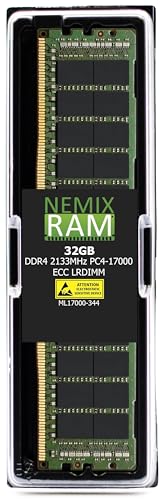
Nemix RAM 32GB DDR4 2133MHz ECC LRDIMM
Best for: High-capacity server virtualization
- Form Factor
- LRDIMM (what this guide is about)
- Total Capacity
- 32GB
- Memory Speed
- 2133MHz
- Voltage
- 1.2V
- Module Configuration
- 1x32GB
- ECC Support
- ECC
View on Amazon: Nemix RAM 32GB DDR4 2133MHz ECC LRDIMM Affiliate link
This is a 32GB single-stick DDR4 LRDIMM running at 2133MHz. It uses 1.2V and includes ECC for data integrity. The load-reduced buffering lowers electrical load on the memory bus. This allows high-DIMM-count server boards to reach higher capacities per channel. It is designed for virtualization and in-memory database workloads. You need a platform that explicitly supports LRDIMM form factors.
Pros
- 32GB capacity per stick for high density
- ECC support ensures data integrity
- Load-reduced buffering lowers electrical load
- 1.2V standard voltage operation
Cons
- Slower 2133MHz speed compared to modern standards
- Single stick configuration requires matching pairs
- Limited to LRDIMM form factor only
Good fit if
- You run virtualization workloads
- You need ECC memory for servers
- Your board supports LRDIMM modules
Skip if
- You require speeds above 2133MHz
- You use consumer desktop motherboards
- You need UDIMM compatibility
Verdict: Nemix 32GB DDR4-2133 ECC LRDIMM fits servers needing high capacity per channel with error correction. It suits workloads prioritizing stability over speed.
Specifications side by side
| Spec | Micron 64GB 3200MHz DDR4 RDIMM | Nemix RAM 32GB DDR4 2133MHz ECC LRDIMM |
|---|---|---|
| Total Capacity | 64GB | 32GB |
| Memory Speed | not stated | 2133MHz |
| Voltage | not stated | 1.2V |
| Module Configuration | not stated | 1x32GB |
| Form Factor | RDIMM | LRDIMM |
| ECC Support | not stated | ECC |
| Height | 0.48 inches | not stated |
| Compatible Device | not stated | Server |
| Size | 64GB | 32GB (1X32GB) DDR4 2133MHZ LRDIMM |
| Length | 2.07 inches | not stated |
| Weight | 1.12 ounces | 4 ounces |
| Dimensions | not stated | 6 × 0.5 × 0.5 inches |
| Color | Multicolor | 32GB |
| Model | MTA36ASF8G72PZ-3G2B2 | ML17000-344K01-106 |
Frequently asked questions
Can I mix RDIMM and LRDIMM in the same server?
No, you cannot mix these memory types. Servers require uniform memory modules for stable operation. Mixing RDIMM and LRDIMM can cause boot failures or system instability. Always install identical memory kits across all channels. Check your motherboard manual for supported configurations before upgrading your server hardware.
Which offers better capacity per stick?
RDIMM modules often provide higher individual capacities. The Micron 64GB RDIMM demonstrates this capability. LRDIMMs like the Nemix 32GB unit offer high density but may cap lower per stick. RDIMMs are ideal when you need maximum memory in a single slot without relying on load-reduced buffers.
Does LRDIMM reduce memory controller load?
Yes, LRDIMMs significantly reduce the electrical load on the memory controller. This allows servers to populate more slots with memory. The Micron RDIMM places a heavier load on the controller. LRDIMMs are better for systems needing many slots filled with high-capacity modules simultaneously.
Is ECC support standard on both types?
Yes, both RDIMM and LRDIMM include ECC support. This feature corrects single-bit memory errors automatically. The Nemix LRDIMM explicitly lists ECC support. The Micron RDIMM also provides this protection. ECC is essential for servers handling critical data and ensuring long-term system reliability.
Which is faster for general server tasks?
Speed depends on the specific module. The Micron 64GB RDIMM runs at 3200 MHz. The Nemix LRDIMM operates at 2133 MHz. Higher clock speeds generally improve data throughput. Choose the faster RDIMM if bandwidth is your priority. Select the LRDIMM if capacity and stability matter more.
Do I need registered memory for my workstation?
Registered memory is designed for servers and high-end workstations. It handles larger memory capacities and heavier workloads. Standard unbuffered RAM is for consumer PCs. If you run virtualization or large databases, RDIMM or LRDIMM is necessary. Check your motherboard specifications to confirm support for registered DIMMs.