Samsung 16GB 4800MHz ECC RDIMM or Samsung 32GB (2x16GB) 5600MHz DDR5? Which Samsung Model to Buy
As an Amazon Associate we earn from qualifying purchases. Links on this page are affiliate links.
You are comparing the samsung 16gb 4800mhz ecc rdimm vs 32gb 2x16gb 5600mhz ddr5. Both kits use Samsung DDR5 chips and run at 1.1V for efficient power use. The main difference lies in their intended hardware. One module targets servers with registered error correction. The other kit fits laptops with higher speeds. You must match the form factor and error correction type to your specific device to ensure compatibility.
Key differences
| Aspect | Samsung 16GB 4800MHz ECC RDIMM | Samsung 32GB (2x16GB) 5600MHz DDR5 SODIMM |
|---|---|---|
| Capacity | 16GB | 32GB (2x16GB) |
| Form Factor | 288-Pin RDIMM | 262-Pin SODIMM |
| Memory Speed | 4800MHz | 5600MHz |
| ECC Support | ECC Registered | Non-ECC |
| Compatible Device | Server | Laptop |
Which one should you choose?
Choose Samsung 16GB 4800MHz ECC RDIMM if
- You need memory for a compatible server or workstation.
- Your system requires ECC Registered RDIMM modules for data integrity.
- You are building a system that uses 288-pin DIMM slots.
Choose Samsung 32GB (2x16GB) 5600MHz DDR5 SODIMM if
- You are upgrading a laptop, notebook, or all-in-one computer.
- You require higher bandwidth with 5600MHz speeds.
- Your system uses 262-pin SODIMM slots and non-ECC memory.
Verdict: Choose the 16GB RDIMM if you are provisioning a server that demands registered ECC memory. Pick the 32GB SODIMM kit for laptops that need higher speeds and double the capacity. These products serve entirely different hardware ecosystems.
Server vs Laptop Memory Specs
compatible device
You must match the memory to your hardware. The Samsung 16GB 4800MHz ECC RDIMM is designed for select DDR5 servers and workstations. It is explicitly not compatible with desktop or laptop computers. The Samsung 32GB (2x16GB) 5600MHz DDR5 SODIMM targets laptops, notebooks, and all-in-one computers. You cannot use the server module in a portable device, and the laptop module lacks the registration required for enterprise servers. Your choice depends entirely on whether you are building a stationary server rack or upgrading a mobile workstation. Mismatching the form factor will prevent your system from booting.
form factor
Physical dimensions and pin counts differ significantly between these kits. The Samsung 16GB 4800MHz ECC RDIMM uses a 288-pin Registered DIMM form factor. It measures 5.25 inches in length and 1.23 inches in width. This standard size fits full-height server slots. The Samsung 32GB (2x16GB) 5600MHz DDR5 SODIMM uses a 262-pin Small Outline DIMM. It is much shorter, designed for compact spaces. You need to check your motherboard or chassis specifications. The server module will not fit in a laptop slot. The laptop module will not fit in a server slot. Physical compatibility is the first barrier to installation.
ecc support
Error correction capabilities vary by use case. The Samsung 16GB 4800MHz ECC RDIMM includes ECC Registered support. This feature detects and corrects memory errors, which is critical for server stability and data integrity. You cannot mix this with non-ECC or unbuffered modules. The Samsung 32GB (2x16GB) 5600MHz DDR5 SODIMM is Non-ECC Unbuffered. It lacks hardware error correction. This is standard for consumer laptops where cost and power efficiency take priority over absolute data safety. If you run database servers, the registered ECC module is essential. For general laptop use, the non-ECC module is sufficient and compatible with standard consumer platforms.
memory speed
Data transfer rates impact system responsiveness. The Samsung 32GB (2x16GB) 5600MHz DDR5 SODIMM operates at 5600 MHz. This higher frequency allows for faster data processing in compatible devices. The Samsung 16GB 4800MHz ECC RDIMM runs at 4800 MHz. While slower, this speed is optimized for server workloads that prioritize stability and capacity over raw bandwidth. The 5600 MHz module offers a noticeable performance boost in laptops that support it. You should verify your system supports 5600 MHz. The server module is locked to 4800 MHz for its specific enterprise environment. Higher speed benefits mobile computing more than stationary server tasks.
cas latency
Timing values affect how quickly memory responds. The Samsung 32GB (2x16GB) 5600MHz DDR5 SODIMM specifies a CAS Latency of CL46. This value indicates the delay before data is accessed. The Samsung 16GB 4800MHz ECC RDIMM does not list a CAS Latency value in its published specifications. You must rely on the speed rating for comparison. Lower latency generally improves response times, but the server module prioritizes error correction over tight timings. The laptop module provides a clear latency metric. You should check your system manual for the optimal timing settings for the 5600 MHz module. The server module operates on different timing standards typical for registered memory.
voltage
Power consumption is similar for both kits. The Samsung 16GB 4800MHz ECC RDIMM runs at 1.1V. The Samsung 32GB (2x16GB) 5600MHz DDR5 SODIMM also operates at 1.1V. Both modules adhere to the JEDEC DDR5 standard voltage. This efficiency helps reduce heat generation and power usage. You will not see a significant difference in energy consumption between these two options based on voltage alone. The server module may draw more power due to the registered controller, but the base voltage is identical. Your power supply or battery life will not be drastically affected by choosing one voltage standard over the other, as they are the same.
Which Samsung DDR5 Kit Fits Your System
Server administrator needing error correction
You need reliable server memory with error correction. This 16GB module features ECC Registered RDIMM technology. It runs at 4800MHz on a 288-pin form factor. The 1.1V voltage ensures efficient power use. It is built for select DDR5 servers and workstations. It cannot be used in desktops or laptops. This kit helps reduce bottlenecks in professional environments.
Laptop user seeking higher capacity
You require memory for a laptop or notebook. This kit provides 32GB total capacity using two 16GB modules. It operates at a faster 5600MHz speed. The 262-pin SODIMM form factor fits compact devices. It uses Non-ECC Unbuffered memory, which is standard for consumer laptops. The CL46 latency is suitable for general computing tasks.
Workstation builder prioritizing speed
You are upgrading an All-in-One computer or compatible laptop. This kit offers 5600MHz speed, which is faster than the server alternative. The 32GB total capacity allows for multitasking. It uses the standard 1.1V DDR5 voltage. The Non-ECC configuration is appropriate for consumer-grade systems. It expands available memory resources effectively for everyday workloads.
The products compared

Samsung 16GB 4800MHz ECC RDIMM
Best for: Servers requiring ECC Registered RDIMM memory
- Capacity
- 16GB
- Memory Speed
- 4800MHz
- Form Factor
- 288-Pin RDIMM
- Voltage
- 1.1V
- ECC Support
- ECC Registered
- Compatible Device
- Server
View on Amazon: Samsung 16GB 4800MHz ECC RDIMM Affiliate link
This Samsung module is a 16GB DDR5 server memory stick running at 4800MHz. It uses the 288-pin RDIMM form factor and includes ECC Registered error correction. The module operates at 1.1V and is single rank. It is designed strictly for compatible DDR5 servers and workstations. It does not work in desktop or laptop computers. You need a server platform to use this RAM.
Pros
- 16GB capacity per module
- 4800MHz memory speed
- ECC Registered error correction
- 1.1V operating voltage
Cons
- Only 16GB capacity
- Lower 4800MHz speed
- Server-only compatibility
Good fit if
- You need ECC Registered memory for a server
- Your system requires 288-pin RDIMM modules
- You are building a workstation with DDR5 support
Skip if
- You are using a desktop or laptop computer
- You need non-ECC or Unbuffered memory
- You require speeds higher than 4800MHz
Verdict: Samsung 16GB DDR5 4800MHz ECC RDIMM is a solid choice for servers needing reliable error correction. It fits systems that specifically require registered DIMMs rather than standard desktop memory.
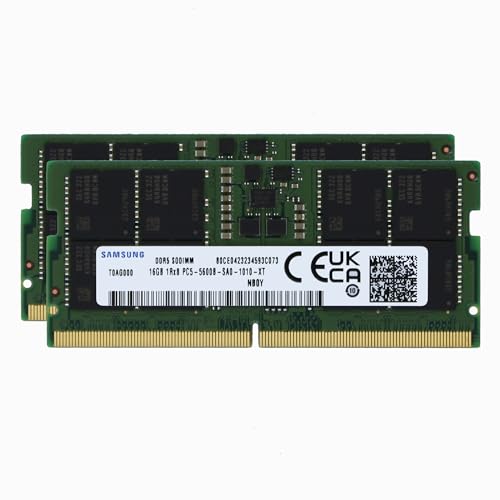
Samsung 32GB (2x16GB) 5600MHz DDR5 SODIMM
Best for: Laptop memory upgrades needing high speed
- Capacity
- 32GB
- Memory Speed
- 5600MHz
- CAS Latency
- CL46
- Kit Configuration
- 2x16GB
- Form Factor
- 262-Pin SODIMM
- Voltage
- 1.1V
View on Amazon: Samsung 32GB (2x16GB) 5600MHz DDR5 SODIMM Affiliate link
This Samsung kit gives you 32GB of DDR5 memory in a 2x16GB configuration. It runs at 5600MHz with PC5-44800 speeds and CL46 latency. The modules are Non-ECC SODIMMs designed for laptops and notebooks. You get a single rank x8 architecture at 1.1V. This setup expands system memory to reduce bottlenecks and handle heavier workloads on compatible portable devices.
Pros
- High 5600MHz speed for fast data transfer
- 32GB total capacity via 2x16GB modules
- Standard 1.1V voltage for efficiency
- Compatible with select laptops and notebooks
Cons
- Non-ECC memory lacks error correction
- SODIMM form factor limits use to laptops
- CL46 latency is standard for DDR5
Good fit if
- You need high capacity for laptop multitasking
- You want faster DDR5 speeds than 4800MHz
- You are upgrading a compatible notebook
Skip if
- You require ECC error correction for servers
- You are building a desktop PC with DIMMs
- You need lower latency for gaming
Verdict: Samsung 32GB DDR5 5600MHz SODIMM Kit provides ample speed and capacity for modern laptops. It suits users prioritizing multitasking performance over server-grade error correction.
Specifications side by side
| Spec | Samsung 16GB 4800MHz ECC RDIMM | Samsung 32GB (2x16GB) 5600MHz DDR5 SODIMM |
|---|---|---|
| Capacity | 16GB | 32GB |
| Memory Speed | 4800MHz | 5600MHz |
| CAS Latency | not stated | CL46 |
| Kit Configuration | not stated | 2x16GB |
| Form Factor | 288-Pin RDIMM | 262-Pin SODIMM |
| Voltage | 1.1V | 1.1V |
| ECC Support | ECC Registered | Non-ECC |
| Compatible Device | Server | Laptop |
| Size | 16GB | not stated |
| Dimensions | 5.25 × 1.23 × 0.15 inches | not stated |
| Weight | 0.35 ounces | not stated |
| Color | Green | not stated |
| Model | M321R2GA3BB6-CQK | not stated |
Frequently asked questions
Can I use the Samsung 16GB 4800MHz ECC RDIMM in a laptop?
No, you cannot. This module uses an RDIMM form factor designed specifically for servers. Laptops require SODIMM modules. The Samsung 32GB kit uses SODIMM and fits laptop slots. Mixing these types will prevent your system from booting.
Does the Samsung 32GB DDR5 kit support error correction?
No, it does not. This kit is Non-ECC memory. It lacks the error correction features found in server-grade RAM. You should choose the 16GB RDIMM if your server requires ECC for data integrity and stability during heavy workloads.
Is the 4800MHz speed slower than 5600MHz?
Yes, 4800MHz is slower than 5600MHz. The laptop kit runs at a higher frequency. However, the server module prioritizes reliability and error correction over raw speed. Choose based on whether you need speed for multitasking or stability for server tasks.
What is the difference between RDIMM and SODIMM?
RDIMM stands for Registered DIMM, used in servers. It includes a register to stabilize signals. SODIMM is a smaller form factor for laptops. The 16GB kit is RDIMM. The 32GB kit is SODIMM. They are not physically interchangeable.
Can I install two 16GB sticks in a laptop for 32GB total?
Only if you use the correct kit. The Samsung 32GB option comes as a 2x16GB SODIMM kit. It is ready for dual-channel operation in laptops. You cannot use the server RDIMM in a laptop. Ensure your device supports DDR5 SODIMM.
Which kit is better for a desktop PC?
Neither kit is ideal for standard desktops. The RDIMM is for servers. The SODIMM is for laptops. Desktops typically use UDIMM modules. If you must choose, the SODIMM might fit in specific small-form-factor desktops, but check your motherboard manual first.