Sandisk vs Samsung: USB Flash Drives Compared by Specs
As an Amazon Associate we earn from qualifying purchases. Links on this page are affiliate links.
When you compare sandisk vs samsung USB flash drive options, you face a choice between capacity and speed. Both drives offer reliable data storage with backward compatibility. The SanDisk Ultra provides a 64GB capacity with a standard plastic design. The Samsung BAR Plus offers 128GB and a rugged metal body. The main difference lies in read performance and physical durability. You need to decide which specs matter more for your daily workflow.
Key differences
| Aspect | SanDisk Ultra 64GB USB 3.0 Flash Drive | Samsung BAR Plus 128GB USB 3.1 Flash Drive |
|---|---|---|
| Read Speed | Up to 100MB/s | Up to 400MB/s |
| USB Version | USB 3.0 | USB 3.1 |
| Storage Capacity | 64GB | 128GB |
| Casing Material | Plastic | Metal |
Which one should you choose?
Choose SanDisk Ultra 64GB USB 3.0 Flash Drive if
- You need secure file access with built-in software.
- You prefer a compact drive with a low profile.
- You require a drive that operates in wider temperature ranges.
Choose Samsung BAR Plus 128GB USB 3.1 Flash Drive if
- You need faster transfer speeds for large video files.
- You want double the storage capacity in one drive.
- You require a rugged, waterproof, and shock-proof design.
Verdict: Choose the SanDisk if you prioritize software security and a smaller form factor. Pick the Samsung BAR Plus if you need higher speeds, more storage, and a durable metal build. The Samsung drive offers better performance and resilience for most users.
SanDisk vs Samsung USB Drive Specs
read speed
Transfer speeds define how quickly you move files between devices. The Samsung BAR Plus claims read speeds up to 400MB/s. This high figure relies on the USB 3.1 standard. It allows you to send large 4K video files rapidly. The SanDisk Ultra offers read speeds up to 100MB/s. This speed uses the older USB 3.0 interface. While still functional for daily tasks, the transfer rate is significantly lower. You will notice a clear difference when moving large media libraries. The Samsung drive provides much faster throughput for heavy workloads.
storage capacity
Capacity determines how much data fits on the drive. The Samsung BAR Plus comes with 128GB of storage space. This double the amount found in the SanDisk Ultra. The SanDisk model offers 64GB of capacity. Both drives support backward compatibility with USB 2.0 ports. However, the Samsung option gives you more room for photos and videos. If you need to store extensive archives, the larger size helps. The SanDisk drive is suitable for smaller files or occasional backups. Choose based on your total data volume needs.
build quality
Durability affects how long the drive lasts in daily use. The Samsung BAR Plus features a rugged metal casing. This sturdy body protects data from shocks and water exposure. It is also magnet-proof and X-ray-proof. The SanDisk Ultra uses a standard plastic design. It lacks the same level of physical protection. The metal body of the Samsung drive offers better resistance to drops. It also includes an integrated keyring to prevent loss. The plastic SanDisk drive is lighter but less robust against physical stress.
usb version
The USB version dictates the connection standard and potential speed. The Samsung BAR Plus uses the USB 3.1 standard. This newer interface supports higher bandwidth and faster data rates. The SanDisk Ultra utilizes the USB 3.0 standard. Both are backward compatible with USB 2.0 ports. The USB 3.1 version in the Samsung drive ensures future-proof connectivity. It aligns with the latest computer ports. The SanDisk drive remains compatible with older systems. However, it cannot leverage the full potential of newer USB 3.1 ports.
software features
Software tools add security and convenience to data storage. The SanDisk Ultra includes SanDisk Secure Access Software. This tool helps keep your private files locked and safe. The Samsung BAR Plus data does not list specific security software. It focuses on hardware durability and speed instead. If you need built-in encryption or file protection, the SanDisk option provides this feature. The Samsung drive relies on external software solutions. The presence of secure access software is a distinct advantage for the SanDisk model.
Choose Your USB Drive Based on Specs
Users needing fast large file transfers
The Samsung BAR Plus offers read speeds up to 400MB/s using the USB 3.1 standard. This allows you to move large 4K video files in seconds. The metal casing provides durability against shock and water. You get 128GB of storage in a compact, rugged design that protects your data.
Buyers prioritizing secure private file storage
The SanDisk Ultra includes Secure Access Software to keep your files private. It features read speeds up to 100MB/s via USB 3.0. The drive has a 64GB capacity and operates within a wide temperature range. This option suits you if data privacy and standard performance are your main requirements.
Shoppers wanting maximum storage capacity
The Samsung BAR Plus provides 128GB of storage space. This is double the 64GB capacity found in the SanDisk Ultra. The larger capacity helps you store more photos and videos without needing multiple drives. The USB 3.1 interface ensures these larger files transfer quickly when you need them.
The products compared

SanDisk Ultra 64GB USB 3.0 Flash Drive
Best for: Basic file transfers with privacy features
- Storage Capacity
- 64GB
- USB Version
- USB 3.0
- Read Speed
- Up to 100MB/s
- Dimensions
- 0.42 × 0.87 × 0.31 inches
- Weight
- 0.48 ounces
View on Amazon: SanDisk Ultra 64GB USB 3.0 Flash Drive Affiliate link
This SanDisk drive offers 64GB of storage with read speeds up to 100MB/s. It supports USB 3.0 and USB 2.0 connections. The black unit weighs 0.48 ounces. It includes SanDisk Secure Access Software for file privacy. You get a compact drive that fits standard ports. It suits users needing basic, reliable transfer speeds for everyday files.
Pros
- Read speeds up to 100MB/s
- Includes SanDisk Secure Access Software
- Compatible with USB 3.0 and USB 2.0
- Lightweight at 0.48 ounces
Cons
- 64GB capacity is lower than the 128GB option on this list
- 100MB/s read speed is slower than the 400MB/s drive here
- No mention of water or shock resistance in the data
Good fit if
- You need a lightweight drive for basic file transfers
- You want built-in software to keep files private
- You use USB 3.0 ports for moderate speed needs
Skip if
- You require transfer speeds above 100MB/s
- You need more than 64GB of storage in one drive
- You want a rugged metal casing for durability
Verdict: SanDisk 64GB Ultra USB 3.0 fits users who prioritize privacy software and portability over raw speed. It is a solid choice for standard office or school tasks where 100MB/s is sufficient.
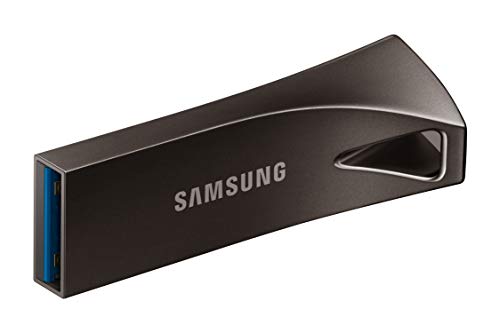
Samsung BAR Plus 128GB USB 3.1 Flash Drive
Best for: Durable, fast USB 3.1 storage
- Storage Capacity
- 128GB
- USB Version
- USB 3.1
- Read Speed
- 400MB/s
- Features
- Metal Casing
- Dimensions
- 1.58 × 0.61 × 0.47 inches
View on Amazon: Samsung BAR Plus 128GB USB 3.1 Flash Drive Affiliate link
The Samsung BAR Plus 128GB USB 3.1 drive offers a rugged metal design with read speeds up to 400MB/s. It measures 1.58 by 0.61 by 0.47 inches. The sturdy casing is waterproof, shock-proof, and temperature-proof. This compact drive suits users who need reliable storage expansion for photos and video files without bulky packaging.
Pros
- Read speeds up to 400MB/s
- Rugged metal casing for durability
- Waterproof and shock-proof construction
- Integrated keyring for portability
Cons
- 128GB capacity is smaller than 256GB or 512GB options
- No included USB-C adapter for direct connection
- Gray color only in this specific variation
Good fit if
- You need fast file transfers for large media files
- You require a durable drive for travel
- You want a compact storage solution with a keyring
Skip if
- You need more than 128GB of space
- You prefer a plastic, lightweight drive
- You require a USB-C native connection
Verdict: Samsung BAR Plus 128GB USB 3.1 fits users who prioritize speed and durability in a compact form factor. It is ideal for transferring large video files safely.
Specifications side by side
| Spec | SanDisk Ultra 64GB USB 3.0 Flash Drive | Samsung BAR Plus 128GB USB 3.1 Flash Drive |
|---|---|---|
| Storage Capacity | 64GB | 128GB |
| USB Version | USB 3.0 | USB 3.1 |
| Read Speed | Up to 100MB/s | 400MB/s |
| Size | 64GB | 128 GB |
| Features | not stated | Metal Casing |
| Dimensions | 0.42 × 0.87 × 0.31 inches | 1.58 × 0.61 × 0.47 inches |
| Weight | 0.48 ounces | not stated |
| Color | black | Gray |
| Model | SDCZ48-064G-UAM46 | MUF-128BE4/AM |
Frequently asked questions
Which USB flash drive has more storage capacity?
The Samsung BAR Plus offers more storage capacity. It provides 128GB of space for your files. The SanDisk Ultra comes with 64GB. If you need to store large video libraries or extensive document archives, the Samsung option gives you double the room. This extra space helps you keep more data on a single portable device.
Is the SanDisk Ultra USB 3.0 or USB 3.1?
The SanDisk Ultra uses the USB 3.0 standard. This version ensures backward compatibility with older USB 2.0 ports while offering faster transfer rates than legacy devices. It supports basic file transfers suitable for office or school tasks. The speed is sufficient for everyday documents and smaller media files without requiring the latest interface technology.
Does the Samsung BAR Plus have a metal body?
Yes, the Samsung BAR Plus features a metal casing. This construction provides durability and protects the internal components from physical stress. The metal design also helps with heat dissipation during high-speed transfers. You get a robust drive that can withstand daily carry in bags or pockets better than standard plastic enclosures.
How fast is the Samsung BAR Plus read speed?
The Samsung BAR Plus has a read speed of up to 400MB/s. This high speed relies on the USB 3.1 interface. It allows you to move large 4K video files quickly. If you frequently transfer high-resolution media, this speed reduces wait times significantly compared to standard USB 3.0 drives.
What is the best use case for the SanDisk Ultra?
The SanDisk Ultra is best for basic file transfers with privacy features. It fits users who prioritize portability and software security over raw speed. Its 64GB capacity and compact plastic design make it ideal for standard office or school tasks. You get a reliable drive for everyday documents without needing extreme performance.
Which drive is more compact in size?
The SanDisk Ultra is more compact in overall dimensions. It measures 0.87 inches in width and 0.31 inches in height. The Samsung BAR Plus is longer at 1.58 inches. If you need a drive that slips easily into a pocket or keychain without bulk, the SanDisk Ultra offers a smaller footprint for your portable storage needs.
Can I use these drives with older computers?
Yes, both drives offer backward compatibility. The SanDisk Ultra uses USB 3.0, which works with USB 2.0 ports at slower speeds. The Samsung BAR Plus uses USB 3.1 but remains compatible with older interfaces. You can plug either drive into legacy systems to access your data, though transfer rates will match the port's maximum capability.