15 Best 16GB DDR4 RAMS, Compared
As an Amazon Associate we earn from qualifying purchases. Links on this page are affiliate links.
Finding the best 16GB ddr4 RAMs requires matching your system’s needs to specific module speeds and form factors. We compared 15 options strictly by the specifications published on their listings. The G.SKILL Trident Z RGB 16GB DDR4 RAM Kit leads as the top pick because it offers dual-channel 3000MT/s performance with CL16 latency at 1.35V. This guide helps you decide which kit fits your desktop, laptop, or server build based on verified technical data.
Quick picks
The best fit for you
- You need the best overall desktop memory kit G.SKILL Trident Z RGB 16GB DDR4 RAM Kit It offers dual-channel 3000MT/s speed with CL16 latency for balanced performance.
- You want the fastest standard desktop memory speed G.SKILL Trident Z RGB 16GB 3600MHz RAM This kit runs at 3600MHz with CL18 latency for high throughput.
- You require low-profile RAM for small cases Corsair LPX 16GB 2400MHz DDR4 RAM Its 0.39-inch height provides clearance for large CPU coolers in tight spaces.
- You are upgrading a laptop with dual-channel RAM G.SKILL Ripjaws 16GB DDR4 3200MHz SODIMM Laptop RAM This SODIMM kit delivers 3200MT/s speed in a form factor for notebooks.
- You need server memory with error correction SK Hynix 16GB DDR4-2133 ECC Registered Server Memory It features ECC registered technology with CL13 latency for server stability.
Our 15 picks

G.SKILL Trident Z RGB 16GB DDR4 RAM Kit
Best for: desktop builders needing dual-channel 3000MT/s memory
- Size
- 16GB (what this guide is about)
- Total Capacity
- 16GB
- Memory Speed
- 3000MT/s
- CAS Latency
- CL16
- Voltage
- 1.35V
- Module Configuration
- 2x8GB
This desktop memory kit provides 16GB of DDR4 memory across two 8GB modules. It runs at speeds up to 3000MT/s using its Intel XMP profile with CL16 latency at 1.35V. It suits you if you need a dual-channel 288-pin UDIMM setup for a standard Intel or AMD desktop build that supports memory overclocking.
Pros
- Dual-channel 16GB kit split across two 8GB modules
- Up to 3000MT/s speed with Intel XMP profile
- CL16 CAS latency with 16-18-18-38 timings
- Standard 288-pin UDIMM form factor for desktop PCs
Cons
- Rated speed tops out at 3000MT/s, below 3200MT/s and 3600MT/s kits on this list
- Requires 1.35V operating voltage rather than standard 1.2V DDR4 levels
- Non-ECC design is incompatible with server motherboards requiring ECC
Good fit if
- You want a dual-channel 2x8GB configuration for a desktop PC.
- You have an Intel or AMD motherboard that supports Intel XMP overclocking.
- You need CL16 latency at 3000MT/s operating speeds.
Skip if
- You need ECC registered memory for server hardware.
- You are upgrading a laptop system that requires SODIMM modules.
- You want speeds higher than 3000MT/s.
Verdict: G.SKILL Trident Z RGB 16GB (2x8GB) 3000MT/s RAM delivers dual-channel DDR4 performance for desktop builders running Intel or AMD systems with XMP support. It fits users who want a 16GB configuration with CL16 latency operating at 1.35V.

G.SKILL Ripjaws 16GB DDR4 3200MHz SODIMM Laptop RAM
Best for: Dual-channel laptop memory upgrades at 3200MT/s
- Size
- 16GB (what this guide is about)
- Total Capacity
- 16GB
- Memory Speed
- 3200MT/s
- CAS Latency
- CL22
- Voltage
- 1.20V
- Module Configuration
- 2x8GB
View on Amazon: G.SKILL Ripjaws 16GB DDR4 3200MHz SODIMM Laptop RAM
This G.SKILL Ripjaws kit provides 16GB of DDR4 memory across two 8GB modules. Built for notebook systems, it uses a 260-pin SO-DIMM design and runs at 3200MT/s using 1.20V with CL22 latency. You get a matched dual-channel configuration suited for laptops that support standard 3200MT/s memory without needing higher operating voltages.
Pros
- Dual-channel 2x8GB matched kit configuration
- 3200MT/s memory speed
- Standard 1.20V operating voltage
Cons
- CL22 latency is higher than tighter DDR4 timings
- 260-pin SO-DIMM form factor fits laptops, not desktop motherboards
- Non-ECC design lacks server-grade error correction
Good fit if
- You need a 16GB dual-channel upgrade for a DDR4 notebook.
- You want 3200MT/s speeds running at standard 1.20V.
Skip if
- You are upgrading a desktop computer requiring standard 288-pin DIMMs.
- You need ECC registered memory for server hardware.
Verdict: G.SKILL Ripjaws 16GB (2x8GB) 3200MT/s Laptop RAM delivers dual-channel 3200MT/s speeds at standard 1.20V to compatible notebooks. It serves laptop users replacing single-module configurations with a matched 16GB kit.

SK Hynix 16GB DDR4-2133 ECC Registered Server Memory
Best for: registered ECC server motherboards needing CL13 timings
- Size
- 16GB (what this guide is about)
- Total Capacity
- 16GB
- Memory Speed
- 2133 MHz
- CAS Latency
- CL13
- ECC Support
- ECC REG
- Compatible Device
- Server
View on Amazon: SK Hynix 16GB DDR4-2133 ECC Registered Server Memory
This SK Hynix module gives you 16GB of registered ECC memory designed for server systems. It runs at a 2133MHz frequency and features a low CAS latency rating of CL13. If you run a compatible server motherboard requiring registered error-correcting memory, this module provides the exact hardware-level data stability and low latency timing your hardware setup demands.
Pros
- Registered ECC support for server data integrity
- Low CAS latency rating of CL13
- Single 16GB module configuration
Cons
- Base 2133MHz operating speed is lower than 2400MHz or 3200MHz modules
- Server-only design incompatible with standard non-ECC desktop platforms
Good fit if
- You manage a server system that accepts DDR4 registered ECC memory.
- You want low CL13 CAS latency for specific server workloads.
Skip if
- You need memory for a standard non-ECC consumer desktop or laptop.
- You require memory speeds higher than 2133MHz.
Verdict: SK Hynix 16GB DDR4-2133 ECC Server RAM equips enterprise or home-lab server owners with error-correcting memory running at tight CL13 latency. It provides targeted reliability for registered memory platforms that do not require higher base clock speeds.
Corsair LPX 16GB 2400MHz DDR4 RAM
Best for: compact setups requiring low CAS latency
- Size
- 16GB (what this guide is about)
- Total Capacity
- 16GB
- Memory Speed
- 2400 MHz
- CAS Latency
- CL14
- Dimensions
- 6.1 × 3.54 × 0.39 inches
- Weight
- 3.2 ounces
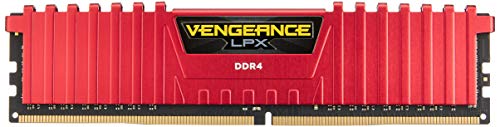
This DDR4 memory kit gives you 16GB of capacity operating at a 2400MHz clock speed with C14 CAS latency. It features a low-profile red heat spreader measuring 0.39 inches tall, which aids installation beneath tight CPU coolers. It suits you if you need dependable standard-frequency RAM with lower latency for your desktop build.
Pros
- Low CAS latency rating of C14
- Low-profile heat spreader measuring 0.39 inches high
- Lightweight module design at 3.2 ounces
- Built for high-performance overclocking
Cons
- Memory speed is limited to 2400MHz
- Fixed red heat spreader color restricts aesthetic matching
Good fit if
- You need low-profile RAM to fit under low-clearance CPU coolers.
- You prefer tight C14 timings over higher raw clock speeds.
Skip if
- You require higher frequencies such as 3000MHz or 3200MHz.
- You need laptop SO-DIMM or ECC server modules.
Verdict: Corsair LPX 16GB 2400MHz C14 DDR4 RAM delivers tight C14 response times and a low 0.39-inch profile for builders who prioritize physical clearance.

G.SKILL Ripjaws V 16GB DDR4 3200MHz UDIMM
Best for: desktop builders planning future memory slot expansions
- Size
- 16GB (what this guide is about)
- Total Capacity
- 16GB
- Memory Speed
- 3200MT/s
- CAS Latency
- CL16
- Voltage
- 1.35V
- Module Configuration
- 1x16GB
This G.SKILL Ripjaws V module is a single 16GB DDR4 desktop memory stick rated for up to 3200MT/s. It operates at 1.35V with CL16 latency via Intel XMP. Because it uses a 1x16GB setup rather than two sticks, you can populate one DIMM slot now while keeping remaining motherboard slots open for future system memory upgrades.
Pros
- 3200MT/s speed rating with CL16 latency
- Single 16GB module leaves open slots for expansion
- Includes Intel XMP profile support
Cons
- Single-module configuration does not enable dual-channel operation on its own
- Requires BIOS adjustment to reach the rated 3200MT/s speed
Good fit if
- You want a single 16GB module to keep other desktop RAM slots free.
- You have an Intel or AMD desktop motherboard supporting 288-pin DDR4 UDIMMs.
Skip if
- You need a multi-module kit right away for immediate dual-channel memory bandwidth.
- You require ECC memory for workstation or server hardware.
Verdict: G.SKILL Ripjaws V 16GB DDR4-3200 Desktop RAM suits desktop builders who want CL16 timing on a single stick while preserving spare slots for later memory additions.

G.SKILL Ripjaws V 16GB DDR4-3000 Kit
Best for: desktop builders wanting low-latency CL15 memory
- Size
- 16GB (what this guide is about)
- Total Capacity
- 16GB
- Memory Speed
- 3000MT/s
- CAS Latency
- CL15
- Voltage
- 1.35V
- Module Configuration
- 2x8GB
This desktop memory kit pairs two 8GB modules for a total capacity of 16GB. It runs at up to 3000MT/s with CL15-16-16-35 timings at 1.35V using an Intel XMP profile. You get dual-channel operation and lower latency than standard CL16 or CL17 kits. It suits desktop users who want tight CAS 15 timings without custom manual tuning.
Pros
- Tighter CAS 15 latency with 15-16-16-35 timings
- Two 8GB sticks provide dual-channel operation
- Intel XMP profile enables rated 3000MT/s speed
Cons
- Requires BIOS adjustments to exceed standard JEDEC boot speeds
- Runs at 1.35V instead of standard 1.2V DDR4 voltage
- Non-ECC design excludes error-correcting workstation or server setups
Good fit if
- You want low CL15 latency for your desktop build.
- You have a motherboard that supports Intel XMP profiles.
- You prefer a 2x8GB dual-channel configuration over a single stick.
Skip if
- You need ECC memory for a dedicated server motherboard.
- You need laptop SO-DIMM modules instead of full-size 288-pin UDIMMs.
Verdict: G.SKILL Ripjaws V 16GB 3000MT/s CL15 RAM delivers responsive CAS 15 timings for desktop builders who have an XMP-capable motherboard.

SK Hynix 16GB DDR4 ECC Server RAM
Best for: Server platforms requiring 2133MHz ECC registered memory
- Size
- 16GB (what this guide is about)
- Total Capacity
- 16Gb
- Memory Speed
- 2133Mhz
- Module Configuration
- 1X16gb
- ECC Support
- Ecc Registered
- Compatible Device
- Server
This SK Hynix module gives you 16GB of DDR4 memory running at 2133MHz. Built as an ECC registered stick in a single 16GB configuration, it targets server platforms requiring error checking and stable signal buffering. You should select this memory if you maintain or upgrade compatible server hardware that specifically requires 2133MHz registered DDR4 modules.
Pros
- 16GB capacity on a single module
- ECC registered support for server stability
- Standard 2133MHz DDR4 operating speed
Cons
- Server-only compatibility excludes standard desktop motherboards
- 2133MHz base speed is lower than other DDR4 alternatives on this list
Good fit if
- You run a server board designed for DDR4 ECC registered modules.
- You need a single 16GB stick rated for 2133MHz PC4-17000 operation.
Skip if
- You use a typical desktop PC that needs unbuffered non-ECC RAM.
- You require speeds higher than 2133MHz for your system workload.
Verdict: SK Hynix 16GB 2133MHz ECC Registered Server RAM provides enterprise error checking for system administrators maintaining dedicated 2133MHz DDR4 server boards.

Timetec 16GB DDR4 2400MHz UDIMM RAM
Best for: standard 2400MHz desktop memory expansions
- Size
- 16GB (what this guide is about)
- Total Capacity
- 16GB
- Memory Speed
- 2400MHz
- CAS Latency
- CL17
- Voltage
- 1.2V
- Module Configuration
- 1x16GB
This Timetec memory upgrade provides a single 16GB DDR4 module running at 2400MHz with CL17 timings. It operates at standard 1.2V across a 288-pin UDIMM layout with a dual-rank build. If you need straightforward plug-and-play memory to expand a compatible desktop PC or workstation without adjusting system voltages, this non-ECC module gives you reliable basic capacity.
Pros
- Single 16GB dual-rank (2Rx8) module leaves open slots for future upgrades
- Standard 1.2V operating voltage allows direct plug-and-play installation
- Backed by a limited lifetime warranty and US-based technical support
Cons
- Operates at 2400MHz with CL17 latency, which is slower than 3000MHz or 3200MHz alternatives
- Single-stick configuration does not provide dual-channel memory bandwidth on its own
- Desktop 288-pin UDIMM form factor is incompatible with laptop SODIMM slots
Good fit if
- You want a single 16GB DDR4 module to expand an existing desktop setup.
- You need standard 1.2V 2400MHz plug-and-play memory without configuring custom BIOS settings.
Skip if
- You need higher-frequency memory speeds such as 3000MHz or 3200MHz for your system.
- You are upgrading a laptop that requires smaller SODIMM modules.
Verdict: Timetec 16GB DDR4 2400MHz UDIMM Desktop RAM fits standard desktop builders who require a plug-and-play 1.2V non-ECC memory stick at baseline DDR4-2400 speeds.

OWC 16GB DDR4 2400MHz SO-DIMM
Best for: 2017 iMac memory upgrades
- Size
- 16GB (what this guide is about)
- Total Capacity
- 16GB
- Memory Speed
- 2400MHz
- Voltage
- 1.2 Volts
- Module Configuration
- 2x8GB
- Form Factor
- SO-DIMM
This kit gives you 16GB of DDR4 memory in two 8GB sticks. It runs at 2400MHz with 1.2V power. The modules are non-ECC and non-registered SO-DIMMs. They fit 2017 iMac models and select PC laptops. You get a lifetime limited warranty. This upgrade boosts performance for compatible systems.
Pros
- 16GB total capacity (2x8GB)
- 2400MHz memory speed
- Compatible with 2017 iMac models
- Lifetime limited warranty
Cons
- Lower 2400MHz speed than many competitors
- Non-ECC configuration limits server use
- SO-DIMM form factor restricts desktop use
Good fit if
- You own a 2017 iMac needing an upgrade
- You need reliable SO-DIMM memory for laptops
- You want a lifetime warranty for peace of mind
Skip if
- You require high-speed RAM above 2400MHz
- You are building a standard desktop PC
- You need ECC registered memory for servers
Verdict: OWC 16GB DDR4 2400MHz SO-DIMM is a solid choice for 2017 iMac owners who need a straightforward, warranty-backed upgrade. It fits users who prioritize compatibility and support over maximum speed.

SK Hynix 16GB DDR4 2400MHz ECC RDIMM
Best for: Server and workstation ECC registered memory builds
- Size
- 16GB (what this guide is about)
- Total Capacity
- 16GB
- Memory Speed
- 2400MHz
- CAS Latency
- CL17
- Voltage
- 1.2V
- Module Configuration
- 1x16GB
This SK Hynix module gives you 16GB of DDR4 memory running at 2400MHz with CL17 timing. Built as a 288-pin registered RDIMM with error-correcting code (ECC) support, it operates at standard 1.2V. If you run compatible server or workstation hardware that requires registered memory to maintain data stability, this module fits your board.
Pros
- Registered RDIMM design with ECC support
- Runs at standard 1.2V operating voltage
- Dual-rank 2Rx8 configuration
Cons
- RDIMM format is incompatible with standard desktop motherboards
- 2400MHz speed is slower than higher-clocked consumer kits
Good fit if
- You run a server or workstation that requires 288-pin ECC registered memory.
- You need a 16GB DDR4-2400 CL17 replacement or expansion module.
Skip if
- You have a standard consumer desktop PC that requires unbuffered DIMMs.
- You need higher clock rates such as 3200MHz or 3600MHz.
Verdict: SK Hynix 16GB DDR4-2400 ECC RDIMM provides stable, error-checking memory for enterprise and workstation systems that demand registered DDR4 modules.

SK Hynix 16GB DDR4 2133MHz Desktop RAM
Best for: basic desktop computing tasks
- Size
- 16GB (what this guide is about)
- Total Capacity
- 16GB
- Memory Speed
- 2133MHz
- Module Configuration
- 2Rx8
- Compatible Device
- Desktop
This SK Hynix kit provides 16GB of DDR4 memory for desktop systems. It runs at 2133MHz with a 2Rx8 configuration. The module uses standard 1.2V voltage. You get reliable performance for everyday computing tasks. The multicolor design adds a subtle visual element to your build. It fits standard desktop motherboards without requiring special cooling.
Pros
- 16GB total capacity
- 2133MHz speed
- 2Rx8 configuration
- 1.2V voltage
Cons
- 2133MHz is slower than many competitors
- 2Rx8 limits dual-channel bandwidth
- No heat spreader listed
Good fit if
- You need basic desktop memory
- You prioritize capacity over speed
- You have a budget build
Skip if
- You need high-speed gaming
- You want XMP overclocking
- You need ECC support
Verdict: SK Hynix 16GB DDR4 2133MHz Desktop RAM is a solid choice for users who need reliable, standard-speed memory for general desktop use. It avoids the premium cost of higher speeds while delivering the full 16GB capacity you need for multitasking.

G.SKILL Trident Z RGB 16GB 3600MHz RAM
Best for: high-speed 3600MHz desktop PC builds
- Size
- 16GB (what this guide is about)
- Total Capacity
- 16GB
- Memory Speed
- 3600MT/s
- CAS Latency
- CL18
- Voltage
- 1.35V
- Module Configuration
- 2x8GB
This G.SKILL Trident Z RGB kit gives you 16GB of desktop memory across two 8GB 288-pin UDIMMs. It runs at up to 3600MT/s using an Intel XMP profile with CL18-22-22-42 latency at 1.35V. It suits you if you need fast dual-channel DDR4 bandwidth for an Intel or AMD desktop setup that supports BIOS memory overclocking.
Pros
- Reaches 3600MT/s via Intel XMP profile
- Dual-channel kit with two 8GB modules
- Compatible with both Intel and AMD desktop platforms
Cons
- Requires BIOS adjustments or XMP support to reach rated 3600MT/s speed
- Draws 1.35V rather than standard 1.2V JEDEC DDR4 voltage
- Non-ECC design lacks server-grade error checking
Good fit if
- You have an Intel or AMD desktop system with XMP support in BIOS.
- You want 3600MT/s dual-channel performance for a standard desktop.
Skip if
- You need ECC registered memory for a dedicated server or workstation.
- You require SODIMM modules for a laptop or compact system.
Verdict: G.SKILL Trident Z RGB 16GB 3600MHz DDR4 provides high-speed dual-channel performance for desktop users who can enable Intel XMP in their BIOS.

Timetec 16GB DDR4 3200MHz UDIMM Desktop RAM
Best for: standard desktop 3200MHz memory upgrades
- Size
- 16GB (what this guide is about)
- Total Capacity
- 16GB
- Memory Speed
- 3200MHz
- CAS Latency
- CL22
- Voltage
- 1.2V
- Module Configuration
- 1x16GB
This single 16GB DDR4 desktop module runs at 3200MHz using standard 1.2V power. It features a CL22 latency, a dual-rank build, and a standard 288-pin UDIMM format. If your system requires lower speeds, it automatically downclocks to 2933MHz or 2666MHz. It suits you if you need a straightforward unbuffered memory expansion for a desktop PC.
Pros
- Operates at 3200MHz at 1.2V
- Downclocks automatically to 2933MHz or 2666MHz
- Dual rank 2Rx8 module architecture
- Backed by a limited lifetime warranty
Cons
- Single-module configuration does not provide multi-channel operation alone
- CL22 latency is slower than CL14 or CL16 options
- Features no integrated heatsink
Good fit if
- You want a single 16GB module running at 1.2V without voltage adjustments.
- You need a desktop 288-pin UDIMM that downclocks to 2933MHz or 2666MHz.
- You plan to add memory to an open desktop slot.
Skip if
- You need memory for a laptop SODIMM slot.
- You require tighter timings such as CL16 latency.
- You require error-correcting ECC memory.
Verdict: Timetec 16GB DDR4 3200MHz Desktop RAM provides standard JEDEC-spec operation with automatic downclocking support. It fits desktop users who need plug-and-play capacity without configuring custom voltages or XMP settings.

G.SKILL Ripjaws V 16GB 3000MHz DDR4 RAM
Best for: dual-channel Intel and AMD desktop builds
- Size
- 16GB (what this guide is about)
- Total Capacity
- 16GB
- Memory Speed
- 3000MT/s
- CAS Latency
- CL16
- Voltage
- 1.35V
- Module Configuration
- 2x8GB
This dual-channel desktop memory kit gives you 16GB of DDR4 memory split across two 8GB modules. It operates at 3000MT/s with CL16-18-18-38 timings at 1.35V using Intel XMP profiles. Because it uses standard 288-pin UDIMM slots and non-ECC operation, you get a direct match for standard Intel or AMD desktop gaming setups.
Pros
- Dual-channel 2x8GB kit configuration
- Intel XMP profile for 3000MT/s operation
- CL16-18-18-38 timings at 1.35V
Cons
- 3000MT/s speed is lower than 3200MT/s and 3600MT/s options on the list
- Requires BIOS overclock adjustment to run past default SPD speeds
Good fit if
- You want a matched 2x8GB dual-channel setup for an AMD or Intel desktop motherboard.
- You have an XMP-capable board that supports 3000MT/s at 1.35V.
Skip if
- You need 3200MT/s or 3600MT/s speeds for higher throughput.
- You require ECC registered modules or laptop SO-DIMMs.
Verdict: G.SKILL Ripjaws V 16GB (2x8GB) 3000MHz DDR4 suits desktop builders who want a matched dual-channel pair configured for 3000MT/s XMP operation.

Timetec 16GB DDR4 2666MHz SODIMM RAM
Best for: laptop and mini PC memory upgrades
- Size
- 16GB (what this guide is about)
- Total Capacity
- 16GB
- Memory Speed
- 2666MHz
- CAS Latency
- CL19
- Voltage
- 1.2V
- Module Configuration
- 1x16GB
This Timetec module gives you 16GB of DDR4 memory running at 2666MHz on a 1.2V draw. Built as a single 260-pin SODIMM with CL19 latency, it fits compatible laptops, mini PCs, and all-in-one systems. It suits you if your compact machine needs a simple drop-in capacity upgrade without manual voltage tuning or desktop-sized DIMM slots.
Pros
- Standard 1.2V operating voltage
- 2666MHz operating frequency
- Compact 260-pin SODIMM form factor
- Limited lifetime warranty coverage
Cons
- Higher latency rated at CL19
- Incompatible with standard desktop DIMM slots
- Single module does not supply dual-channel operation alone
Good fit if
- You need a single 16GB SODIMM stick for an upgradeable laptop or mini PC.
- You want plug-and-play DDR4 memory operating at 1.2V and 2666MHz.
Skip if
- You are upgrading a desktop computer requiring standard 288-pin DIMM slots.
- You require lower latency than CL19 for tighter memory timings.
Verdict: Timetec 16GB DDR4 2666MHz SODIMM matches laptop and mini PC owners who need a single-stick 2666MHz memory expansion with standard 1.2V plug-and-play operation.
Specifications side by side
| Spec | G.SKILL Trident Z RGB 16GB DDR4 RAM Kit | G.SKILL Ripjaws 16GB DDR4 3200MHz SODIMM Laptop RAM | SK Hynix 16GB DDR4-2133 ECC Registered Server Memory | Corsair LPX 16GB 2400MHz DDR4 RAM | G.SKILL Ripjaws V 16GB DDR4 3200MHz UDIMM | G.SKILL Ripjaws V 16GB DDR4-3000 Kit | SK Hynix 16GB DDR4 ECC Server RAM | Timetec 16GB DDR4 2400MHz UDIMM RAM | OWC 16GB DDR4 2400MHz SO-DIMM | SK Hynix 16GB DDR4 2400MHz ECC RDIMM | SK Hynix 16GB DDR4 2133MHz Desktop RAM | G.SKILL Trident Z RGB 16GB 3600MHz RAM | Timetec 16GB DDR4 3200MHz UDIMM Desktop RAM | G.SKILL Ripjaws V 16GB 3000MHz DDR4 RAM | Timetec 16GB DDR4 2666MHz SODIMM RAM |
|---|---|---|---|---|---|---|---|---|---|---|---|---|---|---|---|
| Total Capacity | 16GB | 16GB | 16GB | 16GB | 16GB | 16GB | 16Gb | 16GB | 16GB | 16GB | 16GB | 16GB | 16GB | 16GB | 16GB |
| Memory Speed | 3000MT/s | 3200MT/s | 2133 MHz | 2400 MHz | 3200MT/s | 3000MT/s | 2133Mhz | 2400MHz | 2400MHz | 2400MHz | 2133MHz | 3600MT/s | 3200MHz | 3000MT/s | 2666MHz |
| CAS Latency | CL16 | CL22 | CL13 | CL14 | CL16 | CL15 | not specified | CL17 | not specified | CL17 | not specified | CL18 | CL22 | CL16 | CL19 |
| Voltage | 1.35V | 1.20V | not specified | not specified | 1.35V | 1.35V | not specified | 1.2V | 1.2 Volts | 1.2V | not specified | 1.35V | 1.2V | 1.35V | 1.2V |
| Module Configuration | 2x8GB | 2x8GB | not specified | not specified | 1x16GB | 2x8GB | 1X16gb | 1x16GB | 2x8GB | 1x16GB | 2Rx8 | 2x8GB | 1x16GB | 2x8GB | 1x16GB |
| Form Factor | U-DIMM | SO-DIMM | not specified | not specified | U-DIMM | U-DIMM | not specified | UDIMM | SO-DIMM | not specified | not specified | U-DIMM | UDIMM | U-DIMM | SODIMM |
| ECC Support | Non-ECC | Non-ECC | ECC REG | not specified | Non-ECC | Non-ECC | Ecc Registered | Non-ECC | Non-ECC | ECC REG | not specified | Non-ECC | Non-ECC | Non-ECC | Non-ECC |
| Height | 1.7 inches | not specified | not specified | not specified | not specified | 0.5 inches | not specified | 1.2 inches | 1.02 inches | not specified | not specified | not specified | not specified | not specified | not specified |
| Compatible Device | Desktop, PC | Laptop | Server | not specified | Desktop, PC | Desktop, PC | Server | Desktop | not specified | not specified | Desktop | Desktop, PC | Desktop | Desktop, PC | PC, Laptop |
| Size | 16GB | 16GB | 16GB | 16GB | 16GB | 16GB | 16GB | 16GB | 16GB | 16GB | 16GB | 16GB | 16GB | 16GB | 16GB |
| Dimensions | 5.2 × 0.67 × 1.7 inches | 1.1 × 9.7 × 6.5 inches | not specified | 6.1 × 3.54 × 0.39 inches | 3.94 × 3.94 × 3.94 inches | 7.2 × 5.2 × 0.5 inches | 5.25 × 0.16 × 1.21 inches | 5.3 × 0.2 × 1.2 inches | 7.01 × 5 × 1.02 inches | not specified | not specified | 3.94 × 1.57 × 0.39 inches | not specified | not specified | not specified |
| Weight | 4.8 ounces | 1.76 ounces | not specified | 3.2 ounces | 2.4 ounces | 3.17 ounces | not specified | 1 pounds | 0.81 ounces | not specified | not specified | 5.29 ounces | not specified | not specified | not specified |
| Color | Multicolor | black | not specified | Red | various | Black | Multicolor | black | 2 x 8GB | Multicolor | Multicolor | Multicolor | Black | Red | Black |
| Model | F4-3000C16D-16GTZR | F4-3200C22D-16GRS | HMA42GR7MFR4N-TF | CMK16GX4M2A2400C14R | F4-3200C16S-16GVK | F4-3000C15D-16GVKB | HMA42GR7AFR4N-TF | 75TT24NU2R8-8G | OWC2400DDR4S16P | 8541593987 | not specified | F4-3600C18D-16GTZRX | not specified | F4-3000C16D-16GVRB | 76HN26NUS1R |
If you need a complete system, see our guide on the best mini PCs with 16GB RAM.
How to choose the right 16GB DDR4 RAM
-
Check your device type
You must match the form factor to your hardware. Desktops require UDIMM modules, while laptops and mini PCs need SODIMM. The G.SKILL Trident Z RGB is a UDIMM designed for desktops. In contrast, the G.SKILL Ripjaws SODIMM fits notebooks. Using the wrong form factor prevents installation. Verify your slot type before purchasing. This ensures the physical module fits your motherboard or memory slot without forcing or damage.
-
Select the right speed
Memory speed affects data throughput. You will find options ranging from 2133MHz to 3600MHz. Higher numbers generally mean faster performance. The G.SKILL Trident Z RGB operates at 3000MHz, offering a balanced pace. The G.SKILL Trident Z RGB 3600MHz model provides higher throughput for demanding tasks. Check your motherboard support to ensure the speed runs correctly. Selecting the appropriate MHz aligns with your performance needs.
-
Compare CAS latency values
CAS latency indicates response time. Lower numbers mean faster reaction to commands. The Corsair LPX features a tight C14 latency, which is quite low. The G.SKILL Ripjaws V offers CL15 timing for responsive desktop use. The G.SKILL Trident Z RGB uses CL16 latency. Higher latency, like CL22 in the Ripjaws SODIMM, is common in laptops. You should compare these numbers to judge how quickly your system accesses data.
-
Verify ECC support needs
Error Correcting Code memory adds reliability. Servers and workstations often require ECC support. The SK Hynix 16GB DDR4-2133 ECC Server RAM includes this feature for data integrity. The Timetec 16GB DDR4 2400MHz UDIMM is Non-ECC, suitable for standard desktops. Desktop builders typically do not need ECC. However, server administrators must ensure compatibility. Check your system requirements to determine if error correction is necessary for your setup.
-
Review voltage requirements
Voltage impacts power usage and heat. Standard DDR4 runs at 1.2V. The Timetec 16GB DDR4 2400MHz UDIMM operates at this baseline voltage. Many high-performance kits, like the G.SKILL Trident Z RGB, use 1.35V. Higher voltage supports faster speeds but may generate more heat. You should check your cooling capabilities. Selecting the correct voltage ensures stable operation and compatibility with your power delivery system.
Frequently asked questions
Can I use 16GB DDR4 RAM in my laptop?
You can, provided your laptop supports SODIMM modules. The G.SKILL Ripjaws 16GB DDR4 3200MHz SODIMM is designed specifically for notebooks. It operates at 3200MT/s with CL22 latency. Another option is the OWC 16GB DDR4 2400MHz SO-DIMM, which fits 2017 iMac upgrades. Always check your device’s compatible form factor before purchasing.
What is the fastest 16GB DDR4 RAM on this list?
The G.SKILL Trident Z RGB 16GB 3600MHz RAM is the fastest option here. It runs at 3600MHz with CL18 latency and 1.35V voltage. This kit is ideal for desktop builders who can enable Intel XMP in their BIOS. It provides high-speed dual-channel performance for demanding tasks. Ensure your motherboard supports this speed for optimal results.
Do I need ECC memory for my server?
Yes, if you are running a server or workstation. The SK Hynix 16GB DDR4-2133 ECC Registered Server Memory offers error-correcting capabilities. It runs at CL13 latency for tight timing reliability. Another option is the SK Hynix 16GB DDR4 2400MHz ECC RDIMM. These modules provide stable, error-checking memory for enterprise systems that demand registered DDR4 modules.
Is there a low-profile 16GB DDR4 RAM option?
The Corsair LPX 16GB 2400MHz DDR4 RAM features a low 0.39-inch profile. It delivers tight C14 response times for compact setups. This form factor prioritizes physical clearance for small cases. It is suitable for builders who need standard desktop memory without height restrictions. Check your case dimensions to ensure compatibility with this slim design.
What is the lowest latency 16GB DDR4 RAM available?
The G.SKILL Ripjaws V 16GB 3000MHz CL15 RAM offers the lowest CAS latency here. It runs at CL15 with 3000MT/s speed and 1.35V voltage. This kit is designed for desktop builders wanting responsive timings. It requires an XMP-capable motherboard to operate at these settings. This option provides tight timing for performance-focused desktop builds.
Can I use a single 16GB stick for future upgrades?
Yes, using a single 16GB stick leaves empty slots for expansion. The G.SKILL Ripjaws V 16GB DDR4 3200MHz UDIMM is a single-stick option. It runs at CL16 timing with 1.35V voltage. This allows you to add more memory later while preserving spare slots. It suits desktop builders planning future memory slot expansions for increased capacity.
Which RAM is best for basic desktop computing?
The Timetec 16GB DDR4 2400MHz UDIMM is a solid choice for standard desktop use. It operates at 2400MHz with CL17 latency and 1.2V voltage. This plug-and-play module requires no custom voltage or XMP settings. It fits users needing baseline DDR4 speeds for general multitasking. It provides reliable performance for everyday desktop computing tasks without complexity.