Best 3000MHz DDR4 RAMS: 11 Spec-Based Picks
As an Amazon Associate we earn from qualifying purchases. Links on this page are affiliate links.
Choosing the best 3000MHz ddr4 RAMs requires matching speed to your system’s needs. We compared 11 kits using only the specifications published on each listing. The G.SKILL Trident Z RGB 16GB DDR4 RAM Kit leads because its 1.35V voltage and CL16 latency balance performance with stable RGB integration. These picks help you decide whether you need low-profile clearance, high capacity, or specific timing for your build.
Quick picks
The best fit for you
- You want the best overall RGB desktop kit G.SKILL Trident Z RGB 16GB DDR4 RAM Kit This 16GB dual-channel kit offers 3000MHz speed with CL16 latency and integrated RGB lighting.
- You need low-profile memory for compact builds Corsair Vengeance LPX 16GB DDR4 3000MHz The Corsair Vengeance LPX provides 3000MHz speed with tight CL15 timings and low clearance.
- You require 32GB capacity in a low profile Corsair Vengeance LPX 32GB 3000MHz CL15 DDR4 This kit delivers 32GB of DDR4 memory at 3000MHz with fast CL15 timings and low height.
- You want 64GB capacity for four-slot motherboards Kingston Fury Beast RGB 64GB 3000MHz RAM The Kingston Fury Beast provides 64GB capacity with 3000MHz speed and tight CL15 timing.
- You need 1.2V memory for laptop upgrades G.SKILL Ripjaws 8GB 3000MHz SO-DIMM RAM This SODIMM stick offers 3000MHz speed at a low 1.2V voltage for single-stick expansion.
Our 11 picks

G.SKILL Trident Z RGB 16GB DDR4 RAM Kit
Best for: RGB-focused 16GB dual-channel desktop builds
- Memory Speed
- 3000MHz (what this guide is about)
- Total Capacity
- 16GB
- CAS Latency
- CL16
- Voltage
- 1.35V
- Module Configuration
- 2x8GB
- Form Factor
- U-DIMM
This G.SKILL Trident Z RGB kit gives you 16GB of desktop memory configured as two 8GB 288-pin UDIMMs. It runs at 3000MHz with CL16-18-18-38 timings at 1.35V using an Intel XMP profile. You get integrated multicolor RGB lighting on modules measuring 1.7 inches tall. It suits your build if you want standard 16GB dual-channel desktop capacity.
Pros
- Intel XMP profile for 3000MHz operation at 1.35V
- Dual-channel kit with two matched 8GB 288-pin UDIMMs
- Integrated multicolor RGB light bar
- CL16-18-18-38 rated timings
Cons
- CL16 latency is higher than 3000MHz CL15 alternatives
- 1.7-inch module height can limit clearance under large CPU air coolers
Good fit if
- You want a 16GB (2x8GB) desktop configuration with multicolor RGB lighting.
- You have an Intel or AMD desktop motherboard with XMP support.
Skip if
- You require 32GB or 64GB of total system RAM.
- You need low-profile memory modules to fit beneath a tight CPU cooler.
Verdict: G.SKILL Trident Z RGB 16GB DDR4-3000 Kit fits desktop builders who want standard dual-channel 16GB capacity paired with integrated RGB lighting and 3000MHz XMP overclocking support.

Corsair Vengeance LPX 16GB DDR4 3000MHz
Best for: compact desktop builds requiring low-profile memory
- Memory Speed
- 3000MHz (what this guide is about)
- Total Capacity
- 16GB
- CAS Latency
- CL15
- Voltage
- 1.35V
- Module Configuration
- 2x8GB
- Height
- 34mm
This is a 16GB desktop memory kit configured as two 8GB DDR4 modules. You get a 3000MHz operating frequency with CL15 latency at 1.35V, configured via Intel XMP 2.0. The 34mm module height fits tight spaces under large CPU coolers. It suits you if you need standard desktop memory for compact PC builds.
Pros
- Low 34mm module height clears tight spaces
- CL15 CAS latency at 3000MHz
- Solid aluminum heatspreader dissipates heat
- Intel XMP 2.0 support for one-setting setup
Cons
- 16GB capacity offers less headroom than 32GB kits
- No integrated RGB lighting
Good fit if
- You build in small-form-factor PC cases.
- You want lower latency timings with CL15 memory.
- You need low-clearance sticks beneath CPU coolers.
Skip if
- You need 32GB or more RAM for heavy productivity.
- You require SODIMM memory for a laptop.
Verdict: Corsair Vengeance LPX 16GB 3000MHz CL15 DDR4 RAM provides tight CL15 timing and low-profile 34mm clearance for space-constrained desktop builds.

Corsair Vengeance LPX 32GB 3000MHz CL15 DDR4
Best for: compact desktop builds needing 32GB CL15 memory
- Memory Speed
- 3000MHz (what this guide is about)
- Total Capacity
- 32GB
- CAS Latency
- CL15
- Module Configuration
- 2x16GB
- Height
- 34mm
- Dimensions
- 5.31 × 1.31 × 0.27 inches
View on Amazon: Corsair Vengeance LPX 32GB 3000MHz CL15 DDR4
This dual-channel DDR4 memory kit provides 32GB of system memory across two 16GB modules running at 3000MHz. It features a CAS latency of CL15, Intel XMP 2.0 support, and a low-profile 34mm aluminum heatspreader. You get a compact footprint designed to fit under large CPU air coolers, making it a reliable fit for memory-heavy desktop builds.
Pros
- 32GB total capacity across two 16GB modules
- Tighter CL15 latency at 3000MHz
- Low-profile 34mm height clears large CPU coolers
- Solid aluminum heatspreader dissipates module heat
Cons
- No integrated RGB lighting
- 32GB total capacity is lower than available 64GB kits
Good fit if
- You need 32GB of memory with CL15 latency at 3000MHz.
- You use a large air cooler requiring 34mm clearance.
Skip if
- You want integrated RGB lighting on your RAM modules.
- You require a 64GB memory setup for heavier workloads.
Verdict: Corsair Vengeance LPX 32GB DDR4-3000 CL15 RAM gives builders seeking 32GB of memory a low-profile 34mm design paired with fast CL15 timings. It suits desktop users who want tight latency and maximum cooler clearance without RGB illumination.

G.SKILL Ripjaws V 16GB DDR4-3000 Kit
Best for: Desktop builds prioritizing low CL15 memory latency
- Memory Speed
- 3000MHz (what this guide is about)
- Total Capacity
- 16GB
- CAS Latency
- CL15
- Voltage
- 1.35V
- Module Configuration
- 2x8GB
- Form Factor
- U-DIMM
This G.SKILL Ripjaws V kit provides 16GB of DDR4 memory across two 8GB modules, operating at 3000MHz with CL15-16-16-35 timings at 1.35V. It uses a standard 288-pin UDIMM desktop form factor with Intel XMP profiles for easy overclocking. If you need tight CL15 latency for a desktop build without RGB lighting, this dual-channel setup fits your system.
Pros
- Tighter CL15-16-16-35 timings compared to common CL16 kits
- Pre-configured Intel XMP profile for 3000MT/s operation
- Two-stick 2x8GB setup enables dual-channel memory bandwidth
- Standard 1.35V operating voltage at rated speed
Cons
- 16GB capacity offers less headroom than 32GB or 64GB kits
- Lacks integrated RGB illumination
- Desktop UDIMM form factor is incompatible with laptops
Good fit if
- You want 16GB of dual-channel desktop memory running at 3000MHz.
- You prefer lower CL15 latency for faster cycle response.
- You use an Intel or AMD desktop system that supports Intel XMP.
Skip if
- You need 32GB or 64GB of RAM for heavy workloads.
- You are upgrading a laptop requiring SO-DIMM modules.
- You want RGB lighting accents inside your case.
Verdict: G.SKILL Ripjaws V 16GB DDR4-3000 CL15 RAM Kit delivers 3000MHz speeds and tight CL15 timings for desktop builders focused strictly on low latency. It provides a reliable two-stick configuration for standard desktop motherboards with XMP support.

G.SKILL Ripjaws V 16GB 3000MHz DDR4 RAM
Best for: standard 16GB dual-channel desktop gaming builds
- Memory Speed
- 3000MHz (what this guide is about)
- Total Capacity
- 16GB
- CAS Latency
- CL16
- Voltage
- 1.35V
- Module Configuration
- 2x8GB
- Form Factor
- U-DIMM
The G.SKILL Ripjaws V is a 16GB dual-channel desktop memory kit containing two 8GB DDR4 modules. It runs at 3000MHz with CL16-18-18-38 timings and 1.35V using an Intel XMP profile. This kit suits you if you need reliable dual-channel DDR4 performance for gaming or everyday desktop computing without extra features like RGB lighting.
Pros
- Dual-channel 16GB setup via two matched 8GB modules
- Intel XMP profile for 3000MHz operation at 1.35V
- Standard 288-pin desktop U-DIMM form factor
Cons
- CL16 latency is looser than CL15 alternatives
- No RGB lighting support
Good fit if
- You need a 16GB dual-channel desktop memory configuration.
- You have a desktop motherboard supporting Intel XMP profiles.
Skip if
- You need tighter CL15 memory timings.
- You require ECC support for server or workstation builds.
Verdict: G.SKILL Ripjaws V 16GB DDR4-3000 Kit provides desktop builders with a straightforward 2x8GB dual-channel setup running at 3000MHz CL16 via Intel XMP.
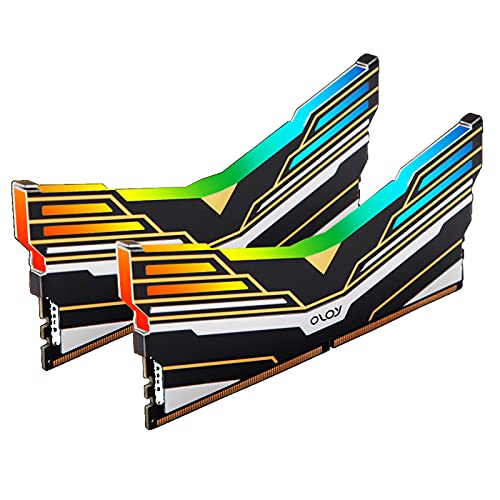
OLOy Warhawk RGB 16GB (2x8GB) DDR4-3000
Best for: RGB desktop builds needing standard 16GB memory
- Memory Speed
- 3000MHz (what this guide is about)
- Total Capacity
- 16GB
- CAS Latency
- CL16
- Voltage
- 1.35V
- Module Configuration
- 2x8GB
- Form Factor
- UDIMM
This OLOy Warhawk desktop kit delivers 16GB of DDR4 memory across two 8GB modules. Operating at 3000MHz with CL16-18-18-36 timings and 1.35V, it features Intel XMP 2.0 for one-step setup and Aura Sync RGB lighting. You get full compatibility with Intel and AMD systems, making it a reliable match for standard gaming builds needing moderate capacity and addressable lighting.
Pros
- 3000MHz speed with CL16-18-18-36 timings
- Intel XMP 2.0 support for automated setup
- Aura Sync RGB lighting integration
- Manufacturer lifetime warranty coverage
Cons
- Higher CL16 latency compared to CL15 alternatives
- 2.4-inch dimension profile may challenge tight cooler clearances
- 16GB total capacity restricts heavy multitasking headroom
Good fit if
- You want a 16GB dual-channel configuration with integrated RGB lighting.
- You use an Intel or AMD desktop motherboard supporting XMP 2.0 profiles.
Skip if
- You require tighter CL15 latency for specific memory-bound tasks.
- You need 32GB or more capacity for high-demand productivity workflows.
Verdict: OLOy Warhawk RGB 16GB (2x8GB) DDR4-3000 RAM suits desktop builders who want plug-and-play XMP 2.0 overclocking paired with synchronized RGB lighting in a dual-channel 16GB configuration.

Corsair Vengeance 32GB DDR4 3000MHz SODIMM
Best for: Compatible Intel laptops and NUC mini PCs
- Memory Speed
- 3000MHz (what this guide is about)
- Total Capacity
- 32GB
- CAS Latency
- C16
- Voltage
- 1.2V
- Module Configuration
- 2x16GB
- Form Factor
- SODIMM
This kit provides 32GB of DDR4 memory across two 16GB SODIMM modules running at 3000MHz. It operates at 1.2V with CL16 latency and 16-18-18-39 timings. If you need high-capacity memory for compatible 6th or 7th generation Intel Core i5 and i7 laptops or Intel NUC mini PCs, this dual-channel configuration upgrades your mobile setup.
Pros
- 32GB total capacity across two 16GB modules
- Runs at 3000MHz at standard 1.2V voltage
- Auto-overclocking on compatible notebooks without BIOS setup
- Limited lifetime warranty
Cons
- SODIMM form factor fits laptops and mini PCs rather than desktop slots
- CL16 latency with 16-18-18-39 timings is looser than CL15 kits
Good fit if
- You need a 32GB dual-channel upgrade for a compatible laptop or Intel NUC.
- You want 3000MHz memory that runs at 1.2V without BIOS adjustment.
Skip if
- You need standard full-sized DIMMs for a desktop motherboard.
- You prioritize lower CL15 latency.
Verdict: Corsair Vengeance 32GB SODIMM DDR4 Kit fits users seeking a high-capacity 3000MHz dual-channel memory upgrade for compatible Intel NUC mini PCs and high-performance notebooks.

G.SKILL Ripjaws 8GB 3000MHz SO-DIMM RAM
Best for: 1.2V laptop memory upgrades
- Memory Speed
- 3000MHz (what this guide is about)
- Total Capacity
- 8GB
- CAS Latency
- CL16
- Voltage
- 1.2 V
- Module Configuration
- 8GBx1
- Form Factor
- SO-DIMM
This G.SKILL Ripjaws module provides 8GB of DDR4 memory running at 3000MHz for compatible laptops. Operating at 1.2V, it delivers standard DDR4 operating voltage alongside CL16-18-18-43 timings and Intel XMP 2.0 support. It suits you if you need a compact 260-pin SO-DIMM stick to upgrade notebook memory without increasing voltage over the standard 1.2V baseline.
Pros
- Runs at 3000MHz at standard 1.2V operating voltage
- Intel XMP 2.0 profile support
- Low-profile 30mm module height for compact laptop slots
Cons
- Single 8GB module lacks multi-channel bandwidth out of the box
- CL16-18-18-43 timings are slower than desktop CL15 alternatives
Good fit if
- You need a 260-pin SO-DIMM module for a laptop
- You want 3000MHz speed while staying at 1.2V
Skip if
- You require a dual-channel kit with 16GB or more total capacity
- You are building a standard desktop system that uses 288-pin DIMMs
Verdict: G.SKILL Ripjaws 8GB 3000MHz SO-DIMM RAM provides single-stick laptop memory expansion for users needing 3000MHz speed at 1.2V.
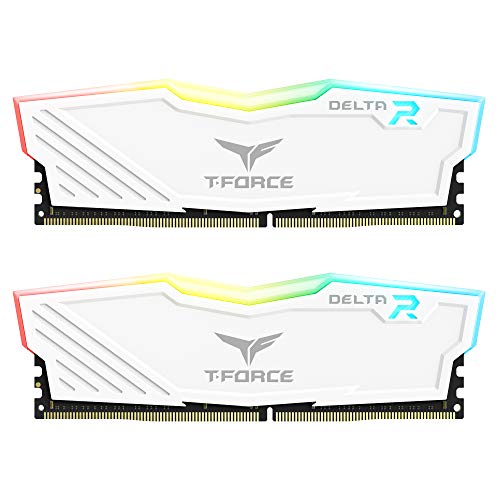
TEAMGROUP T-Force Delta RGB 16GB (2x8GB)
Best for: white desktop builds needing wide-angle RGB
- Memory Speed
- 3000MHz (what this guide is about)
- Total Capacity
- 16GB
- CAS Latency
- CL16
- Voltage
- 1.2V~1.4V
- Module Configuration
- 2x8GB
- Form Factor
- DIMM
This TEAMGROUP dual-channel kit equips your desktop with 16GB of DDR4 memory across two 8GB modules. Operating at 3000MHz with CL16 latency, it balances transfer rates and response times at 1.2V to 1.4V. The tall modules feature 120-degree full-frame RGB illumination, making it a direct fit if you are assembling a white-themed system.
Pros
- Dual-channel 16GB kit (two 8GB modules)
- 120-degree wide-angle full-frame RGB lighting
- Qualified vendor list (QVL) approved for leading motherboards
- Operates at 1.2V to 1.4V
Cons
- Module height of 1.93 inches restricts clearance under compact CPU coolers
- Slower CL16 base latency compared to CL15 options on the list
Good fit if
- You want full-frame RGB illumination for a white-themed desktop build.
- You run a standard dual-channel DDR4 setup requiring 3000MHz speeds.
Skip if
- You have tight CPU cooler clearance requiring low-profile memory under 1.93 inches.
- You need tighter CL15 latency timings.
Verdict: TEAMGROUP T-Force Delta RGB 16GB 3000MHz White delivers dependable dual-channel performance for desktop PC builders prioritizing wide-angle illumination inside an open-view case.

Corsair Vengeance LPX 16GB 3000MHz White RAM
Best for: compact builds needing low-profile white memory
- Memory Speed
- 3000MHz (what this guide is about)
- Total Capacity
- 16GB
- CAS Latency
- C16
- Module Configuration
- 2x8GB
- Height
- 34mm
- Dimensions
- 5.32 × 0.28 × 1.32 inches
View on Amazon: Corsair Vengeance LPX 16GB 3000MHz White RAM
This Corsair memory kit provides 16GB of DDR4 memory split across two 8GB sticks running at 3000MHz. It features a CAS latency of CL16 and supports Intel XMP 2.0 for simple profile setup. With a low-profile height of 34mm, it fits under large CPU air coolers. You will find it suits compact or white-themed desktop builds.
Pros
- Low-profile 34mm height fits small-form-factor cases and tight CPU coolers
- Intel XMP 2.0 support allows one-setting profile configuration
- Solid aluminum heatspreader provides passive heat dissipation
- Limited lifetime warranty included
Cons
- CL16 latency is higher than CL15 alternatives on the list
- 16GB total capacity limits memory-heavy productivity tasks
- No RGB lighting included
Good fit if
- You need low-profile modules measuring 34mm to clear large CPU coolers.
- You want a dual-channel 16GB kit with a white aluminum heatspreader.
Skip if
- You require 32GB or 64GB of system memory for demanding applications.
- You prioritize lower CL15 latency over low-profile physical clearance.
Verdict: Corsair Vengeance LPX 16GB 3000MHz White RAM gives small-form-factor builders reliable clearance beneath bulky CPU heatsinks. It serves desktop owners who need basic 16GB dual-channel speeds without tall heatsinks or decorative RGB LEDs.

Kingston Fury Beast RGB 64GB 3000MHz RAM
Best for: four-slot desktop setups needing 64GB capacity
- Memory Speed
- 3000MHz (what this guide is about)
- Total Capacity
- 64GB
- CAS Latency
- CL15
- Module Configuration
- 4x16GB
- Height
- 1.62 inches
- Compatible Device
- Desktop
This Kingston desktop memory pack provides 64GB of DDR4 memory across four 16GB modules running at 3000MHz with CL15 latency. It features Intel XMP profiles, AMD Ryzen compatibility, and built-in RGB lighting with Infrared Sync technology. You get large-capacity desktop multitasking and low CL15 response times if your motherboard has four open memory slots.
Pros
- 64GB capacity across four 16GB modules
- CL15 CAS latency at 3000MHz
- Intel XMP and AMD Ryzen compatibility
- Integrated RGB lighting with Infrared Sync Technology
Cons
- Requires four open motherboard DIMM slots
- 1.62-inch height requires physical clearance under large CPU coolers
- Plug N Play profile defaults to 2666MHz without XMP configuration
Good fit if
- You need 64GB of total system RAM for heavy desktop workloads.
- You have a motherboard with four available DDR4 slots.
- You want CL15 latency alongside RGB lighting control.
Skip if
- You use a compact motherboard that provides only two DIMM slots.
- You need low-profile RAM under 1.62 inches to clear your CPU cooler.
Verdict: Kingston Fury Beast RGB 64GB DDR4-3000 Kit fits desktop builders who need 64GB capacity and tight CL15 timing across a four-slot motherboard layout.
Specifications side by side
| Spec | G.SKILL Trident Z RGB 16GB DDR4 RAM Kit | Corsair Vengeance LPX 16GB DDR4 3000MHz | Corsair Vengeance LPX 32GB 3000MHz CL15 DDR4 | G.SKILL Ripjaws V 16GB DDR4-3000 Kit | G.SKILL Ripjaws V 16GB 3000MHz DDR4 RAM | OLOy Warhawk RGB 16GB (2x8GB) DDR4-3000 | Corsair Vengeance 32GB DDR4 3000MHz SODIMM | G.SKILL Ripjaws 8GB 3000MHz SO-DIMM RAM | TEAMGROUP T-Force Delta RGB 16GB (2x8GB) | Corsair Vengeance LPX 16GB 3000MHz White RAM | Kingston Fury Beast RGB 64GB 3000MHz RAM |
|---|---|---|---|---|---|---|---|---|---|---|---|
| Total Capacity | 16GB | 16GB | 32GB | 16GB | 16GB | 16GB | 32GB | 8GB | 16GB | 16GB | 64GB |
| Memory Speed | 3000MT/s | 3000MHz | 3000MHz | 3000MT/s | 3000MT/s | 3000MHz | 3000MHz | 3000MHz | 3000MHz | 3000MHz | 3000MHz |
| CAS Latency | CL16 | CL15 | CL15 | CL15 | CL16 | CL16 | C16 | CL16 | CL16 | C16 | CL15 |
| Voltage | 1.35V | 1.35V | not specified | 1.35V | 1.35V | 1.35V | 1.2V | 1.2 V | 1.2V~1.4V | not specified | not specified |
| Module Configuration | 2x8GB | 2x8GB | 2x16GB | 2x8GB | 2x8GB | 2x8GB | 2x16GB | 8GBx1 | 2x8GB | 2x8GB | 4x16GB |
| Form Factor | U-DIMM | not specified | not specified | U-DIMM | U-DIMM | UDIMM | SODIMM | SO-DIMM | DIMM | not specified | not specified |
| ECC Support | Non-ECC | not specified | not specified | Non-ECC | Non-ECC | not specified | not specified | Non-ECC | Non-ECC | not specified | not specified |
| Height | 1.7 inches | 34mm | 34mm | 0.5 inches | not specified | 0.26 inches | not specified | 30mm | 1.93 inches | 34mm | 1.62 inches |
| Compatible Device | Desktop, PC | Desktop, PC | not specified | Desktop, PC | Desktop, PC | Desktop | Laptop | Laptop | Desktop | not specified | Desktop |
| Size | 16GB | 16GB Kit (2x8GB) | 32GB Kit (2x16GB) | 16GB | 16GB | 8GBx2 | (2 x 16GB) | 8 GB (1 x 8 GB) | 16GB (2x8GB) | 16GB Kit (2x8GB) | 64GB |
| Dimensions | 5.2 × 0.67 × 1.7 inches | 6.74 × 3.55 × 0.61 inches | 5.31 × 1.31 × 0.27 inches | 7.2 × 5.2 × 0.5 inches | not specified | 5.63 × 2.4 × 0.26 inches | 2.66 × 0.16 × 11.2 inches | not specified | 5.79 × 0.28 × 1.93 inches | 5.32 × 0.28 × 1.32 inches | 5.25 × 0.28 × 1.62 inches |
| Weight | 4.8 ounces | 3.21 ounces | 2.56 ounces | 3.17 ounces | not specified | 1.72 ounces | 0.56 ounces | 0.39 ounces | 3.53 ounces | 2.72 ounces | 5.5 ounces |
| Length | not specified | not specified | not specified | not specified | not specified | not specified | not specified | 2.76 inches | not specified | not specified | not specified |
| Color | Multicolor | Black | Black | Black | Red | Black | DDR4 | Black | White | White | RGB |
| Model | F4-3000C16D-16GTZR | CMK16GX4M2B3000C15 | CMK32GX4M2B3000C15 | F4-3000C15D-16GVKB | F4-3000C16D-16GVRB | MD4U083016BEDA | CMSX32GX4M2A3000C16 | F4-3000C16S-8GRS | TF4D416G3000HC16CDC01 | CMK16GX4M2D3000C16W | KF430C15BB1AK4/64 |
How to choose the right one
-
Match capacity to workload
Your primary task determines the total gigabytes you need. Standard gaming and office work typically run well on 16GB kits. The G.SKILL Trident Z RGB offers this standard dual-channel capacity for most desktop users. If you edit video or run virtual machines, 32GB provides headroom. The Corsair Vengeance LPX 32GB kit serves those larger workloads. For heavy multitasking, the Kingston Fury Beast delivers 64GB. Select the size that prevents your system from swapping data to your drive.
-
Check form factor fit
You must verify the physical module type before buying. Desktop motherboards require UDIMM sticks, while laptops and mini PCs use SODIMM. The Corsair Vengeance LPX is a UDIMM for standard towers. The Corsair Vengeance SODIMM kit is designed for notebooks and NUCs. Installing the wrong form factor is impossible and wastes money. Confirm your slot type in your device manual. This physical constraint is the first filter in your selection process.
-
Compare CAS latency values
Lower CAS latency means faster data access times. All kits here run at 3000MHz, so latency becomes the differentiator. CL15 is tighter and faster than CL16. The Corsair Vengeance LPX achieves this CL15 speed at 1.35V. The G.SKILL Ripjaws V also offers CL15 timings. Most other options use CL16. If you want the lowest possible latency at this speed tier, prioritize the CL15 models. The difference is measurable in benchmark tests.
-
Verify voltage requirements
Overclocked memory requires higher voltage than standard settings. Most 3000MHz kits operate at 1.35V. This ensures stability at the higher speed. The G.SKILL Trident Z RGB and Corsair Vengeance LPX both use 1.35V. Laptop upgrades often stick to 1.2V for efficiency. The G.SKILL Ripjaws SODIMM runs at 1.2V. Ensure your motherboard and power supply can handle the required voltage. Mismatched voltage can cause instability or reduced lifespan.
-
Ensure cooler clearance
Tall heatsinks on large CPU coolers can block memory slots. Low-profile kits solve this issue. The Corsair Vengeance LPX is designed for compact clearance. It fits under bulky air coolers easily. The G.SKILL Trident Z RGB has a taller profile. It suits open builds where aesthetics matter more than clearance. Check the height of your CPU cooler. Match it against the RAM height specifications to avoid physical conflicts during installation.
Frequently asked questions
Which 3000MHz DDR4 RAM is best for laptops?
You should choose a SODIMM form factor for laptops. The G.SKILL Ripjaws 8GB 3000MHz SO-DIMM RAM operates at 1.2V, which is ideal for laptop power efficiency. Alternatively, the Corsair Vengeance 32GB DDR4 3000MHz SODIMM Kit provides higher capacity for compatible Intel NUC mini PCs and high-performance notebooks.
What is the lowest CAS latency available in this list?
The lowest CAS latency is CL15. You can find this timing in the Corsair Vengeance LPX 16GB DDR4 3000MHz, the Corsair Vengeance LPX 32GB 3000MHz CL15 DDR4, and the Kingston Fury Beast RGB 64GB 3000MHz RAM. Tighter latency like CL15 can improve system responsiveness compared to CL16 options.
Can I use 3000MHz RAM in a desktop PC?
Yes, most of these kits are designed for desktop PCs. They use the UDIMM form factor, which fits standard desktop motherboards. Examples include the G.SKILL Trident Z RGB 16GB DDR4 RAM Kit and the OLOy Warhawk RGB 16GB (2x8GB) DDR4-3000. Both support XMP overclocking for desktop builders.
Which kit offers the highest total memory capacity?
The Kingston Fury Beast RGB 64GB 3000MHz RAM offers the highest capacity. It is designed for four-slot desktop setups. This kit provides 64GB of total memory with CL15 timing, making it suitable for users who need extensive memory resources for heavy workloads or large datasets.
Do all these kits run at 1.35V?
No, voltage varies by kit and device type. Most desktop UDIMM kits, like the G.SKILL Trident Z RGB, run at 1.35V. However, laptop SODIMM modules operate at lower voltages. The G.SKILL Ripjaws 8GB 3000MHz SO-DIMM RAM runs at 1.2V, which is standard for laptop memory upgrades.
Is there a white color option for desktop builds?
Yes, there are white options for desktop builds. The TEAMGROUP T-Force Delta RGB 16GB (2x8GB) delivers wide-angle illumination in white. The Corsair Vengeance LPX 16GB 3000MHz White RAM also offers a low-profile design in white, suitable for builders who want basic dual-channel speeds without tall heatsinks.
Which RAM is best for small form factor cases?
Low-profile kits are best for small cases. The Corsair Vengeance LPX 16GB DDR4 3000MHz has a low profile that clears bulky CPU heatsinks. The Corsair Vengeance LPX 32GB 3000MHz CL15 DDR4 also features a low-profile 34mm design. These allow for maximum cooler clearance in space-constrained desktop builds.
What is the difference between CL15 and CL16?
CAS Latency (CL) indicates how many clock cycles the RAM waits before accessing data. Lower numbers mean faster response. CL15 kits, like the Corsair Vengeance LPX 16GB, offer tighter timing than CL16 options, such as the G.SKILL Trident Z RGB. This can result in slightly better performance in latency-sensitive tasks.