11 Best Samsung DDR4 RAMS for Laptop, Compared
As an Amazon Associate we earn from qualifying purchases. Links on this page are affiliate links.
Finding the best samsung ddr4 RAMs for laptop requires matching your system’s limits to the right specs. We compared 11 models using only the published listing data. The top pick is the Samsung 32GB DDR4 3200MHz SODIMM Laptop RAM. It leads because it offers a single 32GB stick for high-capacity upgrades without needing dual slots. All options use standard 1.2V voltage and SODIMM form factors. This guide helps you decide which capacity and speed fit your specific notebook requirements.
Quick picks
The best fit for you
- You need the highest single-slot capacity for your laptop Samsung 32GB DDR4 3200MHz SODIMM Laptop RAM This 32GB module fits into one slot, doubling your notebook's memory without needing a second stick.
- You want a balanced dual-channel kit for your laptop Samsung 32GB (2x16GB) DDR4 3200MHz SODIMM Kit The two 16GB sticks provide 32GB total capacity at 3200MHz, enabling dual-channel performance for smoother multitasking.
- You require maximum memory capacity for your dual-slot laptop Samsung 64GB DDR4 3200MHz SODIMM Kit This 64GB kit uses two 32GB modules to fill both slots, offering the highest DDR4 density available.
- You are upgrading an older laptop limited to 2666MHz Samsung 32GB DDR4 2666MHz SODIMM The 32GB capacity runs at 2666MHz, ensuring compatibility with systems that do not support faster speeds.
Our 11 picks
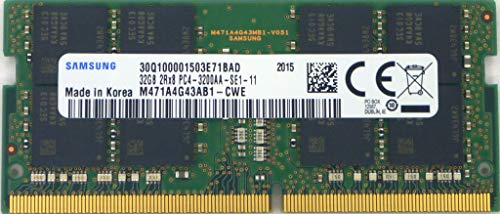
Samsung 32GB DDR4 3200MHz SODIMM Laptop RAM
Best for: single-slot laptop memory upgrades to 32GB
- Compatible Device
- Laptop (what this guide is about)
- Total Capacity
- 32GB
- Memory Speed
- 3200 Mbps
- Voltage
- 1.2V
- Form Factor
- SODIMM
- Dimensions
- 2.75 × 0.13 × 1.18 inches
This Samsung memory module gives you 32GB of DDR4 capacity on a single 260-pin SODIMM stick. It operates at 3200MHz with a standard 1.2V power draw, using a 2Rx8 rank configuration with 16 chips. You can install it to maximize an empty laptop slot or replace a lower-capacity stick when you need substantial memory.
Pros
- 32GB capacity on a single module
- 3200MHz operating frequency
- Standard 1.2V power requirement
- Dual-rank 2Rx8 build with 16 chips
Cons
- Sold as a single stick rather than a matched two-pack kit
- Total package capacity stops at 32GB instead of 64GB
Good fit if
- You have a laptop with an open 260-pin SODIMM slot.
- You need 32GB of memory on a single stick running at 3200MHz.
- Your system requires standard 1.2V DDR4 memory modules.
Skip if
- You need a matched pair of modules in one package.
- You want 64GB total capacity across two slots immediately.
Verdict: Samsung 32GB 3200MHz DDR4 SODIMM delivers high single-slot capacity and standard 1.2V operation for laptop users upgrading from smaller memory sticks. It gives notebook systems a reliable 3200MHz dual-rank module for memory-intensive workloads.

Samsung 16GB 3200MHz DDR4 SODIMM
Best for: single-slot 16GB DDR4 laptop upgrades
- Compatible Device
- Laptop (what this guide is about)
- Total Capacity
- 16GB
- Memory Speed
- 3200 MT/s
- CAS Latency
- CL22
- Voltage
- 1.2V
- Module Configuration
- 1x16GB
This Samsung memory upgrade is a single 16GB DDR4 SODIMM module built for laptops and all-in-one systems. It operates at 3200MHz with CL22 timings and a standard 1.2V profile. The dual-rank 2Rx8 build delivers dependable transfer rates for everyday workloads. It suits you if you need to populate an open laptop memory slot with 16GB of standard-voltage memory.
Pros
- 3200MHz speed matches standard PC4-25600 specifications
- Dual-rank 2Rx8 module architecture
- Standard 1.2V DDR4 power requirement
- Compatible with notebooks and all-in-one systems using 260-pin slots
Cons
- Single-module configuration does not enable dual-channel memory alone
- CL22 CAS latency is higher than 2666MHz CL19 modules on the list
Good fit if
- You need to add a single 16GB module to an existing laptop setup.
- You have a laptop or all-in-one PC with an empty 260-pin DDR4 slot.
Skip if
- You need a matched dual-module kit for instant dual-channel operation.
- You require 32GB or 64GB of total system memory.
Verdict: Samsung 16GB DDR4 3200MHz SODIMM gives laptop users a single unbuffered dual-rank stick to fill an open memory slot. It delivers standard 1.2V operation at 3200MHz for notebook and all-in-one upgrades.

Samsung 32GB (2x16GB) DDR4 3200MHz SODIMM Kit
Best for: dual-slot laptop users wanting 32GB 3200MHz
- Compatible Device
- Laptop (what this guide is about)
- Total Capacity
- 32GB
- Memory Speed
- 3200MHz
- CAS Latency
- CL22
- Voltage
- 1.2V
- Module Configuration
- 2x16GB
View on Amazon: Samsung 32GB (2x16GB) DDR4 3200MHz SODIMM Kit
This memory kit gives you two 16GB modules for 32GB total DDR4 RAM. It runs at 3200MHz with CL22 timings on standard 1.2V power. The 260-pin SODIMM form factor fits laptops and all-in-one systems with dual memory slots. It suits you if you want a dual-channel upgrade with matched single-rank 1Rx8 modules.
Pros
- 32GB total capacity split across two 16GB modules
- 3200MHz memory speed with CL22 latency
- Standard JEDEC 1.2V operating voltage
- Single-rank 1Rx8 module design
Cons
- Requires two available SODIMM slots instead of one
- CL22 CAS latency is higher than 2666MHz alternatives
- Lacks ECC support for specialized workstation systems
Good fit if
- You have a laptop with two open 260-pin DDR4 SODIMM slots.
- You want a matched 32GB dual-channel setup running at 3200MHz.
- Your system requires standard 1.2V non-ECC memory modules.
Skip if
- You own a notebook with only a single memory slot available.
- You need 64GB total capacity for higher-demand workloads.
- Your system specifically requires ECC memory.
Verdict: Samsung 32GB (2x16GB) DDR4 3200MHz SODIMM Kit suits laptop users who need a balanced two-stick dual-channel setup running at standard JEDEC 3200MHz speed. It delivers 32GB across two slots without exceeding 1.2V power requirements.

Samsung 32GB 3200MHz DDR4 SODIMM Kit
Best for: dual-channel laptop upgrades up to 32GB
- Compatible Device
- Laptop (what this guide is about)
- Total Capacity
- 32GB
- Memory Speed
- 3200MHz
- CAS Latency
- CL22
- Voltage
- 1.2V
- Module Configuration
- 2x16GB
This Samsung kit pairs two 16GB DDR4 SODIMM modules to give you 32GB of dual-channel system memory. It runs at standard JEDEC speeds up to 3200MHz with CL22 timings on 1.2V without needing overclocking profiles. You get a plug-and-play upgrade designed for laptops and all-in-one PCs that have two available 260-pin memory slots.
Pros
- Two-module kit enables dual-channel memory configurations
- Runs at 3200MHz frequency at standard 1.2V JEDEC voltage
- Dual-rank (2Rx8) module layout
Cons
- Occupies two SODIMM slots, preventing future expansion on dual-slot boards
- Non-ECC unbuffered design does not support error-checking correction
Good fit if
- You have a laptop with two available 260-pin DDR4 SODIMM slots.
- You want a balanced 32GB dual-channel configuration running at 3200MHz.
Skip if
- You have a single available memory slot on your motherboard.
- You require a higher total capacity such as 64GB.
Verdict: Samsung 32GB (2x16GB) DDR4 3200MHz SODIMM Kit delivers a dual-channel memory upgrade for users with dual-slot laptops supporting DDR4-3200 at 1.2V.

Samsung 8GB DDR4 3200MHz SODIMM
Best for: entry-level laptop memory upgrades
- Compatible Device
- Laptop (what this guide is about)
- Total Capacity
- 8GB
- Memory Speed
- 3200MHz
- CAS Latency
- CL22
- Voltage
- 1.2V
- Module Configuration
- 1x8GB
This Samsung module gives you 8GB of DDR4 memory running at 3200MHz with CL22 timing. Designed for laptops and all-in-one systems, it uses a standard 260-pin SODIMM form factor at 1.2V. If your notebook needs a basic single-stick upgrade to replace a slower module or fill an open slot for everyday workloads, this option fits your machine.
Pros
- Standard 3200MHz operating frequency
- JEDEC standard 1.2V power requirement
- Non-ECC unbuffered design for notebook compatibility
- Compact 260-pin SODIMM form factor
Cons
- 8GB capacity is the lowest on the list
- Single-module configuration does not enable dual-channel operation on its own
- 1Rx16 rank design uses fewer memory chips than 1Rx8 or 2Rx8 modules
Good fit if
- You need an 8GB DDR4 replacement stick for an entry-level laptop.
- You want a single 3200MHz module running at standard 1.2V.
Skip if
- You need 16GB or higher capacity for memory-intensive workloads.
- You want a matched dual-module kit in a single package.
Verdict: Samsung 8GB DDR4 3200MHz SODIMM provides baseline memory expansion for notebook owners seeking a single-module replacement for everyday computing tasks.

Samsung 32GB DDR4 2666MHz SODIMM
Best for: older laptops needing 32GB DDR4
- Compatible Device
- Laptop (what this guide is about)
- Total Capacity
- 32GB
- Memory Speed
- 2666MHz
- CAS Latency
- CL19
- Voltage
- 1.2V
- Module Configuration
- 2x16GB
This Samsung kit gives you 32GB of DDR4 memory in two 16GB modules. It runs at 2666MHz with a CL19 latency. The modules use 1.2V power and fit into 260-pin laptop slots. You get dual-rank performance for multitasking. It is a solid upgrade for older laptops that support DDR4. The build is standard for notebook upgrades.
Pros
- 32GB total capacity across two 16GB sticks
- 2666MHz speed for compatible systems
- 1.2V low voltage operation
- CL19 CAS latency timing
Cons
- Slower 2666MHz speed compared to 3200MHz options
- Higher CL19 latency than CL22 kits
- Limited to older DDR4 laptop standards
Good fit if
- You need a 32GB upgrade for an older laptop
- Your system supports DDR4 2666MHz memory
- You want genuine Samsung components
Skip if
- You require 3200MHz or faster speeds
- Your laptop uses DDR5 memory
- You need a single 32GB stick
Verdict: Samsung 32GB DDR4 2666MHz SODIMM fits users with older laptops needing a reliable 32GB upgrade. It offers stable performance for daily tasks without the premium of faster speeds.

Samsung 16GB DDR4 2666MHz SODIMM
Best for: Laptops limited to 2666MHz DDR4 memory
- Compatible Device
- Laptop (what this guide is about)
- Total Capacity
- 16GB
- Memory Speed
- 2666MHz
- CAS Latency
- CL19
- Voltage
- 1.2V
- Module Configuration
- 1x16GB
This single-module upgrade gives you 16GB of DDR4 memory running at 2666MHz with CL19 latency. It operates at standard 1.2V across a 260-pin SODIMM interface and features a 2Rx8 dual-rank configuration. You will find it suitable if your laptop or all-in-one system requires non-ECC memory and caps transfer rates at 2666MHz rather than higher 3200MHz frequencies.
Pros
- CL19 CAS latency rated for standard 2666MHz operation
- 2Rx8 dual-rank memory architecture
- Standard 1.2V DDR4 power requirement
- Single 16GB module fits 260-pin SODIMM slots
Cons
- 2666MHz clock speed is lower than 3200MHz alternatives
- Single-stick package does not provide dual-channel operation on its own
Good fit if
- You need a single 16GB stick for a laptop capped at 2666MHz.
- You want dual-rank 2Rx8 memory that runs at standard 1.2V.
Skip if
- You have a system that supports faster 3200MHz memory speeds.
- You need a matched dual-channel pair in a single package.
Verdict: Samsung 16GB 2666MHz DDR4 Laptop SODIMM provides a targeted 16GB dual-rank expansion for older or entry-level notebooks whose motherboards max out at 2666MHz.

Samsung 16GB DDR4 3200MHz SODIMM
Best for: single-slot 16GB DDR4 laptop upgrades
- Compatible Device
- Laptop (what this guide is about)
- Total Capacity
- 16GB
- Memory Speed
- 3200MHz
- CAS Latency
- CL22
- Voltage
- 1.2V
- Module Configuration
- 1x16GB
This Samsung memory module gives you 16GB of DDR4 memory running at 3200MHz. Designed as a single 260-pin SODIMM operating at 1.2V with CL22 latency, it fits compatible laptops and all-in-one systems. Its single-rank 1Rx8 layout suits you if you need to expand an open slot without replacing your current module.
Pros
- 3200MHz transfer speed with CL22 latency
- Standard 1.2V operating voltage
- Single-rank 1Rx8 module design
- 260-pin SODIMM form factor for laptops and all-in-one systems
Cons
- Single-module configuration rather than a dual-channel kit
- Non-ECC unbuffered design without error-correcting code support
Good fit if
- You need a single 16GB stick to fill an open memory slot.
- You require standard DDR4 3200MHz speed running at 1.2V.
Skip if
- You require a matched two-module kit for dual-channel operation.
- You need higher total capacity such as 32GB or 64GB.
Verdict: Samsung 16GB DDR4 3200MHz 1Rx8 SODIMM gives notebook users an unbuffered expansion stick running at standard JEDEC 1.2V voltage. It fits laptops that need an individual 16GB module addition.

Samsung 32GB DDR4 3200MHz SODIMM
Best for: single-slot high-capacity laptop memory upgrades
- Compatible Device
- Laptop (what this guide is about)
- Total Capacity
- 32GB
- Memory Speed
- 3200MHz
- CAS Latency
- CL22
- Voltage
- 1.2V
- Module Configuration
- 1x32GB
This Samsung module is a single 32GB DDR4 SODIMM designed for notebooks and all-in-one systems. Operating at 3200MHz with CL22 timings and standard 1.2V power, it lets you expand system memory using one slot. It fits you if your laptop has a single free slot and requires unbuffered, non-ECC memory for heavy multitasking workloads.
Pros
- Single 32GB high-density module
- 3200MHz speed at standard 1.2V
- Dual-rank 2Rx8 configuration
- Standard 260-pin SODIMM form factor
Cons
- Single-module format does not provide dual-channel operation alone
- CL22 CAS latency
Good fit if
- You need to maximize capacity in a laptop with only one available SODIMM slot.
- You require standard JEDEC 1.2V DDR4-3200 memory without voltage tweaks.
Skip if
- You want a pre-matched two-stick kit for immediate dual-channel operation.
- You need lower CL19 latency memory.
Verdict: Samsung 32GB DDR4 3200MHz SODIMM delivers high single-slot density for laptops needing a standard 1.2V non-ECC memory expansion.

Samsung 64GB DDR4 3200MHz SODIMM Kit
Best for: laptops requiring maximum DDR4 capacity
- Compatible Device
- Laptop (what this guide is about)
- Total Capacity
- 64GB
- Memory Speed
- 3200MHz
- CAS Latency
- CL22
- Voltage
- 1.2V
- Module Configuration
- 2x32GB
This dual-module memory kit provides 64GB of total DDR4 memory across two 32GB modules. It operates at 3200MHz speeds with CL22 timing and standard 1.2V voltage on 260-pin SODIMM slots. You get dual-rank 2Rx8 unbuffered capacity designed specifically for notebooks and all-in-one systems needing substantial memory headroom for heavy workloads.
Pros
- 64GB total capacity across two 32GB modules
- Operates at 3200MHz standard memory speed
- JEDEC standard 1.2V operating voltage
Cons
- High CAS latency at CL22
- Lacks ECC error checking support
Good fit if
- You need 64GB of memory across two SODIMM slots.
- You run memory-heavy workloads on a 3200MHz DDR4 notebook.
Skip if
- You only have a single open RAM slot in your system.
- You require lower CAS latency than CL22.
Verdict: Samsung 64GB (2x32GB) 3200MHz DDR4 SODIMM Kit equips dual-slot DDR4 laptops and all-in-one systems with maximum memory capacity at standard 1.2V power.

Samsung 64GB DDR4 2666MHz SODIMM Kit
Best for: laptops capped at 2666MHz needing 64GB
- Compatible Device
- Laptop (what this guide is about)
- Total Capacity
- 64GB
- Memory Speed
- 2666MHz
- CAS Latency
- CL19
- Voltage
- 1.2V
- Module Configuration
- 2x32GB
This dual-channel kit provides 64GB of memory across two 32GB 260-pin SODIMM modules. Operating at 2666MHz with CL19 latency and a standard 1.2V profile, it fits compatible laptops and all-in-one systems. It suits you if you handle heavy multitasking workloads that demand maximum memory density rather than the higher 3200MHz speeds available.
Pros
- High 64GB capacity split across two 32GB modules
- CL19 CAS latency at 2666MHz
- Standard JEDEC 1.2V operating voltage
- Dual-rank 2Rx8 module architecture
Cons
- 2666MHz frequency is slower than 3200MHz alternatives
- Non-ECC unbuffered design lacks error-correcting code
Good fit if
- You need 64GB of total RAM for memory-heavy applications.
- Your laptop hardware maxes out at 2666MHz transfer speeds.
- You have two available 260-pin DDR4 SODIMM slots.
Skip if
- Your laptop supports faster 3200MHz DDR4 memory modules.
- You require ECC memory for error-tolerant enterprise tasks.
Verdict: Samsung 64GB DDR4 2666MHz SODIMM Kit provides maximum memory density for dual-slot laptops limited to 2666MHz transfer rates.
Specifications side by side
| Spec | Samsung 32GB DDR4 3200MHz SODIMM Laptop RAM | Samsung 16GB 3200MHz DDR4 SODIMM | Samsung 32GB (2x16GB) DDR4 3200MHz SODIMM Kit | Samsung 32GB 3200MHz DDR4 SODIMM Kit | Samsung 8GB DDR4 3200MHz SODIMM | Samsung 32GB DDR4 2666MHz SODIMM | Samsung 16GB DDR4 2666MHz SODIMM | Samsung 16GB DDR4 3200MHz SODIMM | Samsung 32GB DDR4 3200MHz SODIMM | Samsung 64GB DDR4 3200MHz SODIMM Kit | Samsung 64GB DDR4 2666MHz SODIMM Kit |
|---|---|---|---|---|---|---|---|---|---|---|---|
| Total Capacity | 32GB | 16GB | 32GB | 32GB | 8GB | 32GB | 16GB | 16GB | 32GB | 64GB | 64GB |
| Memory Speed | 3200 Mbps | 3200 MT/s | 3200MHz | 3200MHz | 3200MHz | 2666MHz | 2666MHz | 3200MHz | 3200MHz | 3200MHz | 2666MHz |
| CAS Latency | not specified | CL22 | CL22 | CL22 | CL22 | CL19 | CL19 | CL22 | CL22 | CL22 | CL19 |
| Voltage | 1.2V | 1.2V | 1.2V | 1.2V | 1.2V | 1.2V | 1.2V | 1.2V | 1.2V | 1.2V | 1.2V |
| Module Configuration | not specified | 1x16GB | 2x16GB | 2x16GB | 1x8GB | 2x16GB | 1x16GB | 1x16GB | 1x32GB | 2x32GB | 2x32GB |
| Form Factor | SODIMM | SO-DIMM | SODIMM | SODIMM | SODIMM | SODIMM | SODIMM | SODIMM | SODIMM | SODIMM | SODIMM |
| ECC Support | not specified | Non-ECC | Non-ECC | Non-ECC | Non-ECC | Non-ECC | Non-ECC | Non-ECC | Non-ECC | Non-ECC | Non-ECC |
| Compatible Device | Laptop | Laptop | Laptop | Laptop | Laptop | Laptop | Laptop | Laptop | Laptop | Laptop | Laptop |
| Size | 32GB | 16GB | 16GB | 1Rx8 | 16GB | 2Rx8 | 8GB | 1Rx16 | 16GB | 2Rx8 | 16GB | 2Rx8 | 16GB | 1Rx8 | not specified | not specified | not specified |
| Dimensions | 2.75 × 0.13 × 1.18 inches | not specified | 2.74 × 1.18 × 0.15 inches | 2.74 × 1.18 × 0.15 inches | 2.74 × 1.18 × 0.15 inches | 2.74 × 1.18 × 0.15 inches | 2.74 × 1.18 × 0.15 inches | 2.74 × 1.18 × 0.15 inches | not specified | not specified | not specified |
| Color | Multicolor | Multicolor | 2 Module Kit | 2 Module Kit | 1 Module | 2 Module Kit | 1 Module | 1 Module | not specified | not specified | not specified |
| Model | M471A4G43AB1-CWE | M471A2K43DB1-CWE | not specified | not specified | not specified | not specified | not specified | not specified | not specified | not specified | not specified |
How to choose the right Samsung DDR4 RAM
-
Check your laptop speed limits
Your laptop motherboard dictates the maximum memory speed it supports. If your system handles 3200MHz, choose a module like the Samsung 32GB DDR4 3200MHz SODIMM Laptop RAM to get that performance. If your laptop is older and caps at 2666MHz, select the Samsung 32GB DDR4 2666MHz SODIMM instead. Running faster RAM in a slower system will just force it to downclock. Always verify your laptop’s maximum supported speed in the manual to avoid paying for performance you cannot use.
-
Match capacity to your slots
Decide if you need a single stick or a kit. If you have only one open slot, a single module like the Samsung 16GB DDR4 3200MHz SODIMM works well. If you have two empty slots, a kit like the Samsung 32GB (2x16GB) DDR4 3200MHz SODIMM Kit enables dual-channel mode for better bandwidth. Single sticks are ideal for simple upgrades, while kits provide balanced performance for demanding tasks. Check how many slots your laptop has before buying.
-
Verify form factor compatibility
Laptops require SODIMM modules, which are smaller than desktop DIMMs. All options in this guide use the SODIMM form factor, so they fit standard laptop slots. Ensure you do not buy desktop RAM, as it will not fit physically. The Samsung 8GB DDR4 3200MHz SODIMM and other listed products are all SODIMM. This physical constraint is the first step in compatibility. Double-check that your device uses SODIMM slots, as some specialized or ultra-thin laptops may use soldered memory with no upgrade path.
-
Understand voltage requirements
Standard DDR4 laptop RAM operates at 1.2V. All products listed here use this standard voltage, ensuring compatibility with most modern notebooks. This voltage level balances performance and power efficiency. You do not need to worry about high-voltage desktop modules. Just confirm your laptop supports standard 1.2V DDR4. This is the norm for almost all DDR4 SODIMM products. Sticking to 1.2V ensures stable operation and prevents potential power delivery issues in your laptop’s memory controller.
-
Consider latency for responsiveness
CAS Latency (CL) affects how quickly memory responds to commands. Lower numbers are faster. The Samsung 32GB DDR4 2666MHz SODIMM has a CL19 rating, while the 3200MHz versions typically have CL22. The higher speed of 3200MHz often offsets the slightly higher latency. For most users, speed matters more than minor latency differences. Choose based on your laptop’s speed limit. If you need maximum capacity at lower speeds, the 2666MHz CL19 options are reliable choices for daily computing tasks.
Frequently asked questions
Can I mix 3200MHz and 2666MHz Samsung DDR4 RAM in my laptop?
You can physically install both speeds, but the system will downclock all modules to the lowest common denominator. If you mix a 3200MHz stick with a 2666MHz one, both run at 2666MHz. This ensures stability but sacrifices the higher bandwidth of the faster module. Check your motherboard manual to confirm if mixed speeds are supported.
What is the difference between 1Rx8 and 2Rx8 Samsung memory?
The notation refers to rank configuration, which affects how data is organized on the chips. A 1Rx8 module has one rank of memory chips, while a 2Rx8 has two ranks. Dual-rank modules like the 16GB 2Rx8 kits often provide slightly better performance in specific workloads. Single-rank options are common in smaller capacities.
Does Samsung DDR4 RAM require XMP profiles for laptop use?
No. These modules operate at standard JEDEC voltages, typically 1.2V, without needing XMP or EXPO profiles. They are designed for plug-and-play compatibility with laptop motherboards that support DDR4. You do not need to adjust BIOS settings to achieve the listed speeds, such as 3200MHz or 2666MHz, as long as the laptop supports them.
Is the Samsung 32GB SODIMM compatible with all laptops?
Compatibility depends on your laptop’s maximum supported capacity and slot count. While the 32GB SODIMM fits standard SODIMM slots, not all notebooks support a single 32GB stick. Verify your system’s manual for maximum per-slot capacity. Some older models may only support up to 16GB per slot, requiring two 16GB sticks instead.
How do I know if my laptop supports 3200MHz RAM?
Check your laptop’s official specifications or user manual for the maximum supported memory speed. If the manual lists 3200MHz, you can use modules like the Samsung 32GB DDR4 3200MHz SODIMM. If it only lists 2666MHz, installing faster RAM will cause it to run at 2666MHz. Always match the speed to your system’s limit for optimal performance.
Can I use Samsung DDR4 RAM in a desktop computer?
No. These are SODIMM modules, designed specifically for laptops and small form-factor systems. Desktop computers require standard DIMM modules, which are larger and have more pins. Using SODIMM in a desktop slot is physically impossible. Ensure you are buying the correct form factor for your device type.