Choosing DDR5 RAMs in 2026: The Specs That Matter and 8 Picks
As an Amazon Associate we earn from qualifying purchases. Links on this page are affiliate links.
This ddr5 RAM buying guide helps you select memory that matches your system’s needs. You will compare key specifications like speed, latency, and capacity to find the right fit. The recommendations are based strictly on published data from eight distinct kits. We evaluate each option by its technical attributes rather than subjective impressions or marketing claims.
You can decide whether to prioritize high-speed performance for gaming or stable capacity for professional workloads. The list includes options for AMD platforms with EXPO profiles and Intel systems with XMP support. You will see choices ranging from entry-level 16GB sticks to high-capacity 64GB modules. Each product is chosen for its specific strengths, such as low latency or compact form factors. This approach ensures you make an informed choice based on clear, factual differences between the available DDR5 memory kits.
Our top pick: G.SKILL Trident Z5 Neo 64GB DDR5-6000 CL30.
Key DDR5 RAM Specs to Check
Memory Speed
Speed, measured in MHz or MT/s, determines how fast data moves between the CPU and memory. Higher numbers generally mean better performance in gaming and heavy multitasking. DDR5 kits in this guide range from 4800MHz to 6000MHz. You should match the speed to your platform’s limits. The G.SKILL Trident Z5 Neo offers 6000MHz for high-end builds. The TEAMGROUP Elite runs at 4800MHz, which is sufficient for basic tasks. Faster speeds often cost more and may require better cooling. Choose the highest speed your motherboard and CPU support for the best results.
- Check motherboard QVL for supported speeds
- Match speed to CPU capabilities
- Higher MT/s improves gaming performance
Compatible Device
Ensure the RAM is designed for your specific hardware. Most kits here are for desktop PCs, but some are optimized for certain platforms. AMD systems often benefit from kits with EXPO profiles, while Intel systems use XMP. The Kingston Fury Beast is noted for compact Intel builds. The G.SKILL kit is optimized for AMD. Using the wrong type can lead to instability or failure to boot. Always verify the compatible device list before purchasing. This ensures the memory will work with your motherboard’s chipset and CPU architecture without issues.
- Verify desktop vs laptop compatibility
- Check AMD EXPO or Intel XMP support
- Confirm motherboard CPU socket support
Form Factor
The physical size and shape of the RAM module must fit your case and cooler. Most desktop DDR5 uses UDIMM form factors. Low-profile designs, like the Kingston Fury Beast, are better for small cases or large air coolers that might block taller modules. The TEAMGROUP Elite is a standard UDIMM. Check your case’s maximum RAM height clearance. If you have a large CPU cooler, low-profile sticks prevent interference. This physical constraint is critical for building a functional system without fitting issues.
- Measure case RAM height clearance
- Check CPU cooler interference
- Identify UDIMM vs SO-DIMM needs
CAS Latency
CAS Latency (CL) indicates the delay before data is accessed. Lower numbers mean faster response times. DDR5 kits here range from CL30 to CL40. The G.SKILL Trident Z5 Neo has CL30, which is very low for DDR5. The TEAMGROUP Elite and Crucial 16GB both have CL40. Lower latency improves performance in games and responsive tasks. However, higher speed kits often have higher latency numbers. You must balance speed and latency. A 6000MHz CL30 kit is generally faster than a 4800MHz CL40 kit in real-world use.
- Lower CL values mean faster response
- Balance CL with memory speed
- CL30 is better than CL40
Overclocking Profile
Overclocking profiles allow you to easily run RAM at its rated speed. AMD EXPO is for AMD platforms, while Intel XMP is for Intel. The Kingston Fury Beast and Corsair Vengeance support Intel XMP. The G.SKILL Trident Z5 Neo supports AMD EXPO. The TEAMGROUP T-Force Delta RGB supports both. Without these profiles, you would need to manually configure settings, which is difficult. Ensure your motherboard supports the specific profile of the RAM you choose. This simplifies setup and ensures stable performance at the advertised speeds.
- Match profile to motherboard brand
- EXPO for AMD, XMP for Intel
- Check motherboard BIOS support
Capacity and Configuration
Capacity determines how much data you can hold in active memory. Kits here range from 16GB to 64GB. The Crucial 16GB kit is good for basic upgrades. The TEAMGROUP Elite and Kingston Fury Beast offer 32GB, which is a sweet spot for most users. The G.SKILL kit provides 64GB for heavy workloads. Some kits are single modules, like the Patriot Signature 32GB, while others are dual-channel pairs. Dual-channel kits generally offer better performance than single sticks. Choose the capacity that matches your software needs.
- 16GB for basic tasks, 32GB for gaming
- 64GB for professional workloads
- Dual-channel kits outperform single sticks
Types of DDR5 RAM Kits
High-Capacity AMD Kits
These kits prioritize large storage volumes for demanding workloads. The G.SKILL Trident Z5 Neo offers 64GB at 6000MHz with CL30 latency. It includes an AMD EXPO profile for easy setup on compatible platforms. This configuration suits users who need substantial memory for heavy multitasking or content creation. The trade-off is higher cost and the requirement for specific motherboard support to achieve the advertised speeds.
Standard Capacity Kits
Standard kits provide a balance of speed and capacity for most desktop users. Options like the TEAMGROUP Elite 32GB and Kingston Fury Beast 32GB offer dual-channel performance. The TEAMGROUP kit runs at 4800MHz with CL40 latency, focusing on stability. The Kingston variant reaches 5200MT/s with Intel XMP support. These kits fit general computing and gaming. The main trade-off is moderate speed compared to high-end models, making them ideal for users who do not need extreme performance.
Single-Module Upgrades
Single-stick modules allow for easy expansion in systems with limited slots. The Crucial 16GB and Patriot 32GB options are designed for this purpose. The Crucial stick runs at 4800MHz with CL40 latency, while the Patriot model offers 32GB capacity in one unit. These are suitable for budget builds or upgrading existing PCs without replacing all memory. The trade-off is the loss of dual-channel bandwidth, which can impact performance in bandwidth-sensitive tasks compared to matched pairs.
Aesthetic-Focused Kits
Some kits include RGB lighting for visual appeal without sacrificing core performance. The TEAMGROUP T-Force Delta RGB provides 32GB at 6000MHz with CL38 latency. It supports both Intel XMP and AMD EXPO profiles for broad compatibility. The white color and lighting features suit users who prioritize case aesthetics. The trade-off is often a slightly higher price point and the addition of lighting components that may require software configuration for customization.
Common Mistakes When Buying DDR5
Ignoring motherboard QVL lists
Check your motherboard’s Qualified Vendor List before buying. Not all kits work with every board, even if they fit. Mismatched compatibility can cause boot failures or unstable speeds. Stick to listed models to ensure your system recognizes the memory correctly from the start.
Overlooking CL latency values
Speed is not the only factor. Look at CAS Latency (CL) alongside MHz. A lower CL number means faster response times for data access. High speed with high latency can hurt performance. Balance both specs to get the best real-world speed for your tasks.
Assuming all kits fit
Check physical dimensions before purchasing. Some high-performance kits have large heatspreaders that block CPU coolers. Measure the clearance inside your case. Ensure the RAM height does not interfere with your cooler. Physical fit is just as critical as electrical compatibility for a successful build.
Mixing different RAM kits
Do not combine kits with different speeds or timings. This forces all memory to run at the slowest common denominator. It also risks stability issues. Buy matching kits from the same manufacturer. This ensures identical timing profiles and reliable operation across all memory channels in your system.
Quick picks
Our 8 picks

G.SKILL Trident Z5 Neo 64GB DDR5-6000 CL30
Best for: AMD desktop builds needing 64GB capacity
- Capacity
- 64GB
- Memory Speed
- 6000MT/s
- CAS Latency
- CL30-40-40-96
- Kit Configuration
- 2x32GB
- Form Factor
- 288-pin U-DIMM
- Overclocking Profile
- AMD EXPO
The G.SKILL Trident Z5 Neo is a 64GB desktop memory kit containing two 32GB DDR5 modules. It runs at up to 6000MT/s with CL30-40-40-96 timings at 1.40V using its built-in AMD EXPO profile. This kit suits you if you build an AMD desktop system on compatible chipsets and need low CAS latency paired with high capacity.
Pros
- 64GB capacity split across two 32GB modules
- 6000MT/s rated speed with CL30-40-40-96 timings
- Includes AMD EXPO profile for BIOS overclocking
- Standard 288-pin U-DIMM form factor for desktop PCs
Cons
- Requires BIOS adjustments to run above default JEDEC speeds
- Configured with AMD EXPO profile rather than Intel XMP
- Non-ECC design lacks hardware error correction
Good fit if
- You use an AMD X870, X670, B850, B840, or B650 motherboard.
- You need 64GB of total RAM for desktop multitasking.
- You want 6000MT/s speed combined with CL30 latency.
Skip if
- You require error-correcting ECC memory.
- You need SO-DIMM RAM for a laptop.
- You build an Intel platform that relies on XMP.
Verdict: G.SKILL Trident Z5 Neo 64GB DDR5-6000 CL30 RAM delivers 64GB of low-latency DDR5 memory optimized specifically for compatible AMD platforms. It provides 6000MT/s speeds at CL30-40-40-96 through its built-in AMD EXPO profile.

TEAMGROUP Elite 32GB (2x16GB) DDR5 4800MHz UDIMM Kit
Best for: Basic desktop computing and stability
- Capacity
- 32GB
- Memory Speed
- 4800MHz
- CAS Latency
- CL40
- Kit Configuration
- 2x16GB
- Form Factor
- 288 Pin UDIMM
- Voltage
- 1.1V
View on Amazon: TEAMGROUP Elite 32GB (2x16GB) DDR5 4800MHz UDIMM Kit
This TEAMGROUP kit provides 32GB of DDR5 memory running at 4800MHz with CL40 latency. It uses a standard 288-pin UDIMM form factor and operates at 1.1V. The module includes on-die ECC for self-correction of DRAM cells. It is a dual-channel kit suitable for basic desktop builds. You should choose this if you need reliable entry-level DDR5 performance without high-speed overclocking.
Pros
- 32GB capacity in a 2x16GB configuration
- On-die ECC for data stability
- Low 1.1V operating voltage
- Standard UDIMM form factor
Cons
- 4800MHz speed is slower than competitors
- No RGB lighting or heat spreader
- CL40 latency is higher than faster kits
Good fit if
- You need a budget-friendly DDR5 upgrade
- You prioritize stability with on-die ECC
- You are building a standard office PC
Skip if
- You require speeds above 5200MT/s
- You want aesthetic RGB lighting effects
- You need high-performance gaming specs
Verdict: TEAMGROUP Elite DDR5 32GB 4800MHz is a functional, no-frills memory kit. It fits users who need reliable, entry-level DDR5 capacity for everyday computing tasks. It is not suitable for users seeking high-speed gaming performance.

Crucial 16GB DDR5 4800MHz Desktop RAM
Best for: Basic desktop upgrades and budget builds
- Capacity
- 16GB
- Memory Speed
- 4800MHz
- CAS Latency
- CL40
- Form Factor
- 288-pin UDIMM
- Overclocking Profile
- Intel XMP 3.0, AMD EXPO
- Voltage
- 1.1V
This Crucial 16GB kit runs at 4800MHz with CL40 latency. It uses a standard 288-pin UDIMM form factor and operates at 1.1V. The module supports both Intel XMP 3.0 and AMD EXPO profiles, making it versatile for modern 12th and 13th Gen Intel or Ryzen 7000 systems. You get reliable performance for general multitasking and gaming without the bulk of higher-speed options.
Pros
- 16GB capacity for standard desktop needs
- Supports Intel XMP 3.0 and AMD EXPO
- Micron-backed reliability and testing
- Standard UDIMM form factor fits most boards
Cons
- 4800MHz speed is slower than many competitors
- Only 16GB total capacity
- No RGB lighting or heatsink included
Good fit if
- You need a basic, reliable upgrade for an existing system
- You are building on a budget and prioritize stability over speed
- You want a single stick or small kit for light multitasking
Skip if
- You require high-speed gaming performance above 5200MHz
- You need 32GB or more capacity for heavy workloads
- You want aesthetic RGB lighting for your build
Verdict: Crucial 16GB DDR5 4800MHz Desktop RAM is a safe, no-frills choice for users who prioritize compatibility and stability over raw speed or capacity.
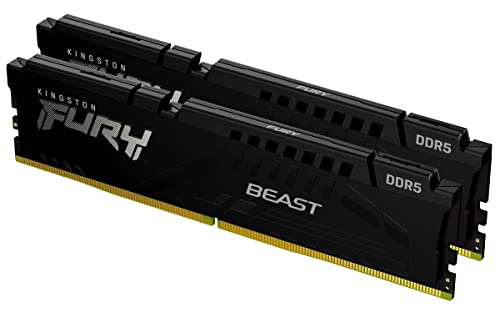
Kingston Fury Beast 32GB 5200MT/s DDR5 RAM
Best for: compact Intel desktop builds needing 32GB
- Capacity
- 32GB
- Memory Speed
- 5200MT/s
- CAS Latency
- CL40
- Kit Configuration
- 2x16GB
- Overclocking Profile
- Intel XMP 3.0
- Compatible Device
- Desktop
This Kingston FURY Beast kit provides 32GB of DDR5 memory across two 16GB modules. It runs at 5200MT/s with CL40 latency. The design features a low-profile heat spreader and supports Intel XMP 3.0 for easy overclocking. You get a compact black module that fits most desktop cases. This kit suits users who need reliable baseline performance without the bulk of taller, RGB-equipped sticks.
Pros
- 32GB total capacity via 2x16GB configuration
- 5200MT/s memory speed
- Intel XMP 3.0 support for automated overclocking
- Low-profile heat spreader design
Cons
- 5200MT/s speed is slower than many competitors
- No RGB lighting or aesthetic customization
- Limited to Intel XMP 3.0 profiles
Good fit if
- You need a standard 32GB desktop memory kit
- You prefer a low-profile build for compact cases
- You use an Intel platform with XMP 3.0
Skip if
- You require speeds above 5600MT/s
- You need AMD EXPO compatibility
- You want RGB lighting for your build
Verdict: Kingston FURY Beast 32GB DDR5 5200MT/s is a functional, low-profile memory option for Intel-based desktops. You should choose it if you prioritize case compatibility and standard capacity over high-speed performance or visual flair.

TEAMGROUP T-Force Delta RGB 32GB 6000MHz DDR5 RAM
Best for: RGB-focused builds needing 6000MHz DDR5
- Capacity
- 32GB
- Memory Speed
- 6000MHz
- CAS Latency
- CL38
- Kit Configuration
- 2x16GB
- Overclocking Profile
- Intel XMP 3.0 & AMD Expo
- ECC Support
- On-die ECC
View on Amazon: TEAMGROUP T-Force Delta RGB 32GB 6000MHz DDR5 RAM
This 32GB kit (2x16GB) runs at 6000MHz with CL38 latency. It supports both Intel XMP 3.0 and AMD EXPO for easy overclocking. The white heatsink includes RGB lighting and on-die ECC for stability. You get a lifetime warranty and efficient power management. This module suits desktop users who want high speed and visual flair without complex setup.
Pros
- 6000MHz speed with CL38 latency
- Supports Intel XMP 3.0 and AMD EXPO
- On-die ECC for stable system operation
- White RGB design with smart IC controller
- Lifetime warranty included
Cons
- RGB lighting requires compatible motherboard software
- Heatsink height is 1.79 inches
- Single-module configuration not available in this listing
Good fit if
- You need a 32GB kit for modern AMD or Intel platforms
- You want RGB lighting with easy XMP or EXPO setup
- You prefer white aesthetics for your build
Skip if
- You require a single 32GB stick for dual-channel flexibility
- You need a black color scheme
- You want a kit with lower CL30 latency
Verdict: TEAMGROUP T-Force Delta RGB DDR5 32GB is a solid mid-range choice for gamers and creators who value 6000MHz speed and RGB aesthetics. It fits users who want plug-and-play compatibility with both Intel and AMD systems.

Kingston Fury Beast 16GB 5600MT/s CL40 DDR5 RAM
Best for: single-slot upgrades and compact builds
- Capacity
- 16GB
- Memory Speed
- 5600MT/s
- CAS Latency
- CL40
- Form Factor
- DIMM
- Overclocking Profile
- Intel XMP 3.0
- Compatible Device
- Desktop
View on Amazon: Kingston Fury Beast 16GB 5600MT/s CL40 DDR5 RAM
This single Kingston Fury Beast module offers 16GB of DDR5 memory running at 5600MT/s with CL40 latency. It features a low-profile heat spreader and supports Intel XMP 3.0 for easy overclocking. The compact design fits well in smaller cases. You should choose this if you need a single stick upgrade or are building a budget system. It provides improved stability and efficiency for desktop use.
Pros
- 5600MT/s memory speed
- 16GB single-module capacity
- Intel XMP 3.0 support
- Low-profile heat spreader design
Cons
- Single module limits dual-channel performance
- Only 16GB capacity per stick
- CL40 latency is slower than higher-end kits
Good fit if
- You are upgrading a single DIMM slot
- You need a compact low-profile memory stick
- You are building a budget desktop PC
Skip if
- You require dual-channel performance
- You need more than 16GB per stick
- You want higher clock speeds than 5600MT/s
Verdict: Kingston Fury Beast 16GB 5600MT/s DDR5 is a practical single-stick option for users who need to fill one memory slot with a compact, efficient module. It suits budget builds or upgrades where dual-channel speeds are not a priority.
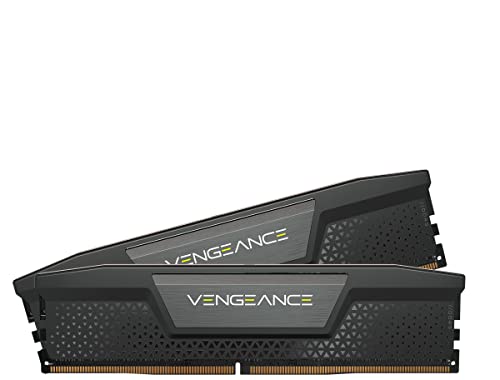
Corsair Vengeance DDR5 32GB 5200MHz
Best for: Intel desktops needing stable 32GB capacity
- Capacity
- 32GB
- Memory Speed
- 5200MHz
- CAS Latency
- CL40
- Kit Configuration
- 2x16GB
- Overclocking Profile
- Intel XMP 3.0
- Voltage
- 1.25V
This Corsair Vengeance kit offers 32GB of DDR5 memory running at 5200MHz with CL40 latency. It uses a 1.25V voltage profile and supports Intel XMP for easy configuration. The module features onboard voltage regulation for stability. You get a black heatsink that measures 5.3 inches long. This kit suits desktop users who need reliable performance without complex manual tuning.
Pros
- 32GB capacity in a 2x16GB dual-channel configuration
- 5200MHz speed with CL40-40-40-77 timings
- Onboard voltage regulation for stable overclocking
- Custom Intel XMP 3.0 profiles via iCUE software
Cons
- CL40 latency is higher than faster 6000MHz kits
- Requires Intel XMP support for optimized performance
- No RGB lighting included in this black model
Good fit if
- You want a straightforward 32GB DDR5 upgrade
- You use Intel-based desktop systems
- You prefer a low-profile black heatsink
Skip if
- You need AMD EXPO compatibility
- You require RGB lighting effects
- You want speeds above 5200MHz
Verdict: Corsair Vengeance DDR5 32GB 5200MHz provides stable performance for Intel desktops. It fits users who prioritize capacity and voltage regulation over high-speed RGB aesthetics.

Patriot Signature DDR5 32GB Single Module
Best for: Upgrading systems with one high-capacity stick
- Capacity
- 32GB
- Memory Speed
- 4800MT/s
- CAS Latency
- CL40
- Kit Configuration
- 1x32GB
- Voltage
- 1.1V
- ECC Support
- Non-ECC
This Patriot Signature kit is a single 32GB DDR5 module running at 4800MHz with CL40 timings. It uses a premium aluminum heatshield and operates at 1.1v. You get non-ECC unbuffered memory in a black finish. This single stick is ideal if you need to expand an existing system by adding one more slot. It suits users who prioritize capacity per stick over dual-channel speed.
Pros
- High 32GB capacity in a single module
- Premium aluminum heatshield for thermal management
- Low 1.1v operating voltage
- Non-ECC unbuffered technology
Cons
- Single module limits dual-channel performance
- 4800MHz speed is slower than many competitors
- Higher CL40 latency compared to faster kits
Good fit if
- You need to fill a second memory slot with high capacity
- You want a single stick upgrade for existing DDR5 hardware
- You prioritize total capacity over maximum bandwidth
Skip if
- You require dual-channel performance for gaming
- You need speeds above 5200MT/s
- You are building a new system from scratch
Verdict: Patriot Signature DDR5 32GB Single Module offers high capacity in one stick for easy upgrades. It fits users expanding existing systems who do not need dual-channel speeds.
Specifications side by side
| Spec | G.SKILL Trident Z5 Neo 64GB DDR5-6000 CL30 | TEAMGROUP Elite 32GB (2x16GB) DDR5 4800MHz UDIMM Kit | Crucial 16GB DDR5 4800MHz Desktop RAM | Kingston Fury Beast 32GB 5200MT/s DDR5 RAM | TEAMGROUP T-Force Delta RGB 32GB 6000MHz DDR5 RAM | Kingston Fury Beast 16GB 5600MT/s CL40 DDR5 RAM | Corsair Vengeance DDR5 32GB 5200MHz | Patriot Signature DDR5 32GB Single Module |
|---|---|---|---|---|---|---|---|---|
| Capacity | 64GB | 32GB | 16GB | 32GB | 32GB | 16GB | 32GB | 32GB |
| Memory Speed | 6000MT/s | 4800MHz | 4800MHz | 5200MT/s | 6000MHz | 5600MT/s | 5200MHz | 4800MT/s |
| CAS Latency | CL30-40-40-96 | CL40 | CL40 | CL40 | CL38 | CL40 | CL40 | CL40 |
| Kit Configuration | 2x32GB | 2x16GB | not specified | 2x16GB | 2x16GB | not specified | 2x16GB | 1x32GB |
| Form Factor | 288-pin U-DIMM | 288 Pin UDIMM | 288-pin UDIMM | not specified | not specified | DIMM | not specified | not specified |
| Overclocking Profile | AMD EXPO | not specified | Intel XMP 3.0, AMD EXPO | Intel XMP 3.0 | Intel XMP 3.0 & AMD Expo | Intel XMP 3.0 | Intel XMP 3.0 | not specified |
| Voltage | 1.40V | 1.1V | 1.1V | not specified | not specified | not specified | 1.25V | 1.1V |
| ECC Support | Non-ECC | Non-ECC, On-die ECC | Non-ECC | not specified | On-die ECC | not specified | not specified | Non-ECC |
| Compatible Device | Desktop, PC | Desktop, PC | Desktop | Desktop | Desktop | Desktop | Desktop, PC | Desktop |
| Size | 64GB | 32GB | 16GB | 32GB | 32GB(2x16GB) | 5600MT/s | 32GB (2x16GB) | 32GB (1 x 32GB) 4800MT/s DDR5 Module |
| Dimensions | 6.3 × 5.51 × 0.39 inches | 5.91 × 50 × 30.3 inches | 5.25 × 0.16 × 1.23 inches | 5.25 × 0.26 × 1.37 inches | 5.68 × 0.28 × 1.79 inches | 5.4 × 0.5 × 1.9 inches | 5.3 × 1.4 × 0.3 inches | 0.28 × 5.39 × 1.69 inches |
| Weight | 6.35 ounces | 0.53 ounces | not specified | 2.72 ounces | 1.59 ounces | 1.38 ounces | 1.31 ounces | 0.71 ounces |
| Color | Black | Dual Channel | Multicolor | Black | White | Black | Black | black |
| Model | F5-6000J3040G32GX2-TZ5N | TED532G4800C40DC01 | CT16G48C40U5 | KF552C40BBK2-32 | FF4D532G6000HC38ADC01 | KF556C40BB-16 | CMK32GX5M2B5200C40 | PSD532G48002 |
If you plan an outdoor workspace, the pergola buying guide outlines material and dimension specifications.
Frequently asked questions
Does DDR5 RAM work with AMD motherboards?
Yes, but you must verify platform support. The G.SKILL Trident Z5 Neo features an AMD EXPO profile, which ensures compatibility with AMD systems. It runs at 6000MHz with CL30 latency. This profile simplifies setup for users building on compatible AMD platforms. Always check your motherboard specifications to confirm support for these features.
Is 32GB of DDR5 enough for gaming?
For most gamers, 32GB is sufficient. Kits like the TEAMGROUP T-Force Delta RGB and Kingston Fury Beast provide this capacity. The T-Force Delta offers 6000MHz speed, while the Beast runs at 5200MT/s or 5600MT/s. These speeds handle modern titles well. You only need more capacity if you also stream or edit video simultaneously.
What is the difference between CL30 and CL40 latency?
CAS Latency (CL) measures the delay before data access. Lower numbers are faster. The G.SKILL Trident Z5 Neo uses CL30, offering lower latency than the CL40 kits from TEAMGROUP or Crucial. This difference can improve responsiveness in sensitive tasks. For general use, CL40 is stable, but CL30 provides better performance for demanding workloads.
Can I use a single stick of DDR5 RAM?
You can, but it runs in single-channel mode. The Patriot Signature and Kingston Fury Beast offer 32GB and 16GB single modules respectively. This is useful for upgrading existing systems with limited slots. However, dual-channel kits like the Corsair Vengeance provide better bandwidth. Single sticks are practical for budget builds or specific compact cases.
Do I need RGB lighting on my RAM?
RGB lighting is purely aesthetic and does not affect performance. The TEAMGROUP T-Force Delta RGB includes this feature for visual appeal. Other kits, like the Kingston Fury Beast or Crucial 16GB, have no RGB. Choose based on your case design preferences. If you want a clean look, non-RGB options like the TEAMGROUP Elite are suitable.
What is the fastest DDR5 speed in this guide?
The fastest speed listed is 6000MHz. Both the G.SKILL Trident Z5 Neo and the TEAMGROUP T-Force Delta RGB operate at this speed. The Trident Z5 achieves this with CL30 latency, while the Delta uses CL38. Higher speeds generally improve gaming and multitasking performance. Ensure your motherboard supports these speeds for optimal results.
Is DDR5 compatible with Intel XMP?
Yes, many kits support Intel XMP for easy overclocking. The Kingston Fury Beast and Corsair Vengeance kits include Intel XMP profiles. The TEAMGROUP T-Force Delta RGB supports both Intel XMP and AMD EXPO. These profiles allow you to reach advertised speeds with simple BIOS settings. Verify your motherboard supports XMP 3.0 for the best experience.