ECC Support Explained: What It Means for DDR5 RAMs
As an Amazon Associate we earn from qualifying purchases. Links on this page are affiliate links.
ECC Support Explained For DDR5
ECC stands for Error Correction Code. This feature allows RAM to detect and fix memory errors automatically. You might see this listed as ECC or Non-ECC on product pages. It is a critical specification for system stability and data integrity.
How it works is straightforward. Standard RAM stores data in bits. ECC RAM adds extra bits to each byte. These extra bits calculate a checksum. If a bit flips due to electrical noise or radiation, the system detects the mismatch. It then corrects the error before the data reaches the processor. This process happens in real time.
You will find two main values for this spec. Some modules are labeled ECC. Others are Non-ECC. Desktop gaming PCs often use Non-ECC memory. This is because most consumer applications do not require constant data verification. Servers and workstations typically require ECC support explained in their design documents. These systems handle sensitive data that cannot tolerate corruption.
Why does this matter to you? If you run a server, a virtual machine host, or a scientific workstation, data accuracy is vital. A single uncorrected error can crash a program or corrupt a file. ECC memory prevents these issues. For casual users, the difference is negligible. Your games and web browser do not need this protection.
When shopping, check the product specifications carefully. Look for the term ECC in the memory type section. If it is absent, assume the module is Non-ECC. Motherboard compatibility also matters. Not all consumer motherboards support ECC modules. Even if you buy ECC RAM, it may not function correctly if the board lacks support.
DDR5 memory introduces new ways to handle errors. Some DDR5 modules use On-Die ECC. This corrects errors inside the chip itself. It does not provide full system-level correction. Full ECC requires additional pins and circuitry. This increases cost and complexity. You must weigh the need for reliability against your budget and use case. Choose the option that fits your specific workflow.
Choose Between ECC and Non-ECC Memory
ECC
ECC memory includes hardware that detects and corrects single-bit errors in real time. This ensures data integrity during critical operations. You should choose ECC if you run servers, workstations, or handle sensitive data where corruption is unacceptable. The Nemix RAM 256GB DDR5 ECC RDIMM Kit is an example of high-capacity enterprise memory designed for stability. Samsung also offers 32GB and 64GB ECC RDIMMs for similar needs. These modules typically use the registered DIMM form factor. This adds a small latency overhead but provides essential protection against silent data corruption. It is the standard choice for professional environments where reliability outweighs minor speed differences.
Non-ECC
Non-ECC memory lacks the additional circuitry for error correction. It offers slightly lower latency and is generally more affordable. You should choose Non-ECC for standard desktops, gaming PCs, or laptops where minor memory errors rarely impact daily use. The TEAMGROUP Elite 32GB DDR5 UDIMM Kit is a common choice for dual-channel desktop builds. Samsung also provides 16GB Non-ECC UDIMMs for single-stick upgrades. Timetec offers 8GB SODIMMs for basic laptop upgrades. These modules use unregistered DIMMs or SODIMMs. They are ideal for users who prioritize cost and speed over advanced error protection. Most consumer systems do not support ECC, making Non-ECC the only viable option for standard personal computers.
Is ECC Worth The Upgrade?
Who needs it
You need ECC if your work relies on absolute data integrity. Servers and workstations benefit most from this feature. It detects and corrects single-bit errors in real time. This prevents subtle corruption that can crash systems or ruin complex calculations. If you run databases, compile large codebases, or handle financial records, ECC is essential. It ensures your data remains accurate over long periods. Non-ECC memory is faster and cheaper, but it lacks this safety net. For critical operations, that risk is too high. ECC provides peace of mind. It is not just a spec; it is a guarantee of stability. Choose ECC when failure is not an option. Your system will run more reliably under heavy loads. The slight performance trade-off is negligible compared to the value of correct data. Prioritize this feature if you cannot afford to lose work or face system downtime due to memory errors.
Who can skip it
You can skip ECC if you are a gamer or general user. Your applications do not require perfect data accuracy. Games and consumer software tolerate minor errors without issue. Non-ECC memory offers better performance per dollar. It is faster and more affordable. You should prioritize capacity and speed instead. More RAM allows smoother multitasking. Higher frequency improves frame rates. These specs matter more for your daily tasks. ECC adds cost without tangible benefits for you. It is overkill for browsing, video editing, or casual gaming. Focus on getting the right amount of memory for your workflow. Speed helps with responsiveness. Capacity prevents bottlenecks. ECC is a specialized tool for specific professional needs. You do not need it for standard computing. Save your money for other upgrades that enhance your experience more directly.
ECC Terms Explained
Error Correction Code
A method that detects and fixes data errors in memory. It ensures your information stays accurate and prevents system crashes caused by corrupted bits.
Single-Bit Error
A change in one memory bit. ECC memory corrects these small errors automatically before they cause problems for your running applications or data.
Multi-Bit Error
When multiple bits change simultaneously. ECC usually cannot fix these. It only detects them, which may lead to a system crash or data loss.
Data Integrity
The accuracy and consistency of your data over time. ECC helps maintain this by fixing errors as they happen, keeping your files safe from corruption.
System Stability
How reliably your computer runs without crashing. ECC improves stability by preventing memory errors from causing unexpected shutdowns or blue screens during heavy workloads.
Non-ECC Memory
Standard RAM without error correction features. It is common in consumer PCs. It does not fix memory errors, making it less suitable for critical tasks.
Workstation
A high-performance computer for professional tasks. These systems often use ECC RAM to handle complex calculations, video editing, or scientific modeling without data risks.
Server
A computer that provides data to other computers. Servers use ECC memory to ensure uptime and data accuracy, as errors can disrupt services for many users.
Quick picks
| # | Product | Best for | Price |
|---|---|---|---|
| 1 | Nemix RAM 256GB DDR5 4800MHz ECC RDIMM Kit | Enterprise servers requiring high capacity | Check price of Nemix RAM 256GB DDR5 4800MHz ECC RDIMM Kit on Amazon |
| 2 | TEAMGROUP Elite 32GB (2x16GB) DDR5 4800MHz UDIMM Kit | General desktop use without registered ECC | Check price of TEAMGROUP Elite 32GB (2x16GB) DDR5 4800MHz UDIMM Kit on Amazon |
| 3 | Samsung 32GB DDR5 4800MHz ECC RDIMM | server and workstation memory upgrades | Check price of Samsung 32GB DDR5 4800MHz ECC RDIMM on Amazon |
| 4 | Samsung 16GB DDR5 4800MHz UDIMM | Single 16GB upgrade for non-ECC desktops | Check price of Samsung 16GB DDR5 4800MHz UDIMM on Amazon |
| 5 | Samsung 64GB DDR5 4800MHz ECC RDIMM | Server systems needing high single-stick capacity | Check price of Samsung 64GB DDR5 4800MHz ECC RDIMM on Amazon |
| 6 | Timetec 8GB DDR5 4800MHz Laptop RAM | basic laptop memory upgrades | Check price of Timetec 8GB DDR5 4800MHz Laptop RAM on Amazon |
Our 6 picks
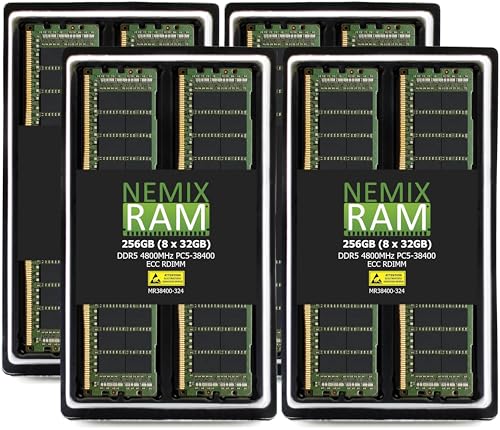
Nemix RAM 256GB DDR5 4800MHz ECC RDIMM Kit
Best for: Enterprise servers requiring high capacity
- ECC Support
- ECC (what this guide is about)
- Capacity
- 256GB
- Memory Speed
- 4800MHZ
- CAS Latency
- CL40
- Kit Configuration
- 8X32GB
- Form Factor
- 288-PIN RDIMM
View on Amazon: Nemix RAM 256GB DDR5 4800MHz ECC RDIMM Kit Affiliate link
This kit provides 256GB of DDR5 memory using eight 32GB modules. It features registered ECC technology and runs at 4800MHz with CL40 latency. The 1.1V voltage and 288-pin RDIMM form factor suit enterprise servers. You need this if your system requires high-capacity, error-correcting memory. It is designed for platforms like Sapphire Rapids and Xeon Scalable processors.
Pros
- Registered ECC corrects single-bit errors
- 256GB total capacity across 8 sticks
- 1.1V low voltage operation
- Compatible with major server brands
Cons
- High latency with CL40 timing
- Requires specific server motherboard support
- Large physical footprint for 8 modules
Good fit if
- You need maximum memory capacity
- You run data-critical server workloads
- You use Xeon Scalable processors
Skip if
- You use standard desktop computers
- You require high-speed gaming performance
- You have limited DIMM slots
Verdict: Nemix RAM 256GB DDR5 ECC RDIMM fits servers needing large, stable memory pools. It suits enterprise environments where data integrity matters more than speed.

TEAMGROUP Elite 32GB (2x16GB) DDR5 4800MHz UDIMM Kit
Best for: General desktop use without registered ECC
- ECC Support
- Non-ECC (what this guide is about)
- Capacity
- 32GB
- Memory Speed
- 4800MHz
- CAS Latency
- CL40
- Kit Configuration
- 2x16GB
- Form Factor
- 288 Pin UDIMM
View on Amazon: TEAMGROUP Elite 32GB (2x16GB) DDR5 4800MHz UDIMM Kit Affiliate link
This TEAMGROUP kit offers 32GB of DDR5 memory at 4800MHz in a standard UDIMM form factor. It lacks registered ECC support found in server-grade modules, relying instead on JEDEC on-die ECC for basic cell stability. The 1.1V voltage and CL40 latency align with standard desktop performance. It suits users building general-purpose PCs who prioritize compatibility over the error correction required for critical data workloads.
Pros
- 32GB capacity via 2x16GB dual-channel configuration
- 4800MHz speed with CL40 timing
- Standard UDIMM form factor for desktops
- On-die ECC for self-correcting DRAM cells
Cons
- No registered ECC for server-grade error correction
- Lower 4800MHz speed compared to higher-tier DDR5 options
- UDIMM lacks the buffering of RDIMM modules
Good fit if
- You need standard desktop memory for general use
- You prefer dual-channel 32GB configurations
- You want on-die stability without registered ECC
Skip if
- You require registered ECC for server reliability
- You need speeds faster than 4800MHz
- You are building a workstation with RDIMM requirements
Verdict: TEAMGROUP Elite DDR5 32GB Non-ECC provides reliable standard desktop performance with on-die stability. It fits users who need dual-channel capacity without the complexity of registered ECC modules.

Samsung 32GB DDR5 4800MHz ECC RDIMM
Best for: server and workstation memory upgrades
- ECC Support
- ECC (what this guide is about)
- Capacity
- 32GB
- Memory Speed
- 4800 MHz
- Form Factor
- 288-Pin Registered DIMM
- Voltage
- 1.1V
- Compatible Device
- Server
View on Amazon: Samsung 32GB DDR5 4800MHz ECC RDIMM Affiliate link
This Samsung module is a 32GB DDR5 Registered DIMM designed for server environments. It operates at 4800MHz with PC5-38400 bandwidth and includes ECC support for data integrity. The 2Rx8 configuration and 1.1V voltage are standard for this class. It is strictly for compatible servers and workstations, not desktops or laptops. You need a system that supports ECC Registered memory to use it.
Pros
- 32GB single-module capacity
- ECC Registered RDIMM type
- 4800MHz speed rating
- 2Rx8 dual rank structure
Cons
- Incompatible with desktop computers
- Incompatible with laptop computers
- Cannot mix with Non-ECC modules
Good fit if
- You run a compatible DDR5 server
- You need ECC data protection
- You require 32GB single sticks
Skip if
- You use a standard desktop PC
- You use a laptop computer
- You need Non-ECC memory
Verdict: Samsung 32GB ECC DDR5 RDIMM is a specialized server memory stick. It fits users who need registered ECC modules for their workstation or server hardware.

Samsung 16GB DDR5 4800MHz UDIMM
Best for: Single 16GB upgrade for non-ECC desktops
- ECC Support
- Non-ECC (what this guide is about)
- Capacity
- 16 GB
- Memory Speed
- 4800 MHz
- Kit Configuration
- 1x16GB
- Form Factor
- UDIMM
- Compatible Device
- Desktop
View on Amazon: Samsung 16GB DDR5 4800MHz UDIMM Affiliate link
This Samsung module is a 16GB DDR5 UDIMM running at 4800MHz. It uses Non-ECC technology, meaning it does not include error correction. The physical dimensions are 6 inches long and 1 inch high. You should choose this if you need a single stick for a desktop PC that does not require ECC support. It fits standard non-server systems.
Pros
- 16GB capacity for single-channel or dual-channel setups
- 4800MHz speed meets PC5-38400 standard
- UDIMM form factor fits standard desktop motherboards
- Non-ECC design for compatible consumer systems
Cons
- Non-ECC support lacks error correction for critical data
- 16GB capacity is smaller than the 32GB kits on this list
- Single module limits immediate dual-channel performance without a second stick
Good fit if
- You need a single 16GB stick for a basic desktop build
- Your motherboard does not support ECC memory
- You are upgrading from a lower capacity like 8GB
Skip if
- You require ECC support for server or workstation stability
- You need a 32GB or higher capacity kit
- You want a pre-matched dual-channel kit for immediate performance
Verdict: Samsung 16GB DDR5 4800MHz Non-ECC UDIMM fits users who need a single, affordable stick for a standard desktop that does not require error correction. It is not suitable for systems needing ECC or higher capacities.

Samsung 64GB DDR5 4800MHz ECC RDIMM
Best for: Server systems needing high single-stick capacity
- ECC Support
- ECC (what this guide is about)
- Capacity
- 64GB
- Memory Speed
- 4800 MHz
- Form Factor
- 288-Pin Registered DIMM
- Voltage
- 1.1V
- Compatible Device
- Server
View on Amazon: Samsung 64GB DDR5 4800MHz ECC RDIMM Affiliate link
This is a single 64 GB Samsung DDR5 module designed for servers. It runs at 4800 MHz with PC5-38400 bandwidth. The ECC Registered RDIMM form factor ensures data integrity for critical workloads. It operates at 1.1V and uses a 2Rx4 configuration. This kit is not for desktops or laptops. It suits users who need high capacity and error correction in compatible server hardware.
Pros
- 64 GB single-module capacity
- ECC Registered RDIMM support
- 4800 MHz DDR5 speed
- 1.1V operating voltage
Cons
- Single module limits dual-channel performance
- Incompatible with desktop or laptop computers
- Cannot mix with EC4 or non-ECC modules
Good fit if
- You need a single high-capacity server stick
- You require ECC error correction for stability
- You are building or upgrading a compatible server
Skip if
- You are installing memory in a desktop PC
- You are installing memory in a laptop
- You need to mix this with other ECC types
Verdict: Samsung 64GB DDR5 ECC RDIMM provides essential server-grade memory with error correction. It fits users who need large capacity in a single stick for compatible server systems.

Timetec 8GB DDR5 4800MHz Laptop RAM
Best for: basic laptop memory upgrades
- ECC Support
- Non-ECC (what this guide is about)
- Capacity
- 8 GB
- Memory Speed
- 4800 MHz
- CAS Latency
- CL40
- Kit Configuration
- 1x8GB
- Form Factor
- 262Pin SODIMM
View on Amazon: Timetec 8GB DDR5 4800MHz Laptop RAM Affiliate link
This Timetec module is an 8GB DDR5 SODIMM designed for laptops. It runs at 4800MHz with CL40 latency and operates at 1.1V. The data sheet lists it as Non-ECC for the main bus, though it includes On-die ECC for internal data processing. It uses a 262-pin form factor. You should choose this if you need a single, low-capacity stick for basic laptop upgrades or replacements.
Pros
- DDR5 4800MHz speed for modern laptop performance
- On-die ECC improves internal data accuracy
- Low 1.1V power consumption with onboard PMIC
- Compact 262-pin SODIMM form factor
Cons
- Only 8GB capacity limits multitasking
- Non-ECC designation excludes server or workstation use
- Single-rank 1Rx16 configuration may limit bandwidth
Good fit if
- You need a single 8GB upgrade for a laptop
- You require DDR5 SODIMM compatibility for portable devices
- You prioritize low voltage power efficiency over high capacity
Skip if
- You need ECC support for critical server data integrity
- You require more than 8GB of memory per stick
- You are building a desktop PC with DIMM slots
Verdict: Timetec 8GB DDR5 SODIMM Laptop RAM fits users needing a basic 8GB upgrade for compatible laptops. It offers stable 4800MHz performance but lacks the capacity or error correction for demanding workstations.
Specifications side by side
| Spec | Nemix RAM 256GB DDR5 4800MHz ECC RDIMM Kit | TEAMGROUP Elite 32GB (2x16GB) DDR5 4800MHz UDIMM Kit | Samsung 32GB DDR5 4800MHz ECC RDIMM | Samsung 16GB DDR5 4800MHz UDIMM | Samsung 64GB DDR5 4800MHz ECC RDIMM | Timetec 8GB DDR5 4800MHz Laptop RAM |
|---|---|---|---|---|---|---|
| Capacity | 256GB | 32GB | 32GB | 16 GB | 64GB | 8 GB |
| Memory Speed | 4800MHZ | 4800MHz | 4800 MHz | 4800 MHz | 4800 MHz | 4800 MHz |
| CAS Latency | CL40 | CL40 | not stated | not stated | not stated | CL40 |
| Kit Configuration | 8X32GB | 2x16GB | not stated | 1x16GB | not stated | 1x8GB |
| Form Factor | 288-PIN RDIMM | 288 Pin UDIMM | 288-Pin Registered DIMM | UDIMM | 288-Pin Registered DIMM | 262Pin SODIMM |
| Voltage | 1.1V | 1.1V | 1.1V | not stated | 1.1V | 1.1V |
| ECC Support | Registered ECC | Non-ECC, On-die ECC | ECC RDIMM | Non-ECC | ECC RDIMM | Non-ECC |
| Compatible Device | Server | Desktop, PC | Server | Desktop | Server | Laptop |
| Size | 256GB (8X32GB) DDR5 4800MHZ RDIMM | 32GB | 32GB | 16GB | 64GB | DDR5 8GB |
| Dimensions | not stated | 5.91 × 50 × 30.3 inches | 5.25 × 1.23 × 0.15 inches | 0.1 × 6 × 1 inches | 5.25 × 1.23 × 0.15 inches | not stated |
| Weight | not stated | 0.53 ounces | not stated | 0.6 ounces | 0.71 ounces | not stated |
| Color | Black | Dual Channel | Green | Black | Green | Black |
| Model | not stated | TED532G4800C40DC01 | M321R4GA3BB0-CQK | M323R2GA3BB0-CQK | M321R8GA0BB0-CQK | 76 |
Frequently asked questions
Can I use ECC DDR5 RAM in a standard desktop PC?
No, standard desktops typically do not support ECC memory. You must check your motherboard and CPU specifications to confirm compatibility. Most consumer desktops require Non-ECC UDIMM modules. Using ECC RDIMM sticks, like the Samsung 32GB or 64GB options, will likely prevent your system from booting. Stick to Non-ECC kits for standard desktop use.
What is the difference between RDIMM and UDIMM form factors?
RDIMM stands for Registered DIMM, which includes a register buffer to stabilize signals for high-capacity server environments. UDIMM, or Unbuffered DIMM, connects directly to the memory controller for lower latency in desktops. The Nemix 256GB kit uses RDIMM for enterprise stability. In contrast, the TEAMGROUP Elite kit uses UDIMM for general desktop performance without registered error correction.
Does DDR5 ECC RAM improve gaming performance?
ECC RAM does not typically boost gaming performance. It focuses on data integrity rather than speed. Gaming PCs usually benefit more from Non-ECC UDIMM kits, which offer lower latency. The Samsung 16GB Non-ECC UDIMM is designed for standard desktops where speed matters more than error correction. ECC is unnecessary for most consumer gaming applications.
How much capacity does the top ECC DDR5 kit offer?
The top-ranked Nemix RAM kit provides 256GB of total capacity. It consists of eight 32GB modules, making it ideal for large memory pools. This high capacity suits enterprise servers needing extensive resources. Other ECC options, like the Samsung 64GB RDIMM, offer single-stick capacity for systems with fewer slots. Choose based on your specific slot count and capacity needs.
Is DDR5 4800MHz fast enough for server workloads?
4800MHz is the base speed for DDR5 memory. It provides stable performance for most server and workstation tasks. The Nemix, Samsung, and TEAMGROUP kits all operate at this frequency. While higher speeds exist, 4800MHz ensures compatibility with standard server platforms. Focus on ECC support and form factor rather than speed for critical data integrity applications.
Can I mix ECC and Non-ECC RAM in the same system?
No, you cannot mix ECC and Non-ECC RAM. The system requires consistent memory types for stability. Mixing them will likely cause boot failures or system instability. You must use either all ECC modules, like the Samsung RDIMM sticks, or all Non-ECC modules, such as the Timetec laptop RAM. Ensure all sticks in a kit share the same ECC status and form factor.