Kingston DataTraveler Exodia 256GB USB vs Kingston DataTraveler Kyson 128GB Metal (2026): Key Differences
As an Amazon Associate we earn from qualifying purchases. Links on this page are affiliate links.
You are comparing the kingston datatraveler exodia 256gb USB vs datatraveler kyson 128gb. Both drives use USB 3.2 technology for fast data transfer between laptops and desktops. They share a functional loop for keychain attachment. The main difference lies in capacity and build. The Exodia offers double the storage space in a plastic shell with a cap. The Kyson provides a metal casing and capless design in a smaller package.
Key differences
| Aspect | Kingston DataTraveler Exodia 256GB USB 3.2 Flash Drive | Kingston DataTraveler Kyson 128GB Metal Flash Drive |
|---|---|---|
| Storage Capacity | 256GB | 128GB |
| Casing Material | Plastic | Metal |
| Cap Design | Practical cap | Capless |
| Read Speed | Not listed | Up to 200MB/s |
| Dimensions | 2.65 x 0.83 x 0.4 inches | 1.54 x 0.5 x 0.19 inches |
Which one should you choose?
Choose Kingston DataTraveler Exodia 256GB USB 3.2 Flash Drive if
- You need 256GB of storage for large files.
- You prefer a drive with a protective cap.
- You want a larger, easier-to-grip form factor.
Choose Kingston DataTraveler Kyson 128GB Metal Flash Drive if
- You prioritize a durable metal construction.
- You want a compact, capless design for portability.
- You need confirmed read speeds up to 200MB/s.
Verdict: Choose the Exodia if you need more storage space and do not mind a larger plastic body. The Kyson is better if you value a sleek metal finish and a compact, capless design. Your choice depends on whether capacity or form factor matters more to you.
Exodia vs Kyson Spec Showdown
Storage Capacity
The Kingston DataTraveler Exodia offers 256GB of storage, while the Kingston DataTraveler Kyson provides 128GB. This means the Exodia holds twice as much data. You can store more videos, larger files, and extensive document libraries on the Exodia without needing to manage space. The Kyson’s smaller capacity may require you to delete files more often or use external cloud storage. If your workflow involves handling large media files or extensive backups, the Exodia’s higher capacity reduces the need for frequent file management. The Kyson is sufficient for basic document storage and smaller media files.
Read Speed
The Kingston DataTraveler Kyson lists a read speed of up to 200MB/s. The Kingston DataTraveler Exodia does not have a specific read speed listed in its published specifications. Both drives use USB 3.2 Gen 1 technology, which supports high-speed transfers. However, the Kyson’s published metric suggests it may retrieve data faster than the Exodia, which only states it offers performance for easy access. If quick retrieval of large files is a priority, the Kyson’s stated speed is a clear advantage. The Exodia’s lack of a specified speed makes direct comparison difficult based on available data.
Build and Design
The Kingston DataTraveler Kyson features a stylish metal casing and a capless design. The Kingston DataTraveler Exodia has a plastic body with a practical cap that protects the USB plug. The Kyson’s metal build may offer better durability and heat dissipation. Its capless design eliminates the risk of losing the cap, which is a common issue with capped drives. The Exodia’s cap provides physical protection for the connector when not in use. The Exodia is slightly longer and wider, while the Kyson is more compact. Your preference depends on whether you value a rugged metal feel or a protected connector.
Dimensions and Weight
The Kingston DataTraveler Exodia measures 2.65 inches in length, 0.83 inches in width, and 0.4 inches in height, weighing 0.67 ounces. The Kingston DataTraveler Kyson measures 1.54 inches in length, 0.5 inches in width, and 0.19 inches in height, weighing 0.71 ounces. The Kyson is significantly shorter and thinner, making it more pocket-friendly. The Exodia is longer and bulkier, which might make it easier to grip but less convenient for tight spaces. The Kyson’s compact form factor is ideal for carrying in a pocket or small bag. The Exodia’s larger size may be easier to handle but less portable.
Compatibility
Both the Kingston DataTraveler Exodia and the Kingston DataTraveler Kyson are compatible with Windows 10, 8.1, and 8. They both use USB 3.2 technology, ensuring they work with modern laptops, desktops, and monitors. The Exodia explicitly lists compatibility with Windows 10, 8.1, and 8. The Kyson’s compatibility is not explicitly detailed beyond its USB 3.2 interface, but it likely supports the same operating systems. Both drives are designed for easy access to various digital devices. You can use either drive with your Windows-based computer without concern for driver issues.
Which Kingston Flash Drive Suits You
Users needing maximum portable storage capacity
The Exodia provides 256GB of space, which is double the Kyson's 128GB. This extra room lets you store larger video files, extensive document libraries, and more music without managing space. You get the same USB 3.2 Gen 1 speed, but with twice the room for your data.
Buyers prioritizing speed and metal build
The Kyson offers read speeds up to 200MB/s, which is faster than the Exodia's standard USB 3.2 Gen 1 performance. Its metal casing feels durable, and the capless design reduces the risk of losing the cover. It is a compact, high-performance drive for quick transfers.
Those wanting a sleek, capless design
The Kyson features a capless metal design that eliminates the need to replace a loose cap. Its silver finish looks professional, and the functional loop keeps it secure on your keys. This compact form factor is ideal for users who travel frequently and want a reliable, stylish drive.
The products compared

Kingston DataTraveler Exodia 256GB USB 3.2 Flash Drive
Best for: Keychain storage with 256GB capacity
- Storage Capacity
- 256GB
- USB Version
- USB 3.2 Gen 1
- Compatible Device
- Desktop, Laptop
- Dimensions
- 2.65 × 0.83 × 0.4 inches
- Weight
- 0.35 ounces
View on Amazon: Kingston DataTraveler Exodia 256GB USB 3.2 Flash Drive Affiliate link
The Kingston DataTraveler Exodia is a 256GB USB 3.2 Gen 1 flash drive designed for everyday file transfers. It features a compact black body with a large loop for key rings and a protective cap. This drive offers ample space for documents, music, and videos. It suits users who need reliable portable storage with a secure attachment point for their keys.
Pros
- 256GB storage capacity
- USB 3.2 Gen 1 interface
- Integrated large key ring loop
- Protective cap for USB plug
Cons
- Plastic construction lacks metal durability
- No included software for encryption
- Standard USB 3.2 Gen 1 speeds
Good fit if
- You need a keychain-friendly drive
- You require 256GB of space
- You want a cap-protected connector
Skip if
- You need metal housing
- You require USB 3.2 Gen 2 speeds
- You want hardware encryption
Verdict: Kingston Exodia 256GB USB 3.2 is a practical choice for users who prioritize keychain attachment and solid capacity over premium materials. It fits those who value convenience and reliable everyday storage.
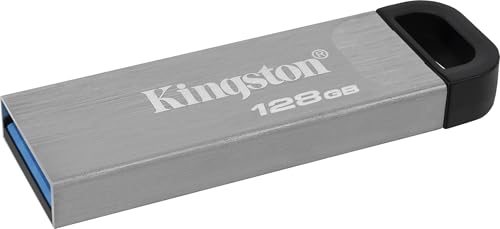
Kingston DataTraveler Kyson 128GB Metal Flash Drive
Best for: Users needing durable, capless storage
- Storage Capacity
- 128GB
- USB Version
- USB 3.2
- Read Speed
- Up to 200MB/s
- Pack Quantity
- 1
- Features
- Metal Casing
- Dimensions
- 1.54 × 0.5 × 0.19 inches
View on Amazon: Kingston DataTraveler Kyson 128GB Metal Flash Drive Affiliate link
This Kingston DataTraveler Kyson offers 128GB of storage in a capless metal design. It supports USB 3.2 and delivers read speeds up to 200MB/s. The compact silver build includes a functional loop for easy attachment to keys or bags. You get reliable performance for documents and media. This drive suits users who value durability and quick transfers without the hassle of a removable cap.
Pros
- Capless metal casing for durability
- Read speeds up to 200MB/s
- USB 3.2 connectivity
- Functional loop for portability
Cons
- 128GB capacity is smaller than the 256GB competitor
- Write speed is not listed in the data
- No included protective case
Good fit if
- You need a durable, capless drive for daily use
- You prioritize fast read speeds for media transfer
- You want a compact drive with a key loop
Skip if
- You require more than 128GB of storage
- You need to know the exact write speed
- You prefer a drive with a protective cap
Verdict: Kingston DataTraveler Kyson 128GB Metal provides solid read speeds and a rugged metal build for users who need reliable, portable storage. It is a practical option for those who value durability over maximum capacity.
Specifications side by side
| Spec | Kingston DataTraveler Exodia 256GB USB 3.2 Flash Drive | Kingston DataTraveler Kyson 128GB Metal Flash Drive |
|---|---|---|
| Storage Capacity | 256GB | 128GB |
| USB Version | USB 3.2 Gen 1 | USB 3.2 |
| Read Speed | not stated | Up to 200MB/s |
| Pack Quantity | not stated | 1 |
| Compatible Device | Desktop, Laptop | not stated |
| Size | 256GB | 1 Count (Pack of 1) |
| Features | not stated | Metal Casing |
| Dimensions | 2.65 × 0.83 × 0.4 inches | 1.54 × 0.5 × 0.19 inches |
| Weight | 0.35 ounces | 0.71 ounces |
| Color | Black | Silver |
| Model | DTX/256GB | DTKN/128GB |
Frequently asked questions
Which Kingston flash drive has a metal body?
The Kingston DataTraveler Kyson 128GB Metal features a metal casing. This rugged build offers durability for users who need reliable portable storage. The Exodia model uses a different material, focusing on capacity rather than a premium metal finish. You get a sturdy drive with the Kyson.
What is the physical size difference between the two drives?
The Exodia is larger, measuring 2.65 inches in length and 0.83 inches in width. The Kyson is more compact at 1.54 inches long and 0.5 inches wide. You should choose the Exodia if you prioritize space, or the Kyson for a smaller footprint.
Does the Kingston DataTraveler Kyson include a cap?
The Kyson is described as a capless drive with a metal casing. This design protects the USB connector without a separate cover. You do not need to worry about losing a cap when using this drive for everyday data transfer tasks.
Which drive weighs more?
The Kingston DataTraveler Kyson weighs 0.71 ounces, while the Exodia weighs 0.67 ounces. The difference is minimal, but the Kyson is slightly heavier due to its metal construction. You get a very light drive with either option for portable use.
Can I attach a keychain to these drives?
Both drives share a functional loop for keychain attachment. You can easily secure either the Exodia or the Kyson to your keys or bag. This feature ensures you do not lose the drive while carrying it around during your daily activities.
What is the model number for the 256GB drive?
The model number for the 256GB Kingston drive is DTX/256GB. This identifies the Exodia version with USB 3.2 connectivity. You can use this number to verify specifications or find replacement parts if needed for your specific storage requirements.
Is the Kyson drive available in black?
The Kingston DataTraveler Kyson 128GB Metal is listed in silver. The Exodia model comes in black. If you prefer a silver finish, the Kyson is your option. You get a distinct color choice based on the specific model you select.