Kingston Fury Beast 32GB 5200MT/s DDR5 RAM vs Kingston Fury Beast RGB 32GB (2026): Key Differences
As an Amazon Associate we earn from qualifying purchases. Links on this page are affiliate links.
You are comparing the kingston fury beast 32gb 5200mt s ddr5 RAM vs fury beast RGB 32gb. Both kits offer 32GB of DDR5 memory running at 5200MT/s with CL40 latency. They share Intel XMP 3.0 support for easy overclocking on desktop systems. The main difference lies in aesthetics and connectivity. One model features a low-profile black heat spreader, while the other includes an RGB design with infrared sync technology. This choice depends on your visual preferences and case compatibility.
Key differences
| Aspect | Kingston Fury Beast 32GB 5200MT/s DDR5 RAM | Kingston Fury Beast RGB 32GB 5200MT/s DDR5 |
|---|---|---|
| Color / Lighting | Black | RGB |
| Special Features | Low-profile heat spreader | Infrared Sync Technology |
| Height | 1.37 inches | 1.66 inches |
| Weight | 2.72 ounces | 3.17 ounces |
Which one should you choose?
Choose Kingston Fury Beast 32GB 5200MT/s DDR5 RAM if
- You prefer a low-profile design that fits in smaller cases.
- You want a simple black aesthetic without lighting.
- You need slightly lighter components for your build.
Choose Kingston Fury Beast RGB 32GB 5200MT/s DDR5 if
- You want customizable RGB lighting effects.
- You value infrared sync for synchronized lighting across modules.
- You have a case with enough clearance for taller heat spreaders.
Verdict: Choose the standard Beast if you prioritize compact size and a minimalist look. Pick the RGB version if you want visual customization and synchronized lighting features. Both provide identical memory performance for your desktop.
Beast vs Beast RGB Specs Compared
Memory Speed and Latency
Both the Kingston Fury Beast 32GB DDR5 and the Beast RGB variant operate at the same 5200MT/s speed. They also share identical CL40 CAS latency. This means your system sees no performance difference in raw data transfer rates between the two kits. The timing and frequency are exactly the same. You get identical bandwidth for gaming or content creation regardless of which model you choose. The core memory performance is tied because the silicon specs match perfectly.
Overclocking Profile Support
Each kit supports Intel XMP 3.0 for automated overclocking. This feature allows your motherboard to read the memory settings and apply them instantly. You do not need to manually adjust timings or voltage in the BIOS. Both products offer this same streamlined setup process. The configuration profile is identical across both SKUs. You get the same ease of use when enabling higher speeds. The overclocking capability is matched because the profile technology is the same.
RGB Lighting and Design
The Beast RGB includes enhanced RGB lighting with a new heat spreader design. It also features patented Kingston FURY Infrared Sync Technology. This allows you to synchronize the lighting with other compatible components. The standard Beast kit lacks any lighting features. It has a low-profile black heat spreader instead. If you want visible aesthetics and sync capabilities, the RGB model is the only option. The visual difference is significant for open-case builds.
Physical Dimensions and Height
The standard Beast kit has a height of 1.37 inches. The Beast RGB model is taller at 1.66 inches. Both have a length of 5.25 inches. The width is slightly different, with the RGB version at 0.28 inches versus 0.26 inches for the standard. The RGB kit is also heavier at 3.17 ounces compared to 2.72 ounces. If you have large CPU coolers, the lower profile of the standard kit may offer better clearance. The height difference is a key physical factor.
Compatible Device Type
Both memory kits are designed specifically for desktop computers. They are not intended for laptops or mobile devices. The form factor is DIMM, which is standard for desktop motherboards. You can install either kit in any compatible desktop system. There is no difference in device compatibility. Both support the same desktop platforms that handle DDR5 memory. The target environment is identical for both products.
Which Kingston DDR5 Kit Fits You
Minimalist builders who want clean aesthetics
Choose the standard Beast if you prefer a low-profile black design. It measures 1.37 inches in height and weighs 2.72 ounces. This kit lacks RGB lighting, making it ideal for cases where visibility is limited. You get reliable 5200MT/s performance without extra visual components.
Enthusiasts who want synchronized RGB lighting
The Beast RGB model includes Kingston FURY Infrared Sync Technology. This feature allows you to synchronize the enhanced RGB lighting with compatible motherboards. The heat spreader design highlights the colors. If you want your system to look impressive, this kit adds visual flair to your build.
Users with small form factor cases
The standard Beast has a lower profile at 1.37 inches compared to the RGB version. This compact size helps fit into smaller desktop cases. Both kits use the same DIMM form factor, but the reduced height of the non-RGB variant provides better clearance for large CPU coolers.
The products compared
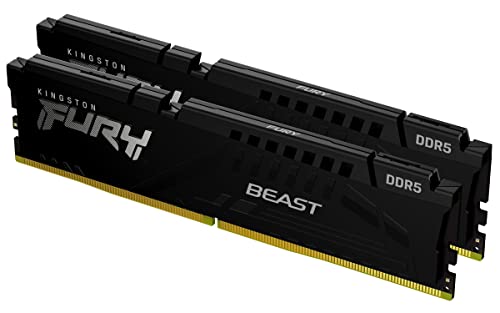
Kingston Fury Beast 32GB 5200MT/s DDR5 RAM
Best for: compact builds and clean aesthetics
- Capacity
- 32GB
- Memory Speed
- 5200MT/s
- CAS Latency
- CL40
- Kit Configuration
- 2x16GB
- Overclocking Profile
- Intel XMP 3.0
- Compatible Device
- Desktop
View on Amazon: Kingston Fury Beast 32GB 5200MT/s DDR5 RAM Affiliate link
This Kingston FURY Beast kit offers 32GB of DDR5 memory running at 5200MT/s with CL40 latency. It uses a low-profile heat spreader design, making it suitable for compact builds. The kit supports Intel XMP 3.0 for straightforward overclocking. You get a black finish and a compact form factor. It is a practical option for desktop users seeking reliable performance without the bulk of larger coolers.
Pros
- 32GB capacity in a 2x16GB kit configuration
- 5200MT/s memory speed for efficient data transfer
- Low-profile heat spreader design fits small cases
- Intel XMP 3.0 support for easy overclocking
Cons
- CL40 latency is higher than some competitors
- No RGB lighting for aesthetic customization
- Black finish lacks color variety
Good fit if
- You need a low-profile RAM kit for compact builds
- You want reliable DDR5 performance at 5200MT/s
- You prefer a clean, non-RGB aesthetic
Skip if
- You require RGB lighting for your build
- You need lower latency than CL40
- You prefer a white or colored RAM kit
Verdict: Kingston FURY Beast 32GB 5200MT/s DDR5 is a solid choice for users prioritizing compatibility and low-profile design over aesthetic flair or ultra-low latency.

Kingston Fury Beast RGB 32GB 5200MT/s DDR5
Best for: RGB-focused Intel desktop builds
- Capacity
- 32GB
- Memory Speed
- 5200MT/s
- CAS Latency
- CL40
- Kit Configuration
- Kit of 2
- Form Factor
- DIMM
- Overclocking Profile
- Intel XMP 3.0
View on Amazon: Kingston Fury Beast RGB 32GB 5200MT/s DDR5 Affiliate link
This kit offers 32GB of DDR5 memory running at 5200MT/s with CL40 latency. It features enhanced RGB lighting and infrared sync technology for synchronized effects. The design includes a new heat spreader for improved stability during overclocking. You will need a motherboard that supports Intel XMP 3.0 to utilize these speeds. It is suitable for desktop builds where visual customization and reliable performance are priorities.
Pros
- 32GB capacity in a 2x16GB kit configuration
- 5200MT/s memory speed with CL40 latency
- Enhanced RGB lighting with infrared sync technology
- Intel XMP 3.0 support for easy overclocking
Cons
- Higher CL40 latency compared to faster options
- Requires Intel XMP 3.0 compatible motherboard
- Infrared sync needs a compatible RGB header
Good fit if
- You want synchronized RGB lighting effects
- You need 32GB of DDR5 memory
- You use an Intel XMP 3.0 platform
Skip if
- You prefer non-RGB components
- You need lower latency like CL32
- You are building with AMD EXPO only
Verdict: Kingston FURY Beast RGB DDR5 32GB delivers reliable 5200MT/s performance with customizable lighting. It fits users who prioritize visual sync and stable overclocking on Intel platforms.
Specifications side by side
| Spec | Kingston Fury Beast 32GB 5200MT/s DDR5 RAM | Kingston Fury Beast RGB 32GB 5200MT/s DDR5 |
|---|---|---|
| Capacity | 32GB | 32GB |
| Memory Speed | 5200MT/s | 5200MT/s |
| CAS Latency | CL40 | CL40 |
| Kit Configuration | 2x16GB | Kit of 2 |
| Form Factor | not stated | DIMM |
| Overclocking Profile | Intel XMP 3.0 | Intel XMP 3.0 |
| Compatible Device | Desktop | Desktop |
| Size | 32GB | 32GB |
| Dimensions | 5.25 × 0.26 × 1.37 inches | 5.25 × 0.28 × 1.66 inches |
| Weight | 2.72 ounces | 3.17 ounces |
| Color | Black | RGB |
| Model | KF552C40BBK2-32 | KF552C40BBAK2-32 |
Frequently asked questions
Does the Beast RGB kit run at the same speed as the standard Beast?
Yes, both kits operate at 5200MT/s. They also share identical CL40 CAS latency. You will see no performance difference in raw speed between the two options. The only distinction lies in the physical design and lighting features rather than memory performance metrics.
Is the standard Beast RAM compatible with Intel XMP?
Yes, the Kingston Fury Beast 32GB supports Intel XMP profiles. This allows you to easily enable overclocking on compatible desktop systems. You can achieve the rated 5200MT/s speed without manual configuration, ensuring stable performance out of the box for your desktop build.
Which kit is better for a small form factor PC?
The standard Beast is better for compact builds. It has a lower profile, measuring only 1.37 inches in height. The RGB version stands 1.66 inches tall. If you are using a low-profile case or large air cooler, the slimmer standard kit offers better clearance.
Do both kits include RGB lighting for system sync?
No, only the Beast RGB model includes lighting. The standard Beast kit is black and lacks any illumination features. If you want customizable lighting effects to match your other components, you must choose the RGB variant. The standard model prioritizes a minimalist aesthetic over visual flair.
Are these RAM kits suitable for desktop computers only?
Yes, both kits are designed for desktop use. They are not compatible with laptops or other portable devices. The specifications list desktop as the compatible device for both the standard and RGB versions. You should ensure your desktop motherboard supports DDR5 memory before purchasing either option.
What is the weight difference between the two kits?
The standard Beast weighs 2.72 ounces, while the RGB version weighs 3.17 ounces. The RGB kit is slightly heavier due to the added lighting components and slightly larger heatsink. The difference is minimal, but the standard kit is lighter overall.