Kingston Fury Beast 32GB 5200MT/s DDR5 RAM or Kingston FURY Renegade RGB 32GB? Which Kingston Model to Buy
As an Amazon Associate we earn from qualifying purchases. Links on this page are affiliate links.
When you compare kingston fury beast 32gb 5200mt s ddr5 RAM vs fury renegade RGB 32gb, you see two distinct approaches from Kingston. Both kits offer 32GB of capacity in a 2x16GB configuration and support Intel XMP 3.0 for easy overclocking. The main difference lies in performance and aesthetics. The Beast focuses on a low-profile design with standard speeds, while the Renegade RGB pushes higher speeds and adds dynamic lighting. You need to decide if raw speed or case compatibility matters more to you.
Key differences
| Aspect | Kingston Fury Beast 32GB 5200MT/s DDR5 RAM | Kingston FURY Renegade RGB 32GB 7200MT/s |
|---|---|---|
| Memory Speed | 5200MT/s | 7200MT/s |
| CAS Latency | CL40 | CL38 |
| Height | 1.37 inches | 1.73 inches |
| Color | Black | Silver, White |
| Lighting | Not listed | Dynamic customizable RGB |
Which one should you choose?
Choose Kingston Fury Beast 32GB 5200MT/s DDR5 RAM if
- You have a small form factor case with limited RAM clearance.
- You prefer a stealthy black look without visible lighting effects.
- You need reliable performance at standard DDR5 speeds.
Choose Kingston FURY Renegade RGB 32GB 7200MT/s if
- You want the highest possible memory bandwidth for demanding tasks.
- You want to customize the RGB lighting to match your build.
- Your motherboard supports high-speed overclocking profiles.
Verdict: Choose the Kingston Fury Beast if you prioritize case compatibility and a low-profile design. Pick the FURY Renegade RGB if you want maximum speed and customizable lighting for a high-end build. Both kits provide solid 32GB capacity and XMP 3.0 support.
Beast vs Renegade DDR5 Specs
memory speed
The Kingston FURY Renegade RGB offers a significantly higher rated memory speed of 7200MT/s. This is a major jump from the Kingston Fury Beast, which is rated at 5200MT/s. Higher speeds generally allow data to transfer faster between the memory and the CPU. For users running demanding workloads or high-refresh-rate gaming, the Renegade provides more headroom. The Beast remains a solid option for standard desktop use where extreme bandwidth is not critical. You should choose the Renegade if maximum throughput is your priority.
cas latency
Latency measures the delay in accessing data. The Kingston FURY Renegade RGB features a CAS Latency of CL38. In contrast, the Kingston Fury Beast has a higher CAS Latency of CL40. A lower number indicates faster response times for individual memory commands. While the Renegade has faster raw speed, its lower latency also contributes to better efficiency. The Beast’s higher latency is typical for its lower base speed tier. If you prefer tighter timing numbers for responsive computing, the Renegade holds the advantage here.
build and form factor
The physical design differs noticeably between these two kits. The Kingston Fury Beast uses a low-profile heat spreader design, which can improve airflow and compatibility with large CPU coolers. The Kingston FURY Renegade RGB is taller, standing at 1.73 inches compared to the Beast’s 1.37 inches. The Renegade also includes dynamic RGB lighting, adding a visual element that the Beast lacks. The Beast is available in black, while the Renegade comes in white and silver. Choose the Beast for compact builds and the Renegade for aesthetic appeal.
overclocking profile
Both kits support Intel XMP 3.0 for automated overclocking. This standard allows your motherboard to apply the correct settings with a single click. The Kingston FURY Renegade RGB is explicitly certified for Intel XMP 3.0, ensuring broad compatibility. The Kingston Fury Beast also lists Intel XMP 3.0 support. This feature simplifies the setup process for both products. You do not need to manually adjust timings or voltages to reach the rated speeds. Both products tie in providing this essential convenience for users who want plug-and-play performance.
software and syncing
The Kingston FURY Renegade RGB includes FURY CTRL Software and patented Infrared Sync Technology. These features allow you to customize lighting effects and sync them across compatible components. The Kingston Fury Beast does not list any software integration or RGB capabilities in its specifications. It focuses on pure performance without visual customization. If you want to manage lighting profiles or sync your system’s aesthetic, the Renegade is the only choice. The Beast is better if you prefer a clean, non-distracting look.
Which Kingston DDR5 Kit Fits You
Users seeking maximum raw performance
The Renegade RGB offers 7200MT/s speed, which is significantly faster than the Beast's 5200MT/s. This higher bandwidth helps data transfer rates. It also features a lower CAS latency of CL38 compared to CL40. If you need the fastest possible memory speeds for demanding tasks, this kit is the better choice for your system.
Owners of small form factor PCs
The Beast kit has a low-profile heat spreader design. It measures only 0.26 inches in width and 1.37 inches in height. This compact size helps it fit into cases with limited clearance. The Renegade RGB is taller at 1.73 inches and wider. If your case has tight space constraints, the Beast profile ensures compatibility.
Buyers who want customizable lighting
The Renegade RGB includes dynamic customizable RGB lighting effects. It also features patented Infrared Sync Technology for synchronized lighting across modules. The Beast kit is black and lacks any mention of RGB features. If you want to display visual effects or sync lights with other components, the Renegade RGB provides the necessary aesthetic control.
The products compared
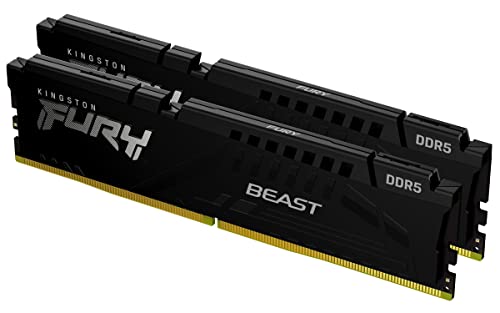
Kingston Fury Beast 32GB 5200MT/s DDR5 RAM
Best for: Standard desktop builds needing stability
- Capacity
- 32GB
- Memory Speed
- 5200MT/s
- CAS Latency
- CL40
- Kit Configuration
- 2x16GB
- Overclocking Profile
- Intel XMP 3.0
- Compatible Device
- Desktop
View on Amazon: Kingston Fury Beast 32GB 5200MT/s DDR5 RAM Affiliate link
The Kingston Fury Beast offers 32GB of DDR5 memory in a 2x16GB kit running at 5200MT/s with CL40 latency. It features a low-profile black heat spreader and supports Intel XMP 3.0 for easy overclocking. This module suits desktop users who prioritize stability and efficiency over maximum speed or RGB lighting. It is a practical choice for standard builds where compact clearance and reliable performance are key.
Pros
- 32GB capacity in a 2x16GB configuration
- 5200MT/s memory speed with CL40 latency
- Low-profile heat spreader design
- Intel XMP 3.0 support
Cons
- Lower speed than the 7200MT/s Renegade option
- No RGB lighting
- Higher latency than faster kits
Good fit if
- You need reliable desktop memory for standard tasks
- You prefer a low-profile design for compact cases
- You want a stable kit without RGB lighting
Skip if
- You require maximum memory speed for heavy workloads
- You want RGB lighting for aesthetic builds
- You need the lowest possible latency
Verdict: Kingston Fury Beast 32GB 5200MT/s DDR5 fits users who value stability and compact design over raw speed or aesthetics. It is a solid choice for standard desktop builds.

Kingston FURY Renegade RGB 32GB 7200MT/s
Best for: high-speed DDR5 builds with white aesthetics
- Capacity
- 32GB
- Memory Speed
- 7200MT/s
- CAS Latency
- CL38
- Kit Configuration
- 2x16GB
- Form Factor
- DIMM
- Overclocking Profile
- Intel XMP 3.0
View on Amazon: Kingston FURY Renegade RGB 32GB 7200MT/s Affiliate link
This Kingston FURY Renegade kit offers 32GB of DDR5 memory running at 7200MT/s with CL38 latency. It uses Intel XMP 3.0 for easy overclocking and features dynamic RGB lighting with infrared syncing. The silver and white heat spreader fits modern builds. You should choose this if you want high-speed performance and visible aesthetics for your desktop.
Pros
- 7200MT/s memory speed
- CL38 CAS latency
- Intel XMP 3.0 support
- Dynamic RGB lighting
Cons
- Higher latency than standard 5200MT/s kits
- Requires compatible motherboard for RGB syncing
- Limited to XMP profiles only
Good fit if
- You want the fastest available DDR5 speeds
- You prefer a white or silver aesthetic
- You use Intel XMP 3.0 motherboards
Skip if
- You need lower latency for stability
- You prefer non-RGB components
- You are on a tight budget
Verdict: Kingston FURY Renegade RGB 32GB DDR5 delivers top-tier speed and style for enthusiasts. It suits users prioritizing maximum bandwidth and visual customization over cost efficiency.
Specifications side by side
| Spec | Kingston Fury Beast 32GB 5200MT/s DDR5 RAM | Kingston FURY Renegade RGB 32GB 7200MT/s |
|---|---|---|
| Capacity | 32GB | 32GB |
| Memory Speed | 5200MT/s | 7200MT/s |
| CAS Latency | CL40 | CL38 |
| Kit Configuration | 2x16GB | 2x16GB |
| Form Factor | not stated | DIMM |
| Overclocking Profile | Intel XMP 3.0 | Intel XMP 3.0 |
| Compatible Device | Desktop | not stated |
| Size | 32GB | 32GB (2x16GB) |
| Dimensions | 5.25 × 0.26 × 1.37 inches | 5.25 × 0.3 × 1.73 inches |
| Weight | 2.72 ounces | 0.71 ounces |
| Color | Black | Silver,White |
| Model | KF552C40BBK2-32 | KF572C38RWAK2-32 |
Frequently asked questions
Which Kingston DDR5 kit is better for standard desktop builds?
The Kingston Fury Beast 32GB 5200MT/s is the better choice for standard desktop builds. It prioritizes stability and features a compact black design. The kit measures 0.26 inches in width, allowing it to fit easily into most cases without interfering with large CPU coolers. This makes it a practical option for users who value reliability over extreme performance metrics.
Does the Kingston FURY Renegade RGB support overclocking profiles?
Yes, the Kingston FURY Renegade RGB supports Intel XMP profiles. This allows you to easily enable higher speeds and tighter timings through your motherboard's BIOS. The kit is rated for 7200MT/s with a CAS latency of CL38. This profile ensures you can achieve the advertised top-tier speed without manual configuration, provided your motherboard and CPU support such high frequencies.
What is the physical size difference between the Beast and Renegade kits?
The Kingston Fury Beast is physically smaller than the Renegade RGB. The Beast measures 1.37 inches in height and 0.26 inches in width. In contrast, the Renegade RGB is taller at 1.73 inches and slightly wider at 0.3 inches. If you have a large air cooler, the lower profile of the Beast provides better clearance and compatibility with your cooling solution.
Is the Kingston Fury Beast suitable for users who want a low profile?
The Kingston Fury Beast is suitable for users seeking a low profile. Its height is only 1.37 inches, and its width is a mere 0.26 inches. This compact form factor ensures it does not obstruct airflow or clash with bulky CPU coolers. It is designed to blend into standard desktop builds where space efficiency and stability are more important than visual customization or maximum bandwidth.
How does the CAS latency compare between the two kits?
The Kingston FURY Renegade RGB has a lower CAS latency of CL38, while the Fury Beast has a CAS latency of CL40. Lower latency means the memory can respond to commands faster. Combined with its higher speed of 7200MT/s, the Renegade offers tighter timings for enhanced performance. The Beast’s higher latency aligns with its more conservative 5200MT/s speed rating for general stability.
Which kit offers better aesthetics for a white build?
The Kingston FURY Renegade RGB offers better aesthetics for a white build. It features a silver and white color scheme with integrated RGB lighting. This makes it ideal for users prioritizing visual customization. The Fury Beast, by contrast, comes in a standard black color. If you are building a system with a white theme and want visible lighting effects, the Renegade is the clear choice.
Does the Kingston FURY Renegade RGB include RGB lighting?
Yes, the Kingston FURY Renegade RGB includes RGB lighting. This feature allows for visual customization to match your system’s theme. The kit is designed for enthusiasts who want maximum bandwidth and style. The lighting can be controlled via your motherboard’s software. This aesthetic component is absent in the standard black Fury Beast, which focuses purely on functional performance and stability.
What is the weight difference between the two memory kits?
The Kingston Fury Beast weighs 2.72 ounces, while the Renegade RGB weighs 0.71 ounces. The Beast is significantly heavier, likely due to its heat spreader design. The Renegade is much lighter, which may affect how it feels during installation. Both kits provide 32GB of capacity. The weight difference does not impact performance but highlights the different physical construction approaches of each model.