Kingston vs ADATA: ddr5 RAMs Compared by Specs
As an Amazon Associate we earn from qualifying purchases. Links on this page are affiliate links.
This comparison looks at Kingston vs ADATA ddr5 RAM options for your build. Both kits share a CL40 latency, which affects timing delays. The main difference lies in their form factor and speed. The Kingston kit is a desktop module running at 5200MT/s. The ADATA stick is a laptop SODIMM running at 4800MHz. You need to check your motherboard or laptop compatibility first. This guide breaks down the specs so you can pick the right memory for your specific hardware needs.
Key differences
| Aspect | Kingston Fury Beast 32GB 5200MT/s DDR5 RAM | ADATA Premier 16GB DDR5 4800MHz SODIMM |
|---|---|---|
| Memory Speed | 5200MT/s | 4800MHz |
| Form Factor | DIMM (Desktop) | SODIMM (Laptop) |
| ECC Support | not listed | On-Die Error Correcting Code |
| Overclocking Profile | Intel XMP 3.0 | not listed |
Which one should you choose?
Choose Kingston Fury Beast 32GB 5200MT/s DDR5 RAM if
- You are building a desktop PC and need higher speed modules.
- You want to use Intel XMP 3.0 for easy overclocking profiles.
- You require a 32GB kit configuration for heavier multitasking.
Choose ADATA Premier 16GB DDR5 4800MHz SODIMM if
- You are upgrading a laptop or small form factor PC.
- You value built-in On-Die Error Correcting Code for stability.
- You need a single 16GB stick for a specific slot.
Verdict: Choose the Kingston kit if you are upgrading a desktop system and want faster speeds with XMP support. Pick the ADATA module if you are working with a laptop or SODIMM slot and need reliable error correction. The form factor dictates your choice more than the speed difference.
DDR5 RAM Specs Compared
Memory speed
The Kingston FURY Beast runs at 5200MT/s, while the ADATA Premier operates at 4800MHz. Higher speed generally allows for faster data transfer rates between the memory and the CPU. This 400MT/s difference favors the Kingston kit for performance-heavy tasks. You will notice the Kingston module handles data more quickly. The ADATA stick is slightly slower but still meets modern DDR5 standards. If raw speed is your priority, the Kingston option provides a clear advantage. The difference is measurable in benchmark tests.
Form factor
These two kits serve different types of computers. The Kingston FURY Beast is designed for desktops, using a standard DIMM slot. The ADATA Premier is a SODIMM module, which is meant for laptops or small form-factor PCs. You cannot swap these parts. A desktop motherboard will not accept the laptop-sized ADATA stick. Conversely, a laptop will not fit the larger Kingston module. This is a fundamental compatibility difference. You must choose based on your computer type, not just performance specs.
Capacity
The Kingston kit offers 32GB of total memory, split across two 16GB sticks. The ADATA option provides only 16GB in a single stick. More capacity allows you to run more applications simultaneously without slowing down your system. The Kingston kit gives you double the storage space. This is useful for video editing, large spreadsheets, or heavy multitasking. The ADATA module is sufficient for basic computing and light gaming. If you need more room for data, the Kingston configuration is the better choice for future-proofing.
ECC support
The ADATA Premier memory includes On-Die Error Correcting Code (ECC). This feature helps detect and fix data errors automatically, which improves stability and data integrity. The Kingston FURY Beast does not list ECC support in its specifications. For most desktop users, standard memory is sufficient. However, if you work with critical data or run stability-sensitive applications, the ADATA feature adds a layer of protection. This spec gives the ADATA kit an edge in reliability for specific professional workflows.
Overclocking profile
The Kingston FURY Beast supports Intel XMP 3.0. This profile allows you to easily overclock your memory to its rated speed with simple BIOS settings. The ADATA Premier does not specify an XMP profile in the provided data. While it runs at its rated speed, you may need to adjust settings manually or rely on default configurations. The XMP 3.0 support makes the Kingston kit easier to configure for peak performance. This convenience is a practical advantage for users who want plug-and-play optimization.
Which Kingston or ADATA DDR5 Kit Fits You
Desktop builders needing high speed and capacity
This Kingston kit offers 32GB capacity across two sticks, doubling the storage of the ADATA option. Its 5200MT/s speed exceeds the ADATA 4800MHz rate. The desktop DIMM form factor fits standard towers. You get better performance for heavy workloads and more room for multitasking with the larger total memory size.
Laptop users requiring compact SODIMM modules
The ADATA Premier uses a 262-pin SODIMM form factor, designed specifically for laptops and small form factor PCs. The Kingston module is a desktop DIMM and will not fit these devices. This physical compatibility makes the ADATA kit the only viable choice for portable computing systems needing DDR5 upgrades.
Users prioritizing built-in error correction features
The ADATA memory includes On-Die Error Correcting Code, a feature highlighted in its specifications. This helps maintain data integrity during operation. The Kingston listing does not mention this specific ECC capability. If reliable error handling is a priority for your system stability, the ADATA specification offers a clear technical advantage.
The products compared
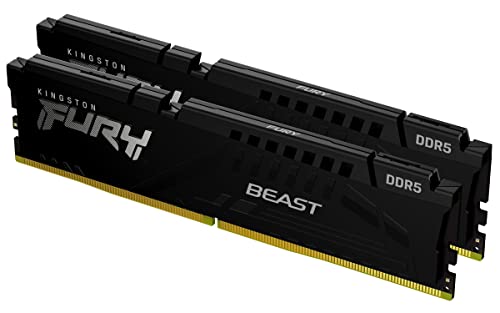
Kingston Fury Beast 32GB 5200MT/s DDR5 RAM
Best for: Desktop users needing 32GB capacity
- Capacity
- 32GB
- Memory Speed
- 5200MT/s
- CAS Latency
- CL40
- Kit Configuration
- 2x16GB
- Overclocking Profile
- Intel XMP 3.0
- Compatible Device
- Desktop
View on Amazon: Kingston Fury Beast 32GB 5200MT/s DDR5 RAM Affiliate link
This Kingston FURY Beast kit gives you 32GB of DDR5 memory in a 2x16GB configuration. It runs at 5200MT/s with a CL40 latency. The low-profile heat spreader helps it fit in smaller cases. It supports Intel XMP 3.0 for easy overclocking. You get improved stability and efficiency for desktop use. This kit suits users who need more capacity than the 16GB options available from competitors.
Pros
- 32GB total capacity via 2x16GB modules
- 5200MT/s memory speed
- Intel XMP 3.0 support
- Low-profile heat spreader design
Cons
- Higher CL40 latency compared to faster kits
- Only supports Intel XMP profiles
- Desktop-only form factor
Good fit if
- You need 32GB of RAM for multitasking
- You have a desktop PC with Intel processors
- You want a low-profile kit for compact builds
Skip if
- You require AMD EXPO support
- You need a 16GB single stick kit
- You are building a laptop with SODIMM slots
Verdict: Kingston FURY Beast 32GB DDR5 provides ample memory for demanding desktop workloads. It is a solid choice for Intel-based systems needing more than 16GB.

ADATA Premier 16GB DDR5 4800MHz SODIMM
Best for: Laptop upgrades needing single 16GB stick
- Capacity
- 16GB
- Memory Speed
- 4800MHz
- CAS Latency
- CL40
- Kit Configuration
- 1x16GB
- Form Factor
- 262-Pin SODIMM
- ECC Support
- On-Die Error Correcting Code
View on Amazon: ADATA Premier 16GB DDR5 4800MHz SODIMM Affiliate link
This ADATA Premier module is a 16GB single stick of DDR5 memory designed for laptops. It runs at 4800MHz with CL40 latency. The 262-pin SODIMM form factor fits portable computers. It includes On-Die ECC for data stability. The built-in power management IC aims for better energy efficiency. You should consider this if you need a single high-capacity stick for a laptop upgrade.
Pros
- 16GB single-stick capacity
- 4800MHz memory speed
- On-Die Error Correcting Code
- 262-pin SODIMM form factor
Cons
- Single stick configuration limits dual-channel performance
- Lower 4800MHz speed compared to 5200MHz competitors
- CL40 latency is higher than faster kits
Good fit if
- You need a single 16GB stick for a laptop
- You prioritize capacity over maximum speed
- You want On-Die ECC for stability
Skip if
- You require dual-channel performance from two sticks
- You need speeds faster than 4800MHz
- You are building a desktop PC
Verdict: ADATA Premier 16GB DDR5 SODIMM offers stable single-stick performance for laptops. It fits users who need 16GB of capacity in one module rather than a dual-channel kit.
Specifications side by side
| Spec | Kingston Fury Beast 32GB 5200MT/s DDR5 RAM | ADATA Premier 16GB DDR5 4800MHz SODIMM |
|---|---|---|
| Capacity | 32GB | 16GB |
| Memory Speed | 5200MT/s | 4800MHz |
| CAS Latency | CL40 | CL40 |
| Kit Configuration | 2x16GB | 1x16GB |
| Form Factor | not stated | 262-Pin SODIMM |
| Overclocking Profile | Intel XMP 3.0 | not stated |
| ECC Support | not stated | On-Die Error Correcting Code |
| Compatible Device | Desktop | not stated |
| Size | 32GB | 16GB(1x16GB) |
| Dimensions | 5.25 × 0.26 × 1.37 inches | 23.6 × 23.6 × 33.5 inches |
| Weight | 2.72 ounces | 0.71 ounces |
| Color | Black | 4800MHz |
| Model | KF552C40BBK2-32 | AD5S480016G-S |
Frequently asked questions
Which Kingston or ADATA DDR5 RAM is best for desktops?
The Kingston Fury Beast is the better choice for desktop systems. It uses a standard DIMM form factor designed for desktop motherboards. The kit provides 32GB of capacity and runs at 5200MT/s. This speed and capacity make it suitable for demanding desktop workloads. The ADATA option is a SODIMM, which is intended for laptops.
What is the difference between Kingston and ADATA DDR5 speeds?
The Kingston kit operates at 5200MT/s, while the ADATA Premier runs at 4800MHz. This difference means the Kingston module can transfer data faster. Higher speeds generally improve performance in tasks that rely heavily on memory bandwidth. The Kingston option offers a clear advantage in raw speed for compatible systems.
Does the Kingston Fury Beast support overclocking profiles?
Yes, the Kingston Fury Beast supports Intel XMP profiles. This allows you to enable higher speeds easily through your BIOS. The kit is rated for 5200MT/s when XMP is activated. This feature ensures you can achieve the advertised performance without manual configuration adjustments.
Can I use the ADATA Premier in a desktop computer?
No, the ADATA Premier is a SODIMM module. SODIMM stands for Small Outline Dual Inline Memory Module. These are designed specifically for laptops and small form-factor computers. Desktop motherboards require standard DIMM modules, which the Kingston kit provides. You cannot install the ADATA stick in a standard desktop slot.
How much memory does the Kingston Fury Beast have?
The Kingston Fury Beast has 32GB of total capacity. This is a dual-stick kit, meaning it contains two 16GB modules. Having 32GB allows for smoother multitasking and better performance in memory-intensive applications. It is a significant upgrade over the single 16GB stick offered by the ADATA Premier.
What is the CAS latency for these DDR5 kits?
Both kits feature a CAS latency of CL40. CAS latency refers to the delay before the RAM responds to a command. Since both options share this same latency value, timing delays are identical. The performance difference comes from their speed ratings and capacity rather than latency variations.
Is the Kingston kit compatible with Intel systems?
Yes, the Kingston Fury Beast is compatible with Intel-based systems. It explicitly supports Intel XMP profiles for easy setup. The module is designed for desktop use, fitting standard desktop motherboards. If you are building or upgrading an Intel desktop, this kit is a solid choice for your memory needs.