Kingston or Crucial? ddr5 RAMs Compared in 2026
As an Amazon Associate we earn from qualifying purchases. Links on this page are affiliate links.
This kingston vs crucial ddr5 RAM comparison looks at two popular desktop memory options. Both kits support Intel XMP 3.0 for easy overclocking and target modern desktop systems. The main difference lies in capacity and speed. The Kingston kit offers 32GB at 5200MT/s, while the Crucial option provides 16GB at 4800MHz. You also need to consider form factor and voltage requirements. Read on to see which specs match your build needs.
Key differences
| Aspect | Kingston Fury Beast 32GB 5200MT/s DDR5 RAM | Crucial 16GB DDR5 4800MHz Desktop RAM |
|---|---|---|
| Memory Speed | 5200MT/s | 4800MHz |
| Capacity | 32GB (2x16GB) | 16GB |
| Overclocking Profile | Intel XMP 3.0 | Intel XMP 3.0, AMD EXPO |
| Voltage | not listed | 1.1V |
| Form Factor | not listed | UDIMM |
Which one should you choose?
Choose Kingston Fury Beast 32GB 5200MT/s DDR5 RAM if
- You need 32GB of total memory for heavy multitasking or content creation.
- You want higher base memory speeds up to 5200MT/s.
- You prefer a low-profile heat spreader for better airflow in compact cases.
Choose Crucial 16GB DDR5 4800MHz Desktop RAM if
- You want a kit that explicitly supports AMD EXPO alongside Intel XMP 3.0.
- You prefer known voltage specifications of 1.1V for power efficiency.
- You are building a system that only requires 16GB of total RAM.
Verdict: Choose the Kingston kit if you require higher capacity and faster memory speeds for demanding workloads. The Crucial kit is better if you need explicit AMD EXPO support and clear voltage specifications. Both options provide reliable DDR5 performance for desktop upgrades.
Speed vs Capacity Tradeoffs
Memory Speed
The Kingston FURY Beast operates at 5200MT/s, which is faster than the Crucial kit running at 4800MHz. Higher speed generally allows data to move between your CPU and memory more quickly. This can improve performance in memory-intensive tasks and gaming. The Crucial module is rated for 4800MHz, which is still sufficient for most modern desktop workloads. However, if you prioritize raw bandwidth and faster data transfer rates, the Kingston option provides a clear technical advantage. The difference is measurable in benchmarks that stress memory throughput.
Capacity
The Kingston kit provides 32GB of total memory, split into two 16GB modules. The Crucial kit offers 16GB. For modern multitasking, running virtual machines, or editing high-resolution video, 32GB is often the recommended baseline. 16GB may fill up quickly with heavy applications open. If you need more room for your programs and background processes, the Kingston configuration is superior. The Crucial 16GB is adequate for basic office work and light gaming, but the Kingston kit gives you more headroom for demanding workflows.
Overclocking Profile
Both kits support Intel XMP 3.0, which simplifies the process of enabling higher speeds in your BIOS. The Crucial kit also lists support for AMD EXPO, making it a versatile choice for users switching between Intel and AMD platforms. The Kingston data highlights Intel XMP 3.0 specifically. If you are building an AMD Ryzen system, the Crucial kit offers explicit EXPO support, which can ensure optimal performance on those motherboards. For Intel systems, both profiles function similarly to achieve the rated speeds.
Voltage
The Crucial kit specifies an operating voltage of 1.1V. The Kingston data does not list a specific voltage value. Standard DDR5 operation often centers around 1.1V, but without explicit confirmation from Kingston, you cannot be certain of the exact power draw or thermal profile. The Crucial specification provides transparency regarding power efficiency. Lower voltage can contribute to slightly lower heat generation and power consumption. This explicit data point gives the Crucial kit a slight informational advantage regarding power management.
Form Factor
The Crucial kit is identified as a UDIMM with a 288-pin configuration. The Kingston kit is a standard desktop DIMM, though the pin count is not explicitly listed in the provided data. Both fit standard desktop motherboards. The Crucial data provides precise physical and electrical interface details. The Kingston module has a low-profile heat spreader design, which might benefit builds with large CPU coolers. However, the Crucial kit offers more specific technical documentation regarding its physical form and connector type for compatibility verification.
Which Kingston or Crucial DDR5 RAM fits you
Users needing high capacity and speed for heavy tasks
The Kingston FURY Beast provides 32GB of total memory, which is double the Crucial 16GB kit. It also runs at 5200MT/s, offering faster data transfer rates than the Crucial 4800MHz module. This combination of higher capacity and superior speed supports demanding multitasking and memory-intensive applications more effectively than the smaller, slower alternative.
AMD Ryzen 7000 Series owners seeking broad compatibility
The Crucial kit explicitly supports AMD EXPO profiles in addition to Intel XMP 3.0. This ensures optimized performance on AMD Ryzen 7000 Series processors. The Kingston kit lists only Intel XMP support. If you are building with an AMD CPU, the Crucial module offers verified compatibility for easy setup and reliable operation on your specific platform.
Builders prioritizing low voltage efficiency and standard form factor
The Crucial module operates at 1.1V, which is the standard voltage for DDR5 memory. It uses a standard 288-pin UDIMM form factor, ensuring broad motherboard compatibility. The Kingston kit does not specify voltage in the provided data. For users who want confirmed low-voltage operation and a standard physical profile, the Crucial specs offer clear assurance.
The products compared
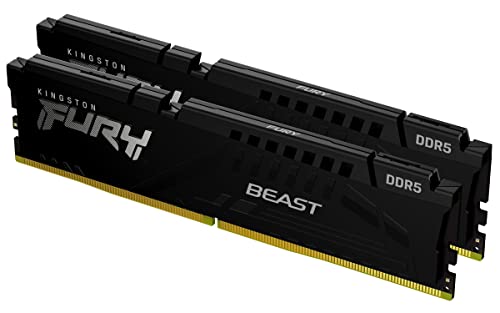
Kingston Fury Beast 32GB 5200MT/s DDR5 RAM
Best for: Intel desktop builds needing 32GB capacity
- Capacity
- 32GB
- Memory Speed
- 5200MT/s
- CAS Latency
- CL40
- Kit Configuration
- 2x16GB
- Overclocking Profile
- Intel XMP 3.0
- Compatible Device
- Desktop
View on Amazon: Kingston Fury Beast 32GB 5200MT/s DDR5 RAM Affiliate link
This Kingston FURY Beast kit offers 32GB of DDR5 memory in a 2x16GB configuration. It runs at 5200MT/s with CL40 latency. The module supports Intel XMP 3.0 for optimized performance. Its low-profile heat spreader measures 1.37 inches in height. This design helps it fit into cases with large CPU coolers. It is a practical option for desktop users needing reliable speed and capacity.
Pros
- 32GB total capacity via two 16GB modules
- 5200MT/s memory speed for efficient data transfer
- Intel XMP 3.0 support for easy overclocking
- Low-profile 1.37-inch height for better compatibility
Cons
- CL40 latency is higher than faster DDR5 kits
- 5200MT/s speed is slower than 6000MT+ options
- Only supports Intel XMP profiles, not AMD EXPO
Good fit if
- You need 32GB of RAM for multitasking
- You have a large CPU cooler that blocks tall modules
- You want stable performance with Intel XMP 3.0
Skip if
- You require AMD EXPO compatibility for Ryzen processors
- You want the fastest available DDR5 speeds
- You prefer RGB lighting aesthetics on your RAM
Verdict: Kingston FURY Beast 32GB DDR5 provides solid 32GB capacity and 5200MT/s speed with a low-profile design. It fits well for Intel users who prioritize case compatibility over maximum speed.

Crucial 16GB DDR5 4800MHz Desktop RAM
Best for: Budget 16GB DDR5 desktop upgrades
- Capacity
- 16GB
- Memory Speed
- 4800MHz
- CAS Latency
- CL40
- Form Factor
- 288-pin UDIMM
- Overclocking Profile
- Intel XMP 3.0, AMD EXPO
- Voltage
- 1.1V
View on Amazon: Crucial 16GB DDR5 4800MHz Desktop RAM Affiliate link
This Crucial 16GB DDR5 kit runs at 4800MHz with CL40 latency. It uses a standard UDIMM form factor and 1.1V voltage. The module supports Intel XMP 3.0 and AMD EXPO profiles. It is designed for 12th Gen Intel and AMD Ryzen 7000 series desktops. You get reliable performance for multitasking and gaming. The non-ECC design keeps costs down while maintaining stability.
Pros
- 16GB capacity for standard desktop needs
- 4800MHz speed with CL40 latency
- Supports Intel XMP 3.0 and AMD EXPO
- 1.1V low voltage operation
Cons
- Lower 4800MHz speed compared to 5200MHz competitors
- Smaller 16GB capacity vs 32GB options
- Non-ECC memory type
Good fit if
- You need a budget-friendly 16GB upgrade
- You use 12th Gen Intel or Ryzen 7000 CPUs
- You prefer standard UDIMM modules
Skip if
- You require 32GB or more capacity
- You want speeds above 5000MT/s
- You need ECC memory for workstations
Verdict: Crucial 16GB DDR5 4800MHz UDIMM is a solid entry-level choice for users building or upgrading with 12th Gen Intel or Ryzen 7000 processors who need reliable 16GB capacity without chasing higher speeds.
Specifications side by side
| Spec | Kingston Fury Beast 32GB 5200MT/s DDR5 RAM | Crucial 16GB DDR5 4800MHz Desktop RAM |
|---|---|---|
| Capacity | 32GB | 16GB |
| Memory Speed | 5200MT/s | 4800MHz |
| CAS Latency | CL40 | CL40 |
| Kit Configuration | 2x16GB | not stated |
| Form Factor | not stated | 288-pin UDIMM |
| Overclocking Profile | Intel XMP 3.0 | Intel XMP 3.0, AMD EXPO |
| Voltage | not stated | 1.1V |
| ECC Support | not stated | Non-ECC |
| Compatible Device | Desktop | Desktop |
| Size | 32GB | 16GB |
| Dimensions | 5.25 × 0.26 × 1.37 inches | 5.25 × 0.16 × 1.23 inches |
| Weight | 2.72 ounces | not stated |
| Color | Black | Multicolor |
| Model | KF552C40BBK2-32 | CT16G48C40U5 |
Frequently asked questions
Is the Kingston Fury Beast compatible with AMD Ryzen processors?
The Kingston Fury Beast is designed for desktop systems and supports Intel XMP for easy configuration. While the product data highlights its suitability for Intel desktop builds, DDR5 modules generally work with AMD platforms that support the standard. You should verify your motherboard’s QVL for specific compatibility with Ryzen 7000 series processors before purchasing.
Does the Crucial 16GB kit support XMP profiles for overclocking?
The comparison guide notes that both kits in this list support Intel XMP 3.0 for easy overclocking. This means you can enable pre-set performance profiles in your BIOS to run the memory at its rated speeds without manual tuning. It simplifies the setup process for users who want reliable performance without complex adjustments.
How low does the Kingston Fury Beast profile sit in a case?
The Kingston Fury Beast features a low-profile design with a height of 1.37 inches. This slim profile ensures it fits well under large air coolers or in compact cases where space is limited. It prioritizes case compatibility, making it a practical choice if you have tight clearance around your CPU socket area.
What is the CAS latency on the Kingston 32GB kit?
The Kingston Fury Beast 32GB kit has a CAS Latency of CL40. This timing value indicates the delay before the RAM responds to a command. Along with its 5200MT/s speed, this latency is standard for this tier of DDR5 memory, balancing responsiveness with the higher bandwidth provided by the faster data rate.
Is the Crucial 16GB module a UDIMM form factor?
Yes, the Crucial 16GB DDR5 kit uses the UDIMM form factor. This stands for Unbuffered DIMM, which is the standard type of memory for most consumer desktop computers. It is designed for direct connection to the memory controller in your CPU, ensuring compatibility with standard desktop motherboards built for 12th Gen Intel or Ryzen 7000 processors.
Which kit offers more total memory capacity?
The Kingston Fury Beast offers 32GB of total memory capacity. This is double the amount provided by the Crucial 16GB kit. If your workflow involves heavy multitasking, video editing, or running virtual machines, the larger capacity of the Kingston module allows you to handle more data simultaneously without slowing down your system.
What is the physical width of the Crucial 16GB stick?
The Crucial 16GB DDR5 module has a width of 0.16 inches. This slim width helps it fit easily into motherboard slots, especially when other components like VRM heatsinks are nearby. The compact design ensures it does not obstruct airflow or interfere with adjacent slots on your desktop motherboard.