Kingston vs OWC: DDR5 RAMs Compared by Specs
As an Amazon Associate we earn from qualifying purchases. Links on this page are affiliate links.
You are comparing Kingston vs OWC ddr5 RAM options for your system upgrade. Both kits offer 32GB of capacity with a CL40 latency, but they serve different hardware types. The Kingston FURY Beast is a desktop DIMM designed for high-speed performance with XMP support. The OWC module is a laptop SODIMM focused on compatibility and warranty coverage. You need to check your device type before choosing either kit.
Key differences
| Aspect | Kingston Fury Beast 32GB 5200MT/s DDR5 RAM | OWC 32GB DDR5 4800MHz SODIMM |
|---|---|---|
| Form Factor | DIMM (Desktop) | SODIMM (Laptop) |
| Memory Speed | 5200MT/s | 4800MHz |
| Overclocking Profile | Intel XMP 3.0 | JEDEC Standard |
| ECC Support | not listed | Non-ECC |
| Warranty | not listed | Limited Lifetime |
Which one should you choose?
Choose Kingston Fury Beast 32GB 5200MT/s DDR5 RAM if
- You are upgrading a desktop computer and need higher memory speeds.
- You want to use Intel XMP 3.0 for automatic overclocking profiles.
- You prefer a low-profile heat spreader for better airflow in your case.
Choose OWC 32GB DDR5 4800MHz SODIMM if
- You are upgrading a laptop or small form factor PC that uses SODIMM slots.
- You need a memory kit that is explicitly Non-ECC and JEDEC compliant.
- You want a Limited Lifetime Warranty and free tech support included.
Verdict: The Kingston kit is the better choice for desktop users seeking higher speeds and overclocking features. The OWC kit is the correct option for laptop upgrades due to its SODIMM form factor and lifetime warranty. Choose based on your device's physical slot type first.
DDR5 RAM: Kingston vs OWC Specs
Memory Speed
The Kingston FURY Beast operates at 5200MT/s, which provides higher bandwidth than the OWC kit running at 4800MHz. This 400MT/s difference can improve performance in bandwidth-heavy tasks like large file transfers or high-resolution video editing. You should note that MT/s and MHz are often used interchangeably for DDR5 speeds, so 5200MT/s is effectively 5200MHz. If your workflow relies on maximum data throughput, the Kingston module offers a tangible advantage. The OWC speed is standard for DDR5 but lags behind Kingston in raw numbers.
Form Factor
These kits are designed for entirely different types of computers. The Kingston FURY Beast is a standard DIMM, which fits into desktop motherboards. It is not compatible with laptops. The OWC memory is a SODIMM, the smaller form factor required for laptops and some compact desktops. You must choose based on your hardware. If you have a desktop tower, the OWC kit will not fit. If you are upgrading a laptop, the Kingston DIMM is too large. This is a fundamental compatibility difference rather than a performance one.
Overclocking Profile
The Kingston FURY Beast supports Intel XMP 3.0. This profile allows your motherboard to automatically configure the memory for its rated 5200MT/s speed, which is higher than the base JEDEC standard. This simplifies getting maximum performance. The OWC kit is described as JEDEC-Standard compliant. This means it runs at its base 4800MHz speed without requiring specific overclocking profiles. While this ensures broad compatibility and stability, it offers less flexibility for tuning. If you want to easily enable higher speeds via your BIOS, Kingston provides the necessary profile support.
ECC Support
The OWC memory is explicitly Non-ECC. This means it does not include Error Correction Code, which is typically used in servers or workstations to prevent data corruption. The Kingston FURY Beast data does not explicitly list ECC support, but consumer desktop memory like this is generally Non-ECC as well. Since both kits appear to lack ECC for standard consumer use, this is a neutral factor for typical desktop or laptop upgrades. You do not need to worry about ECC compatibility unless you are building a specialized server system.
Build and Dimensions
The Kingston FURY Beast features a low-profile heat spreader design. Its physical dimensions are 5.25 inches in length, 1.37 inches in height, and 0.26 inches in width. The heat spreader helps dissipate heat during high-speed operation. The OWC kit data does not specify physical dimensions or heat spreader details, only noting black chips. The Kingston kit includes a physical heatsink for thermal management, which is beneficial for sustained loads. The OWC specs are less detailed regarding physical construction, making the Kingston kit appear more robust for desktop cooling.
Which DDR5 RAM Kit Fits Your Build
Desktop gamers seeking high bandwidth
The Kingston FURY Beast runs at 5200MT/s with Intel XMP 3.0 support. This speed offers higher bandwidth than the OWC option. Its desktop DIMM form factor fits standard towers. You get improved stability for overclocking and a low-profile heat spreader. Choose this kit if your system benefits from faster memory throughput for gaming.
Laptop or small form factor users
The OWC kit uses SODIMM modules, which are required for laptops and compact systems. It operates at 4800MHz with Non-ECC support. This ensures compatibility with OEM specifications. You cannot use the Kingston desktop DIMM in these devices. Select this option if your hardware requires the smaller SODIMM form factor for a successful upgrade.
Users prioritizing manufacturer support
OWC provides a Limited Lifetime Warranty and Free Tech Support. This includes an Advanced Replacement Program for hassle-free service. The Kingston kit data does not mention comparable support terms. If long-term security and direct technical assistance are important to you, the OWC kit offers better peace of mind through its warranty structure.
The products compared
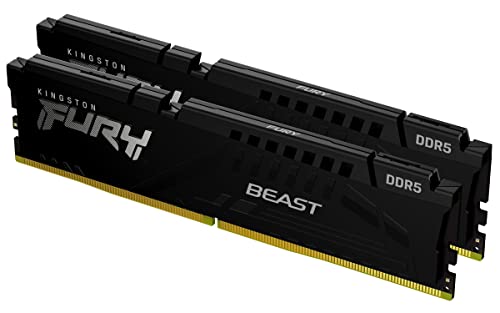
Kingston Fury Beast 32GB 5200MT/s DDR5 RAM
Best for: Desktop users needing 32GB non-ECC memory
- Capacity
- 32GB
- Memory Speed
- 5200MT/s
- CAS Latency
- CL40
- Kit Configuration
- 2x16GB
- Overclocking Profile
- Intel XMP 3.0
- Compatible Device
- Desktop
View on Amazon: Kingston Fury Beast 32GB 5200MT/s DDR5 RAM Affiliate link
This Kingston FURY Beast kit offers 32GB of DDR5 memory in a 2x16GB configuration. It runs at 5200MT/s with a CAS Latency of CL40. The module features Intel XMP 3.0 support for easier overclocking. Its low-profile heat spreader measures 1.37 inches in height. This kit suits desktop users who need reliable performance and efficient cooling for their systems.
Pros
- 32GB total capacity in a 2x16GB kit
- 5200MT/s memory speed
- Intel XMP 3.0 support
- Low-profile heat spreader design
Cons
- CL40 latency is higher than faster kits
- No RGB lighting included
- ECC support is not listed
Good fit if
- You need a 32GB desktop memory kit
- You want Intel XMP 3.0 compatibility
- You have a compact case with limited height
Skip if
- You require ECC memory for workstations
- You need RGB lighting for aesthetics
- You want a single 16GB module instead of a kit
Verdict: Kingston FURY Beast 32GB DDR5 provides solid 5200MT/s performance for desktop builds. It fits users who prioritize capacity and XMP 3.0 ease over RGB or ECC features.

OWC 32GB DDR5 4800MHz SODIMM
Best for: laptop memory upgrades with lifetime support
- Capacity
- 32GB
- Memory Speed
- 4800MHz
- CAS Latency
- CL40
- Kit Configuration
- 2x16GB
- Form Factor
- 262-pin SODIMM
- Voltage
- 1.1V
View on Amazon: OWC 32GB DDR5 4800MHz SODIMM Affiliate link
This OWC kit includes two 16GB DDR5 SODIMM modules running at 4800MHz with CL40 latency. It uses 1.1V and is Non-ECC, making it a standard upgrade for compatible laptops. The modules are JEDEC-compliant and designed to meet OEM specifications. You get a limited lifetime warranty and free tech support. This setup is ideal for users needing reliable memory expansion for portable systems.
Pros
- 32GB total capacity via two 16GB sticks
- DDR5 4800MHz speed for modern laptops
- Limited lifetime warranty included
- JEDEC-standard compliant for broad compatibility
Cons
- 4800MHz is slower than 5200MHz desktop kits
- Non-ECC memory lacks error correction
- SODIMM form factor limits use to laptops
Good fit if
- You need to upgrade a laptop's RAM
- You prefer a lifetime warranty on memory
- You want JEDEC-compliant standard modules
Skip if
- You are building a desktop PC
- You require error-correcting code (ECC) memory
- You need speeds faster than 4800MHz
Verdict: OWC 32GB DDR5 4800MHz SODIMM is a solid choice for laptop owners seeking a reliable, warranty-backed upgrade. It fits users who prioritize compatibility and long-term support over maximum speed.
Specifications side by side
| Spec | Kingston Fury Beast 32GB 5200MT/s DDR5 RAM | OWC 32GB DDR5 4800MHz SODIMM |
|---|---|---|
| Capacity | 32GB | 32GB |
| Memory Speed | 5200MT/s | 4800MHz |
| CAS Latency | CL40 | CL40 |
| Kit Configuration | 2x16GB | 2x16GB |
| Form Factor | not stated | 262-pin SODIMM |
| Overclocking Profile | Intel XMP 3.0 | not stated |
| Voltage | not stated | 1.1V |
| ECC Support | not stated | Non-ECC |
| Compatible Device | Desktop | not stated |
| Size | 32GB | not stated |
| Dimensions | 5.25 × 0.26 × 1.37 inches | not stated |
| Weight | 2.72 ounces | not stated |
| Color | Black | Black Chips |
| Model | KF552C40BBK2-32 | OWC4S8D51R8032P-B926-SF |
Frequently asked questions
Is Kingston Fury Beast DDR5 good for gaming?
Yes, it is a strong choice for desktop gaming. The Kingston FURY Beast offers 5200MT/s speed, which is faster than the OWC option. It supports Intel XMP profiles for easy overclocking. This kit provides 32GB of non-ECC memory, fitting standard desktop towers for smooth performance.
Can I use OWC DDR5 in a desktop PC?
No, the OWC kit is designed for laptops. It uses a SODIMM form factor, which is smaller than the DIMM shape used in desktops. The Kingston FURY Beast uses a standard DIMM size. You must match the physical slot type in your computer to the RAM module.
What is the speed difference between Kingston and OWC DDR5?
The Kingston FURY Beast runs at 5200MT/s, while the OWC kit operates at 4800MHz. This 400MT/s gap means the Kingston module offers higher bandwidth. Higher bandwidth can benefit tasks like video editing or large file transfers. The OWC speed is sufficient for general laptop use.
Does the Kingston FURY Beast support XMP?
Yes, it supports Intel XMP profiles. This feature allows your motherboard to automatically apply the rated 5200MT/s speed. You do not need to manually adjust timings. This makes upgrading your desktop system simpler compared to configuring memory settings manually in the BIOS.
Is OWC memory suitable for MacBook upgrades?
Yes, the OWC 32GB DDR5 SODIMM is ideal for laptop upgrades. Its SODIMM form factor fits portable computers. The kit provides 32GB of capacity, which helps with multitasking. It is a reliable option for users who need extra memory for their mobile devices.
Do both kits include ECC memory?
No, neither kit includes Error Correction Code memory. The Kingston FURY Beast is listed as non-ECC. The OWC kit also specifies non-ECC support. Standard consumer RAM typically omits ECC to keep costs and complexity lower. You only need ECC for specialized server or workstation tasks.
Which RAM kit has better latency specifications?
Both kits share similar latency characteristics. The Kingston FURY Beast lists a CAS Latency of CL40. The OWC kit does not specify a different latency value in its data. You should expect comparable response times from both modules, with speed being the main differentiator.