Kingston vs Timetec ddr5 RAMs: Which Brand Fits You?
As an Amazon Associate we earn from qualifying purchases. Links on this page are affiliate links.
When you compare kingston vs timetec ddr5 RAM, you are looking at two very different upgrades. Both kits use DDR5 technology with a CL40 latency rating. The main difference lies in their intended use. Kingston offers a high-speed desktop module, while Timetec provides a lower-speed option designed specifically for laptops. You need to match the form factor and speed to your specific hardware requirements.
Key differences
| Aspect | Kingston Fury Beast 32GB 5200MT/s DDR5 RAM | Timetec 8GB DDR5 4800MHz Laptop RAM |
|---|---|---|
| Compatible Device | Desktop | Laptop |
| Form Factor | DIMM | SODIMM |
| Memory Speed | 5200MT/s | 4800MHz |
| Overclocking Profile | Intel XMP 3.0 | JEDEC standard |
| ECC Support | not listed | On-die ECC (ODEC) |
Which one should you choose?
Choose Kingston Fury Beast 32GB 5200MT/s DDR5 RAM if
- You are building or upgrading a desktop PC and need higher memory bandwidth.
- You want to use Intel XMP 3.0 profiles to easily overclock your memory speed.
- You require a 32GB kit configuration for demanding multitasking workloads.
Choose Timetec 8GB DDR5 4800MHz Laptop RAM if
- You are upgrading the memory in a laptop and need the SODIMM form factor.
- You prioritize stable power consumption and lower voltage operation at 1.1V.
- You want guaranteed lifetime warranty support from a US-based team.
Verdict: Choose the Kingston kit if you are upgrading a desktop system and need faster speeds with XMP support. Pick the Timetec module if you are repairing or upgrading a laptop, as it is the only option built for that form factor. Your decision depends entirely on whether your device uses DIMM or SODIMM slots.
Kingston vs Timetec DDR5 Specs
Compatible Device
You need to match the memory to your hardware. Kingston FURY Beast is designed specifically for desktop computers. It uses a standard DIMM form factor that fits into desktop motherboards. Timetec offers DDR5 SODIMM modules. These are smaller and built for laptops. You cannot install the Kingston kit in a laptop, nor the Timetec stick in a desktop. Check your device type first. This is a hard constraint for compatibility.
Memory Speed
Speed affects how fast data moves between the CPU and RAM. Kingston FURY Beast runs at 5200MT/s. This is a higher frequency than the Timetec module. Timetec operates at 4800MHz. In practice, the Kingston kit provides more bandwidth for data-intensive tasks. If you are building a new desktop system, the higher speed of the Kingston module offers better performance potential. The Timetec speed is sufficient for basic laptop operations but lags behind the desktop option.
Capacity
Capacity determines how much data you can hold in active memory. Kingston FURY Beast comes in a 32GB kit. It includes two 16GB modules, giving you double the storage of the Timetec option. Timetec provides an 8GB single module. For modern gaming or heavy multitasking, 32GB is the recommended standard. 8GB is quite limited for contemporary workloads. You will likely need to upgrade later if you start with Timetec. Kingston gives you more headroom for future software demands right out of the box.
CAS Latency
CAS Latency (CL) measures the delay before data is accessed. Both products share a CL40 rating. Kingston FURY Beast lists CL40 for its 5200MT/s speed. Timetec also lists CL40 for its 4800MHz speed. While the absolute latency in nanoseconds differs slightly due to clock speed, the published spec is identical. Neither product offers a lower number like CL30 or CL36. For general users, this difference is negligible. Both kits perform similarly in terms of raw latency timing based on the provided specifications.
Overclocking Profile
Overclocking profiles allow you to run memory faster than base speeds. Kingston FURY Beast supports Intel XMP 3.0. This profile helps you achieve the rated 5200MT/s easily in a compatible desktop system. Timetec does not list an XMP or DOCP profile in its data. It relies on standard JEDEC settings. If you want to tweak speeds or ensure stable operation at rated speeds, Kingston is the better choice. Timetec is plug-and-play without advanced configuration options.
Which Kingston or Timetec RAM fits you?
Desktop users needing high-speed performance
You need a desktop kit with 5200MT/s speed. This Kingston module features Intel XMP 3.0 for easier overclocking. The low-profile heat spreader helps with airflow. It comes as a 32GB kit. This setup ensures stability and efficiency for your desktop PC build.
Laptop owners upgrading internal memory
You require SODIMM memory for a laptop. This Timetec module runs at 4800MHz. It includes On-die ECC for better data accuracy. The onboard power management IC lowers consumption to 1.1V. It is a single 8GB stick designed specifically for portable devices.
Users prioritizing onboard power management
You value efficient power usage in your device. This Timetec stick features a dedicated power management IC. It operates at a low 1.1V. The DDR5 On-die ECC improves error checking. This combination supports stable performance while reducing energy draw for your laptop system.
The products compared
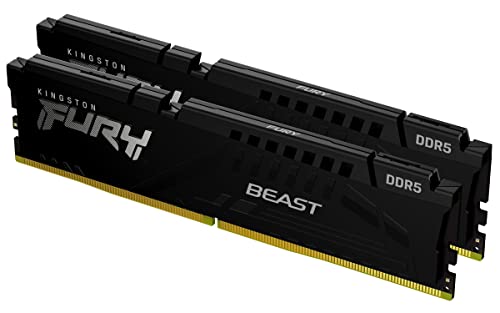
Kingston Fury Beast 32GB 5200MT/s DDR5 RAM
Best for: Intel desktops needing 32GB at 5200MT/s
- Capacity
- 32GB
- Memory Speed
- 5200MT/s
- CAS Latency
- CL40
- Kit Configuration
- 2x16GB
- Overclocking Profile
- Intel XMP 3.0
- Compatible Device
- Desktop
View on Amazon: Kingston Fury Beast 32GB 5200MT/s DDR5 RAM Affiliate link
This Kingston FURY Beast kit gives you 32GB of DDR5 memory running at 5200MT/s. It uses a two-stick configuration for desktops. The module features a low-profile heat spreader and supports Intel XMP 3.0 for easier overclocking. You get a CAS latency of CL40. This kit suits users who need higher speeds than standard 4800MHz options for better system efficiency.
Pros
- 32GB total capacity in a 2x16GB kit
- Fast 5200MT/s memory speed
- Low-profile heat spreader design
- Intel XMP 3.0 support
Cons
- Higher CAS latency than some competitors
- Only supports Intel XMP profiles
- Limited to desktop use
Good fit if
- You need 32GB of RAM for multitasking
- You want speeds above 4800MT/s
- You have a low-clearance case
Skip if
- You require AMD EXPO support
- You need 64GB of capacity
- You are building a laptop
Verdict: Kingston FURY Beast 32GB DDR5 delivers reliable 5200MT/s performance for desktop builders who prioritize speed and compatibility with Intel platforms. It is a solid choice for users seeking a balance of capacity and frequency without bulk.

Timetec 8GB DDR5 4800MHz Laptop RAM
Best for: Basic DDR5 laptop upgrades with ECC
- Capacity
- 8 GB
- Memory Speed
- 4800 MHz
- CAS Latency
- CL40
- Kit Configuration
- 1x8GB
- Form Factor
- 262Pin SODIMM
- Voltage
- 1.1V
View on Amazon: Timetec 8GB DDR5 4800MHz Laptop RAM Affiliate link
This is an 8GB DDR5 laptop memory module running at 4800MHz. It uses a single 1Rx16 rank configuration with CL40 latency. The module includes on-die ECC for improved data accuracy and a power management IC for stable 1.1V operation. It is designed for DDR5 laptops and is not compatible with DDR4 systems. You get a lifetime warranty and US-based technical support.
Pros
- DDR5 4800MHz speed for modern laptops
- On-die ECC (ODEC) for better data processing
- 1.1V low voltage with onboard PMIC
- Lifetime warranty and US-based support
Cons
- Only 8GB capacity, limiting multitasking
- Single rank (1Rx16) configuration
- Lower 4800MHz speed compared to 5200MHz options
Good fit if
- You need a budget-friendly DDR5 upgrade for a laptop
- You require on-die ECC for data reliability
- You are upgrading an older laptop with limited RAM needs
Skip if
- You need more than 8GB of memory
- You require higher speeds like 5200MT/s or above
- You are using a DDR4 motherboard or laptop
Verdict: Timetec 8GB DDR5 SODIMM 4800MHz suits users needing basic DDR5 laptop memory with on-die ECC. It is not ideal for high-performance tasks requiring higher speeds or capacity.
Specifications side by side
| Spec | Kingston Fury Beast 32GB 5200MT/s DDR5 RAM | Timetec 8GB DDR5 4800MHz Laptop RAM |
|---|---|---|
| Capacity | 32GB | 8 GB |
| Memory Speed | 5200MT/s | 4800 MHz |
| CAS Latency | CL40 | CL40 |
| Kit Configuration | 2x16GB | 1x8GB |
| Form Factor | not stated | 262Pin SODIMM |
| Overclocking Profile | Intel XMP 3.0 | not stated |
| Voltage | not stated | 1.1V |
| ECC Support | not stated | Non-ECC |
| Compatible Device | Desktop | Laptop |
| Size | 32GB | DDR5 8GB |
| Dimensions | 5.25 × 0.26 × 1.37 inches | not stated |
| Weight | 2.72 ounces | not stated |
| Color | Black | Black |
| Model | KF552C40BBK2-32 | 76 |
Frequently asked questions
Can I use the Kingston Fury Beast in a laptop?
No, you cannot. The Kingston Fury Beast uses a standard DIMM form factor designed for desktop motherboards. Laptops require SODIMM modules, which are smaller. The Timetec kit is a SODIMM, making it the correct choice for portable computers. Mixing these form factors will result in a physical fit failure.
Does the Timetec 8GB kit support ECC?
No, it does not. The Timetec 8GB DDR5 SODIMM is listed as Non-ECC. While it may include on-die error correction, it lacks the dedicated ECC chips found in server-grade memory. If your system requires registered ECC memory for stability, this specific Timetec module is not suitable for your needs.
Is the Kingston kit compatible with AMD motherboards?
The Kingston Fury Beast lists Intel XMP as its overclocking profile. This suggests it is optimized for Intel platforms. While it might work in some AMD systems, the data specifies Intel compatibility. For guaranteed compatibility with Intel desktops, this kit is a solid choice. AMD users should verify their motherboard support for XMP profiles.
What is the speed difference between these two RAM kits?
The Kingston kit runs at 5200MT/s, while the Timetec kit runs at 4800MHz. This means the Kingston module offers higher bandwidth for desktop tasks. The Timetec module is slower, suitable for basic upgrades. The difference matters for high-performance desktop builds but is less critical for standard laptop usage.
Which brand offers more capacity in this comparison?
Kingston offers more capacity. The Kingston Fury Beast kit provides 32GB of memory. The Timetec kit provides only 8GB. If you need significant memory for heavy multitasking or content creation, the Kingston option is superior. The Timetec kit is intended for basic upgrades where lower capacity is acceptable.
Do these RAM kits include heat spreaders?
The Kingston Fury Beast features a low-profile heat spreader to help with airflow in desktop cases. The Timetec SODIMM data does not mention a heat spreader. SODIMM modules often lack large spreaders due to space constraints. The Kingston design prioritizes thermal management for high-speed desktop operation.