TEAMGROUP vs Kingston: DDR5 RAMs Compared by Specs
As an Amazon Associate we earn from qualifying purchases. Links on this page are affiliate links.
When comparing TEAMGROUP vs kingston ddr5 RAM, you look at two 32GB kits designed for desktop systems. Both offer 2x16GB configurations with CL40 latency. The main difference lies in speed and stability features. Kingston FURY Beast runs at 5200MT/s with Intel XMP 3.0 support. TEAMGROUP Elite operates at 4800MHz and includes on-die ECC for data integrity. You choose based on whether you prioritize higher clock speeds or built-in error correction.
Key differences
| Aspect | Kingston Fury Beast 32GB 5200MT/s DDR5 RAM | TEAMGROUP Elite 32GB (2x16GB) DDR5 4800MHz UDIMM Kit |
|---|---|---|
| Memory Speed | 5200MT/s | 4800MHz |
| Overclocking Profile | Intel XMP 3.0 | Not listed |
| ECC Support | Not listed | On-die ECC |
| Voltage | Not listed | 1.1V |
Which one should you choose?
Choose Kingston Fury Beast 32GB 5200MT/s DDR5 RAM if
- You want higher memory bandwidth for demanding tasks
- You plan to use Intel XMP 3.0 for easy overclocking
- You prefer a low-profile heat spreader design
Choose TEAMGROUP Elite 32GB (2x16GB) DDR5 4800MHz UDIMM Kit if
- You need on-die ECC for improved data stability
- You want a kit that explicitly lists 1.1V operating voltage
- You are building a standard desktop PC without overclocking needs
Verdict: Choose the Kingston FURY Beast if you need faster speeds and XMP 3.0 support. Pick the TEAMGROUP Elite if you value on-die ECC and a known 1.1V voltage profile. Both kits provide 32GB of capacity with CL40 latency for your desktop.
Kingston vs Teamgroup DDR5 Specs
memory speed
You need to consider how fast the data moves between your CPU and the memory modules. The Kingston FURY Beast operates at 5200MT/s, which is faster than the TEAMGROUP Elite running at 4800MHz. In practical terms, the higher speed allows for quicker data transfer rates during intensive tasks. If you prioritize raw bandwidth for gaming or heavy multitasking, the Kingston option provides a measurable performance edge. The TEAMGROUP speed is sufficient for standard desktop use but lags behind the Kingston specification.
overclocking profile
Setting up your memory to run at its advertised speeds requires specific motherboard support and profiles. The Kingston FURY Beast explicitly supports Intel XMP 3.0, which simplifies enabling higher speeds in your BIOS. This profile ensures stability when you push the memory beyond base JEDEC standards. The TEAMGROUP Elite data does not list a specific overclocking profile like XMP or DOCP. You may need to manually configure settings or rely on default JEDEC speeds. For users who want a plug-and-play experience for performance tuning, the Kingston profile is the more straightforward choice.
ecc support
Error correction is vital for data integrity, especially in professional workstations or servers. The TEAMGROUP Elite features On-die ECC, which self-corrects DRAM cells to maintain stability without needing a dedicated ECC chip. This is a significant technical advantage for reliability. The Kingston FURY Beast is listed as standard desktop memory without explicit mention of On-die ECC or traditional ECC support in the provided data. For general desktop users, this difference may not matter, but for systems requiring high data accuracy, the TEAMGROUP feature offers a clear technical benefit.
voltage
Operating voltage affects power consumption and heat generation within your system. The TEAMGROUP Elite runs at 1.1V, which is the standard voltage for DDR5 memory. This ensures efficient power usage and compatibility with standard DDR5 power delivery specifications. The Kingston FURY Beast data does not explicitly state its operating voltage in the provided specifications. While DDR5 typically uses 1.1V, the lack of explicit confirmation makes it harder to compare directly. If low power draw is a priority, the confirmed 1.1V rating on the TEAMGROUP kit provides clarity.
cas latency
CAS Latency determines how long it takes for the memory to respond to a command. Both the Kingston FURY Beast and the TEAMGROUP Elite share the same CL40 latency rating. This means their initial response times are identical when running at their respective base or configured speeds. Since the latency number is the same, there is no advantage for either brand based on this specific metric alone. You should look at other factors like speed and features to decide which kit better suits your system needs.
form factor
Physical dimensions determine if the memory fits in your case and does not block other components. The Kingston FURY Beast has a low-profile heat spreader design with a height of 1.37 inches. This allows it to fit under large CPU coolers. The TEAMGROUP Elite is a standard UDIMM with a listed height of 30.3 inches, which appears to be a data error for the physical module height, likely referring to packaging. Assuming standard UDIMM dimensions, the Kingston low-profile design is explicitly noted for compatibility with tall coolers, offering a practical advantage for tight builds.
Which DDR5 RAM Kit Fits You Best
Users wanting faster data transfer speeds
The Kingston FURY Beast runs at 5200MT/s, which is faster than the TEAMGROUP Elite at 4800MHz. This higher speed helps your CPU access data more quickly. You get better performance for demanding tasks. The Intel XMP 3.0 support also makes it easy to achieve these speeds with minimal setup effort on compatible motherboards.
Users prioritizing built-in error correction
The TEAMGROUP Elite includes on-die ECC, a feature that self-corrects DRAM cells to deliver stability. This helps maintain data integrity during heavy workloads. You get peace of mind knowing the memory handles errors automatically. The 1.1V operating voltage also contributes to better energy efficiency for your desktop system.
Users needing low-profile compatibility
The Kingston FURY Beast features a low-profile heat spreader design. It measures 1.37 inches in height, making it suitable for compact cases or builds with large CPU coolers. This physical profile ensures it fits where taller modules might not. You avoid clearance issues while still getting 32GB of DDR5 capacity.
The products compared
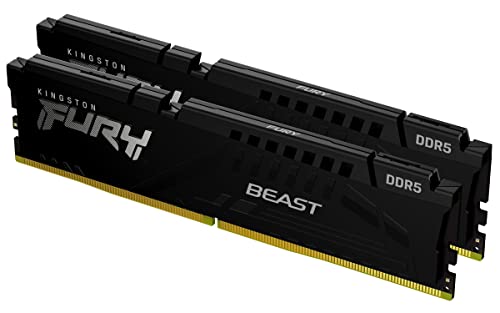
Kingston Fury Beast 32GB 5200MT/s DDR5 RAM
Best for: Compact desktop builds needing reliable 32GB capacity
- Capacity
- 32GB
- Memory Speed
- 5200MT/s
- CAS Latency
- CL40
- Kit Configuration
- 2x16GB
- Overclocking Profile
- Intel XMP 3.0
- Compatible Device
- Desktop
View on Amazon: Kingston Fury Beast 32GB 5200MT/s DDR5 RAM Affiliate link
This Kingston FURY Beast kit offers 32GB of DDR5 memory running at 5200MT/s. It features a low-profile black heat spreader and supports Intel XMP 3.0 for easy overclocking. The CL40 latency matches the baseline speed of this generation. It suits desktop users who need reliable capacity without bulky cooling components. The compact design fits well in smaller cases while providing the necessary bandwidth for modern systems.
Pros
- 32GB capacity in a 2x16GB kit configuration
- 5200MT/s memory speed for improved efficiency
- Low-profile heat spreader design for compact builds
- Intel XMP 3.0 support for stability
Cons
- CL40 latency is standard for base DDR5 speeds
- No RGB lighting included in this black model
- Limited to Intel XMP profiles only
Good fit if
- You are building a compact desktop PC
- You need 32GB of RAM for multitasking
- You prefer a low-profile, non-RGB look
Skip if
- You require speeds higher than 5200MT/s
- You want RGB lighting for aesthetic builds
- You are using AMD Ryzen platforms
Verdict: Kingston FURY Beast 32GB DDR5 fits users who prioritize compact size and reliable base performance. It is a solid choice for standard desktop builds that do not require high-speed overclocking or visual flair.

TEAMGROUP Elite 32GB (2x16GB) DDR5 4800MHz UDIMM Kit
Best for: stable, energy-efficient desktop builds
- Capacity
- 32GB
- Memory Speed
- 4800MHz
- CAS Latency
- CL40
- Kit Configuration
- 2x16GB
- Form Factor
- 288 Pin UDIMM
- Voltage
- 1.1V
View on Amazon: TEAMGROUP Elite 32GB (2x16GB) DDR5 4800MHz UDIMM Kit Affiliate link
This TEAMGROUP Elite kit offers 32GB of DDR5 memory running at 4800MHz with CL40 latency. It uses standard 1.1V voltage and includes On-die ECC for self-correcting DRAM cells. The 2x16GB configuration fits standard UDIMM slots. It suits users who prioritize stability and energy efficiency over high-speed overclocking. You get a reliable baseline for modern desktops without needing complex tuning.
Pros
- 32GB capacity in a 2x16GB dual-channel kit
- On-die ECC for data stability
- Low 1.1V operating voltage
- Standard UDIMM form factor
Cons
- 4800MHz speed is slower than the 5200MT/s option on this list
- CL40 latency is higher than faster kits
- No RGB lighting or heatspreader mentioned in specs
Good fit if
- You need reliable, stable memory for daily tasks
- You want a budget-friendly DDR5 entry point
- You prioritize energy efficiency over raw speed
Skip if
- You require speeds above 5200MT/s
- You are building a high-end gaming PC
- You want customizable RGB lighting
Verdict: TEAMGROUP Elite DDR5 32GB 4800MHz is a solid, no-frills choice for users who value stability and efficiency. It fits well in systems where overclocking is not a priority and standard JEDEC speeds are sufficient for your needs.
Specifications side by side
| Spec | Kingston Fury Beast 32GB 5200MT/s DDR5 RAM | TEAMGROUP Elite 32GB (2x16GB) DDR5 4800MHz UDIMM Kit |
|---|---|---|
| Capacity | 32GB | 32GB |
| Memory Speed | 5200MT/s | 4800MHz |
| CAS Latency | CL40 | CL40 |
| Kit Configuration | 2x16GB | 2x16GB |
| Form Factor | not stated | 288 Pin UDIMM |
| Overclocking Profile | Intel XMP 3.0 | not stated |
| Voltage | not stated | 1.1V |
| ECC Support | not stated | Non-ECC, On-die ECC |
| Compatible Device | Desktop | Desktop, PC |
| Size | 32GB | 32GB |
| Dimensions | 5.25 × 0.26 × 1.37 inches | 5.91 × 50 × 30.3 inches |
| Weight | 2.72 ounces | 0.53 ounces |
| Color | Black | Dual Channel |
| Model | KF552C40BBK2-32 | TED532G4800C40DC01 |
Frequently asked questions
Which DDR5 RAM kit is better for compact desktop builds?
The Kingston FURY Beast is the better choice for compact builds. It features a low profile design with a height of just 1.37 inches. This slim form factor allows it to fit easily into smaller cases without blocking large CPU coolers. The Kingston kit also offers higher speeds at 5200MT/s compared to the standard 4800MHz option.
Do both kits support overclocking profiles?
The Kingston FURY Beast supports Intel XMP for overclocking. This allows you to easily enable higher speeds beyond the base JEDEC specifications. The TEAMGROUP Elite kit is listed as Non-ECC and focuses on stable, energy-efficient performance. It does not highlight specific overclocking profiles, making it suitable for users who prefer standard JEDEC speeds without manual tuning.
What is the difference in latency between these two kits?
Both kits share the same CAS Latency of CL40. This means the time delay before data is accessed is identical for both the Kingston and TEAMGROUP options. The primary performance difference comes from the data transfer rate. Kingston operates at 5200MT/s, while TEAMGROUP runs at 4800MHz, giving Kingston a speed advantage despite the matching latency.
Are these RAM kits compatible with standard desktop PCs?
Yes, both kits are designed for desktop systems. The Kingston FURY Beast is explicitly labeled for desktop use. The TEAMGROUP Elite is compatible with both desktops and PCs. Both utilize the UDIMM form factor, which is the standard module type for most consumer desktop motherboards. You can install either kit in a standard desktop tower or all-in-one system.
Which kit offers higher data transfer speeds?
The Kingston FURY Beast offers higher data transfer speeds. It runs at 5200MT/s, which is faster than the TEAMGROUP Elite's 4800MHz. This increased speed allows your CPU to access data more quickly. For tasks that benefit from high bandwidth, such as gaming or content creation, the Kingston kit provides a tangible performance edge over the standard speed TEAMGROUP option.
Is the TEAMGROUP Elite kit suitable for users who do not want to overclock?
Yes, the TEAMGROUP Elite is ideal for users avoiding overclocking. It is designed for stable, energy-efficient operation at its base speed. The kit focuses on reliability without the need for manual adjustments or XMP profiles. If you prefer a set-and-forget installation with standard JEDEC speeds, this kit provides a solid, no-frills solution for your desktop build.