USB Version Explained: What It Means for USB Flash Drives
As an Amazon Associate we earn from qualifying purchases. Links on this page are affiliate links.
Understanding USB Version Standards
The USB version dictates the maximum data transfer speed your flash drive can achieve. This specification is critical for determining how quickly you can move large files, such as high-resolution photos or video projects. When you see USB version explained in product listings, it refers to the underlying protocol governing the connection between your computer and the storage device. Different versions offer distinct bandwidth limits and power delivery capabilities. You will typically encounter four main standards in the current market. USB 2.0 is the oldest standard still in use. It offers a maximum theoretical speed of 480 Mbps. This version is sufficient for small documents or basic backups but becomes a bottleneck for modern media files. USB 3.0, often labeled as USB 3.0 Gen 1, increased speeds significantly. It provides a maximum theoretical bandwidth of 5 Gbps. This is a substantial jump from the previous generation and handles most everyday tasks efficiently. USB 3.1 Gen 2 doubles the speed of USB 3.0. It reaches up to 10 Gbps. This version is ideal for users who frequently transfer large datasets. Finally, USB 3.2 represents the latest evolution in this specific niche. It combines multiple lanes to achieve even higher throughput. Understanding these differences helps you select the right hardware. If you primarily copy small files, an older standard may suffice. However, for professional workflows involving large media, a higher version is necessary. Always check the product specifications to confirm the exact version. The physical connector shape does not always indicate the version. A USB-C port can support various speeds depending on the internal controller. Ensure your host computer also supports the same version to realize the full potential of the drive. Mismatched versions will result in the slower speed of the two connected devices.
USB Versions Compared for Drives
USB 3.2
USB 3.2 offers high-speed data transfers, making it ideal for moving large files quickly. You get read speeds up to 100MB/s on drives like the TEAMGROUP C175. This version suits users who need efficiency for everyday backups and file transfers. It balances performance with durability. The Lexar JumpDrive V100 also uses this standard for basic storage needs. If you prioritize speed and backward compatibility, this is a strong choice. It works well with modern computers while remaining compatible with older ports at reduced speeds.
USB 3.0
USB 3.0 provides reliable performance for high-capacity transfers. Drives like the PNY Turbo Attaché 3 leverage this version for sturdy, capless designs. It fits users who value capacity and ruggedness over absolute maximum speed. The Kingston Vault Privacy drive also uses USB 3.0 for secure, small file storage. This standard is practical for everyday use, offering a good balance of speed and durability. You get consistent performance for regular file management tasks. It is a solid choice if you need a dependable drive for frequent use without the bulk of larger capacities.
USB 3.1
USB 3.1 enhances data transfer rates for media-heavy tasks. The Amazon Basics retractable drive uses this version for high-capacity storage up to 256GB. It suits users who need port protection and ample space for media files. Read speeds reach 130MB/s, offering efficient handling of large video or photo libraries. This version is practical for those who prioritize capacity and physical protection. The retractable design adds convenience, though it may lack status lights. It is a good fit for users who want a sleek, high-capacity drive for daily media storage and transfer.
USB 2.0
USB 2.0 is suitable for small files and bulk distribution. The mosDART 16GB drive uses this version for waterproof, durable storage. It is not ideal for high-speed transfers or large individual capacities. This option suits users who need many drives for events or bulk giveaways. The 10-pack format offers cost-effective distribution for small data sets. You get durability and water resistance, which are key for outdoor or harsh environments. While slower than newer standards, it remains functional for basic file storage. Choose this if you prioritize ruggedness and quantity over speed or high capacity.
Is USB Version Worth It?
Who needs it
You should prioritize the USB version if you regularly transfer large media files. Moving high-resolution photos or 4K video projects requires the bandwidth that newer standards provide. If you are a content creator or a gamer, the difference between USB 3.2 and older versions is significant. You will notice faster load times and quicker backups. The speed benefits are most apparent when dealing with bulk data. For these users, the higher version number translates directly to saved time. It ensures your workflow remains uninterrupted by slow transfer bottlenecks. The increased throughput supports demanding tasks without causing delays. Choosing a drive with a modern USB specification future-proofs your storage solution for larger file sizes.
Who can skip it
You can ignore the USB version if you only store small documents or text files. Transferring a few hundred megabytes of data will take seconds regardless of the standard. Casual users who rarely move large files will not notice any performance gap. In this case, focus on capacity and physical durability instead. Look for drives with robust casings or compact designs. The speed advantage of USB 3.2 is unnecessary for basic office tasks. Prioritize reliability and ease of use over raw transfer rates. A standard USB 2.0 or 3.0 drive handles these light loads efficiently. Save your budget for other features that matter more to your daily routine. The extra cost for higher speeds offers no practical benefit for minimal data usage.
USB Terms Glossary
USB Version
The hardware standard determining maximum data transfer rates. Newer versions like USB 3.2 offer faster speeds for large files compared to older USB 2.0 standards.
Data Transfer Speed
How fast data moves between the drive and your computer. Measured in megabytes per second, higher numbers mean quicker file copies and saves.
Backward Compatibility
The ability of a newer USB drive to work with older ports. You can plug a USB 3.2 drive into a USB 2.0 port, but it runs slower.
Bandwidth
The maximum amount of data that can flow through the connection per second. Higher bandwidth allows multiple large files to transfer simultaneously without bottlenecks.
Interface
The physical connector type, such as USB Type-A or Type-C. Ensure your drive matches the port shape on your computer or laptop for connection.
Throughput
The actual amount of data successfully transferred over time. Real-world throughput often falls slightly below the theoretical maximum speed listed in product specifications.
Quick picks
| # | Product | Best for | Price |
|---|---|---|---|
| 1 | TEAMGROUP C175 64GB USB 3.2 Flash Drive | everyday file transfers and backups | Check price of TEAMGROUP C175 64GB USB 3.2 Flash Drive on Amazon |
| 2 | PNY Turbo Attaché 3 128GB USB 3.0 Flash Drive | High-capacity everyday file transfers | Check price of PNY Turbo Attaché 3 128GB USB 3.0 Flash Drive on Amazon |
| 3 | Amazon Basics 256GB USB 3.1 Retractable Flash Drive | high-capacity media storage | Check price of Amazon Basics 256GB USB 3.1 Retractable Flash Drive on Amazon |
| 4 | mosDART 16GB Waterproof Flash Drive 10-Pack | Bulk distribution of small, durable drives | Check price of mosDART 16GB Waterproof Flash Drive 10-Pack on Amazon |
| 5 | Lexar 32GB JumpDrive V100 USB 3.2 Flash Drive | basic USB 3.2 storage needs | Check price of Lexar 32GB JumpDrive V100 USB 3.2 Flash Drive on Amazon |
| 6 | Kingston 8GB Vault Privacy Encrypted USB Drive | Secure small file storage | Check price of Kingston 8GB Vault Privacy Encrypted USB Drive on Amazon |
Our 6 picks

TEAMGROUP C175 64GB USB 3.2 Flash Drive
Best for: everyday file transfers and backups
- USB Version
- USB 3.2 (what this guide is about)
- Storage Capacity
- 64GB
- Read Speed
- 100MB/s
- Compatible Device
- PC, Laptop
- Dimensions
- 4.88 × 3.58 × 0.39 inches
- Weight
- 0.53 ounces
View on Amazon: TEAMGROUP C175 64GB USB 3.2 Flash Drive Affiliate link
The TEAMGROUP C175 offers 64GB of storage with USB 3.2 Gen 1 connectivity. It delivers read speeds up to 100MB/s for standard file transfers. The matte black design features a seamless, cap-less body that prevents loss. This drive suits users who need reliable plug-and-play performance on PCs or laptops without complex setup.
Pros
- USB 3.2 Gen 1 interface for modern compatibility
- 100MB/s read speed for efficient data access
- Seamless cap-less design prevents loss
- Lifetime warranty included
Cons
- 100MB/s read speed is slower than USB 3.2 Gen 2 options
- 64GB capacity is smaller than 128GB or 256GB alternatives
- No hardware encryption or password protection features
Good fit if
- You need a reliable, cap-less drive for daily backups
- You want a lifetime warranty for long-term use
- You prefer a simple, plug-and-play storage solution
Skip if
- You require high-speed transfers exceeding 100MB/s
- You need large capacity for extensive media libraries
- You require hardware encryption for sensitive data
Verdict: TEAMGROUP C175 64GB USB 3.2 Flash Drive fits users who prioritize durability and warranty over maximum speed or capacity.

PNY Turbo Attaché 3 128GB USB 3.0 Flash Drive
Best for: High-capacity everyday file transfers
- USB Version
- USB 3.0 (what this guide is about)
- Storage Capacity
- 128GB
- Read Speed
- Up to 100MB/s
- Dimensions
- 5.28 × 0.25 × 3.9 inches
- Weight
- 0.64 ounces
View on Amazon: PNY Turbo Attaché 3 128GB USB 3.0 Flash Drive Affiliate link
This PNY drive uses USB 3.0 technology to move large files faster than older USB 2.0 models. It offers 128 GB of storage, holding thousands of songs or documents. The capless sliding collar design protects the connector while allowing you to attach it to keychains or bags. It works with both USB 2.0 and 3.0 ports on PCs and Macs.
Pros
- USB 3.0 interface for faster data transfer
- 128 GB storage capacity for large files
- Capless sliding collar design for durability
- Backwards compatible with USB 2.0 ports
Cons
- USB 3.0 is slower than USB 3.2 Gen 1
- Read speed not specified in data
- No hardware encryption mentioned
Good fit if
- You need 128 GB of portable storage
- You want a durable capless design
- You use USB 3.0 or 2.0 ports
Skip if
- You require USB 3.2 Gen 2 speeds
- You need hardware encryption for security
- You prefer a smaller 32 GB capacity
Verdict: PNY 128GB Turbo Attaché 3 USB 3.0 fits users who prioritize capacity and a rugged capless design over the fastest possible transfer speeds.
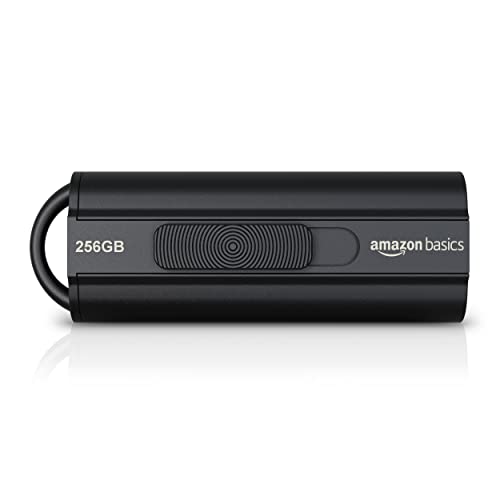
Amazon Basics 256GB USB 3.1 Retractable Flash Drive
Best for: high-capacity media storage
- USB Version
- USB 3.1 (what this guide is about)
- Storage Capacity
- 256 GB
- Read Speed
- Up to 130.0 MB/s
- Dimensions
- 2.24 × 0.79 × 0.53 inches
- Weight
- 0.32 ounces
View on Amazon: Amazon Basics 256GB USB 3.1 Retractable Flash Drive Affiliate link
This Amazon Basics drive offers 256 GB of storage with USB 3.1 connectivity. It delivers read speeds up to 130MB/s and write speeds up to 30MB/s. The retractable design protects the connector. You get high capacity for photos and videos. It works with Windows and Mac. The drive lacks an LED indicator. You need a USB 3.1 port for top speed.
Pros
- 256 GB storage capacity
- Read speeds up to 130MB/s
- Retractable telescopic design
- Backwards compatible with USB 2.0
Cons
- No LED activity indicator
- Write speed limited to 30MB/s
- Requires reformatting for files over 4GB
Good fit if
- You need large storage for media files
- You want a durable retractable design
- You use Windows or Mac computers
Skip if
- You need speeds faster than 130MB/s
- You require an LED status light
- You frequently transfer files larger than 4GB
Verdict: Amazon Basics 256GB USB 3.1 Retract Drive fits users who prioritize capacity and port protection over speed or status lights.

mosDART 16GB Waterproof Flash Drive 10-Pack
Best for: Bulk distribution of small, durable drives
- USB Version
- USB 2.0 (what this guide is about)
- Storage Capacity
- 16GB
- Pack Quantity
- 10
- Features
- Waterproof
- Dimensions
- 1.57 × 0.47 × 0.19 inches
View on Amazon: mosDART 16GB Waterproof Flash Drive 10-Pack Affiliate link
This MOSDART drive uses USB 2.0 technology, offering a reliable baseline for standard data transfers. You get a pack of ten 16GB silver drives, each measuring 1.57 by 0.47 by 0.19 inches. The waterproof construction adds durability for everyday use. It is a practical option for bulk distribution or simple file storage where high speed is not a priority.
Pros
- USB 2.0 interface for broad compatibility
- Waterproof design for added protection
- Includes 10 drives in one package
- Compact silver build at 1.57 inches long
Cons
- USB 2.0 speed is slower than USB 3.0 options
- 16GB capacity is limited for large media files
- No included software for encryption or backup
Good fit if
- You need multiple drives for events or giveaways
- You require waterproof storage for outdoor use
- You transfer small files like documents or photos
Skip if
- You need fast transfer speeds for large videos
- You require more than 16GB per drive
- You want a single high-capacity professional drive
Verdict: MOSDART 16GB USB 2.0 Flash Drive 10-Pack suits users who need durable, waterproof storage for small files in bulk quantities. It is not suitable for users requiring high-speed transfers or large individual capacities.

Lexar 32GB JumpDrive V100 USB 3.2 Flash Drive
Best for: basic USB 3.2 storage needs
- USB Version
- USB 3.2 (what this guide is about)
- Storage Capacity
- 32GB
- Dimensions
- 2.49 × 0.77 × 0.43 inches
- Weight
- 0.32 ounces
View on Amazon: Lexar 32GB JumpDrive V100 USB 3.2 Flash Drive Affiliate link
The Lexar JumpDrive V100 is a 32GB USB 3.2 Gen 1 flash drive. It offers backward compatibility with USB 2.0 devices. The drive measures 2.49 inches long and weighs 0.32 ounces. It supports PC and Mac systems. This drive suits users needing basic storage expansion. It is ideal for backing up small files. You get two-year limited product support with this model.
Pros
- USB 3.2 Gen 1 technology for fast transfers
- Backwards compatible with USB 2.0 devices
- Compact 0.77-inch width and 0.43-inch height
- Compatible with PC and Mac systems
Cons
- Only 32GB storage capacity
- No included software for encryption
- Plastic build feels less durable
Good fit if
- You need a basic USB 3.2 drive
- You use older USB 2.0 ports
- You want a small form factor
Skip if
- You require more than 32GB space
- You need hardware encryption
- You prefer metal construction
Verdict: Lexar 32GB JumpDrive V100 USB 3.2 is a compact option for users who need basic USB 3.2 speeds. It fits those who prioritize backward compatibility over high capacity.

Kingston 8GB Vault Privacy Encrypted USB Drive
Best for: Secure small file storage
- USB Version
- USB 3.0 (what this guide is about)
- Storage Capacity
- 8 GB
- Security Standard
- AES 256-bit
- Size
- 8GB
- Dimensions
- 3.16 × 0.5 × 1 inches
- Weight
- 0.53 ounces
View on Amazon: Kingston 8GB Vault Privacy Encrypted USB Drive Affiliate link
This Kingston flash drive uses USB 3.0 for SuperSpeed transfers and includes 256-bit AES hardware encryption. It offers 8 GB of storage in a compact blue design. The drive is customizable for corporate IT needs and includes optional ESET anti-virus protection. It suits users who need basic secure storage for small files.
Pros
- 256-bit AES hardware-based encryption
- USB 3.0 SuperSpeed technology
- TAA compliant for government use
- Optional ESET anti-virus protection
Cons
- Only 8 GB storage capacity
- No software included for encryption management
- Small 8 GB limit for large files
Good fit if
- You need hardware encryption for sensitive data
- You require TAA compliance for work
- You only store small files
Skip if
- You need more than 8 GB
- You want software-free setup
- You need high-speed large transfers
Verdict: Kingston 8GB DTVP30 USB 3.0 is a secure option for small, sensitive files. It fits users who prioritize encryption over capacity.
Specifications side by side
| Spec | TEAMGROUP C175 64GB USB 3.2 Flash Drive | PNY Turbo Attaché 3 128GB USB 3.0 Flash Drive | Amazon Basics 256GB USB 3.1 Retractable Flash Drive | mosDART 16GB Waterproof Flash Drive 10-Pack | Lexar 32GB JumpDrive V100 USB 3.2 Flash Drive | Kingston 8GB Vault Privacy Encrypted USB Drive |
|---|---|---|---|---|---|---|
| Storage Capacity | 64GB | 128GB | 256 GB | 16GB | 32GB | 8 GB |
| USB Version | USB 3.2 Gen 1 | USB 3.0 | USB 3.1 | USB 2.0 | USB 3.2 Gen 1 | USB 3.0 |
| Read Speed | 100MB/s | Up to 100MB/s | Up to 130.0 MB/s | not stated | not stated | not stated |
| Security Standard | not stated | not stated | not stated | not stated | not stated | AES 256-bit |
| Pack Quantity | not stated | not stated | not stated | 10 | not stated | not stated |
| Compatible Device | PC, Laptop | not stated | not stated | not stated | not stated | not stated |
| Size | 64GB | 128GB | 256 GB | USB 2.0 16GB x 10 | 32GB | 8GB |
| Features | not stated | not stated | not stated | Waterproof | not stated | not stated |
| Dimensions | 4.88 × 3.58 × 0.39 inches | 5.28 × 0.25 × 3.9 inches | 2.24 × 0.79 × 0.53 inches | 1.57 × 0.47 × 0.19 inches | 2.49 × 0.77 × 0.43 inches | 3.16 × 0.5 × 1 inches |
| Weight | 0.53 ounces | 0.64 ounces | 0.32 ounces | not stated | 0.32 ounces | 0.53 ounces |
| Color | Black | Grey | Black | Silver | Gray | Blue |
| Model | TC175364GB01 | P-FD128TBOP-GE | LS21USB256G1 | U188-2.0-16-10 | LJDV100-32GABNL | DTVP30/8GB |
Frequently asked questions
Does USB 3.2 work with older computers?
Yes, newer USB versions are backward compatible. You can plug a USB 3.2 drive into a USB 2.0 port. The drive will function, but transfer speeds will drop to the older standard's maximum. This ensures your hardware works across different systems without needing adapters.
What is the main difference between USB 3.0 and USB 3.1?
The primary difference is the maximum theoretical bandwidth. USB 3.1 doubles the speed potential of USB 3.0. In practice, this means faster file transfers for large data sets. Drives like the Amazon Basics 256GB USB 3.1 model leverage this for higher throughput than older 3.0 equivalents.
Is USB 2.0 still useful for flash drives?
It remains useful for small files and bulk distribution. USB 2.0 drives like the mosDART 16GB pack are durable and waterproof. They suit users who need reliable storage for documents or small media. You do not need high speeds for basic file archiving or temporary data transport.
How do I know which USB version my drive uses?
Check the product specifications or packaging labels. Manufacturers list the USB version, such as USB 3.0 or USB 3.2, in the attributes. For example, the PNY Turbo Attaché 3 is explicitly marked as USB 3.0. This information tells you the speed tier and compatibility requirements.
Can a USB 3.0 drive fit in a USB 3.1 port?
Yes, the physical connectors are identical for these versions. You can insert a USB 3.0 drive into a USB 3.1 port without issue. The drive will operate at its native USB 3.0 speed. The port supports the older standard, ensuring seamless integration with existing peripherals.
Why does my USB 3.2 drive run slower than expected?
Speed depends on both the drive and the host port. If you connect a USB 3.2 drive to a USB 2.0 port, it caps at USB 2.0 speeds. Also, write speeds often lag behind read speeds. The TEAMGROUP C175 reads at 100MB/s, but writing may be slower depending on file size.