DDR4 RAMS Buying Guide (2026): What Matters and 8 Picks
As an Amazon Associate we earn from qualifying purchases. Links on this page are affiliate links.
This ddr4 RAM buying guide helps you choose the right memory for your specific setup. You will compare key specs like speed, capacity, and form factor to find a match for your needs. The selection process focuses on practical performance metrics rather than marketing claims. You can decide between standard desktop kits, high-speed gaming modules, or specialized server memory based on your hardware requirements.
The 8 recommended products were chosen strictly from their published specifications. Each option serves a distinct purpose, from basic upgrades to high-capacity server builds. You will see details on clock rates, latency, and physical dimensions. This approach ensures you pick memory that fits your motherboard and case without guesswork. The guide walks through these decisions to simplify your upgrade path.
Our top pick: G.SKILL Trident Z RGB 16GB DDR4 RAM Kit.
Key Specs for DDR4 RAM Selection
Memory Speed
Memory speed determines how quickly data moves between the RAM and the processor. Higher speeds, measured in MHz or MT/s, reduce latency in data-intensive tasks like gaming or video editing. You will see kits ranging from 2400MHz to 4000MHz. Faster kits, such as the G.SKILL Ripjaws V at 4000MHz, offer better performance for compatible high-end desktops. However, not all motherboards support the highest speeds. You must verify your CPU and motherboard limits before buying faster RAM. If your system cannot handle high speeds, you pay extra for performance you cannot use. Choose a speed that matches your platform’s maximum supported frequency for the best value and stability.
- Check motherboard CPU support limits
- Match speed to your use case
- Verify XMP profile compatibility
Compatible Device
The type of computer you own dictates which RAM you can install. Desktop PCs and laptops use different physical connectors and electrical standards. Desktops typically use UDIMM or RDIMM sticks, while laptops require smaller SODIMM modules. For example, the G.SKILL Ripjaws 16GB DDR4 SODIMM is designed specifically for laptops. Using desktop RAM in a laptop will not work due to size and pin differences. Conversely, laptop RAM will not fit in a desktop slot. You must identify your device type before shopping. Mixing incompatible types can prevent your system from booting. Always check your device’s manual or specifications to confirm the required form factor and device compatibility.
- Identify desktop or laptop device
- Confirm physical slot type
- Check manufacturer device list
Form Factor
Form factor refers to the physical size and shape of the memory stick. The most common types are UDIMM for standard desktops, SODIMM for laptops, and RDIMM for servers. The Corsair Vengeance LPX uses a low-profile design, which helps in compact builds with large CPU coolers. The G.SKILL Trident Z RGB is a standard UDIMM size. You need to ensure the physical dimensions fit your case and do not interfere with other components. RDIMM modules are larger and have different pin configurations for server stability. Selecting the wrong form factor means the RAM will not physically install. Measure your available space if you are building a small form factor PC.
- Match UDIMM, SODIMM, or RDIMM
- Check clearance for CPU coolers
- Verify physical dimensions fit case
CAS Latency
CAS Latency, or CL, measures the delay between the memory controller requesting data and the data being available. Lower numbers indicate faster response times. For instance, the G.SKILL RipjawsV 8GB has a CL15 latency, while the Timetec 32GB kit has a higher CL22. Lower latency improves system responsiveness, especially in gaming and real-time applications. However, higher speed kits often have higher latency numbers. You need to balance speed and latency for optimal performance. A kit with 3200MHz speed and CL16 may outperform a 2400MHz kit with CL15 in many tasks. Check the CL value alongside the frequency to understand true performance.
- Compare CL value with speed
- Lower CL means faster response
- Check timing specs in manual
Overclocking Profile
Overclocking profiles allow you to run RAM faster than its base JEDEC speed. XMP profiles are common in consumer RAM, enabling easy speed boosts via BIOS settings. The G.SKILL Trident Z RGB supports XMP for 3000MHz operation. Without XMP, the RAM runs at a slower default speed. You need a motherboard and CPU that support XMP or similar technologies. Enabling these profiles can significantly improve performance in gaming and creative workloads. However, overclocking may require better cooling and can reduce system stability if pushed too far. Verify that your system supports the specific profile of the RAM you choose to ensure you get the advertised speeds.
- Verify XMP profile support
- Check motherboard BIOS compatibility
- Ensure cooling for overclocking
ECC Support
Error Correction Code (ECC) memory detects and fixes data corruption, ensuring system stability. This feature is critical for servers and workstations handling sensitive data. The Kingston 64GB DDR4 ECC REG kit includes this protection. Standard consumer desktops and laptops usually do not support ECC RAM. Using ECC modules in non-ECC systems can prevent booting. You must check if your motherboard supports ECC before purchasing. If you are building a server or a high-reliability workstation, ECC is essential. For gaming or general desktop use, Non-ECC RAM is sufficient and more affordable. Confirm your system’s ECC capabilities to avoid compatibility issues.
- Check motherboard ECC support
- Use ECC only for servers
- Verify CPU ECC compatibility
Voltage
Voltage indicates the power required to run the RAM at its specified speed. Standard DDR4 operates at 1.2V. Some high-performance kits, like the G.SKILL Trident Z RGB, require 1.35V to achieve higher speeds. Higher voltage can generate more heat, which may affect stability in small cases. You need to ensure your motherboard can supply the required voltage safely. Running RAM at lower voltages can save power and reduce heat but may limit speed. Check the voltage requirements in the product specifications. Higher voltage does not always mean better performance; it often just enables higher speeds. Match the voltage to your cooling capabilities and power supply.
- Check required operating voltage
- Ensure motherboard voltage support
- Consider heat from higher voltage
Types of DDR4 RAM Kits
Desktop UDIMM
Unbuffered DIMMs are the standard for consumer desktops. The G.SKILL Trident Z RGB 16GB kit offers 3000MHz speed with CL16 latency. It fits users seeking fast performance for gaming. The 1.35V voltage supports XMP overclocking profiles. You get reliable compatibility with most motherboards. The trade-off is limited capacity per stick compared to server modules. It is not ideal for heavy multitasking or server workloads. This type balances speed and cost for general PC users.
Server RDIMM
Registered DIMMs provide stability for enterprise environments. The Micron 64GB 3200MHz RDIMM handles high capacity needs. It includes registered buffers to support more memory modules. This reduces electrical load on the memory controller. It suits servers and workstations requiring 64GB capacity. Standard desktops cannot use these modules. The trade-off is higher cost and incompatibility with consumer hardware. You get error correction features for data integrity. This type is essential for professional hardware stability.
Laptop SODIMM
Small Outline DIMMs fit compact laptop systems. The G.SKILL Ripjaws 16GB 3200MHz SODIMM offers high speed in a small form factor. It uses Non-ECC memory for standard operation. The CL22 latency is slightly higher than desktop kits. It fits users needing laptop upgrades without server features. The compact size ensures it fits thin chassis designs. You get reliable performance for mobile computing. The trade-off is lower heat dissipation compared to desktop sticks. This type is specific to portable devices and all-in-one PCs.
Common Mistakes to Avoid
Ignoring motherboard speed limits
You must check your motherboard’s supported maximum speed. Buying faster RAM than your board supports wastes money. The kit will run at the lower limit. Always verify the QVL list for your specific model to ensure compatibility and stability.
Mixing kit speeds and timings
Do not combine different RAM kits with varying speeds or CAS latency. The system will downclock all modules to match the slowest kit. This reduces overall performance. Buy a single matched kit to ensure all sticks run at the same specifications.
Overlooking physical clearance
Large CPU coolers or graphics cards can block RAM slots. Measure the height of your cooler and the width of your GPU. Ensure the RAM profile fits without physical interference. Low-profile kits are safer choices for densely packed desktop cases.
Forgetting to enable XMP
RAM often runs at base JEDEC speeds out of the box. You must manually enable XMP or DOCP in the BIOS to reach advertised speeds. Without this step, you lose performance. Check your motherboard manual for the exact menu location to activate profiles.
Quick picks
Our 8 picks

G.SKILL Trident Z RGB 16GB DDR4 RAM Kit
Best for: Desktop gaming with RGB aesthetics
- Total Capacity
- 16GB
- Memory Speed
- 3000MT/s
- CAS Latency
- CL16
- Voltage
- 1.35V
- Module Configuration
- 2x8GB
- Form Factor
- U-DIMM
This G.SKILL kit offers 16GB of DDR4 memory in a 2x8GB configuration. It supports speeds up to 3000MT/s with a CL16 latency. The module runs at 1.35V and uses a 288-pin U-DIMM form factor. It includes an Intel XMP profile for overclocking. You get non-ECC memory suitable for standard desktop PCs. The RGB lighting adds visual flair to your build.
Pros
- Supports speeds up to 3000MT/s
- Low CL16 latency for responsive performance
- Includes Intel XMP overclocking profile
- Operates at efficient 1.35V voltage
Cons
- 16GB capacity is lower than 32GB or 64GB options on this list
- Requires BIOS adjustments to reach maximum speed
- Non-ECC memory lacks error correction for servers
Good fit if
- You need a 16GB desktop memory kit
- You want high-speed DDR4 with XMP support
- You prefer RGB lighting for your PC
Skip if
- You require ECC memory for stability
- You need more than 16GB of RAM
- You want plug-and-play speeds without BIOS changes
Verdict: G.SKILL Trident Z RGB 16GB DDR4 provides fast 3000MT/s performance for desktop users. It suits gamers who want XMP overclocking and visual appeal. It is not ideal for servers or heavy multitasking.

Micron 64GB 3200MHz DDR4 RDIMM
Best for: Server and workstation capacity upgrades
- Total Capacity
- 64GB
- Form Factor
- RDIMM
- Height
- 0.48 inches
- Length
- 2.07 inches
- Weight
- 1.12 ounces
This Micron module is a 64GB DDR4 registered DIMM running at 3200MHz. It uses the RDIMM form factor, which includes error correction for server and workstation stability. The physical dimensions are 2.07 by 0.48 inches, and it weighs 1.12 ounces. You need a motherboard that supports registered memory to use this kit. It is designed for high-capacity professional systems rather than standard desktop PCs.
Pros
- Generous 64GB single-stick capacity
- Fast 3200MHz memory speed
- RDIMM form factor for error correction
- Compact 0.48-inch height
Cons
- RDIMM type requires compatible server/workstation motherboards
- Single stick only, not a dual-channel kit
- No heat spreader for passive cooling
Good fit if
- You are upgrading a server or workstation
- You need maximum capacity per slot
- You require ECC registered memory stability
Skip if
- You are building a standard desktop PC
- You need dual-channel kit configuration
- Your motherboard only supports UDIMM modules
Verdict: Micron 64GB DDR4 RDIMM 3200MHz offers high capacity and speed for professional hardware. It fits users who need registered memory for stability in servers or workstations.

G.SKILL RipjawsV 8GB 2400MHz Red
Best for: Basic desktop upgrades needing 8GB
- Total Capacity
- 8GB
- Memory Speed
- 2400MT/s
- CAS Latency
- CL15
- Voltage
- 1.20V
- Module Configuration
- 2x4GB
- Form Factor
- U-DIMM
This G.SKILL RipjawsV kit gives you 8GB of DDR4 memory in a 2x4GB configuration. It runs at 2400MT/s with a CL15 latency. The module uses 1.20V and includes an Intel XMP profile for easy overclocking. It fits standard desktop U-DIMM slots. This kit suits users who need basic desktop RAM for everyday tasks or light gaming without high-speed demands.
Pros
- 2400MT/s speed with CL15 latency
- Includes Intel XMP overclock profile
- Low 1.20V power consumption
- Non-ECC U-DIMM form factor
Cons
- Small 8GB total capacity
- Lower 2400MT/s speed compared to modern standards
- Requires BIOS adjustment for XMP speeds
Good fit if
- You need a budget-friendly 8GB upgrade
- You are building a basic desktop PC
- You want reliable JEDEC default speeds
Skip if
- You require 16GB or more memory
- You need speeds above 2666MT/s
- You are using a laptop requiring SO-DIMM
Verdict: G.SKILL RipjawsV 8GB DDR4 2400MHz is a straightforward memory kit for basic desktop builds. It works well for users who only need 8GB of RAM for standard computing tasks.

G.SKILL Ripjaws 16GB DDR4 3200MHz SODIMM Laptop RAM
Best for: Laptop memory upgrades needing 16GB
- Total Capacity
- 16GB
- Memory Speed
- 3200MT/s
- CAS Latency
- CL22
- Voltage
- 1.20V
- Module Configuration
- 2x8GB
- Form Factor
- SO-DIMM
View on Amazon: G.SKILL Ripjaws 16GB DDR4 3200MHz SODIMM Laptop RAM
This G.SKILL Ripjaws kit provides 16GB of DDR4 memory in a 2x8GB configuration. It operates at 3200MT/s with CL22 latency and 1.20V voltage. The 260-pin SO-DIMM form factor is designed specifically for laptops and notebooks. It is non-ECC, making it suitable for standard consumer systems. You get matched modules for stability, provided you do not mix kits.
Pros
- 16GB total capacity in a 2x8GB kit
- 3200MT/s memory speed
- CL22 CAS latency
- 1.20V operating voltage
- 260-pin SO-DIMM form factor for laptops
Cons
- Non-ECC support limits use in servers
- 16GB capacity may be insufficient for heavy multitasking
- No heat spreader or RGB lighting
Good fit if
- You need a direct upgrade for a laptop
- You require 3200MT/s speed for daily tasks
- You want a standard non-ECC kit
Skip if
- You need ECC memory for reliability
- You require more than 16GB of RAM
- You are building a desktop computer
Verdict: G.SKILL Ripjaws DDR4 16GB SO-DIMM is a straightforward memory kit for laptop owners who need a reliable 16GB upgrade. It fits users who prioritize speed and standard compatibility over server-grade features or high capacity.

G.SKILL Ripjaws V 16GB 4000MHz
Best for: High-performance desktop gaming builds
- Total Capacity
- 16GB
- Memory Speed
- 4000 MT/s
- CAS Latency
- CL18
- Module Configuration
- 2x8GB
- Form Factor
- U-DIMM
- Dimensions
- 23.6 × 23.6 × 33.5 inches
This G.Skill Ripjaws V kit provides 16GB of DDR4 memory across two 8GB modules. It runs at a clock speed of 4000MHz with a CAS latency of CL18. The 288-pin DIMM form factor fits standard desktop motherboards. You get high-speed performance for gaming or intensive tasks. The black heat spreader keeps components cool during operation.
Pros
- 4000MHz memory clock speed
- 16GB total capacity (2x8GB)
- CL18 CAS latency
- 288-pin DIMM form factor
Cons
- 4000MHz speed exceeds standard DDR4 compatibility for many motherboards
- Non-ECC memory lacks server-grade error correction
- No RGB lighting or heat spreader design details listed
Good fit if
- You need high-speed DDR4 for gaming
- You have a motherboard supporting 4000MHz
- You want a 16GB desktop kit
Skip if
- You require ECC registered memory
- Your motherboard maxes out below 3200MHz
- You need laptop SO-DIMM modules
Verdict: G.Skill Ripjaws V 16GB DDR4 4000MHz delivers top-tier speed for compatible desktops. It suits gamers who can utilize the 4000MHz clock rate for faster data processing.

Timetec 32GB DDR4 3200MHz UDIMM Memory
Best for: Desktops needing single high-capacity RAM
- Total Capacity
- 32GB
- Memory Speed
- 3200MHz
- CAS Latency
- CL22
- Voltage
- 1.2V
- Module Configuration
- 1x32GB
- Form Factor
- UDIMM
This Timetec module offers 32GB of single-stick DDR4 memory running at 3200MHz with a CL22 latency. It uses standard 1.2V voltage and lacks ECC or XMP profiles. The 288-pin UDIMM form factor fits desktop PCs. You can use this if you need a large single-capacity stick for general desktop computing. It downclocks to 2933MHz or 2666MHz if your system requires it.
Pros
- 32GB single-module capacity
- 3200MHz base memory speed
- 1.2V low voltage operation
- Downclocks to 2933MHz or 2666MHz
- CL22 CAS latency timing
Cons
- Non-XMP profile limits manual overclocking
- Single stick configuration only
- No ECC error correction support
Good fit if
- You need a single 32GB stick for desktop expansion
- You want standard non-ECC memory for general use
- You require compatibility with systems supporting 2666MHz or 2933MHz
Skip if
- You are building a laptop or mini PC
- You need registered ECC memory for servers
- You want XMP profiles for easy overclocking
Verdict: Timetec 32GB DDR4 3200MHz Non-ECC UDIMM fits users who need a high-capacity single stick for desktops without requiring server-grade ECC or overclocking profiles.
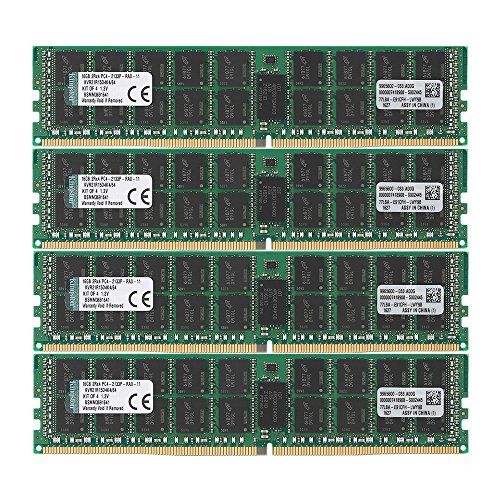
Kingston 64GB DDR4 ECC REG Server Kit
Best for: Server systems needing 64GB ECC registered memory
- Total Capacity
- 64GB
- Memory Speed
- 2133MHz
- CAS Latency
- CL15
- Module Configuration
- 4x16GB
- Form Factor
- DIMM
- ECC Support
- ECC Reg
This Kingston kit provides 64GB of DDR4 memory across four 16GB modules. It operates at 2133MHz with CL15 latency. The modules are Registered DIMMs with ECC support, designed specifically for server environments. You get 240-pin DR x 4 architecture. This configuration ensures data integrity and stability for enterprise-grade hardware. It is not intended for standard desktop gaming or consumer PCs.
Pros
- Provides 64GB total capacity via four 16GB sticks
- Includes ECC support for error correction
- Registered DIMM design for server stability
- Operates at 2133MHz speed
Cons
- Lower 2133MHz speed compared to modern desktop standards
- Requires server-compatible motherboard with registered memory support
- Not suitable for standard consumer desktop systems
Good fit if
- You are building or upgrading a server system
- You need ECC memory for data integrity
- You require 64GB of registered RAM
Skip if
- You are building a standard desktop PC
- You need high-speed gaming memory
- Your motherboard does not support registered DIMMs
Verdict: Kingston 64GB DDR4 ECC Registered Server RAM is a specialized solution for server builds requiring 64GB of registered memory with error correction. It fits enterprise environments but is incompatible with standard consumer desktops.

Corsair Vengeance LPX 16GB 2666MHz DDR4 Kit
Best for: compact builds and basic computing
- Total Capacity
- 16GB
- Memory Speed
- 2666MHz
- CAS Latency
- C16
- Module Configuration
- 4x4GB
- Height
- 34mm
- Dimensions
- 6.1 × 3.6 × 0.8 inches
This Corsair kit provides 16GB of DDR4 memory across four 4GB modules. It runs at 2666MHz with a CL16 latency. The low-profile design fits small builds. It uses an aluminum heatspreader for heat dissipation. You get Intel XMP 2.0 support for easy setup. This kit suits users needing standard capacity for everyday tasks.
Pros
- Low-profile 34mm height for small form factor builds
- Intel XMP 2.0 support for simple installation
- Aluminum heatspreader for efficient heat dissipation
- Compatible with latest Intel and AMD motherboards
Cons
- Four-module kit limits dual-channel performance potential
- 2666MHz speed is lower than many competitors
- 16GB total capacity may be insufficient for heavy workloads
Good fit if
- You are building a compact PC case
- You need reliable basic DDR4 memory
- You prefer a low-profile aesthetic
Skip if
- You require high-speed gaming memory
- You need 32GB or more capacity
- You prefer dual-channel configurations
Verdict: Corsair Vengeance LPX 16GB DDR4 2666MHz fits users who prioritize low-profile compatibility and standard speeds over high performance. It is a practical option for basic computing needs.
Specifications side by side
| Spec | G.SKILL Trident Z RGB 16GB DDR4 RAM Kit | Micron 64GB 3200MHz DDR4 RDIMM | G.SKILL RipjawsV 8GB 2400MHz Red | G.SKILL Ripjaws 16GB DDR4 3200MHz SODIMM Laptop RAM | G.SKILL Ripjaws V 16GB 4000MHz | Timetec 32GB DDR4 3200MHz UDIMM Memory | Kingston 64GB DDR4 ECC REG Server Kit | Corsair Vengeance LPX 16GB 2666MHz DDR4 Kit |
|---|---|---|---|---|---|---|---|---|
| Total Capacity | 16GB | 64GB | 8GB | 16GB | 16GB | 32GB | 64GB | 16GB |
| Memory Speed | 3000MT/s | not specified | 2400MT/s | 3200MT/s | 4000 MT/s | 3200MHz | 2133MHz | 2666MHz |
| CAS Latency | CL16 | not specified | CL15 | CL22 | CL18 | CL22 | CL15 | C16 |
| Voltage | 1.35V | not specified | 1.20V | 1.20V | not specified | 1.2V | not specified | not specified |
| Module Configuration | 2x8GB | not specified | 2x4GB | 2x8GB | 2x8GB | 1x32GB | 4x16GB | 4x4GB |
| Form Factor | U-DIMM | RDIMM | U-DIMM | SO-DIMM | U-DIMM | UDIMM | DIMM | not specified |
| ECC Support | Non-ECC | not specified | Non-ECC | Non-ECC | not specified | Non-ECC | ECC Reg | not specified |
| Height | 1.7 inches | 0.48 inches | not specified | not specified | not specified | not specified | not specified | 34mm |
| Compatible Device | Desktop, PC | not specified | Desktop, PC | Laptop | not specified | Desktop, PC | Server | not specified |
| Size | 16GB | 64GB | 8GB | 16GB | One size | 32GB | 64GB | 16GB Kit (4x4GB) |
| Dimensions | 5.2 × 0.67 × 1.7 inches | not specified | 5.4 × 0.55 × 0.17 inches | 1.1 × 9.7 × 6.5 inches | 23.6 × 23.6 × 33.5 inches | not specified | 13 × 4.5 × 0.1 inches | 6.1 × 3.6 × 0.8 inches |
| Weight | 4.8 ounces | 1.12 ounces | 4.6 ounces | 1.76 ounces | 3.17 ounces | not specified | 0.35 ounces | 3.03 ounces |
| Length | not specified | 2.07 inches | not specified | not specified | not specified | not specified | not specified | not specified |
| Color | Multicolor | Multicolor | Red | black | black | Black | Multicolor | Black |
| Model | F4-3000C16D-16GTZR | MTA36ASF8G72PZ-3G2B2 | F4-2400C15D-8GVR | F4-3200C22D-16GRS | 4713294223876 | not specified | KVR21R15D4K4/64 | CMK16GX4M4A2666C16 |
If you are setting up an outdoor workstation, the canopy buying guide outlines shelter dimensions, fabric ratings, and frame specs.
Frequently asked questions
What is the difference between UDIMM and SODIMM?
UDIMM stands for Unbuffered Dual In-line Memory Module, designed for desktop computers. SODIMM, or Small Outline DIMM, is the smaller form factor used in laptops. You must match the physical size to your device. For example, the G.SKILL Ripjaws 16GB kit is a SODIMM for laptops, while the Trident Z RGB is a UDIMM for desktops.
Does DDR4 RAM require ECC support for gaming?
No, standard gaming does not require Error Correction Code (ECC) memory. Most desktop kits, like the G.SKILL Ripjaws V 16GB, are Non-ECC. ECC is reserved for servers and workstations to prevent data corruption. The Kingston 64GB Server Kit includes ECC, but it is incompatible with standard consumer desktops and unnecessary for typical gaming setups.
How does CAS Latency affect performance?
CAS Latency (CL) measures the delay before the RAM responds to a command. Lower numbers indicate faster response times. For instance, the G.SKILL RipjawsV 8GB has a CL15 latency at 2400MHz, while the Trident Z RGB has CL16 at 3000MHz. You should balance speed with latency for optimal performance in your specific system.
Can I use server RAM in a desktop PC?
Generally, no. Server RAM often uses RDIMM or registered modules that consumer motherboards do not support. The Micron 64GB RDIMM is built for servers and workstations. Standard desktops require UDIMM or SODIMM modules. Using incompatible server memory will prevent your computer from booting. Always verify your motherboard’s supported memory types before purchasing.
What voltage do DDR4 modules typically run at?
Standard DDR4 operates at 1.2V. Some high-performance kits use higher voltages like 1.35V to achieve faster speeds. The G.SKILL Trident Z RGB runs at 1.35V to support XMP overclocking. The Timetec 32GB kit operates at the standard 1.2V. Check your motherboard’s specifications to ensure it can handle the voltage required by your chosen RAM.
Is 3200MHz the best speed for all users?
Not necessarily. The best speed depends on your motherboard and CPU capabilities. The Corsair Vengeance LPX runs at 2666MHz, which is sufficient for basic computing. The G.SKILL Ripjaws 16GB SODIMM runs at 3200MHz for laptops. Higher speeds like 4000MHz, found in the Ripjaws V kit, benefit enthusiasts but may not provide noticeable gains for all users.