Best USB Flash Drives with USB-A: 15 Spec-Based Picks
As an Amazon Associate we earn from qualifying purchases. Links on this page are affiliate links.
Standard USB-A ports remain widespread across desktop computers, consoles, and laptops. Finding the right USB flash drive with USB connectivity depends on your required storage capacity and transfer performance. We compared 15 products based on the specifications published on their listings.
The SanDisk 128GB Ultra USB-A Flash Drive leads the list because it pairs 128GB of capacity with USB 3.0 read speeds up to 100MB/s for dependable everyday transfers. This guide helps you choose the right combination of interface support, form factor, and storage volume for your devices.
Quick picks
The best fit for you
- You need reliable everyday file transfers on USB-A SanDisk 128GB Ultra USB-A Flash Drive It provides 128GB of capacity paired with USB 3.0 read speeds reaching up to 100MB/s.
- You want the fastest read speeds across dual ports SanDisk 128GB Ultra Dual Drive Go USB-C and USB-A It features USB-A and USB-C connectors combined with high read speeds reaching up to 400MB/s.
- You need the largest storage capacity on the list SanDisk 512GB Ultra Dual Drive Luxe USB-C/USB-A It offers 512GB of storage capacity alongside both USB-A and USB-C connector compatibility.
- You want low-profile storage that stays plugged into laptops SanDisk 128GB Ultra Fit USB 3.1 Flash Drive Its low-profile casing delivers 128GB of storage with USB 3.1 speeds reaching up to 130MB/s.
Our 15 picks

SanDisk 128GB Ultra USB-A Flash Drive
Best for: everyday USB-A file transfers and backups
- Connector Type
- USB-A (what this guide is about)
- Storage Capacity
- 128GB
- USB Version
- USB 3.0
- Read Speed
- Up to 100MB/s
- Dimensions
- 0.42 × 0.87 × 0.31 inches
- Weight
- 0.48 ounces
The SanDisk 128GB Ultra is a USB 3.0 flash drive fitted with a standard USB-A connector. It gives you 128GB of storage capacity and supports read speeds reaching up to 100MB/s. It works with older USB 2.0 ports and includes a one-year subscription to RescuePRO Deluxe file recovery software. This drive fits your needs if you want everyday file storage and transfers across standard desktop and laptop USB-A ports.
Pros
- Up to 100MB/s read speeds
- USB 3.0 interface with backward compatibility for USB 2.0
- Includes one-year RescuePRO Deluxe software subscription offer
- Lightweight footprint at approximately 0.03 pounds
Cons
- No USB-C connector included
- Write speeds are not specified in the official specs
Good fit if
- You need 128GB of storage on a dedicated USB-A connection.
- You connect to USB 3.0 or legacy USB 2.0 hardware.
- You want bundled file recovery software included.
Skip if
- You need a USB-C connector for modern phones or laptops.
- You require read speeds faster than 100MB/s.
Verdict: SanDisk 128GB Ultra USB-A Flash Drive pairs 128GB of capacity with USB 3.0 transfer speeds up to 100MB/s for reliable daily file handling.

SanDisk 64GB Ultra Flair USB-A Drive
Best for: budget-friendly, durable everyday USB-A storage
- Connector Type
- USB-A (what this guide is about)
- Storage Capacity
- 64GB
- USB Version
- USB 3.0
- Read Speed
- 150MB/s
- Security Standard
- 128-bit AES
- Dimensions
- 0.52 × 1.67 × 0.26 inches
The Sandisk 64GB Ultra Flair is a compact USB 3.0 flash drive fitted with a standard USB-A connector. You get 64GB of storage along with maximum read speeds reaching 150MB/s for everyday file transfers. It features a durable metal casing that measures 1.67 inches long and 0.26 inches tall. It suits you if you need a sturdy, portable drive for moving documents, media, or backups between standard USB ports.
Pros
- Read speeds up to 150MB/s via USB 3.0
- Durable metal casing
- Supports 128-bit AES file encryption
- Compact profile measuring 0.26 inches thick
Cons
- Lacks a USB-C connector for modern mobile devices
- Requires a software download for Mac encryption support
Good fit if
- You need a dedicated USB-A drive with up to 150MB/s read speeds.
- You want a protective metal exterior for daily carry.
- You intend to password-protect sensitive files on Windows or Mac.
Skip if
- You need a native USB-C connection for phones or newer laptops.
- You require more than 64GB of capacity for large backups.
Verdict: Sandisk 64GB Ultra Flair USB-A Flash Drive provides solid USB 3.0 speeds and built-in encryption inside a slim metal housing. It serves as a dependable, pocket-sized storage tool for any standard USB-A port.

SanDisk 64GB Ultra Dual Drive USB-C and USB-A
Best for: cross-device transfers between USB-A and USB-C
- Connector Type
- USB-C, USB-A (what this guide is about)
- Storage Capacity
- 64GB
- Read Speed
- Up to 150MB/s
- Features
- OTG Dual Drive
- Dimensions
- 0.37 × 1.5 × 0.79 inches
View on Amazon: SanDisk 64GB Ultra Dual Drive USB-C and USB-A
This SanDisk flash drive gives you 64GB of storage with both USB-A and USB-C connectors on one unit. It delivers read speeds up to 150MB/s for moving data. You can plug it into standard USB-A computer ports or newer USB-C smartphones and tablets. It suits you if you need to transfer files between older USB-A computers and modern mobile devices without carrying adapters.
Pros
- Dual USB-A and USB-C connectors
- Up to 150MB/s read speeds
- OTG dual drive support for Android smartphones and tablets
- Compact 1.5-inch length and 0.02-pound weight
Cons
- 64GB capacity limits storage for large backups
- Write speed is not specified in published data
Good fit if
- You move files between USB-A computers and USB-C mobile devices.
- You want read speeds up to 150MB/s in a dual-port drive.
Skip if
- You need more than 64GB of storage capacity.
- You require confirmed write speeds for your workflow.
Verdict: SanDisk 64GB Ultra Dual Drive USB-A & USB-C provides versatile dual-connector connectivity with 150MB/s read speeds. It handles cross-device file sharing between legacy ports and USB-C hardware effectively.

SanDisk 128GB Ultra Fit USB 3.1 Flash Drive
Best for: semi-permanent low-profile USB-A laptop storage
- Connector Type
- USB-A (what this guide is about)
- Storage Capacity
- 128GB
- USB Version
- USB 3.1
- Read Speed
- Up to 130MB/s
- Dimensions
- 0.37 × 0.56 × 6.14 inches
This SanDisk 128GB Ultra Fit is a compact USB 3.1 flash drive equipped with a standard USB-A connector. It delivers read speeds up to 130MB/s and write performance rated up to 15 times faster than standard USB 2.0 drives. The plug-and-stay design fits into laptops, game consoles, or in-car audio systems. It suits you if you need unobtrusive extra capacity that can stay inserted full-time.
Pros
- Up to 130MB/s read speeds over USB 3.1
- Compact plug-and-stay design for laptops, consoles, and car audio
- 128GB storage capacity
- Five-year limited manufacturer warranty
Cons
- No USB-C connector included
- Write speed listed as a comparison ratio rather than an exact MB/s rating
Good fit if
- You need a low-profile USB-A drive to leave plugged into a laptop or car audio port.
- You want 128GB of storage with read speeds up to 130MB/s.
Skip if
- You require a native USB-C connector for modern mobile devices.
- You need verified write speeds specified in megabytes per second.
Verdict: SanDisk 128GB Ultra Fit USB-A Drive provides compact plug-and-stay USB 3.1 storage with read speeds up to 130MB/s. It is a practical choice when you want extra capacity left permanently in a USB-A port.
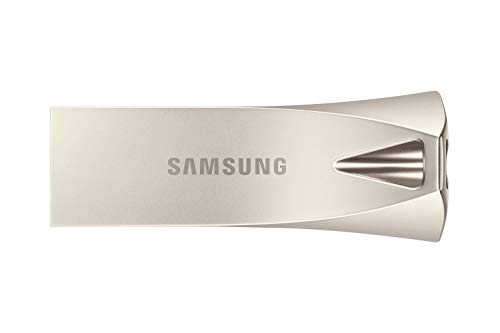
Samsung 128GB USB 3.1 Type-A Flash Drive
Best for: compact everyday USB-A file storage
- Connector Type
- USB-A (what this guide is about)
- Storage Capacity
- 128GB
- USB Version
- 3.0 (3.1 Gen 1)
- Dimensions
- 0.47 × 1.57 × 0.59 inches
- Weight
- 0.35 ounces
This Samsung flash drive gives you 128GB of storage space with a dedicated USB Type-A connector. It uses the USB 3.0 (3.1 Gen 1) interface to transfer your files on standard ports. The silver housing measures approximately 1.57 inches wide and weighs about 0.022 pounds. If you need portable capacity for standard USB-A computer ports, this drive fits your daily workflow.
Pros
- 128GB storage capacity
- USB 3.0 (3.1 Gen 1) interface
- Compact footprint under 1.6 inches wide
- Lightweight build at approximately 0.022 pounds
Cons
- No secondary USB-C connector included
- Read and write speeds are omitted from specifications
Good fit if
- You want 128GB of storage for dedicated USB-A hardware.
- You prefer a lightweight silver drive under 1.6 inches long.
Skip if
- You require a native USB Type-C plug for newer mobile devices.
- You need more than 128GB of space for larger media libraries.
Verdict: Samsung 128GB USB 3.1 Gen 1 Flash Drive provides 128GB of storage inside a compact silver USB Type-A casing. It handles everyday file management across standard USB-A computer ports.

Samsung BAR Plus 64GB USB 3.1 Flash Drive
Best for: durable key ring USB-A file transfers
- Connector Type
- USB-A (what this guide is about)
- Storage Capacity
- 64 GB
- USB Version
- USB 3.1
- Read Speed
- 200MB/s
- Size
- 64GB
- Dimensions
- 1.57 × 0.61 × 0.46 inches
The Samsung BAR Plus 64GB is a USB 3.1 flash drive fitted with a standard USB-A connector. It delivers read speeds up to 200MB/s and write speeds up to 30MB/s inside a metal unibody housing. Its design includes an integrated key ring and 5-way durability protection against water, shock, magnets, temperature, and X-rays. It suits you if you need a durable, compact drive for moving files between standard USB-A computers.
Pros
- Read speeds reach up to 200MB/s over USB 3.1
- Metal unibody casing features an integrated key ring
- Five-way protection against water, shock, magnets, temperature, and X-rays
- Backward compatible with USB 3.0 and USB 2.0 ports
Cons
- Write speed is capped at 30MB/s
- Lacks a USB-C connector for modern mobile devices
- Capacity is limited to 64GB
Good fit if
- You want a rugged metal flash drive to carry on your key ring.
- You prioritize fast read performance up to 200MB/s for PC and laptop files.
- You work in environments that require water, shock, and temperature resistance.
Skip if
- You need fast write performance exceeding 30MB/s for frequent large backups.
- You need a native USB-C port for phones or newer laptops.
Verdict: Samsung BAR Plus 64GB USB-A Flash Drive pairs rugged metal protection with fast 200MB/s read speeds for PC workstations. Its 30MB/s write speed makes it better suited for file viewing than heavy data writing.

SanDisk 256GB Ultra Luxe Flash Drive
Best for: durable USB-A storage with metal construction
- Connector Type
- USB-A (what this guide is about)
- Storage Capacity
- 256GB
- Read Speed
- Up to 150MB/s
- Dimensions
- 1.57 × 0.62 × 0.23 inches
The SanDisk Ultra Luxe is a 256GB USB-A flash drive built with a cast metal housing. It uses a USB 3.1 Gen 1 interface delivering read speeds up to 150MB/s. Measuring 1.57 inches long and weighing under 0.02 pounds, it pairs high capacity with physical durability. It suits you if you need reliable portable storage with a standard Type-A port and downloadable file recovery support.
Pros
- Cast metal exterior casing
- Read speeds up to 150MB/s over USB 3.1 Gen 1
- 256GB storage capacity
- Includes RescuePRO Deluxe software download
Cons
- No USB-C connector
- Exact sustained write speeds are not listed
Good fit if
- You need a sturdy metal flash drive for standard USB-A ports.
- You want 256GB of storage with up to 150MB/s read performance.
- You want downloadable file recovery tools included.
Skip if
- You need native USB-C device connectivity.
- You require guaranteed, documented minimum write speeds.
Verdict: SanDisk Ultra Luxe 256GB USB-A Drive provides durable cast metal construction and 150MB/s read speeds for standard Type-A ports. It offers dependable high-capacity storage for everyday file transfers.

SanDisk 128GB Ultra Dual Drive Go USB-C and USB-A
Best for: Fast transfers between USB-A and USB-C devices
- Connector Type
- USB-C, USB-A (what this guide is about)
- Storage Capacity
- 128GB
- USB Version
- USB 3.1 Gen 1
- Read Speed
- Up to 400MB/s
- Features
- OTG Dual Drive
- Dimensions
- 1.7 × 0.5 × 0.1 inches
View on Amazon: SanDisk 128GB Ultra Dual Drive Go USB-C and USB-A
This 2-in-1 flash drive provides 128GB of storage with both USB Type-A and USB Type-C connectors. It supports read speeds up to 400MB/s over USB 3.1 Gen 1 connections. Measuring 1.7 inches long, 0.5 inches wide, and 0.1 inches high, it fits compact setups. It suits you if you need to transfer photos, documents, and media between standard USB-A computers and modern USB-C mobile devices.
Pros
- Dual USB Type-A and USB Type-C connectors
- Read speeds up to 400MB/s
- 128GB storage capacity
- Slim 0.1-inch thickness
Cons
- Write speeds are lower than the 400MB/s read speed
- Mobile connection requires device OTG support
- Automatic backups require downloading a separate app
Good fit if
- You transfer data between USB-A and USB-C hardware.
- You want read performance reaching up to 400MB/s.
- You need a slim flash drive that measures 0.1 inches high.
Skip if
- You require write speeds that match the read speed.
- You use mobile devices without USB Type-C OTG support.
Verdict: SanDisk Ultra Dual Drive Go 128GB USB-A & USB-C offers up to 400MB/s read speeds across both legacy USB-A ports and modern USB-C hardware. It serves as a direct bridge between computers and mobile devices.
SanDisk 64GB Ultra Dual Drive Go USB-A and USB-C
Best for: moving files between USB-A and USB-C devices
- Connector Type
- USB-C, USB-A (what this guide is about)
- Storage Capacity
- 64GB
- USB Version
- USB 3.1 Gen 1
- Read Speed
- Up to 300MB/s
- Features
- OTG Dual Drive
- Dimensions
- 1.7 × 0.5 × 0.1 inches
View on Amazon: SanDisk 64GB Ultra Dual Drive Go USB-A and USB-C
This 64GB flash drive features dual USB Type-A and USB Type-C connectors, letting you move files directly between traditional computers and modern USB-C devices. It runs on the USB 3.1 Gen 1 standard, delivering read speeds up to 150MB/s. Measuring 1.7 by 0.5 by 0.1 inches, it offers a compact black housing with OTG support. It suits you if you need to offload photos or share data across mixed-port setups.
Pros
- Dual USB Type-A and reversible USB Type-C connectors
- USB 3.1 Gen 1 read speeds up to 150MB/s
- Compact dimensions of 1.7 by 0.5 by 0.1 inches
- Automatic photo backup via the SanDisk Memory Zone app
Cons
- Write speeds are lower than the 150MB/s read rate
- Requires USB Type-C host devices to support OTG
Good fit if
- You need to transfer files between USB-A computers and USB-C mobile devices.
- You want a dual-interface flash drive with a 64GB capacity.
- You plan to back up smartphone photos using the SanDisk Memory Zone app.
Skip if
- You require storage capacities greater than 64GB.
- You need write performance that matches the 150MB/s read rate.
- Your mobile devices lack USB Type-C OTG support.
Verdict: SanDisk 64GB Ultra Dual Drive Go provides dual USB-A and USB-C connectivity with USB 3.1 Gen 1 read speeds up to 150MB/s. It is a practical option for transferring files across traditional computers and mobile equipment.
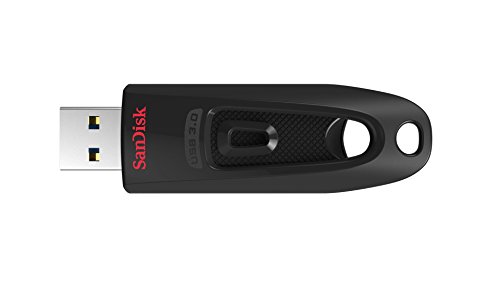
SanDisk Ultra 256GB USB-A Flash Drive
Best for: high-capacity USB-A file storage and security
- Connector Type
- USB-A (what this guide is about)
- Storage Capacity
- 256GB
- Read Speed
- Up to 130MB/s
- Dimensions
- 0.42 × 0.87 × 0.31 inches
The SanDisk Ultra gives you 256GB of storage paired with a standard USB-A connector. It delivers read speeds up to 130MB/s when plugged into a USB 3.0 port and retains backward compatibility with USB 2.0 hardware. Built-in support for password protection and file encryption helps secure your data. This drive suits you if you need high-capacity storage for moving files across standard USB-A systems.
Pros
- Read speeds up to 130MB/s via USB 3.0
- 256GB storage capacity
- Built-in file encryption and password protection
- Backward compatible with USB 2.0 ports
Cons
- Requires a USB 3.0 port to achieve full 130MB/s speed
- Lacks a USB-C connector
- Write speeds are not specified in the product data
Good fit if
- You need 256GB of storage on a dedicated USB-A connection.
- You want built-in password protection and encryption for your files.
- You connect primarily to USB 3.0 or USB 2.0 host devices.
Skip if
- You need a dual-connector drive that includes USB-C.
- You require guaranteed published write speed specifications.
Verdict: SanDisk Ultra 256GB USB-A Flash Drive delivers ample storage with 130MB/s read speeds and password protection for standard USB-A ports. It provides reliable everyday capacity for legacy systems without needing extra adapters.

SanDisk 512GB Ultra Dual Drive Luxe USB-C/USB-A
Best for: dual-port transfers between USB-A and USB-C devices
- Connector Type
- USB-C, USB-A (what this guide is about)
- Storage Capacity
- 512 GB
- Read Speed
- Up to 150MB/s
- Features
- OTG Dual Drive
- Dimensions
- 5.94 × 3.9 × 0.39 inches
- Weight
- 0.63 ounces
View on Amazon: SanDisk 512GB Ultra Dual Drive Luxe USB-C/USB-A
This 512 GB flash drive features an all-metal housing with both USB-A and USB-C connectors. You get read speeds up to 150MB/s and OTG support to move files between USB Type-A computers and USB Type-C devices like phones, tablets, or Macs. It suits you if you need large-capacity portable storage that bridges standard USB-A ports and newer USB-C hardware without carrying extra adapters.
Pros
- Dual USB-A and USB-C connectors for cross-device transfers
- 512 GB storage capacity
- Read speeds up to 150MB/s
- All-metal housing
Cons
- Write speed is not specified in the specifications
- Read speed is capped at 150MB/s unlike available 400MB/s variations
Good fit if
- You switch frequently between USB-A PCs and USB-C phones, tablets, or Macs.
- You want 512 GB of portable storage in an all-metal casing.
Skip if
- You need explicit write speed specifications for your workflow.
- You want faster transfer rates than 150MB/s.
Verdict: SanDisk 512GB Ultra Dual Drive Luxe pairs dual-interface connectivity with ample capacity for moving files between legacy and modern ports. Its 150MB/s read speed and metal shell make it a practical cross-platform drive.

Lexar E32C 64GB Dual USB-A and USB-C Flash Drive
Best for: laptop users switching between USB-A and USB-C
- Connector Type
- USB-C, USB-A (what this guide is about)
- Storage Capacity
- 64GB
- USB Version
- USB 3.2 Gen 1
- Read Speed
- up to 100MB/s
- Compatible Device
- PC, Laptop, Android
- Features
- OTG Dual Drive
View on Amazon: Lexar E32C 64GB Dual USB-A and USB-C Flash Drive
This Lexar flash drive gives you both USB-A and USB-C connectors on a single body with a rotating zinc alloy swivel. It offers 64GB of storage and read speeds up to 100MB/s across USB 3.2 Gen 1 ports. You can plug it directly into standard USB-A laptops or newer USB-C hardware without carrying adapters. It suits you if you need compact dual-port storage for moving daily files between different laptop setups.
Pros
- Dual USB-A and USB-C connectors for broad host compatibility
- Up to 100MB/s read speeds over USB 3.2 Gen 1
- Durable zinc alloy casing with a protective swivel design
- Waterproof, shockproof, magnetic proof, and X-ray proof build
Cons
- Maximum read speed reaches 100MB/s without a specified write speed
- Top capacity in this model line caps at 128GB
Good fit if
- You switch frequently between laptops using USB-A and USB-C ports
- You need a pocket-sized drive with a sturdy zinc alloy metal casing
- You want hardware protected against water, shock, magnets, and X-rays
Skip if
- You require read speeds faster than 100MB/s for massive data transfers
- You need more than 64GB or 128GB of internal flash storage
Verdict: Lexar E32C 64GB Swivel Dual USB Drive provides flexible connectivity across laptops with its dual USB-A and USB-C plugs and metal swivel enclosure. Its 100MB/s read rating handles everyday document and media transfers across different operating systems.

SanDisk Ultra Dual Drive Go 128GB USB Flash Drive
Best for: dual-port file transfers between tablets and PCs
- Connector Type
- USB-C, USB-A (what this guide is about)
- Storage Capacity
- 128GB
- USB Version
- USB 3.1
- Read Speed
- up to 150 MB/s
- Pack Quantity
- 1
- Compatible Device
- PC, Tablets
View on Amazon: SanDisk Ultra Dual Drive Go 128GB USB Flash Drive
This 128GB flash drive features dual USB-A and USB-C connectors with USB 3.1 transfer speeds up to 150 MB/s. It includes a swivel design that protects ports without a cap, along with an attached lanyard loop. If you need to move documents, media, or backups between modern USB-C tablets or smartphones and standard USB-A computers without using adapters, this dual-interface unit fits your workflow.
Pros
- Dual USB-A and USB-C connectors for cross-device compatibility
- Read speeds reach up to 150 MB/s via USB 3.1
- Capless swivel design shields ports from debris
- Includes an Everything But Stromboli lanyard
Cons
- Read speed tops out at 150 MB/s
- No rated write speed listed in the specifications
Good fit if
- You share files directly between USB-C tablets and USB-A computers.
- You prefer a swivel mechanism rather than keeping track of a cap.
- You use OTG-supported mobile devices alongside standard PCs.
Skip if
- You require read transfer speeds exceeding 150 MB/s.
- You only need dedicated USB-A hardware without extra ports.
Verdict: SanDisk 128GB Ultra Dual Drive Go USB-A & USB-C delivers versatile dual-port connectivity with 150 MB/s speeds across both USB-A and USB-C hardware. Its swivel design and included lanyard make it practical for moving files between tablets and computers.
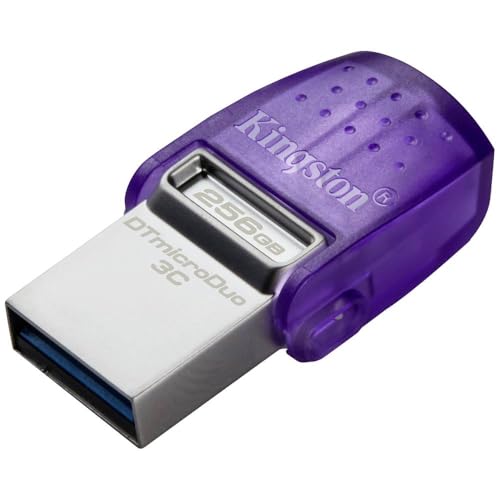
Kingston DataTraveler microDuo 3C 256GB Dual Drive
Best for: dual USB-A and USB-C file transfers
- Connector Type
- USB-C, USB-A (what this guide is about)
- Storage Capacity
- 256GB
- USB Version
- USB 3.2 Gen 1
- Read Speed
- up to 200MB/s
- Dimensions
- 1.18 × 0.65 × 0.33 inches
- Weight
- 0.35 ounces
View on Amazon: Kingston DataTraveler microDuo 3C 256GB Dual Drive
The Kingston DataTraveler microDuo 3C is a compact flash drive featuring both USB-A and USB-C connectors on a single body. Built with the USB 3.2 Gen 1 standard, it delivers read speeds up to 200MB/s across its 256GB capacity. Measuring 1.18 inches long and weighing 0.35 ounces, this unit suits you if you frequently move files between standard USB-A computers and modern USB-C mobile devices or laptops.
Pros
- Dual USB Type-A and USB Type-C connectors
- Read speeds reaching up to 200MB/s
- Compact 1.18-inch length and 0.35-ounce weight
- USB 3.2 Gen 1 interface
Cons
- No official write speed specified in published data
- Maximum storage limited to 256GB
Good fit if
- You need both USB-A and USB-C connections on a single device.
- You want 256GB of storage with up to 200MB/s read transfers.
- You carry your drive often and need a form factor under 0.5 ounces.
Skip if
- You require verified write speed figures before selecting a drive.
- You need storage capacities larger than 256GB.
Verdict: Kingston DataTraveler microDuo 3C 256GB Dual Drive provides dual-port flexibility across USB-A and USB-C devices with read speeds up to 200MB/s. Its miniature frame makes it a practical option for moving files between modern and legacy hardware.

Kingston IronKey Vault Privacy 50 16GB
Best for: hardware-encrypted USB-A data security
- Connector Type
- USB-A (what this guide is about)
- Storage Capacity
- 16GB
- Security Standard
- FIPS 197 with XTS-AES 256-bit
- Dimensions
- 3.06 × 0.9 × 0.47 inches
- Weight
- 0.71 ounces
This Kingston flash drive provides 16GB of storage and connects using a USB-A port. It features FIPS 197 with XTS-AES 256-bit encryption, brute force defense, and BadUSB protection with digitally-signed firmware. Dual read-only settings help you prevent unwanted data changes. This drive suits you if you need hardware security and write-protection features for your files.
Pros
- FIPS 197 with XTS-AES 256-bit hardware encryption
- Brute force and BadUSB protection with signed firmware
- Dual read-only write-protect settings
- Multi-password option with passphrase support
Cons
- 16GB maximum storage capacity on this model
- Lacks a USB-C connector
Good fit if
- You need FIPS 197 with XTS-AES 256-bit hardware encryption.
- You require dual read-only modes to prevent data deletion.
- You need TAA compliance for government or enterprise use.
Skip if
- You need more than 16GB of storage capacity.
- You require a direct USB-C connection.
Verdict: Kingston IronKey 16GB Encrypted USB-A Drive delivers FIPS 197 hardware security and write protection for sensitive files. It is a focused pick when data privacy matters more than high storage capacity.
Specifications side by side
| Spec | SanDisk 128GB Ultra USB-A Flash Drive | SanDisk 64GB Ultra Flair USB-A Drive | SanDisk 64GB Ultra Dual Drive USB-C and USB-A | SanDisk 128GB Ultra Fit USB 3.1 Flash Drive | Samsung 128GB USB 3.1 Type-A Flash Drive | Samsung BAR Plus 64GB USB 3.1 Flash Drive | SanDisk 256GB Ultra Luxe Flash Drive | SanDisk 128GB Ultra Dual Drive Go USB-C and USB-A | SanDisk 64GB Ultra Dual Drive Go USB-A and USB-C | SanDisk Ultra 256GB USB-A Flash Drive | SanDisk 512GB Ultra Dual Drive Luxe USB-C/USB-A | Lexar E32C 64GB Dual USB-A and USB-C Flash Drive | SanDisk Ultra Dual Drive Go 128GB USB Flash Drive | Kingston DataTraveler microDuo 3C 256GB Dual Drive | Kingston IronKey Vault Privacy 50 16GB |
|---|---|---|---|---|---|---|---|---|---|---|---|---|---|---|---|
| Storage Capacity | 128GB | 64GB | 64GB | 128GB | 128GB | 64 GB | 256GB | 128GB | 64GB | 256GB | 512 GB | 64GB | 128GB | 256GB | 16GB |
| USB Version | USB 3.0 | USB 3.0 | not specified | USB 3.1 | 3.0 (3.1 Gen 1) | USB 3.1 | not specified | USB 3.1 Gen 1 | USB 3.1 Gen 1 | not specified | not specified | USB 3.2 Gen 1 | USB 3.1 | USB 3.2 Gen 1 | not specified |
| Connector Type | USB-A | USB-A | USB-C & USB-A | USB-A | USB Type-A | Type-A | USB-A | USB-C, USB-A | USB-C, USB-A | USB-A | USB Type-C, Type-A | USB-A & USB-C | USB Type A & Type-C | USB-C & USB-A | not specified |
| Read Speed | Up to 100MB/s | 150MB/s | Up to 150MB/s | Up to 130MB/s | not specified | 200MB/s | Up to 150MB/s | Up to 400MB/s | Up to 300MB/s | Up to 130MB/s | Up to 150MB/s | up to 100MB/s | up to 150 MB/s | up to 200MB/s | not specified |
| Security Standard | not specified | 128-bit AES | not specified | not specified | not specified | not specified | not specified | not specified | not specified | not specified | not specified | not specified | not specified | not specified | FIPS 197 with XTS-AES 256-bit |
| Pack Quantity | not specified | not specified | not specified | not specified | not specified | not specified | not specified | not specified | not specified | not specified | not specified | not specified | 1 | not specified | not specified |
| Compatible Device | not specified | not specified | not specified | not specified | not specified | not specified | not specified | not specified | not specified | not specified | not specified | PC, Laptop, Android | PC, Tablets | not specified | not specified |
| Size | 128GB | 64GB | 64GB | 128GB | not specified | 64GB | 256GB | 128 GB | 64GB | 256GB | 512 GB | 64GB | 128GB | 256GB | 16GB |
| Features | not specified | not specified | OTG Dual Drive | not specified | not specified | not specified | not specified | OTG Dual Drive | OTG Dual Drive | not specified | OTG Dual Drive | OTG Dual Drive | OTG Dual Drive | not specified | not specified |
| Dimensions | 0.42 × 0.87 × 0.31 inches | 0.52 × 1.67 × 0.26 inches | 0.37 × 1.5 × 0.79 inches | 0.37 × 0.56 × 6.14 inches | 0.47 × 1.57 × 0.59 inches | 1.57 × 0.61 × 0.46 inches | 1.57 × 0.62 × 0.23 inches | 1.7 × 0.5 × 0.1 inches | 1.7 × 0.5 × 0.1 inches | 0.42 × 0.87 × 0.31 inches | 5.94 × 3.9 × 0.39 inches | 1.59 × 0.48 × 0.1 inches | not specified | 1.18 × 0.65 × 0.33 inches | 3.06 × 0.9 × 0.47 inches |
| Weight | 0.48 ounces | 0.63 ounces | not specified | not specified | 0.35 ounces | 0.35 ounces | not specified | not specified | not specified | not specified | 0.63 ounces | not specified | 1 pounds | 0.35 ounces | 0.71 ounces |
| Color | Red | Black | Grey/Silver | Black | Silver | BAR Plus (Champagne Silver) | Black | Black | Black | Black | Silver | Titanium | Black | Purple + Silver | Blue |
| Model | SDCZ48-128G-U46 | SDCZ73-064G-G46 | SDDDC2-064G-I35 | SDCZ430-128G-G46 | MUF-128BE3EU | MUF-64BE3/APC | SDCZ74-256G-G46 | SDDDC3-0128G-G46 | SDDDC3-064G-G46 | SDCZ48-256G-GAM46 | SDDDC4-512G-G46 | LJDE32C064G-BNQEU | SDDDC3-128G-G46 | DTDUO3CG3/256GB | IKVP50/16GB |
If you need higher storage capacity, you can compare specs for the best NAS hard drives with USB 3 0.
How to Choose a USB-A Flash Drive
-
Assess Your Storage Capacity Needs
You should match the drive size to your expected file volume. The drives on this list range from 16GB up to 512GB. If you only move documents and light spreadsheets, 16GB or 64GB provides sufficient space. For archiving large media libraries, high-resolution photos, or system backups without running out of room, select a 512GB model such as the SanDisk Ultra Dual Drive Luxe. Larger capacities allow you to consolidate files on one device.
-
Evaluate Published Read Speeds
Read speed determines how fast you can open or copy files from your flash drive to your computer. Speeds across these drives range from 100MB/s up to 400MB/s. If you frequently load large video files or run presentations directly from external storage, prioritize higher read ratings. A model like the SanDisk Ultra Dual Drive Go offers up to 400MB/s read speeds, which significantly cuts down file retrieval times compared to baseline 100MB/s USB 3.0 options.
-
Verify Stated Write Speeds
Flash drive specifications often emphasize read speeds while write speeds remain lower. Saving large files to your drive relies directly on write performance. For instance, the Samsung BAR Plus lists a 200MB/s read speed alongside a 30MB/s write speed. If your daily routine involves backing up large batches of fresh data, lower write speeds will extend your waiting time. Check write specifications before buying if you transfer large files to the drive regularly.
-
Consider Low-Profile Form Factors
Physical size dictates how you use the drive with your computer or console. Standard drives extend out from the USB port, which can snag during transport. If you plan to leave the drive inserted continuously for extra storage, choose an ultra-compact body. The SanDisk Ultra Fit features a low-profile build specifically designed to remain plugged into your host device without protruding. This form factor prevents accidental port damage when carrying a laptop in a bag.
-
Inspect Exterior Casing Materials
Exterior casing materials determine how well a drive withstands daily transit on keychains or inside pockets. Plastic housings keep overall weight minimal but offer less impact protection. If you attach your flash drive to a key ring or carry it loosely with metal items, look for metal construction. The SanDisk Ultra Luxe provides a cast metal housing that protects internal memory components against physical bending and exterior wear during everyday transit.
-
Check Hardware Security Features
Consider how sensitive your stored data is before making a selection. Standard drives offer unencrypted storage or basic software password protection. If you handle regulated, confidential, or proprietary business files, look for dedicated hardware safeguards. The Kingston IronKey Vault Privacy 50 provides FIPS 197 hardware security and write protection. This specification ensures your data remains protected directly on the controller level rather than relying on computer-side operating system software utilities.
Frequently asked questions
What is the difference between read and write speeds on a USB-A drive?
Read speed indicates how fast you can transfer files from your flash drive to a computer. Write speed determines how quickly files save onto the drive. For example, the Samsung BAR Plus 64GB achieves a 200MB/s read speed alongside a 30MB/s write speed, making it faster at opening stored media than saving large new files.
Can you use a USB-A flash drive with USB-C smartphones or tablets?
You can connect to USB-C devices if your drive includes dual connectors. Drives like the Lexar E32C 64GB and SanDisk Ultra Dual Drive Go feature both standard USB-A and USB-C plugs on one casing. This physical setup lets you plug straight into phones, tablets, or computers without carrying external dongles or adapters.
Which USB-A flash drive offers hardware encryption for sensitive files?
The Kingston IronKey Vault Privacy 50 16GB provides built-in data protection through FIPS 197 hardware security. It also features write protection to shield files from tampering or malware. This USB-A drive is specifically configured for users prioritizing data security over large storage volumes when transporting confidential records between workstations.
What makes a low-profile USB-A flash drive practical for laptops?
Low-profile flash drives feature compact bodies that remain plugged into host devices without protruding significantly. The SanDisk 128GB Ultra Fit measures just 0.366 inches long and 0.563 inches wide. This slim design allows you to leave the drive connected inside a laptop or game console port during travel without snagging or risking physical damage.
Which USB generation standard does a USB-A drive use?
USB-A drives utilize various USB generations, such as USB 3.0, USB 3.1, and USB 3.2. For instance, the Kingston DataTraveler microDuo 3C uses USB 3.2 Gen 1, whereas the SanDisk Ultra Flair operates on USB 3.0. These standards share the identical physical rectangular USB-A port design, allowing newer generation drives to function in older computer ports.
Are metal USB-A flash drives more durable than plastic ones?
Metal casings provide greater physical protection against drops, impacts, and connector bending than plastic housings. Drives like the SanDisk Ultra Luxe and Samsung BAR Plus feature solid metal shells that withstand regular carrying on key rings. While internal memory components function identically, a metal enclosure protects the exterior structure during repeated insertion into computer ports.